Seller Profit Guard · How it works · CSV privacy
Etsy CSV profit calculator
Use an Etsy order item CSV with editable fee and SKU cost assumptions to estimate order-level contribution, flag missing cost records, and compare Offsite Ads scenarios without uploading the raw file.
Maintained by Seller Profit Guard Editorial Team. Last reviewed: 2026-07-29.
What this calculator checks
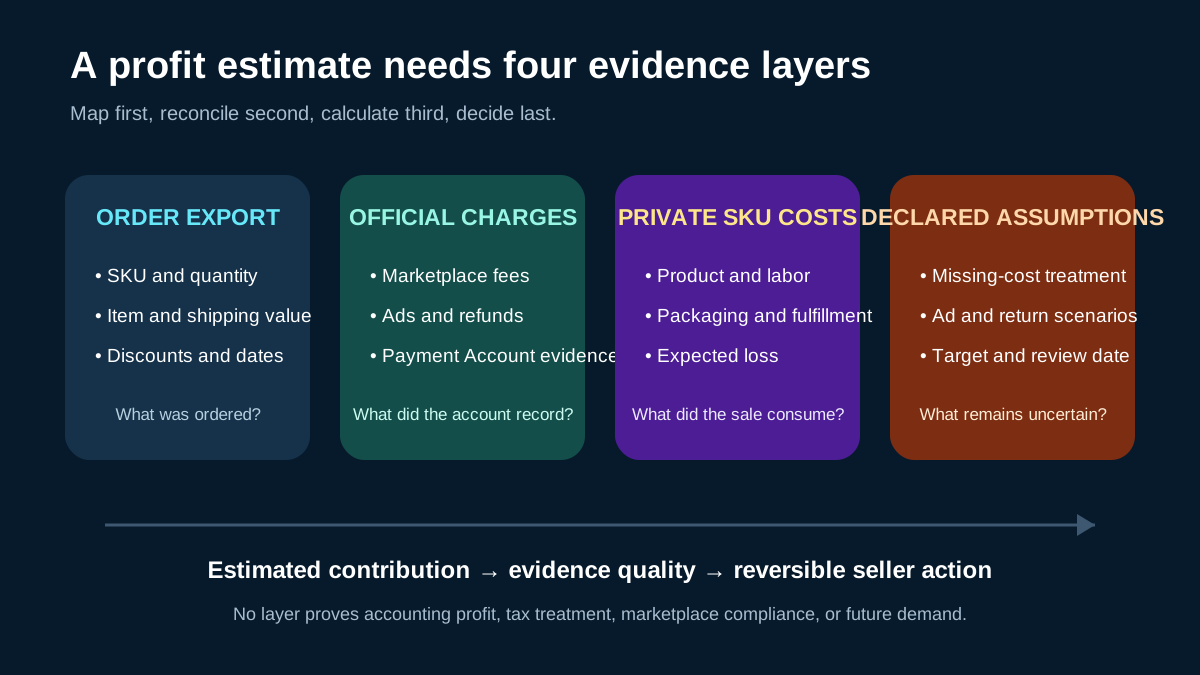
The calculator connects revenue with the costs that gross sales leave out. It can review item revenue, shipping charged, quantity, marketplace and payment fee assumptions, Offsite Ads exposure, material, packaging, labor, shipping cost, and other seller-entered costs.
The result is an operating estimate rather than a tax or accounting figure. Use it to find orders and SKUs that deserve a price, shipping, cost-record, or advertising review, then verify the underlying export and current Etsy rules before changing the business.
- Run no-ad, 12% Offsite Ads, and 15% Offsite Ads stress tests.
- Flag SKUs that sold without a matching cost record.
- Separate revenue, platform fees, private costs, and estimated contribution.
- Export a working report for private seller review.
A safer local-first workflow
The browser reads the file for mapping and calculations. Buyer names, delivery addresses, private messages, and payment credentials are not required. Use a public dummy CSV for testing and redact commercially sensitive SKU costs before sharing screenshots.
Start with one recent export and confirm every mapped column before trusting totals. A missing shipping field or a revenue column mapped to the wrong total can make a precise-looking report wrong.
- Keep the untouched source export in protected storage.
- Use a local working copy and inspect unknown headers before analysis.
- Share synthetic rows and column names for support, never buyer data.
- Treat exported reports and SKU cost libraries as confidential business records.
Map each CSV field before calculating
Begin with the file type, shop currency, requested period, and actual earliest and latest row dates. Identify which column represents an order item, quantity, seller SKU, item price, buyer-paid shipping, seller-funded discount, tax, refund, and transaction reference. Etsy exports can answer different operational questions, so an order-item file should not be treated as a Payment Account statement or a bank deposit record.
Preview representative rows and record every accepted mapping. Keep a missing value unknown until the seller can supply evidence. Do not silently convert an empty shipping cost, SKU cost, fee, or refund field to zero. A zero should mean that the seller has confirmed the cost does not apply to that decision grain.
- Record file type, period, currency, and row grain.
- Confirm revenue and shipping columns separately.
- Preserve quantity and SKU before joining private costs.
- Keep unknown, zero, and not-applicable states distinct.
- Stop when a field combines incompatible concepts.
Separate marketplace evidence from private costs
Marketplace and payment charges should come from current official documentation and the seller's authenticated account records for the relevant country, currency, order, and program status. Private product, material, packaging, fulfillment, labor, software, and support costs come from the seller's own cost records. The calculator connects these layers but does not make one source authoritative for the other.
Record an effective date for every rate and a review date for every private cost. If Offsite Ads status, payment-processing rates, tax treatment, reserve activity, or a refund cannot be confirmed, run a labeled stress case or hold the row for review. Never force a generic percentage into an account-specific answer and present it as a settled fact.
Calculate contribution in visible layers
For one order or SKU cohort, start with seller-attributable revenue and subtract evidenced marketplace and payment charges, product cost, packaging, fulfillment, shipping subsidy, labor, attributable advertising, and mature expected return or replacement loss. Keep every component visible so the seller can explain why the result changed between two runs.
Contribution is an operating estimate, not net income. It does not include every overhead, cash-timing, tax, financing, inventory-valuation, depreciation, or owner-compensation question. A positive contribution can still be below the seller's target, while a negative result can reflect missing mappings or stale cost evidence rather than the product alone.
| Layer | Use | Do not substitute |
|---|---|---|
| Seller-attributable revenue | Item and applicable seller-retained shipping value | Buyer total or marketplace-collected tax |
| Official charges | Current account and policy evidence | Old generic fee percentage |
| Private variable costs | SKU product, labor, packaging, and fulfillment records | Gross payroll or total inventory spend |
| Expected loss | Dated mature return, replacement, or refund evidence | One memorable incident |
| Estimated contribution | Comparable operating review | Taxable income, cash, or guaranteed profit |
Use base, stress, and missing-cost scenarios
A base case should use the seller's accepted current evidence. Stress cases can apply the relevant Offsite Ads rate, a higher shipping cost, a mature return-loss allowance, or a lower retained revenue assumption. Change one major variable at a time and preserve the base packet so the seller can identify which assumption drives the result.
Missing-cost rows require their own queue. Do not rank them as profitable merely because no cost was joined. Review the highest-revenue, highest-quantity, promotion-exposed, and lowest-headroom rows first. A useful report makes uncertainty visible instead of rewarding incomplete records with an artificially high margin.
- Base: accepted mappings, rates, and private SKU costs.
- Stress: one named risk changed against the same row set.
- Missing cost: result withheld or clearly marked incomplete.
- Review: evidence is valid but target headroom is too small.
- Action: one reversible price, cost, shipping, or promotion test.
Interpret warnings before changing a listing
A warning can mean the estimated contribution is below target, the SKU cost join failed, the evidence period is incomplete, or a scenario assumption materially changes the outcome. Read the cause and the affected population before changing price, shipping, advertising, or listing content. A whole-shop edit based on one incomplete row is not a controlled response.
Confirm the issue in current Etsy and seller records, preserve the accepted report, and choose the smallest reversible action. Recalculate after the change using the same denominator and a comparable period. If the difference affects bookkeeping, tax, legal rights, marketplace eligibility, or a buyer obligation, use the relevant official channel or qualified professional rather than this operational estimate.
Keep an audit trail for repeat reviews
A repeatable profit review records the source file, period, currency, accepted mappings, fee evidence, private cost version, scenario settings, missing-cost count, result, reviewer, decision, and next review date. Preserve the prior accepted packet before updating a rate or cost so a later variance can be traced to a source change rather than memory.
Monitor the selected SKU or listing after an authorized action. Compare realized price, shipping, advertising exposure, refund behavior, fulfillment cost, and retained contribution with the forecast. Define a stop or restoration rule before testing. Seller Profit Guard does not publish a listing, change an account, spend advertising money, or authorize a business decision.
- Archive the accepted source and assumption packet.
- Record the reason for changing one mapping, rate, or cost.
- Run the same base and stress cases.
- Have a second person review material changes when feasible.
- Authorize the external action outside the calculator.
- Measure the comparable result and restore when the stop rule triggers.
Sources and further reading
- Etsy Help: What are the Fees and Taxes for Selling on Etsy?: Official overview of listing, transaction, payment, advertising, and other seller fees.
- Etsy Help: How Etsy's Offsite Ads Work: Official Offsite Ads fee, attribution, and fee-cap reference.
- Etsy Help: How to Download a Spreadsheet of Your Sold Transactions: Official CSV export workflow for order items, orders, Etsy Payments sales, and deposits.
- Etsy Help: How to Manage Your Payment Account: Official Payment Account and monthly statement reference.
- Etsy Help: How to Issue a Full or Partial Refund For an Order: Official refund workflow and Payment Account impact reference.
Related Seller Profit Guard tools
- Etsy CSV profit calculator: Run a local order profit check with editable fee and SKU cost assumptions.
- Payment reconciliation tool: Compare order rows with statement activity and flag unmatched rows.
- SKU cost library: Save or import material, labor, packaging, shipping, and target margin assumptions.
- Variant risk checker: Find missing SKUs and variation cost risks before a listing scales.
- Etsy title checker: Review listing-title clarity, repetition, keyword chains, and mobile scanning.
- Etsy tag checker: Review all 13 tag slots for duplicates, repeated meaning, and truthful coverage.
- Free shipping threshold calculator: Estimate when a shipping subsidy can still meet a target margin.
- Return window loss estimator: Model expected reverse shipping, restock work, recovery, and replacement loss.
- Etsy Ads break-even calculator: Estimate target-safe Etsy Ads spend, ACOS, and ROAS after fees, fulfillment, and expected return loss.
- CSV data privacy: Understand what the local-first workflow needs and what it does not need.
- Etsy Profit Formula: Inputs Small Sellers Must Track: Build an Etsy contribution formula from settled revenue, official fee evidence, SKU costs, fulfillment, ads, returns, and a dated target.
- Etsy Profit Example: Trace a $74 Order Step by Step: Follow a complete Etsy order contribution example from CSV revenue and fee evidence through SKU cost, labor, shipping, risk, and decision.
- Etsy Discount Profit: Test Coupons and Free Shipping: Model an Etsy discounted order after seller-funded coupons, shipping subsidy, fees, SKU cost, labor, ads, returns, and target contribution.
- Etsy Profit Calculator Mistakes: 12 Cost Traps: Find Etsy profit errors caused by wrong revenue, deposits, missing labor, repeated fees, discount double counts, averages, returns, and stale costs.
- Etsy Profit Data Sources: Build a Defensible Record: Map Etsy revenue, fees, SKU costs, labor, packaging, shipping, ads, refunds, and assumptions to reliable first-party or seller evidence.
- Etsy Profit Thresholds: Break-Even Is Not Enough: Set Etsy break-even, minimum, target, and stress-safe contribution thresholds using costs, overhead reserve, uncertainty, capacity, and risk.
- Etsy Full Price vs Discount: Compare Contribution: Compare one Etsy SKU at full price and under a seller-funded discount using the same costs, fee evidence, shipping, risk, and target.
- Weekly Etsy Profit Review: A 60-Minute Control Loop: Run a weekly Etsy profit review from exports and mapping through exceptions, SKU contribution, actions, evidence archive, and follow-up.
- Interpret Etsy Profit Results Without False Precision: Read Etsy contribution estimates by scope, evidence quality, sensitivity, uncertainty, grain, target, cash timing, and reversible next action.
- Etsy Profit Audit Checklist and Change Log Template: Use a repeatable Etsy profit audit checklist for sources, mappings, formulas, costs, scenarios, decisions, changes, reviewers, and rollback.
Use the interactive tool
Enable JavaScript to open the calculator and process browser-local inputs. The explanatory content and source links remain available without JavaScript.
Related guide: Read the SKU-level profit guide.
This tool provides operating estimates, not tax, accounting, legal, financial, or marketplace-policy advice. Verify current official sources and your own records before changing prices or operations.