Seller Profit Guard · How it works · CSV privacy
Etsy Payment Account reconciliation tool
Compare order rows with Payment Account or monthly statement activity to find unmatched sales, refunds, fee-only rows, deposits, and timing differences without treating a bank deposit as profit.
Maintained by Seller Profit Guard Editorial Team. Last reviewed: 2026-07-28.
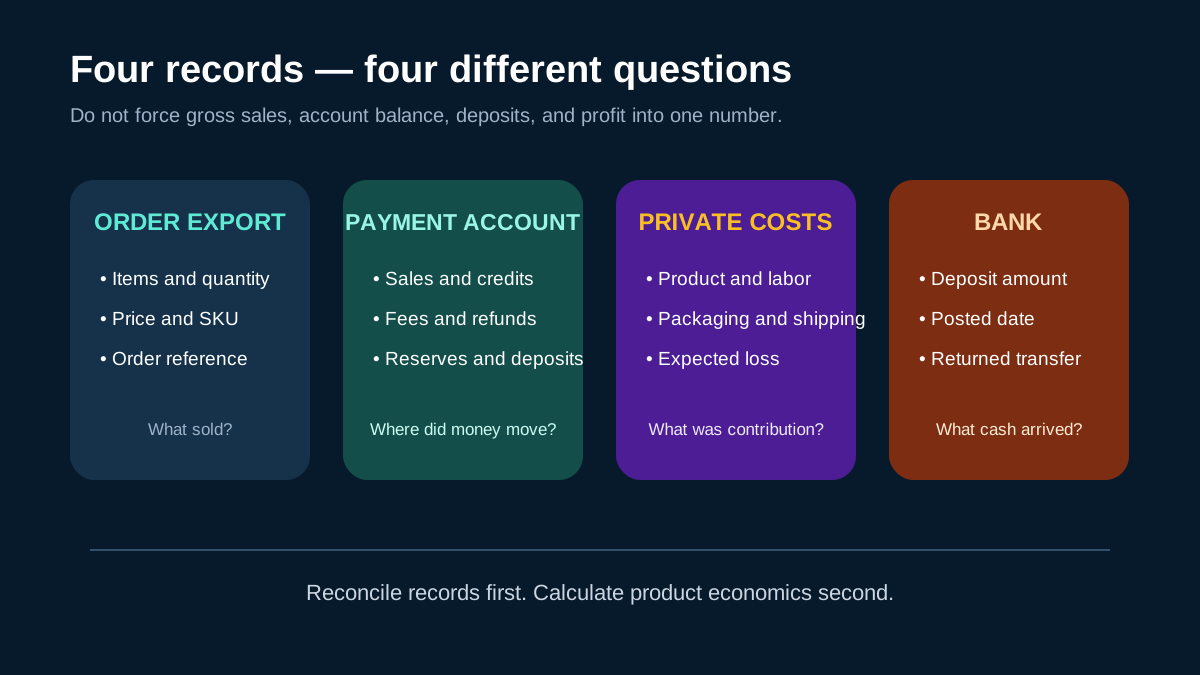
What reconciliation explains
An order export explains what sold. Payment Account activity explains how sales, fees, refunds, adjustments, reserves, shipping labels, and deposits moved through the account. The two files answer different questions, which is why gross sales rarely equal a bank deposit.
The tool highlights rows that need review instead of forcing every difference into one profit number. Reconciliation should be completed before private SKU costs are used to evaluate whether a product was profitable.
- Match order sales to statement sales for the same period.
- Classify refunds, fees, adjustments, and deposits separately.
- Review unmatched rows and formula differences.
- Keep deposits classified as cash transfers, not revenue or profit.
Privacy and review boundary
Reconciliation needs transaction structure, amounts, dates, and row categories. It does not need buyer names, delivery addresses, messages, or payment credentials. Keep the source files local and use redacted examples for support.
If a difference could affect bookkeeping or tax reporting, confirm it in Etsy's official records and with an appropriate professional. Seller Profit Guard only provides an operational review layer.
Use three evidence layers before matching
Start with the sold-transaction or order export, the Payment Account or monthly statement, and the corresponding bank deposit record. Record the requested period and the actual earliest and latest row dates in each source. A calendar-month order export, a statement based on account posting dates, and a bank deposit date can overlap without sharing the same boundaries.
Keep the files in their original protected location and work from local copies. Preserve original headings, currency, signs, transaction references, order references, and row categories before normalizing them. Buyer names, delivery addresses, private messages, complete order files, payment credentials, and account passwords are not required in a public reconciliation note or support screenshot.
- Order exports explain products, quantities, and order references.
- Payment Account activity explains charges, credits, reserves, adjustments, and deposits.
- Bank evidence confirms cash received, not order-level revenue or contribution.
- Private SKU cost records belong in a later contribution review.
- Every imported period needs an owner, source date, and exception log.
Match stable references before amount-only pairs
Prefer an exact transaction or order reference when both sources expose one. Then compare normalized currency, signed amount, activity type, and a documented posting-date window. An equal amount is weak evidence by itself because multiple orders, fees, refunds, shipping labels, or deposits can share the same value.
Use a one-to-one match only when the evidence supports it. One sale can produce several account movements, and one deposit can combine many available-balance movements. Preserve one-to-many and many-to-one relationships instead of duplicating a deposit across orders or forcing every statement row into a sale.
| Evidence | Strong use | Unsafe shortcut |
|---|---|---|
| Order or transaction reference | Primary direct-match key | Discarding it after amount normalization |
| Currency and signed amount | Confirming a candidate pair | Matching equal absolute values across currencies |
| Activity type | Separating sale, fee, refund, reserve, and deposit | Treating every positive row as revenue |
| Posting date | Explaining timing within a documented window | Demanding the order, statement, and bank date match exactly |
Build an opening-to-closing balance bridge
For a month-end review, begin with the opening Payment Account balance. Add sales and other documented credits, subtract fees, refunds, shipping labels, advertising, and other charges, then include reserves and adjustments according to their signed account treatment. Subtract deposits or transfers that reduce the available balance. The calculated closing balance should reconcile to the statement within the declared tolerance.
A balance bridge does not prove profit. It explains movement inside the account. Product cost, labor, packaging, fulfillment, owner compensation, tax treatment, inventory valuation, and other private business costs remain separate. Do not insert an invented plug to make the bridge close; retain the unresolved amount with its source, owner, next review date, and stop condition.
- Confirm opening balance, currency, and statement period.
- Group rows by their original account category and sign.
- Reperform category totals before calculating the bridge.
- Compare calculated and stated closing balances.
- Investigate every difference above the approved tolerance.
- Preserve the accepted prior worksheet before correcting a mapping.
Interpret unmatched and timing rows responsibly
An unmatched row is an investigation state, not proof of an Etsy error or missing money. Common explanations include period boundaries, refund timing, delayed shipping-label adjustments, reserve movements, currency conversion, filtered exports, duplicated imports, sign normalization, or a missing source file. Name the hypothesis and the evidence needed to accept or reject it.
Separate structural conflicts from timing review. Missing currency, unreadable dates, duplicated identifiers, contradictory signs, incomplete source scope, or unresolved privacy and ownership boundaries should block a clean reconciliation claim. A supported timing difference can remain under review with a dated follow-up. Matched means the entered evidence reconciles under its documented rules; it is not an accounting opinion.
Run a reversible weekly operating routine
Save the previous accepted mapping, import the new closed period, confirm source versions, normalize fields, rerun known fixtures, review unmatched rows, and record every rule change. Keep one reviewer independent from the person who changed a mapping when the amount or business consequence is material.
After an authorized correction, compare the new matched count, unresolved count, balance difference, and affected categories with the prior result. Stop when a privacy boundary, source mismatch, duplicate import, unexpected category, or tolerance breach appears. Restore the prior mapping and worksheet when the correction cannot be independently explained.
- Close one evidence period before importing the next.
- Change one mapping or date-window rule at a time.
- Retain a synthetic regression fixture for each accepted category.
- Do not upload private order or statement data for public support.
- Record monitoring, stop, correction, and restoration evidence.
What the tool can and cannot conclude
The tool can organize local evidence, compare aggregate rows, expose unmatched movements, and support a repeatable investigation. It cannot access an Etsy account, verify a bank, determine tax treatment, produce audited books, calculate complete profit, resolve a marketplace dispute, or authorize a filing or business decision.
Treat every result as bounded by the files, periods, currencies, categories, matching rules, and tolerances entered. Verify current official Etsy documentation and the seller's own protected records. Use a qualified bookkeeper, accountant, tax adviser, attorney, or marketplace specialist when the question exceeds operational reconciliation.
Sources and further reading
- Etsy Help: What are the Fees and Taxes for Selling on Etsy?: Official overview of listing, transaction, payment, advertising, and other seller fees.
- Etsy Help: How Etsy's Offsite Ads Work: Official Offsite Ads fee, attribution, and fee-cap reference.
- Etsy Help: How to Download a Spreadsheet of Your Sold Transactions: Official CSV export workflow for order items, orders, Etsy Payments sales, and deposits.
- Etsy Help: How to Manage Your Payment Account: Official Payment Account and monthly statement reference.
- Etsy Help: How to Issue a Full or Partial Refund For an Order: Official refund workflow and Payment Account impact reference.
Related Seller Profit Guard tools
- Etsy CSV profit calculator: Run a local order profit check with editable fee and SKU cost assumptions.
- Payment reconciliation tool: Compare order rows with statement activity and flag unmatched rows.
- SKU cost library: Save or import material, labor, packaging, shipping, and target margin assumptions.
- Variant risk checker: Find missing SKUs and variation cost risks before a listing scales.
- Etsy title checker: Review listing-title clarity, repetition, keyword chains, and mobile scanning.
- Etsy tag checker: Review all 13 tag slots for duplicates, repeated meaning, and truthful coverage.
- Free shipping threshold calculator: Estimate when a shipping subsidy can still meet a target margin.
- Return window loss estimator: Model expected reverse shipping, restock work, recovery, and replacement loss.
- Etsy Ads break-even calculator: Estimate target-safe Etsy Ads spend, ACOS, and ROAS after fees, fulfillment, and expected return loss.
- CSV data privacy: Understand what the local-first workflow needs and what it does not need.
- Etsy Payment Reconciliation: Inputs and Match Rules: Map Etsy order exports, Payment Account activity, fees, refunds, deposits, dates, signs, and references into a traceable reconciliation.
- Etsy Deposit Reconciliation: A Weekly Worked Example: Trace one illustrative Etsy payout week across orders, Payment Account sales, fees, a refund, a shipping label, and a bank deposit.
- Etsy Month-End Reconciliation: Close Without Guessing: Build an Etsy month-end close with opening and closing balances, sales, fees, refunds, reserves, deposits, and dated exceptions.
- Etsy Payment Reconciliation: 12 Errors to Fix: Correct amount-only matches, repeated totals, sign errors, date-window drift, deposit-as-revenue mistakes, and hidden unresolved rows.
- Etsy Reconciliation Data: Which Export Proves What?: Map Etsy order, transaction, Payment Account, monthly statement, deposit, bank, refund, fee, and private-cost evidence by purpose.
- Etsy Reconciliation Thresholds: When to Investigate: Set evidence-based Etsy reconciliation thresholds for direct matches, timing differences, unresolved rows, aging, and escalation.
- Weekly Payout vs Month-End Etsy Reconciliation: Compare weekly Etsy payout checks with month-end reconciliation by scope, source cut-off, balance bridge, exceptions, and decisions.
- Weekly Etsy Payment Reconciliation in 45 Minutes: Run a repeatable Etsy payment reconciliation routine: preserve exports, validate mappings, match rows, bridge deposits, and close exceptions.
- Read Etsy Reconciliation Results Without False Certainty: Interpret direct, grouped, fallback, timing, ambiguous, and unresolved Etsy payment rows without confusing cash, revenue, or profit.
- Etsy Payment Reconciliation Audit Checklist: Use a source, mapping, match, balance, deposit, exception, privacy, approval, and change-log checklist for Etsy reconciliation.
- How do you separate marketplace-collected tax from seller-retained revenue?: Reconcile buyer total to merchandise and shipping plus separately identified marketplace-remitted and seller-collected tax. Subtract merchandise refunds to calculate retained revenue. Keep net marketplace tax outside revenue and payout; show net seller-collected tax as a cash liability; then reconcile retained revenue, liability, fees, and adjustments to payout.
- How do you read a tax-inclusive marketplace export?: An invented USD 10,800 buyer total contains USD 10,000 of merchandise and shipping plus USD 800 of marketplace tax. After USD 500 of merchandise refunds and USD 40 of tax refunds, retained revenue is USD 9,500 and net marketplace tax is USD 760, which remains outside seller payout.
Use the interactive tool
Enable JavaScript to open the calculator and process browser-local inputs. The explanatory content and source links remain available without JavaScript.
Related guide: Read the Payment Account reconciliation guide.
This tool provides operating estimates, not tax, accounting, legal, financial, or marketplace-policy advice. Verify current official sources and your own records before changing prices or operations.