Seller Profit Guard · How it works · CSV privacy
Etsy Ads break-even calculator
Target-safe Etsy Ads spend per converted order equals revenue minus product, packaging, labor, shipping, percentage and fixed fees, any separately evidenced Offsite Ads fee, expected return loss, and the chosen contribution target. This calculator also converts the same ceiling into ACOS and ROAS so attributed revenue is tested against retained order economics.
Maintained by Seller Profit Guard Editorial Team. Last reviewed: 2026-07-25.
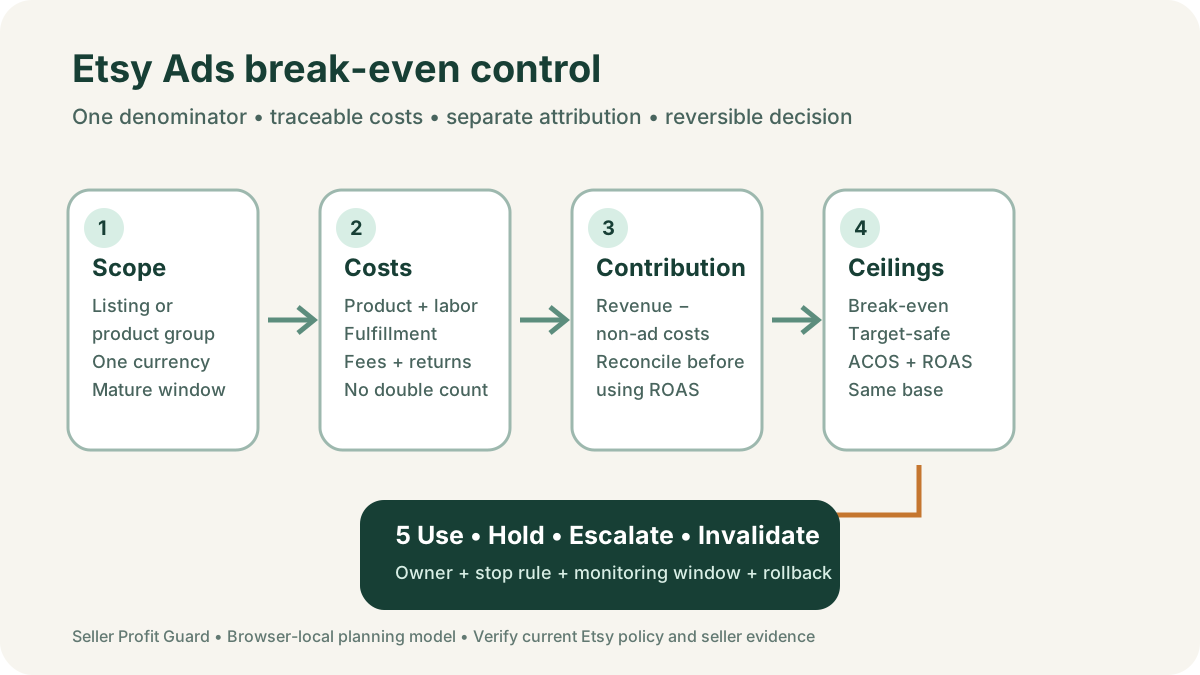
What does the Etsy Ads break-even calculator measure?
The calculator measures how much advertising cost one converted order can carry after the seller enters its revenue and variable operating costs. It first computes contribution before Etsy Ads. That amount is the theoretical break-even ad room: spending all of it on ads would reduce the bounded order contribution to zero. It then reserves the seller's chosen target contribution and reports the smaller target-safe ad room.
The result is expressed in dollars per converted order, ACOS, and ROAS. These are three views of the same denominator, not three independent forecasts. A $6 target-safe ceiling on $40 of modeled revenue is 15% target ACOS and 6.67x target ROAS. Changing the revenue or cost scope changes all three outputs together.
This is an order-economics planning model. It does not connect to Etsy, set a campaign budget, set a cost-per-click bid, infer incremental sales, determine an Offsite Ads charge, predict conversion, certify accounting profit, or guarantee that an attributed order was caused by an ad. Use current official Etsy documentation and reconciled seller evidence before acting.
- Scope one listing or a defensible product group in one currency.
- Use retained order revenue and current variable-cost evidence.
- Compare spend per mature attributed order with the modeled ceiling.
- Keep Etsy Ads click spend and Offsite Ads fees separate.
- Hold when attribution, returns, fees, or product mix are immature.
The exact formulas and twelve inputs
Let R equal item sale price plus buyer-paid shipping. Let C, P, L, and S equal product, packaging, labor, and seller shipping cost. Let f be the entered combined percentage fee rate, F the fixed payment fee, o the optional Offsite Ads percentage, E expected return loss per original order, and m the target contribution rate. Non-ad operating cost is N = C + P + L + S + fR + F + oR + E.
Contribution before Etsy Ads is B = R − N. Break-even ad spend per converted order is B. Target contribution is mR, and target-safe ad spend is T = B − mR. Break-even ACOS is B ÷ R and target ACOS is T ÷ R when revenue is positive. Break-even ROAS is R ÷ B when B is positive; target ROAS is R ÷ T when T is positive.
Planned Etsy Ads spend is a comparison input, not part of the ceiling formula. The tool flags planned spend above the nonnegative target-safe limit. It also validates revenue, fee percentages, target percentage, expected return loss, and planned spend before treating the output as usable.
| Input | Formula role | Preferred evidence | Common mistake |
|---|---|---|---|
| Sale price + buyer shipping | R, modeled order revenue | Resolved order at the selected grain | Using dashboard revenue with a different scope |
| Product + packaging + labor + shipping | Direct variable costs | Versioned SKU, task, and fulfillment records | Leaving labor or packaging at zero without evidence |
| Percentage + fixed fees | fR + F | Current policy and Payment account rows | Applying one rate to the wrong base |
| Offsite Ads estimate | oR in a separate scenario | Order-level attributed fee evidence | Blending Offsite Ads with Etsy Ads click spend |
| Expected return loss | E per original order | Mature frequency × incident severity | Entering refund value instead of retained loss |
| Target margin | mR reserved contribution | Documented operating target | Calling break-even a safe target |
Default fixture: why $4 planned spend is not safe
The public default fixture uses $34 item revenue, no buyer shipping, $11 product cost, $1.25 packaging, $5 labor, $4.50 seller shipping, a 9.5% combined percentage fee assumption, a $0.30 fixed fee, zero Offsite Ads, $1.25 expected return loss, $4 planned Etsy Ads spend, and a 20% target contribution.
Percentage plus fixed fees are $34 × 9.5% + $0.30 = $3.53. Non-ad cost is $11 + $1.25 + $5 + $4.50 + $3.53 + $1.25 = $26.53. Contribution before ads is therefore $34 − $26.53 = $7.47. That produces a 22.0% break-even ACOS and about 4.55x break-even ROAS.
The 20% target reserves $6.80, leaving only $0.67 of target-safe ad room. Target ACOS is about 2.0% and target ROAS is about 50.75x. Planned spend of $4 exceeds the target-safe ceiling, so the tool shows a warning even though contribution before ads remains positive. The warning is the intended control, not a calculator failure.
| Step | Calculation | Default result |
|---|---|---|
| Fees | $34 × 9.5% + $0.30 | $3.53 |
| Non-ad costs | $11 + $1.25 + $5 + $4.50 + $3.53 + $1.25 | $26.53 |
| Contribution before ads | $34 − $26.53 | $7.47 |
| Target contribution | $34 × 20% | $6.80 |
| Target-safe ad spend | $7.47 − $6.80 | $0.67 |
| Planned-spend comparison | $4.00 versus $0.67 | Above target-safe limit |
Worked fixture: a listing with measurable headroom
A second public fixture uses $36 revenue, $8 product cost, $1 packaging, $3 labor, $4 shipping, a 9.5% percentage fee, a $0.30 fixed fee, zero Offsite Ads, $0.80 expected return loss, $6 planned spend, and a 20% target. This is a hand-checkable test case, not a benchmark for another shop.
Fees equal $36 × 9.5% + $0.30 = $3.72. Non-ad cost is $8 + $1 + $3 + $4 + $3.72 + $0.80 = $20.52. Contribution before ads is $15.48. The break-even ACOS is 43.0%, and break-even ROAS is about 2.33x.
The target contribution is $7.20, so target-safe spend is $15.48 − $7.20 = $8.28. Target ACOS is 23.0% and target ROAS is about 4.35x. Planned spend of $6 is $2.28 below that ceiling. A positive gap permits further review; it does not prove that the attributed orders are incremental or that scaling will preserve the same mix.
Etsy Ads attribution is not incremental profit
Etsy's official performance guidance currently describes orders and revenue from ads as attributed when a shopper interacts with an Etsy Ad and then buys any item in the shop within 30 days. That reporting definition can include a purchase different from the advertised listing. Therefore, a listing-level ad report and the economics of the converted order may not share the same product mix.
Attribution answers which advertising interaction receives reporting credit under Etsy's rule. Incrementality asks what would have happened without the ad. The calculator does not answer the second question. A high reported ROAS can coexist with weak retained contribution, cross-listing attribution, organic demand, or a product mix that differs from the input fixture.
Preserve the Ads dashboard export or screenshot, date window, advertised listing set, attributed orders, attributed revenue, and budget spent. Then reconcile the converted-order product and cost mix separately. Use a consistent and sufficiently mature window; do not compare a seven-day cost total with a 30-day attributed-revenue rule.
- Label dashboard ROAS as attributed revenue divided by ad cost.
- Label calculator ROAS as modeled revenue divided by an ad ceiling.
- Do not describe either metric alone as causal lift.
- Reconcile cross-listing orders before making a listing-level decision.
Keep Etsy Ads and Offsite Ads in separate scenarios
Etsy Ads are onsite ads charged on a cost-per-click basis under the current Advertising & Marketing Policy. Etsy states that sellers set a daily budget while Etsy generally manages bids, and the seller is charged for clicks rather than impressions. The calculator's planned Etsy Ads spend should therefore be derived from campaign spend divided by a mature count of attributed converted orders, not from views or a guessed CPC.
Offsite Ads use a different cost path. Etsy pays the upfront advertising cost and may charge an advertising fee when an eligible attributed order follows an offsite click under the current program rules. Because the trigger, amount, and evidence differ, the optional Offsite Ads percentage is not a substitute for Etsy Ads spend.
Use zero Offsite Ads for an Etsy Ads-only scenario. Run a separate scenario with an applicable percentage only when order-level evidence or a deliberately adverse assumption supports it. If a last-click rule, opt-out timing, participation status, order cap, or fee base matters, verify the current official policy and Payment account row rather than hard-coding a universal rate.
Build a defensible expected return-loss input
Expected return loss should be measured per original order at the same product grain as the calculator. One practical method is mature return frequency multiplied by average retained incident loss. Incident loss can include unrecovered product cost, reverse shipping, lost outbound shipping, handling, replacement, and fees that were not credited, net of verified recovery.
A refund amount is not automatically seller loss because it can reverse revenue and may also change fees, inventory recovery, shipping, or replacement obligations. Likewise, a zero return-loss input is valid only when a mature cohort supports zero; blank evidence should remain an unresolved issue rather than silently becoming zero.
Use resolved outcomes after the declared return window and separate open cases. Stress-test an adverse frequency or recovery case when the sample is small or product variants differ materially. The related return-window loss calculator can create the aggregate per-order value without requiring buyer names, addresses, messages, or raw order CSV data.
Compare actual spend with the target-safe ceiling
For one declared window, calculate observed Etsy Ads spend per mature attributed order as budget spent divided by attributed orders after the selected attribution window has had time to mature. Compare that dollar value with T, the target-safe spend per converted order. Use the same currency and listing or product-group scope.
If observed spend is below T with a meaningful buffer, the bounded model passes its economic screen. If spend is near T, hold and investigate cost uncertainty, attribution maturity, and product mix. If spend exceeds T, reduce scope or pause the affected listing set while the evidence is reconciled. This is a seller-defined operating response, not an instruction from Etsy.
Do not use ACOS or ROAS to conceal a denominator mismatch. Target ACOS compares target-safe spend with modeled order revenue. Target ROAS is the reciprocal on the same base. If dashboard revenue includes other items, shipping, discounts, taxes, or currencies differently, bridge those differences before declaring a pass.
| State | Evidence pattern | Bounded response |
|---|---|---|
| Use | Mature scope, reconciled costs, observed spend comfortably below T | Continue a limited review window |
| Hold | Thin headroom, open returns, mixed products, or attribution not mature | Preserve settings and resolve evidence |
| Escalate | Observed spend exceeds T or contribution before ads is nonpositive | Stop expansion and review price, cost, scope, or ads |
| Invalidate | Currency, fee base, order grain, or source cannot reconcile | Do not use the result |
Stress-test the variables that move ad room
Price, buyer-paid shipping, product cost, labor, fulfillment, fees, Offsite Ads exposure, expected return loss, and target margin all move the ceiling. Test one variable at a time before combining changes. A higher price can create more room, but percentage fees and demand response can also change. A lower target creates apparent room by accepting less retained contribution.
Use a representative case and an adverse case. For a variation listing, the adverse case might use the heavier shipping cost, higher material cost, longer labor time, and lower recovery outcome. If the campaign report attributes orders across the shop, use a weighted product mix rather than the cheapest SKU.
Record the source date and owner for every assumption. Re-run after a supplier increase, shipping-zone change, packaging revision, fee-policy change, promotion, product-mix shift, or return outcome. Never overwrite the prior accepted fixture; retain it so the movement in ad room can be explained and reversed.
Validate the calculator with boundary fixtures
A trustworthy calculator must fail visibly. Test zero or negative revenue, percentage fees outside 0% to 100%, Offsite Ads outside 0% to 100%, target margin outside 0% to 100%, negative expected return loss, and negative planned spend. Test a product below break-even before ads and a target that leaves no safe budget.
The public low-cost fixture should return $8.28 target-safe spend, 23.0% target ACOS, $15.48 contribution before ads, 2.33x break-even ROAS, and 4.35x target ROAS. The default fixture should return $0.67, 2.0%, and a planned-spend warning. These fixtures protect both arithmetic and user-facing labels.
Also test rounding at the decision boundary. Store full-precision calculations internally and compare unrounded values; round only for display. A displayed $0.00 can represent a small positive or negative value, so the warning state and formula evidence should control the decision.
A reversible 30-day operating routine
Start by preserving the prior campaign settings, advertised listing set, cost version, return-loss version, calculation output, decision, and rollback reference. Etsy currently recommends using a longer view such as at least 30 days to understand performance, while acknowledging that information may not be real time and outside factors affect results.
At the review date, reconcile Ads dashboard spend, interactions, attributed orders, attributed revenue, and search terms with Payment account charges and resolved order economics. Close or separate returns that are not mature. Recalculate representative and adverse fixtures, then compare observed spend per mature attributed order with target-safe room.
Approve one bounded response: continue unchanged, remove a weak listing from the advertised set, revise a listing using supported search-term evidence, adjust the daily budget within a documented test, or pause. Assign an owner, review date, stop rule, and restoration procedure. Do not change listings, budget, and product economics simultaneously if you want interpretable feedback.
- Freeze the prior Ads, cost, return, calculation, and rollback evidence.
- Let the declared attribution and outcome window mature.
- Reconcile dashboard reporting with Payment account and order economics.
- Run default, boundary, representative, adverse, and prior fixtures.
- Approve one bounded change with a stop rule.
- Measure the next comparable mature window before claiming an effect.
Privacy, evidence, and limitations
The calculator runs from seller-entered values in the browser and does not require buyer identity, address, message history, or a private order export. Keep any working dataset aggregated to the listing or defensible product-group level. Store raw seller records only in the seller's approved private system.
For an audit, record campaign scope, currency, date window, attribution maturity, advertised listing set, order-mix bridge, twelve input values, source and effective date for each value, formula version, fixtures, representative and adverse results, uncertainty, owner, reviewer, decision, monitoring date, stop rule, and rollback reference.
The model excludes fixed overhead unless deliberately allocated into an entered variable-cost line, and it does not calculate tax, cash timing, inventory carrying cost, customer lifetime value, organic cannibalization, causal lift, or accounting profit. Its value is narrower: make the maximum order-funded ad spend visible before a seller interprets reported ROAS as economic safety.
Use the support cluster without duplicating intent
The ten linked guides each answer a separate operational question: formula inputs, a complete hand example, an adverse second scenario, common denominator mistakes, evidence sources, decision thresholds, scenario comparison, a recurring routine, output interpretation, and an audit template. The calculator remains the only interactive page in the cluster.
Begin with formula inputs when setting up the model, the worked example when checking arithmetic, and data sources when evidence is scattered. Use decision thresholds and interpretation before acting. Use the audit template when another person must reproduce or review the decision.
These pages supplement current Etsy rules and the seller's own evidence. They are not platform, legal, accounting, tax, or financial advice. Recheck official sources immediately before a material campaign or policy decision.
Sources and further reading
- Etsy Advertising & Marketing Policy: Current Etsy Ads auction, click-charge, budget, reporting, and Offsite Ads program boundaries; last reviewed July 28, 2026.
- Etsy Help: Review Etsy Ads performance: Official views, clicks, attributed orders, revenue, spend, ROAS, search-term, privacy, and review-window definitions.
- Etsy Help: How ads are placed in Etsy Search: Official placement, relevance, listing quality, likelihood, and cost context.
- Etsy Help: How Offsite Ads work: Official participation, attribution, fee, dashboard, and order-level review context.
- Etsy Fees & Payments Policy: Current seller, Etsy Ads, Offsite Ads, and Payment account fee scope.
- Seller Profit Guard methodology: Formula, evidence hierarchy, editable assumptions, privacy, uncertainty, and non-advice boundaries.
Related Seller Profit Guard tools
- Etsy CSV profit calculator: Run a local order profit check with editable fee and SKU cost assumptions.
- Payment reconciliation tool: Compare order rows with statement activity and flag unmatched rows.
- SKU cost library: Save or import material, labor, packaging, shipping, and target margin assumptions.
- Variant risk checker: Find missing SKUs and variation cost risks before a listing scales.
- Etsy title checker: Review listing-title clarity, repetition, keyword chains, and mobile scanning.
- Etsy tag checker: Review all 13 tag slots for duplicates, repeated meaning, and truthful coverage.
- Free shipping threshold calculator: Estimate when a shipping subsidy can still meet a target margin.
- Return window loss estimator: Model expected reverse shipping, restock work, recovery, and replacement loss.
- Etsy Ads break-even calculator: Estimate target-safe Etsy Ads spend, ACOS, and ROAS after fees, fulfillment, and expected return loss.
- CSV data privacy: Understand what the local-first workflow needs and what it does not need.
- Etsy Ads Break-Even Formula: 12 Inputs: Calculate Etsy Ads break-even and target-safe spend, ACOS, and ROAS from twelve scoped revenue, cost, fee, return, and ad inputs.
- Etsy Ads Break-Even Example: Low-Cost Item: Follow a $36 low-cost Etsy listing from non-ad costs to $8.28 target-safe ad spend, 23.0% ACOS, and 4.35 target ROAS with reproducible math.
- Etsy Ads Break-Even for a High-Return Item: Model a $48 high-return Etsy listing where $4.20 expected return loss leaves no target-safe spend at a 25% target and 4.83x break-even ROAS.
- Etsy Ads Break-Even: 12 Costly Mistakes: Correct twelve Etsy Ads break-even errors involving attribution, denominators, Offsite Ads, returns, fees, listing mix, targets, and rounding.
- Etsy Ads Break-Even Data: Source Map: Map every Etsy Ads break-even input to Ads dashboard, Payment account, listing, cost, shipping, return, and seller-policy evidence.
- Set a Safe Etsy Ads ACOS and ROAS Target: Set break-even, target, stress, evidence, and rollback thresholds for Etsy Ads spend per order, ACOS, ROAS, and retained contribution.
- Etsy Ads ACOS: Low-Cost vs High-Return: Compare low-cost and high-return Etsy listings at the same revenue, fee, attribution, and target grain to isolate the variable driving ad room.
- Weekly Etsy Ads Break-Even Routine: Run a 45-minute weekly Etsy Ads control loop for spend, attribution maturity, listing economics, ACOS, ROAS, exceptions, and rollback.
- Interpret Etsy Ads ACOS and ROAS Safely: Read Etsy Ads contribution, ad ceilings, ACOS, ROAS, attribution, uncertainty, and next actions without confusing attributed revenue with profit.
- Etsy Ads Break-Even Audit and Change Log: Audit Etsy Ads scope, source maturity, costs, formulas, fixtures, privacy, attribution language, approval, live configuration, and rollback.
Use the interactive tool
Enable JavaScript to open the calculator and process browser-local inputs. The explanatory content and source links remain available without JavaScript.
Related guide: Read the break-even ROAS guide.
This tool provides operating estimates, not tax, accounting, legal, financial, or marketplace-policy advice. Verify current official sources and your own records before changing prices or operations.