Seller Profit Guard mistakes that distort contribution
Last updated: 2026-07-27
Written and reviewed by Seller Profit Guard Editorial Team.
The most damaging Etsy profit errors are structural: using deposits as revenue, treating missing costs as zero, double-counting fees or discounts, averaging unlike variations, ignoring labor and fulfillment, and calling gross refund value expected loss. Trace every result to a source, sign, date, grain, and assumption before acting.

Mistake 1: using a bank deposit as order revenue
A deposit is a cash transfer of funds available after Payment Account activity and timing. It can combine multiple sales, fees, refunds, seller services, reserves, adjustments, prior balances, and deposit schedules. Assigning one deposit to one order because the amounts look similar creates false revenue and breaks the audit trail.
Use the order or order-item export to establish what sold and the Payment Account to explain charges and balance movement. Match the platform deposit record to the bank receipt as a separate cash-control step. Product contribution is then calculated from the order plus charges and private costs. Cash availability and product economics are connected, but they are not the same measurement.

Mistake 2: treating a missing cost as zero
Zero is evidence: the seller knows the cost is zero in the defined scope. Blank or unmapped means unknown. When a SKU has no material, provider, labor, packaging, or shipping record, the calculator should block a reliable approval decision and place the row in an exception queue. Filling blanks with zero rewards poor data with an optimistic margin.
The repair is not to guess a precise value. Add the current SKU record, use a documented conservative range, or keep the result incomplete. Count cost coverage across reviewed revenue and units so the seller knows whether the report represents the shop or only its best-documented products. A store-wide average cannot safely fill a missing custom or heavy variation.
| Input state | Meaning | Allowed decision |
|---|---|---|
| Matched current cost | Direct private evidence for the SKU | Base and stress review |
| Dated conservative range | Planning estimate with uncertainty | Provisional bounded decision |
| Blank or unmapped | No usable evidence | Block approval and assign owner |
| Verified zero | Cost genuinely absent in stated scope | Use zero with source note |
| Store average | Blended context only | Do not approve a variation-level price |
Mistakes 3 and 4: subtracting fees or discounts twice
A statement Net field can already reflect an Amount minus Fees & Taxes. If the model starts from Net and subtracts the same fee rows again, contribution is understated. Conversely, if it starts from gross revenue but assumes Net already handled every seller charge, contribution can be overstated. Reproduce the statement's own running logic before choosing the calculation columns.
Discounts create the same problem. Revenue may already be after a seller-funded coupon. Subtracting the coupon again duplicates the reduction. Starting from list price and omitting the coupon does the opposite. Record the revenue convention, funding owner, fee base, and allocation method. The allocated line items must reconcile back to the order.

- Do not add Amount and Net without understanding both fields.
- Do not subtract a fee already embedded in the chosen revenue value.
- Do not subtract a coupon twice when the export is already net.
- Do not assume a platform credit without matched evidence.
- Prove line allocations sum back to the order total.
Mistakes 5 through 7: averages, labor, and shipping
A listing can contain variations with different materials, print-provider charges, personalization minutes, weights, packaging, and label zones. Applying the cheapest or average SKU cost to every order hides the expensive variation. Use a variation-level join key whenever the option changes cost, stock, fulfillment, or return exposure. Keep an old-to-new SKU mapping if names change.
Owner labor is not automatically free, and buyer-paid shipping is not automatically profit. Time the task, state the loaded rate, and separate production from fulfillment or support work when those drivers change differently. Include packaging, label, insurance, handling, carrier adjustments, and seller-funded shipping. A $6 shipping charge and a $7 fulfillment cost create a $1 shortfall before other effects.
| Trap | Optimistic shortcut | Correct control |
|---|---|---|
| Variation mix | One listing-level average | Cost record for each materially different SKU |
| Owner labor | $0 because cash did not leave | Timed task × documented loaded rate |
| Packaging | Included vaguely in material | Per-order component record |
| Buyer shipping | All shipping charge is margin | Revenue less actual fulfillment cost |
| Carrier adjustment | Ignore after label purchase | Reconcile final charge and exception |
Mistakes 8 and 9: ad attribution and return loss
Do not assign every order the shop's blended advertising rate or assign no advertising because the order export lacks the field. Use matched Offsite Ads or statement evidence where available, define the attribution source and window, and use explicit scenarios for unknown future exposure. A profitable organic order does not prove the same SKU survives an attributed order.
Expected return loss is the expected unrecovered operating loss, not the refund amount. Separate outbound shipping, reverse shipping, damaged or unsellable product, replacement production, handling, support time, and confirmed fee or inventory recovery. Multiply a defensible loss per return by an observed or dated scenario rate. Keep actual completed outcomes distinct from planning allowances.
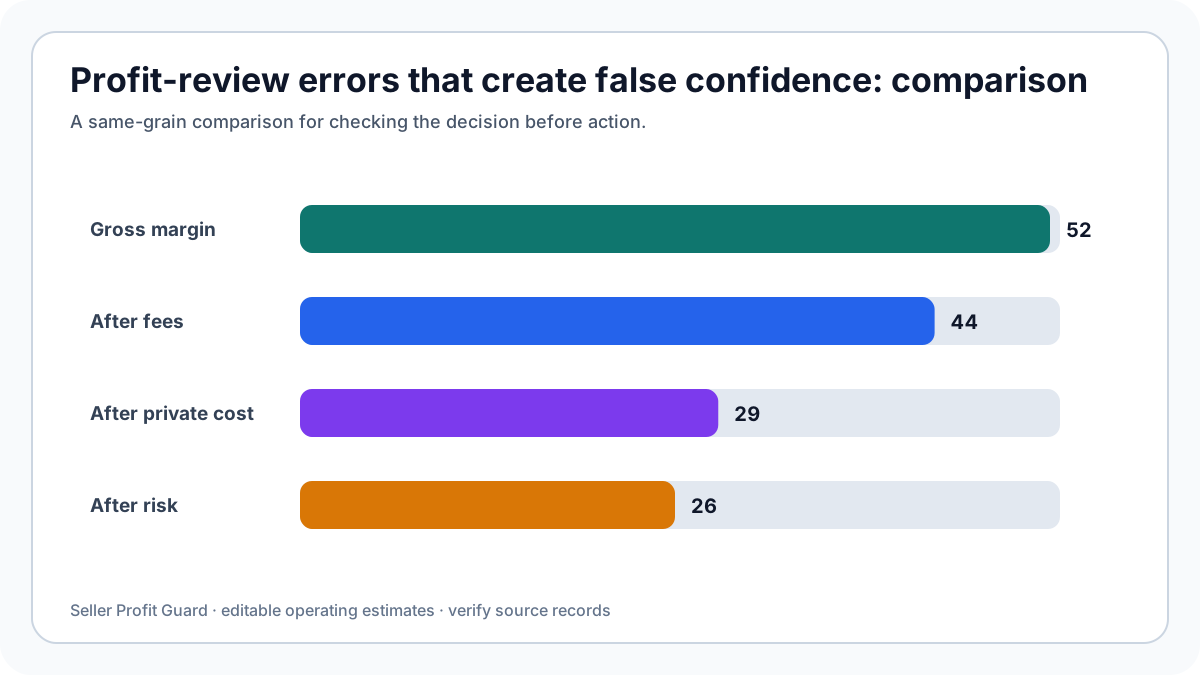
Mistakes 10 through 12: stale evidence, wrong grain, and false precision
A supplier quote, fee rule, labor study, label average, or return rate can be accurate and still be stale. Store effective and review dates. Trigger a review after a material price, supplier, packaging, workflow, carrier, fee, currency, advertising, promotion, or return change. Keep the previous value so a decision can be reconstructed.
Do not mix order-level, item-level, SKU-level, listing-level, shop-level, and monthly values without an allocation rule. A fixed monthly app cost needs an order-volume denominator; order shipping needs an item allocation if the decision is SKU-level. Finally, avoid displaying cents of confidence when major inputs are ranges. Show the base, conservative case, evidence quality, and decision threshold.
- Record source, owner, effective date, and review date for every assumption.
- Label the calculation grain on every report.
- Use allocation rules that sum back to the parent record.
- Show sensitivity for uncertain inputs.
- Do not claim accounting profit or guaranteed future performance.
How to audit and correct a suspicious result
Choose one result that looks unusually high or low. Trace the revenue field to the order, every marketplace charge to the statement or dated rule, every SKU cost to a private record, labor to a time study, shipping to final evidence, and risk to observed or dated scenarios. Check currency, sign, tax, quantity, order/item duplication, discount ownership, and grain.
Recalculate after each correction and record the delta. If adding labor reduces contribution by $7, that is a data-quality finding and an operating signal. If removing a duplicated fee adds $4, the prior report was too pessimistic. Do not hide either correction by overwriting the old result. Preserve the old version, corrected version, reason, reviewer, and effective date.
- Select one anomalous order or SKU instead of changing the whole model.
- Trace revenue, charges, private costs, fulfillment, ads, and loss separately.
- Classify each issue as missing, duplicated, misclassified, stale, or wrong-grain.
- Correct one issue and record its result delta.
- Run a conservative case after the base formula is repaired.
- Update the control or training note that prevents the same error.
Etsy profit mistake questions
Why can a high-revenue product produce little cash? Product cost, labor, packaging, shipping, marketplace charges, advertising, refunds, inventory purchases, timing, and reserves can consume or delay revenue. Reconcile cash separately from product contribution.
Is a negative result always a pricing problem? No. It may be a mapping error, missing credit, duplicated fee, one-off carrier adjustment, damaged batch, or wrong SKU cost. Verify the formula before changing the offer.
Can a store average be used for planning? It can frame a shop-level forecast, but it cannot approve a variation price when cost drivers differ. Label the grain and uncertainty.
How many decimals should the report show? Currency can display cents, but the decision should reflect input uncertainty. A $12.37 estimate based on broad ranges is not more certain than those ranges.
What is the highest-priority fix? Correct errors that can reverse the decision: wrong revenue, missing core cost, duplicated fee or discount, wrong currency, or wrong SKU join.
Privacy and evidence limits for profit-calculation error audit
A contribution review does not need buyer names, delivery addresses, private messages, payment credentials, marketplace passwords, or a public copy of the seller's order history. It normally needs a redacted transaction key, date, SKU, quantity, seller-attributable revenue, relevant fee evidence, and private cost assumptions. Keep the untouched export in controlled storage and work from a local copy.
Seller Profit Guard is designed to read supported CSV files in the browser. A report can still contain commercially sensitive prices, SKU economics, labor rates, and supplier costs, so treat exports as private operating records. For support, share column names and a made-up example row. If an account-specific reserve, fee, refund, or suspension determines the answer, use the authenticated Etsy record rather than a generic assumption.
- Do not upload buyer identity or address fields for a margin calculation.
- Do not paste raw order rows into public communities, support email, or AI prompts.
- Use public dummy data to reproduce mapping and formula issues.
- Store cost libraries, reports, and change logs as confidential business records.
- Escalate tax, accounting, legal, and account-policy questions to the appropriate official or professional source.
How to apply this profit-calculation error audit in Seller Profit Guard
Open the Etsy CSV profit calculator with a recent, representative order-item export or the public dummy sample. Confirm the revenue, quantity, SKU, shipping, discount, fee, and transaction mappings before importing private cost assumptions. Review missing-cost and mapping warnings first; a precise result built on an empty or misidentified field is not decision-ready.
Run the relevant base and stress scenarios, export the private review list, and record the source period, assumptions, result, decision, owner, and next review date. The useful output is not a perfect score. It is a short, evidence-backed queue of listings or SKUs that need a price, cost, shipping, promotion, or data-quality action.
- Preserve the source export and record its shop, currency, period, and file type.
- Confirm every mapped field and keep missing values unknown rather than zero.
- Attach the correct SKU-level material, labor, packaging, fulfillment, and target assumptions.
- Run a base case plus the page-specific stress or comparison case.
- Inspect the rows that fail the target or evidence-quality gate.
- Record one reversible action and a dated follow-up instead of changing the whole shop.
Related resources
- Open the Etsy CSV profit calculator: Run a browser-local order and SKU contribution review with editable assumptions.
- Build an Etsy SKU cost library: Store material, labor, packaging, shipping, and target assumptions for repeat reviews.
- Reconcile Etsy Payment Account activity: Match order and statement evidence before interpreting cash movement as product economics.
- Review CSV data privacy: Keep raw buyer and order data out of public support and community posts.
- Read the editorial policy: See how sources, corrections, AI assistance, and update dates are handled.
Sources and further reading
- Seller Profit Guard calculation methodology: Calculation scope, editable assumptions, contribution terminology, privacy boundaries, and result limits.
- Etsy Help: Fees and Taxes for Selling: Official fee categories, fee bases, country-dependent processing charges, advertising fees, and Payment Account treatment.
- Etsy Help: Download Sold Transaction Spreadsheets: Official order items, orders, Etsy Payments sales, and Etsy Payments deposits CSV workflow.
- Etsy Help: Manage Your Payment Account: Official sales, fees, refunds, seller services, shipping, monthly statements, balance, and deposit context.
- Etsy Help: How Offsite Ads Work: Official attribution, participation, fee-rate, and order-cap context; verify current shop-specific status.
- Etsy Help: Issue a Full or Partial Refund: Official refund workflow and Payment Account impact reference.
Related Seller Profit Guard tools
- Open the Etsy CSV profit calculator: Run a browser-local order and SKU contribution review with editable assumptions.
- Build an Etsy SKU cost library: Store material, labor, packaging, shipping, and target assumptions for repeat reviews.
- Reconcile Etsy Payment Account activity: Match order and statement evidence before interpreting cash movement as product economics.
- Review CSV data privacy: Keep raw buyer and order data out of public support and community posts.
- Read the editorial policy: See how sources, corrections, AI assistance, and update dates are handled.
- Etsy Profit Formula: Inputs Small Sellers Must Track: Continue the Seller Profit Guard evidence and decision workflow.
- Etsy Profit Example: Trace a $74 Order Step by Step: Continue the Seller Profit Guard evidence and decision workflow.
- Etsy Discount Profit: Test Coupons and Free Shipping: Continue the Seller Profit Guard evidence and decision workflow.
- Etsy Profit Data Sources: Build a Defensible Record: Continue the Seller Profit Guard evidence and decision workflow.
- Etsy Profit Thresholds: Break-Even Is Not Enough: Continue the Seller Profit Guard evidence and decision workflow.
Next step: Open the Etsy CSV profit calculator.
This is operational planning help, not tax, accounting, legal, financial, or platform-policy advice. Review the Terms and disclaimer, and verify current platform rules and fee assumptions before changing prices.