CSV data privacy
Last updated: 2026-07-12
Maintained under the Seller Profit Guard editorial policy.
The core privacy boundary is simple: Seller Profit Guard should not need raw buyer names, addresses, private messages, or full order files to provide a useful margin review.
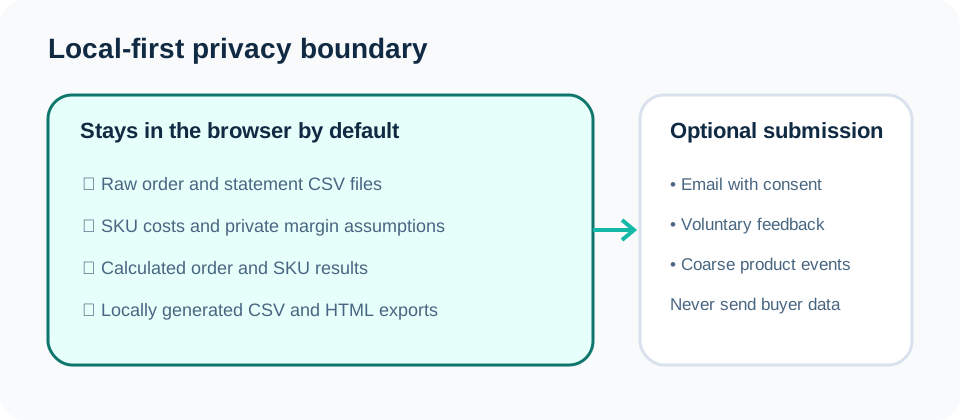
What the tool needs
Profit checks need operational fields: item revenue, shipping charged, quantity, fees, SKU, transaction or order grouping, and your cost assumptions. Those fields explain margin without exposing the person who placed the order.
Buyer identity, delivery address, private notes, gift messages, and payment identifiers are not needed for the margin calculations and should not be sent in support requests. If a screenshot includes those fields, crop or blur it before sharing.
A safe support example usually needs only the column names, a few made-up rows, and a description of what looked wrong. For example, a bug report can say that the tool mapped a shipping column incorrectly without including a real buyer or order.
| Data type | Needed for margin review? | Safer handling |
|---|---|---|
| Item price, shipping charged, quantity | Usually yes | Use the export locally or replace values with sample numbers when reporting a bug. |
| SKU and listing title | Often useful | Redact exact names if they reveal a private product strategy. |
| Material, labor, packaging, shipping cost | Yes when checking SKU profit | Treat as confidential business data. |
| Buyer name, address, private messages | No | Do not upload or send for support. |
| Payment credentials or account secrets | No | Never send through the site or email. |
How to test safely
Use the public dummy CSV sample when testing features or reporting bugs. If you need to describe a real issue, replace buyer, address, order, and SKU values with placeholders before sharing.
For recurring profit reviews, keep the raw exports on your own device and use browser-saved or exported SKU cost libraries for repeated checks. If you export a SKU cost library, store it where you store other private operating records.
If you are comparing Etsy order rows with Payment Account activity, use redacted transaction examples. The tool needs enough structure to understand sale, fee, refund, and deposit rows; it does not need buyer names.
- Use sample rows for bug reports.
- Share column names instead of raw exports when possible.
- Keep cost libraries private.
- Remove buyer identity fields before posting screenshots in communities.
Why local-first matters for sellers
Many Etsy sellers operate from a personal laptop, shared home office, or small team workflow. A local-first review reduces the amount of private order data that has to move between tools, inboxes, and contractors.
Local-first does not remove every privacy responsibility. The seller still controls the original export, local downloads, screenshots, and reports. The safest pattern is to analyze locally, export only the summary you need, and redact before asking for help.
Sources and further reading
- Etsy Help: What are the Fees and Taxes for Selling on Etsy?: Official overview of listing, transaction, payment, advertising, and other seller fees.
- Etsy Help: How Etsy's Offsite Ads Work: Official Offsite Ads fee, attribution, and fee-cap reference.
- Etsy Help: How to Download a Spreadsheet of Your Sold Transactions: Official CSV export workflow for order items, orders, Etsy Payments sales, and deposits.
- Etsy Help: How to Manage Your Payment Account: Official Payment Account and monthly statement reference.
- Etsy Help: How to Issue a Full or Partial Refund For an Order: Official refund workflow and Payment Account impact reference.
Related Seller Profit Guard tools
- Etsy CSV profit calculator: Run a local order profit check with editable fee and SKU cost assumptions.
- Payment reconciliation tool: Compare order rows with statement activity and flag unmatched rows.
- SKU cost library: Save or import material, labor, packaging, shipping, and target margin assumptions.
- Variant risk checker: Find missing SKUs and variation cost risks before a listing scales.
- Etsy title checker: Review listing-title clarity, repetition, keyword chains, and mobile scanning.
- Etsy tag checker: Review all 13 tag slots for duplicates, repeated meaning, and truthful coverage.
- Free shipping threshold calculator: Estimate when a shipping subsidy can still meet a target margin.
- Return window loss estimator: Model expected reverse shipping, restock work, recovery, and replacement loss.
- Etsy Ads break-even calculator: Estimate target-safe Etsy Ads spend, ACOS, and ROAS after fees, fulfillment, and expected return loss.
- CSV data privacy: Understand what the local-first workflow needs and what it does not need.
- CSV Validator Fields and Checks: Define two synthetic fixtures, delimiters, required headers, unique IDs, numeric columns, tolerance, period, scope, privacy, and decisions.
- Seller Order CSV Worked Example: Validate a synthetic Etsy-like order fixture with quoted commas, required headers, row width, unique IDs, numbers, privacy, and a Ready result.
- Marketplace Payout CSV Scenario: Validate a synthetic payout fixture with transaction types, negative refund values, numeric fields, schema boundaries, privacy, and a Ready result.
- CSV Column Mapping Fields and Rules: Define synthetic headers, invented samples, one-to-one mappings, required targets, currency, date semantics, coverage, evidence, privacy, and decisions.
- Order-Item CSV Mapping Example: Map a synthetic order-item export to stable identifiers, SKU, quantity, amount, and order-created timestamp fields with complete evidence.
- Payment Statement CSV Column Mapping: Map a synthetic payment statement to transaction reference, type, gross, fee, net, and occurred timestamp without collapsing financial grain.
- Duplicate Order Checker Formula and Inputs: Define the exact fingerprint, probable-match, repeated-key, and split-shipment logic for synthetic seller rows, including thresholds and privacy boundaries.
- Duplicate Import Worked Example: Work through one invented repeated-file import and one unrelated order row without using customer or production data, then document review controls.
- Split Shipment Duplicate Check: Preserve legitimate shipment rows that share an order reference while exposing why order-level uniqueness would be unsafe.
- Payout Anomaly Formula and Input Controls: Define the balance bridge, sign convention, source windows, reserve movements, tolerance, evidence packet, and reviewer controls.
- Weekly Payout Anomaly Worked Example: Reperform a weekly aggregate bridge with complete numbers, intermediate balances, residual, classification, and next action.
- Month-End Payout Anomaly Close: Close a calendar month without forcing reserve, refund, holiday, deposit, or subsequent-event timing differences into zero.
- Fee Anomaly Formula and Input Contract: Define fee family, event grain, base, percentage rate, fixed amount, expected line count, observed evidence, tolerances, and rule scope.
- Fee Anomaly Worked Example: Changed Rate: Reperform a percentage-fee example, change only the observed amount, and trace the resulting effective-rate difference and review decision.
- Fee Anomaly Review for a Duplicate Line: Use a fixed-fee event to distinguish a true duplicate candidate from a legitimate second trigger, credit, renewal, or quantity event.
- Missing SKU Cost Formula and Input Contract: Define sold-item grain, normalized keys, dated cost records, exact, missing, ambiguous and stale joins, thresholds, and evidence.
- Missing SKU Cost Worked Example: Renamed SKU: Trace a legacy SKU through a dated alias to one canonical SKU and current cost record, including the failing no-alias case.
- Missing SKU Cost Checker for an Unmapped Variation: Use listing, option, variation and SKU evidence to resolve a child item without applying an unsafe parent-listing average cost.
- CSV Privacy Redactor Formula and Input Contract: Define purpose, source, grain, header-only input, required allowlist, keep, remove, review, retention, ownership, and restoration.
- CSV Privacy Redactor Worked Example: Order Export: Reduce an invented Shopify-like order schema to item-level profit fields while removing contact, address, notes, payment-reference, and device columns.
- CSV Privacy Redactor for a Support-Ticket Export: Build an aggregate refund-reason schema without carrying buyer contacts, messages, attachment links, or secrets into profit analysis.
Next step: Read the privacy policy.
This is operational planning help, not tax, accounting, legal, financial, or platform-policy advice. Review the Terms and disclaimer, and verify current platform rules and fee assumptions before changing prices.