Seller Profit Guard · How it works · CSV privacy
Etsy tag and keyword checker for all 13 tag slots
Paste up to 13 Etsy tags to find duplicate phrases, repeated word roots, single-word tags, length problems, and unnecessary title overlap. The checker organizes QA; it does not supply search volume or promise that a tag will rank.
Maintained by Seller Profit Guard Editorial Team. Last reviewed: 2026-07-25.
What the Etsy tag checker checks
Each tag slot is an opportunity to describe a relevant buyer intent. The checker counts entries, normalizes capitalization and punctuation for comparison, flags exact duplicates, and highlights repeated word patterns that may be using several slots to say nearly the same thing.
It also surfaces single-word tags and title overlap for manual review. Those signals are not automatic failures. A single-word term can be meaningful in a narrow category, and some overlap with a core product phrase can be reasonable. The goal is to expose wasted coverage, not to force artificial variety.
- Unused slots within the 13-tag set.
- Exact duplicate phrases after basic normalization.
- Repeated roots across several tags.
- Single-word tags that could become a more specific phrase.
- Tags that merely repeat a category, attribute, or title phrase.
Build tags from buyer decisions
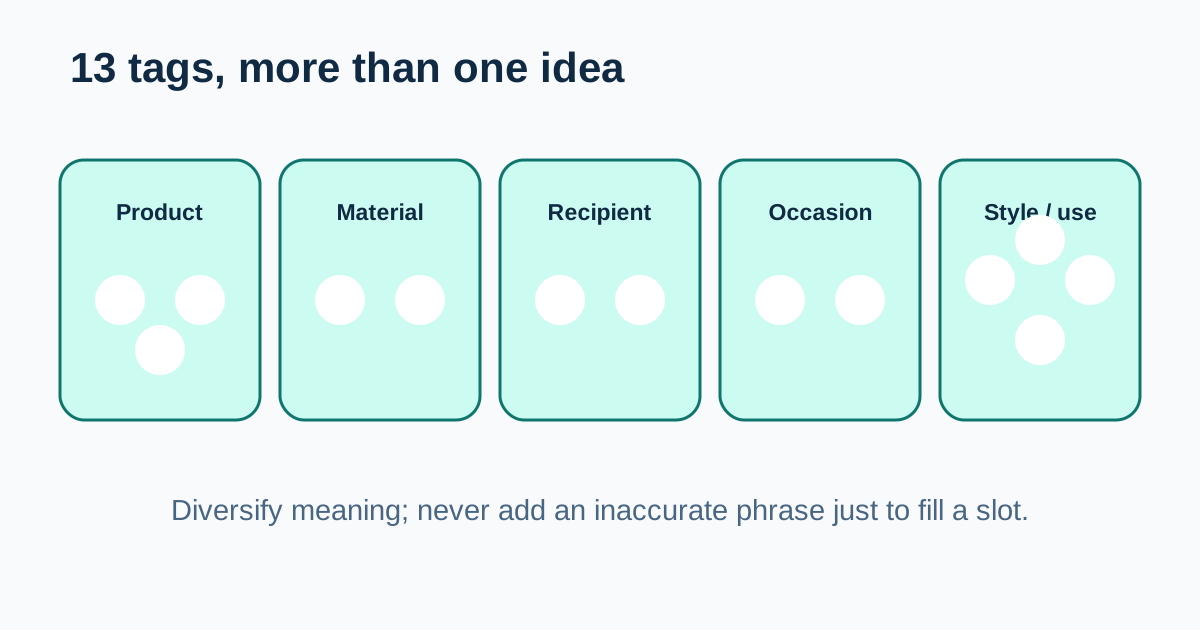
Begin with the product and the reasons someone would choose it. Useful dimensions can include the item type, material, style, recipient, occasion, room, problem solved, compatible use, or production method. Only use a phrase when it truthfully describes the listing.
Group candidate phrases by meaning before filling slots. If five phrases all describe the same recipient, keep the strongest measured or clearest versions and use remaining slots for other relevant dimensions. This produces broader semantic coverage without adding unrelated traffic.
| Meaning group | Question | Example candidate |
|---|---|---|
| Product | What is the item? | birth flower necklace |
| Material | What verified material matters? | sterling silver gift |
| Recipient | Who would reasonably buy or receive it? | gift for new mom |
| Occasion | What event fits the product? | May birthday gift |
| Style or use | What accurate style or use narrows it? | minimal floral jewelry |
Example: reduce duplicate tag coverage
Consider the tags “personalized necklace,” “custom necklace,” “name necklace,” and “personalized jewelry.” They are not exact duplicates, but they use several slots around a similar customization concept. A seller should compare which phrases match the real design and actual Shop Stats before deciding how many to keep.
A revised set might preserve one or two customization phrases and add accurate material, recipient, occasion, or style phrases. The purpose is not to eliminate every repeated word. It is to make each slot contribute a distinct, truthful route by which the right buyer could describe the item.
Use categories and attributes before duplicating them
Etsy says categories and attributes can act like tags. Choose the most specific accurate category and complete every relevant attribute before using tag slots to repeat the same exact information. This can free tags for phrases that add buyer language not already supplied by structured listing fields.
Review the listing as a whole: title, tags, category, attributes, description, images, price, processing time, and policies. Tag QA is only one part of listing quality. An attractive phrase cannot repair an inaccurate category, weak first photo, unsupported claim, or unclear variation.
A reversible tag testing routine
Export or record the current tags, listing URL, date, and a complete Shop Stats baseline. Change a small group of related tags rather than every listing and every field simultaneously. Give the test enough time to collect meaningful impressions before judging it.
Measure query relevance, visits, favorites, and orders together. More impressions are not automatically better when the visitors are looking for a different product. Keep changes that improve qualified discovery or clarity; reverse changes that introduce irrelevant traffic or weaken the listing description.
- Save the original 13 tags and baseline date.
- Run duplicate and coverage QA.
- Choose one meaning group with weak or repetitive coverage.
- Replace only the justified phrases.
- Confirm category and attributes remain accurate.
- Review Shop Stats on a documented comparison window.
Turn 13 tag slots into a coverage map
Lay the current tags into meaning groups before replacing anything. Mark which phrases describe the product, material, style, recipient, occasion, use, or distinctive feature. Then count how many slots repeat the same idea. This makes the opportunity cost visible: four customization phrases may be defensible for a highly specific item, but they leave fewer slots for verified material, design, recipient, or use language.
Build candidate phrases from the listing itself and from relevant Shop Stats, not from an unrelated popular-keyword list. Each candidate should pass three questions: does it truthfully describe this item, could the intended buyer reasonably use the phrase, and does it add a meaning not already covered well? If any answer is no, leave the slot unchanged or find a more accurate phrase.
- Assign every current tag to one primary meaning group.
- Highlight exact duplicates and clusters that repeat the same concept.
- Preserve phrases supported by relevant listing-level search evidence.
- Use open slots for a different accurate buying dimension.
- Keep spelling, material, recipient, and compatibility claims consistent with the listing.
Example: audit all 13 tags as one set
Imagine a verified sterling-silver birth-flower necklace sold with personalization. A draft set may contain “personalized necklace,” “custom necklace,” “name necklace,” “personalized jewelry,” “gift necklace,” and “necklace gift.” Six slots now lean on customization or a broad gift idea, while material, flower design, recipient, month, and style receive little coverage.
A working review could keep the best supported customization phrase, preserve the exact product phrase, and test accurate phrases for material, flower design, relevant recipient, birthday month, and style. The final set depends on the real item and Shop Stats; the checker should never fill all 13 slots with fabricated variations. The useful outcome is a documented set in which each retained phrase has a distinct job.
| Coverage question | Weak set signal | Better review action |
|---|---|---|
| Product | Several generic necklace phrases | Keep one precise product phrase |
| Customization | Four near-synonyms | Retain the strongest supported intent |
| Material | Missing or assumed | Add only the verified material |
| Recipient or occasion | Broad gift repetition | Use a truthful, specific context |
| Style or feature | No distinctive detail | Describe the actual design or use |
How the checker score is calculated
The score begins at 100 and subtracts only deterministic review penalties. Each missing or extra slot subtracts five points. A tag over 20 characters subtracts twelve points, each repeated exact tag occurrence subtracts ten, and each tag with an unsupported edge character subtracts twelve. More than five single-word tags subtract four points each because the set may be losing phrase specificity.
Exact category or attribute duplication can subtract up to twelve points, and a term repeated across three or more tags can subtract up to ten. If verified product-fact phrases are supplied, incomplete exact phrase coverage can subtract up to ten points. Leaving the optional aggregate Shop Stats or change note blank subtracts four points. The result is clamped from zero to 100.
This score is a QA prioritization device, not a search ranking model. It does not know query volume, marketplace competition, conversion, seasonality, listing quality, or whether a phrase is the best commercial choice. A lower score identifies review work; a 100 score means only that the entered set passes the declared mechanical checks.
| Mechanical check | Score effect | Required interpretation |
|---|---|---|
| Slot count | −5 per missing or extra tag | Use 13 only when every phrase is relevant |
| Length | −12 per tag over 20 characters | Rewrite without changing the product truth |
| Exact duplicate | −10 per repeated occurrence | Keep one copy and reconsider the freed slot |
| Unsupported edge character | −12 per affected tag | Correct the field syntax before publishing |
| Fact coverage | Up to −10 | Exact string coverage is not proof of relevance |
| Evidence note | −4 when blank | Preserve a baseline; do not infer causality |
Three fixtures that make the result reproducible
The default necklace fixture contains 13 multi-word tags and no over-length or exact duplicate tag. It records an evidence note, but repeated “flower” and “necklace” terms require review, and only one of three supplied product-fact phrases appears exactly in the combined tag set. With the published score contract, that fixture returns 87 out of 100. The warnings explain the difference rather than hiding it behind a generic grade.
A clean control fixture can return 100 when it contains exactly 13 valid tags, no exact duplicates, no over-length entries, no excessive single-word pattern, no exact category or attribute duplicate, all supplied fact phrases, and a baseline note. That result still does not prove demand or ranking. It proves only that the entered data clears the declared mechanical controls.
An adverse fixture should deliberately include a fourteenth tag, an exact duplicate, an over-length phrase, an invalid edge character, incomplete fact coverage, and no evidence note. It must return hard issues and a materially lower score. Keeping these three fixtures in automated tests protects the score contract from silent changes.
- Default fixture: realistic review case with a stable 87/100 expected score.
- Clean fixture: all declared mechanical gates clear at 100/100.
- Adverse fixture: slot, syntax, duplication, length, evidence, and coverage failures.
- Reset fixture: restores the documented default inputs and output.
- Mobile fixture: remains usable without horizontal overflow at 390 pixels.
Character and normalization boundaries
Etsy's current Help guidance permits spaces, letters, and numbers, with apostrophes and hyphens allowed within words or phrases but not at the beginning. The checker therefore flags leading or trailing punctuation and other unsupported edge patterns. It preserves the seller's visible text for reporting while lowercasing and trimming phrases for exact-duplicate comparison.
Normalization is intentionally conservative. “Silver necklace” and “silver necklaces” are not treated as exact duplicates, and the tool does not stem words or decide that two phrases share the same intent. The repeated-term output counts common words across three or more tags after excluding a small set of generic connectors. A seller must still inspect each phrase in its product context.
Character length is measured in the browser from the entered tag. Sellers using accented letters or other Unicode text should confirm the final value in Etsy's listing editor before publishing because platform validation is the operational authority. The tool is a preflight, not a substitute for the marketplace form.
Privacy and change-control boundaries
The checker runs in the browser and needs only tag phrases plus optional listing-field context. Do not paste buyer names, addresses, messages, order identifiers, payment references, or private order exports. Product facts should be non-personal listing facts such as material, construction, size, compatible use, or personalization capability.
Before editing a live listing, save the original tag set, date, reason, and a non-identifying aggregate Shop Stats note. Change one bounded phrase group when possible, retain a rollback copy, and record other listing changes that could confound the comparison. Never describe a later traffic or sales movement as caused by tags alone.
Seller Profit Guard is independent and is not affiliated with Etsy. The checker provides editorial QA, not marketplace approval, legal advice, trademark clearance, demand research, or a performance guarantee. Etsy's listing editor, account-specific guidance, and current official documentation remain the authority for publication.
Common Etsy tag checker mistakes
Do not force every tag to be unique at the word level. Natural multi-word phrases can share a core product term while serving different intent, and removing that word mechanically can make the phrases less accurate. The problem is not any repeated word; it is spending several limited slots on phrases that contribute no meaningful new route to the item.
Avoid adding high-volume phrases that do not match the product, copying another shop's tags, or changing titles, tags, photos, price, and advertising at the same time. Do not treat thirteen filled slots as proof of quality. A smaller accurate set is safer than a full set containing unsupported claims, although the review should still look for legitimate unused coverage.
Limits of automated tag QA
The checker does not have Etsy account data, live keyword volume, listing conversion, or product context unless you provide it. It cannot decide whether a term is commercially useful, culturally appropriate, seasonal, trademark-sensitive, or accurate for the item.
Use the tool to improve structure, then apply seller judgment and current official guidance. Never add a brand, material, recipient, use case, or product claim merely because a keyword tool suggested it.
Sources and further reading
- Etsy Help: How to Use Tags to Get Found in Search: Official field limits and supported-character guidance: up to 13 tags, up to 20 characters per tag, and accurate, relevant phrases.
- Etsy Seller Handbook: Keywords 101: Official guidance on varied tag phrases, categories, attributes, listing language, and using Shop Stats as seller evidence.
- Etsy Seller Handbook: Optimize Your Shop for Etsy Search: Official checklist recommending all 13 relevant tags, natural multi-word phrases, variety, and avoiding exact attribute duplication.
- Etsy Help: How to Create a Listing: Official listing-form context for titles, attributes, tags, descriptions, variations, and other item information.
Related Seller Profit Guard tools
- Etsy CSV profit calculator: Run a local order profit check with editable fee and SKU cost assumptions.
- Payment reconciliation tool: Compare order rows with statement activity and flag unmatched rows.
- SKU cost library: Save or import material, labor, packaging, shipping, and target margin assumptions.
- Variant risk checker: Find missing SKUs and variation cost risks before a listing scales.
- Etsy title checker: Review listing-title clarity, repetition, keyword chains, and mobile scanning.
- Etsy tag checker: Review all 13 tag slots for duplicates, repeated meaning, and truthful coverage.
- Free shipping threshold calculator: Estimate when a shipping subsidy can still meet a target margin.
- Return window loss estimator: Model expected reverse shipping, restock work, recovery, and replacement loss.
- Etsy Ads break-even calculator: Estimate target-safe Etsy Ads spend, ACOS, and ROAS after fees, fulfillment, and expected return loss.
- CSV data privacy: Understand what the local-first workflow needs and what it does not need.
- Etsy Tag Checker: Six Inputs That Matter: Review six evidence-backed Etsy tag inputs to check 13-slot use, 20-character limits, phrase variety, listing-field overlap, and change context.
- Etsy Tag Checker Example: Gift Listing: Follow a 13-slot gift-listing tag review that removes exact duplication, protects product truth, adds regional and recipient variety, and preserves a baseline.
- Etsy Tag Checker for a Style-Led Listing: Build a style-led Etsy tag set for a linen table runner by separating visual style, use, material, size, recipient, and structured attribute coverage.
- 9 Etsy Tag Checker Mistakes to Avoid: Avoid nine Etsy tag checker mistakes involving separators, character counts, duplicate fields, false facts, shop language, timing, and performance claims.
- Reliable Data for an Etsy Tag Checker: Map Etsy tag checker inputs to the listing editor, category and attribute fields, product records, Shop Stats, search visibility, and controlled notes.
- Safe Thresholds for Etsy Tag Changes: Use hard, review, evidence, and rollback thresholds to decide when an Etsy tag set is ready, uncertain, or blocked without inventing ranking precision.
- Etsy Tag Sets: Gift vs Style Intent: Compare gift-oriented necklace tags with style-oriented linen-runner tags at the same evidence grain to see how product facts change phrase selection.
- Weekly Etsy Tag Review Routine: Run a weekly Etsy tag review from candidate selection and fact validation through bounded publication, Shop Stats feedback, exception handling, and rollback.
- Interpret Etsy Tag Checker Results: Interpret slot count, phrase mix, duplicate, field-overlap, repeated-term, product-fact, title-context, and evidence outputs without false precision.
- Etsy Tag Audit Checklist and Log: Audit Etsy tag scope, product facts, field coverage, checker rules, privacy, approval, publication, Shop Stats feedback, exceptions, and rollback.
Use the interactive tool
Enable JavaScript to open the calculator and process browser-local inputs. The explanatory content and source links remain available without JavaScript.
Related guide: Keep listing language connected to a durable Etsy SKU system.
This tool provides operating estimates, not tax, accounting, legal, financial, or marketplace-policy advice. Verify current official sources and your own records before changing prices or operations.