Seller Profit Guard · How it works · CSV privacy
Markup vs Margin Converter
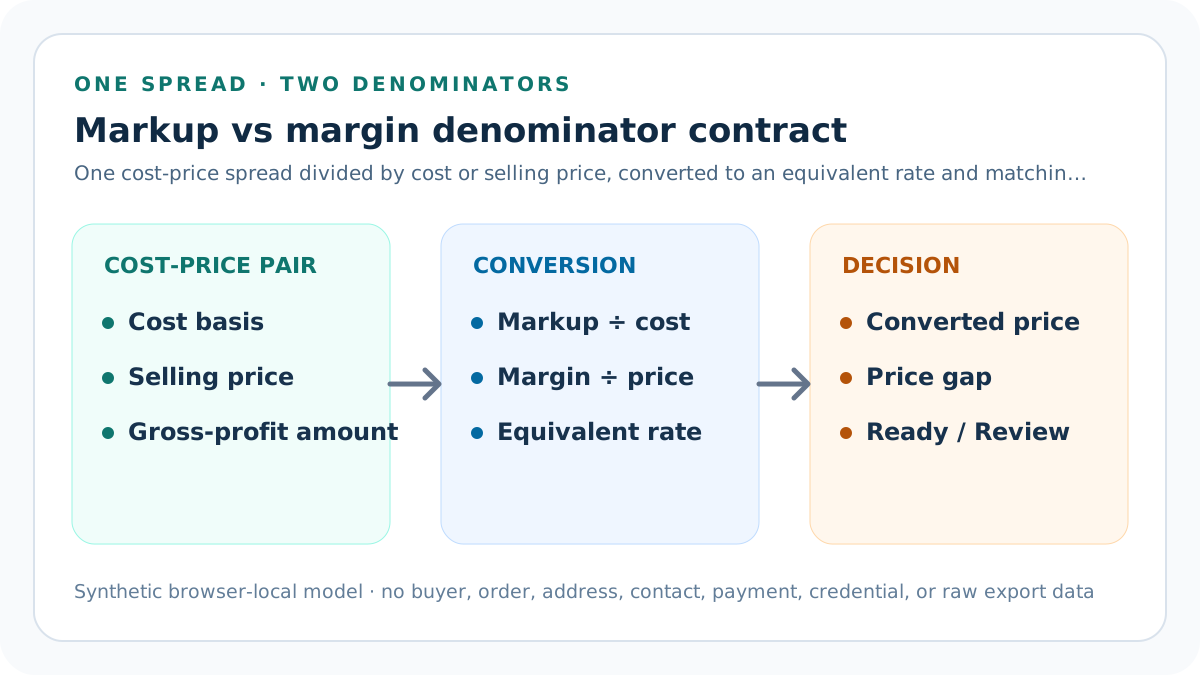
A markup vs margin converter prevents denominator mistakes. Markup divides price minus cost by cost; margin divides the same amount by selling price. Enter one comparable cost basis, current selling price, percentage, and the word markup or margin. The tool calculates the equivalent rate, matching selling price, observed rates, price gap, and an evidence-aware decision.
Maintained by Seller Profit Guard Editorial Team. Last reviewed: 2026-07-30.
What is the difference between markup and margin?
Markup and margin begin with the same gross-profit amount: selling price minus the selected cost basis. They differ only in the denominator. Markup compares that amount with cost. Margin compares it with selling price. A USD 40 cost and USD 60 selling price create USD 20 of gross profit, 50% markup, and 33.33% margin.
Those percentages are not interchangeable labels. Entering a 40% margin as though it were a 40% markup understates the matching price: USD 56 instead of USD 66.67 on a USD 40 cost. The converter makes the denominator explicit before producing any result.
Choose one comparable cost and price grain
The cost basis and selling price must describe the same thing. Use one product unit with one unit price, or one complete order with one order-level revenue amount. Do not compare an individual unit cost with a bundle price, a pre-discount cost with post-refund revenue, or a monthly cost total with one transaction.
Describe the evidence scope in plain language, such as one standard product unit, one three-item bundle, or one retained shipped order. Record a currency and YYYY-MM evidence period. These fields do not make weak data accurate, but they prevent a clean percentage from hiding incompatible inputs.
Define the seller-owned cost basis
The calculator does not decide what belongs in cost. A merchandise-only basis can be useful for a merchandise markup check. A landed unit basis may add inbound freight and duty. A contribution-oriented order basis may include packaging, direct labor, outbound fulfillment, variable fees, acquisition, and expected loss. Each answers a different question.
Name the basis before comparing rates across products or periods. If one item uses supplier cost and another uses fully loaded order-variable cost, their percentages are not comparable. Fixed overhead, owner compensation, financing, income tax, and accounting-policy allocations require separate treatment and qualified review.
Use the markup formula correctly
Markup on cost equals selling price minus cost, divided by cost. To convert an entered markup into a price, multiply cost by one plus the markup rate. With USD 40 cost and 50% markup, the converted selling price is USD 40 × 1.50 = USD 60.
To convert markup into equivalent margin, divide the markup rate by one plus the markup rate. A 50% markup becomes 0.50 ÷ 1.50 = 33.33% margin. The conversion assumes the same cost basis and selling price; changing either input creates a new observation.
Use the margin formula correctly
Margin on selling price equals selling price minus cost, divided by selling price. To convert an entered margin into a price, divide cost by one minus the margin rate. With USD 40 cost and 40% margin, the converted selling price is USD 40 ÷ 0.60 = USD 66.67.
To convert margin into equivalent markup, divide the margin rate by one minus the margin rate. A 40% margin becomes 0.40 ÷ 0.60 = 66.67% markup. A margin at or above 100% leaves a zero or negative denominator and cannot produce a finite positive price from a positive cost.
Read observed markup and margin together
The tool calculates observed markup and observed margin from the entered cost and current selling price before interpreting the target rate. This creates a direct check on the current price. If cost is USD 40 and price is USD 60, observed markup is 50% and observed margin is 33.33%. Both describe the same USD 20 spread.
A negative spread can occur when price is below cost, but this target-price converter blocks nonpositive cost and price rather than making a market decision from an incomplete packet. Use a contribution or order-profit tool when fees, discounts, refunds, shipping, and other variable costs must be modeled separately.
Compare the current price with the converted price
The converted price is the selling price implied by the entered rate and basis. Current price gap equals current selling price minus converted price. A positive gap means the current price clears the arithmetic boundary; a negative gap shows the amount by which it falls short.
Ready means only that the valid current price meets or exceeds the converted price for the declared cost basis. Review means the conversion is structurally valid but the current price is lower. Neither state proves customer acceptance, competitiveness, conversion, inventory velocity, or whole-business profitability.
Why 50% markup is not 50% margin
At USD 40 cost, 50% markup adds USD 20 and produces a USD 60 price. The USD 20 spread is one-half of cost but only one-third of selling price. Therefore the equivalent margin is 33.33%, not 50%. The difference grows as the entered percentage rises.
A 50% margin on the same USD 40 cost requires USD 80 because cost must consume the remaining 50% of selling price. The equivalent markup is 100%. Treating the two rates as synonyms would underprice the margin target by USD 20 in this example.
Validate currency, period, and evidence scope
Use one three-letter calculation currency and convert source amounts before entering them. Preserve the conversion date and rate outside the public page. Do not mix a USD supplier cost with an EUR selling price or compare a historic cost with a current price unless the purpose and conversion are explicit.
The evidence period records the month represented by the packet. The source-review date must be a real calendar date in that month or later, while each source-effective date stays in the seller-owned evidence log. Declare unresolved cost allocation, discount timing, refund status, bundle quantity, tax inclusion, or currency questions instead of forcing them into a precise percentage.
Complete the dated evidence confirmation contract
Record a real source-review date and answer five non-compensating confirmations. Confirm the named cost-basis definition and source, the exact selling-price state and source, the intended markup-or-margin denominator, one comparable product or order grain, and the boundary that keeps fixed overhead, tax, and accounting profit outside this result.
Any answer other than yes returns Block. A favorable converted price cannot repair an undefined cost basis, stale or mismatched price, accidental denominator, mixed unit and order inputs, or an accounting claim the converter was not designed to make.
Apply Block, Review, and Ready precedence
Block takes precedence for nonfinite or nonpositive cost or price, a nonfinite rate, an unsupported basis, negative target rate, margin at or above 100%, invalid source-review date, incomplete confirmation, invalid currency, invalid period, missing scope, or any declared evidence conflict. A favorable current price cannot compensate for invalid structure.
After structural checks pass, Review applies when current price is below the converted price. Ready applies when the current price meets or exceeds it. This order keeps data validity separate from a seller preference and avoids turning a high price into evidence that every source and denominator is correct.
Worked example: convert markup to margin
Enter USD 40 cost basis, USD 60 current price, 50 entered rate, and markup as the basis. Gross profit amount is USD 20. Observed markup is 50% and observed margin is 33.33%. The converted price from the entered markup is USD 60.
The equivalent margin is 33.33%, and the current price gap is USD 0. The packet returns Ready when currency is USD, the evidence month is valid, the scope describes one comparable unit, and no unresolved evidence issue is declared.
Second example: convert margin to markup
Keep USD 40 cost and USD 60 current price, but enter 40 and margin. The target price becomes USD 66.67 because USD 40 must represent the remaining 60% of price. Equivalent markup is 66.67%. The current price gap is negative USD 6.67, so the valid packet returns Review.
Raise the observed current price to USD 70 without changing cost or target. Observed margin becomes 42.86%, observed markup becomes 75%, and the price gap becomes positive USD 3.33. The tool returns Ready, but the seller still needs demand and channel evidence before changing a public price.
Avoid common denominator and rounding mistakes
Do not divide gross profit by cost and label it margin. Do not divide by selling price and label it markup. Do not calculate a margin-derived price as cost times one plus margin. Do not subtract the percentage directly from cost or price. Preserve the equation name beside every percentage.
Keep full precision through the conversion and round only displayed rates and currency. Reusing a rounded equivalent rate as a new input can create avoidable drift. Preserve the original cost, price, entered rate, basis, and calculated full-precision result in the evidence packet.
Separate arithmetic from pricing strategy
The converter answers a narrow arithmetic question: what rate or price is consistent with one cost-price pair and denominator? Pricing strategy also considers customer value, demand elasticity, competitor alternatives, channel positioning, tax treatment, inventory risk, cash timing, promotions, and portfolio effects.
Use a converted price as a review boundary, not an automatic publishing instruction. A numerically valid margin may be commercially unrealistic, while a lower margin may be intentional for a documented bundle, acquisition, clearance, or lifecycle decision. Those choices require separate owners and feedback.
Keep private seller evidence out of public artifacts
The calculator runs in the browser and needs only aggregate arithmetic fields. Do not paste buyer names, addresses, emails, order identifiers, payment details, credentials, private export rows, or supplier-confidential records into public copy, screenshots, community drafts, or feedback forms.
Store evidence pointers, not raw private data, in the change log. Public examples should remain synthetic. If a seller later validates the result against real orders, perform that work inside the local analysis boundary and report only aggregate counts and non-identifying conclusions.
Use an evidence log and rollback reference
Record packet ID, cost-basis definition, cost amount, current price, entered rate, basis, currency, period, source pointers, calculated equivalent rate, converted price, price gap, decision, reviewer, and unresolved issues. A later cost or price update should create a new row rather than overwrite history.
Before changing a public price, preserve the prior price, promotion state, affected SKU scope, expected result, monitoring window, and restoration condition. Roll back when the calculation, route, analytics, accessibility, checkout, policy, or customer feedback violates the approved boundary.
What should you do after the conversion?
If the packet Blocks, repair the named denominator or evidence field. If it Reviews, verify cost basis and rate intent, then decide whether to change price, change cost, change scope, or accept the shortfall under a separately approved strategy. If it is Ready, confirm that the proposed action remains reversible and measurable.
Use the contribution margin calculator for a forward order-cost model, the product price floor calculator for fee- and discount-aware inverse pricing, and the listing cost library for versioned SKU costs. Recalculate when source evidence changes rather than on a mechanical schedule alone.
Sources and further reading
- Seller Profit Guard methodology: Calculation contracts, evidence precedence, deterministic fixtures, release verification, correction, and rollback.
- Seller Profit Guard data privacy: Local-first treatment of seller, buyer, order, payment, contact, credential, and raw export data.
- IRS Publication 334 (2025): Primary U.S. context for cost of goods sold and gross profit; this tool does not make a tax determination.
- IRS Schedule C instructions (2025): Primary U.S. context for inventory and cost-of-goods-sold reporting boundaries.
- OpenStax markup guidance: Primary educational formula source for markup on cost and retail price equal to cost times one plus markup.
- SBA break-even guidance: Primary U.S. small-business source distinguishing selling price, variable cost, and the contribution-margin denominator.
Related Seller Profit Guard tools
- Etsy CSV profit calculator: Run a local order profit check with editable fee and SKU cost assumptions.
- Payment reconciliation tool: Compare order rows with statement activity and flag unmatched rows.
- SKU cost library: Save or import material, labor, packaging, shipping, and target margin assumptions.
- Variant risk checker: Find missing SKUs and variation cost risks before a listing scales.
- Etsy title checker: Review listing-title clarity, repetition, keyword chains, and mobile scanning.
- Etsy tag checker: Review all 13 tag slots for duplicates, repeated meaning, and truthful coverage.
- Free shipping threshold calculator: Estimate when a shipping subsidy can still meet a target margin.
- Return window loss estimator: Model expected reverse shipping, restock work, recovery, and replacement loss.
- Etsy Ads break-even calculator: Estimate target-safe Etsy Ads spend, ACOS, and ROAS after fees, fulfillment, and expected return loss.
- CSV data privacy: Understand what the local-first workflow needs and what it does not need.
- Markup vs Margin Formulas and Inputs: Define cost, price, gross-profit amount, denominator, equivalent rate, converted price, evidence scope, and validation boundaries.
- Markup vs Margin Worked Example: Trace USD 40 cost and USD 60 price through USD 20 gross profit, 50% markup, 33.33% margin, price reconstruction, and a Ready decision.
- Price-Based Margin Conversion Example: Convert a 40% margin on USD 40 cost into 66.67% markup and a USD 66.67 price, then compare a USD 60 current price and decision.
- Markup vs Margin Conversion Mistakes: Diagnose swapped denominators, mixed grains, hidden discounts, cost omissions, percentage-point errors, invalid margins, and rounding drift.
- Reliable Markup and Margin Data Sources: Map cost basis, selling price, discount state, currency, period, scope, and rate intent to seller-owned or first-party evidence.
- Safe Markup and Margin Decision Thresholds: Apply structural, denominator, evidence, converted-price, price-gap, sensitivity, review, and approval gates before acting on a result.
- Markup vs Margin Scenario Comparison: Compare 50% markup with 40% margin at the same USD 40 cost to isolate denominator, equivalent rate, price, and current-price gap.
- Weekly Markup and Margin Review Routine: Run a dated cost-price review with source updates, denominator checks, fixtures, exceptions, approval, feedback, and rollback.
- How to Interpret Markup and Margin Results: Read gross-profit amount, observed rates, equivalent rate, converted price, price gap, and decision without false precision.
- Markup vs Margin Audit Template: Record cost basis, price state, rate denominator, equations, outputs, decision, source changes, approval, feedback, and rollback.
Use the interactive tool
Enable JavaScript to open the calculator and process browser-local inputs. The explanatory content and source links remain available without JavaScript.
Related guide: Define markup, margin, denominators, equivalent rates, and evidence grain.
This tool provides operating estimates, not tax, accounting, legal, financial, or marketplace-policy advice. Verify current official sources and your own records before changing prices or operations.