Seller Profit Guard calculation methodology
Last updated: 2026-07-12
Maintained under the Seller Profit Guard editorial policy.
Seller Profit Guard estimates operating contribution by separating order revenue from platform fees, SKU costs, fulfillment, advertising, refunds, and seller-entered assumptions; it does not calculate tax, accounting, or legal outcomes.
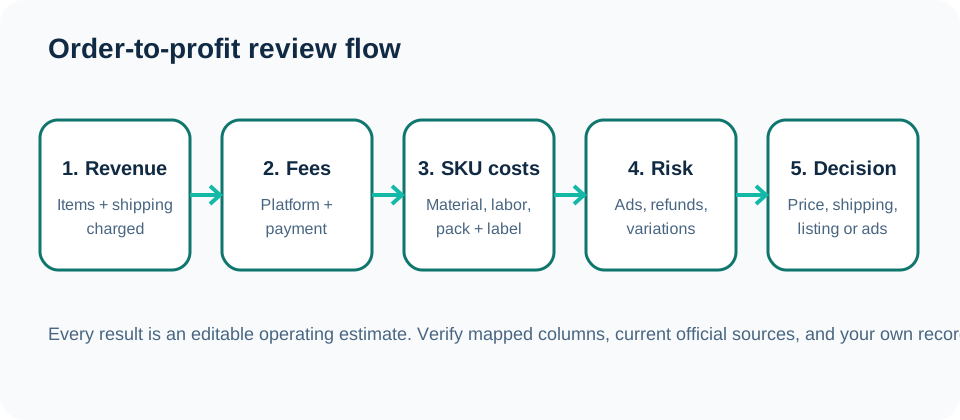
What the estimate measures
The core estimate starts with item revenue and buyer-paid shipping that can be attributed to an order. It subtracts mapped or entered marketplace and payment fees, then subtracts per-unit material, packaging, labor, shipping, and other direct costs. Advertising and expected refund loss are separate layers so a seller can see which assumption changes the result.
Contribution is intentionally narrower than accounting profit. It does not automatically include income tax, sales tax obligations, inventory valuation methods, overhead allocation, currency gains or losses, financing, owner compensation, or every statement adjustment. Those items require the seller's records and, when appropriate, professional advice.
| Component | Typical input | Treatment |
|---|---|---|
| Revenue | Item total and buyer-paid shipping | Added when attributable to the reviewed order. |
| Platform and payment fees | Mapped export values or editable rate assumptions | Subtracted and verified against current records. |
| SKU cost | Material, packaging, labor, fulfillment and other direct cost | Multiplied by quantity when entered per unit. |
| Advertising | Mapped attribution or 12%/15% scenario | Shown as an explicit scenario rather than assumed for every order. |
| Refund and return loss | Refund, lost shipping, replacement, restock and recovery assumptions | Modeled separately because recovery varies by product. |
| Target margin | Seller-entered percentage | Used as a decision threshold, not as evidence of actual profit. |
Why editable assumptions matter
Etsy programs, fees, payment processing, taxes, and export fields can vary by market and can change. Shipping and labor are seller-specific. Hard-coding one universal answer would make a precise interface less trustworthy, so the tool exposes the assumptions that materially affect the result.
Before relying on an estimate, verify the mapped revenue and fee columns, confirm whether costs are per unit or per order, check quantity multiplication, and compare at least one result with a manual calculation. Treat a missing cost as unknown rather than zero.
- Use a no-ad case and relevant ad-fee stress cases.
- Keep buyer-paid shipping revenue separate from actual label and packaging cost.
- Keep deposits separate from sales and profit.
- Review refunds, replacements, and support work as more than a revenue reversal.
- Record the source and review date for fee assumptions.
Data quality and privacy boundary
A calculation can only be as useful as its mapped columns and cost records. Duplicate order rows, blank SKUs, mixed currencies, missing quantities, inconsistent variation names, and stale cost libraries can all create misleading totals. The product flags several of these conditions, but the seller remains responsible for reviewing source records.
Profit review does not require buyer names, addresses, phone numbers, private messages, payment credentials, or marketplace passwords. The free workflow is designed to parse raw CSV files locally. Only voluntary form fields and coarse analytics events are submitted when configured.
Sources and further reading
- Etsy Help: What are the Fees and Taxes for Selling on Etsy?: Official overview of listing, transaction, payment, advertising, and other seller fees.
- Etsy Help: How Etsy's Offsite Ads Work: Official Offsite Ads fee, attribution, and fee-cap reference.
- Etsy Help: How to Download a Spreadsheet of Your Sold Transactions: Official CSV export workflow for order items, orders, Etsy Payments sales, and deposits.
- Etsy Help: How to Manage Your Payment Account: Official Payment Account and monthly statement reference.
- Etsy Help: How to Issue a Full or Partial Refund For an Order: Official refund workflow and Payment Account impact reference.
Related Seller Profit Guard tools
- Etsy CSV profit calculator: Run a local order profit check with editable fee and SKU cost assumptions.
- Payment reconciliation tool: Compare order rows with statement activity and flag unmatched rows.
- SKU cost library: Save or import material, labor, packaging, shipping, and target margin assumptions.
- Variant risk checker: Find missing SKUs and variation cost risks before a listing scales.
- Etsy title checker: Review listing-title clarity, repetition, keyword chains, and mobile scanning.
- Etsy tag checker: Review all 13 tag slots for duplicates, repeated meaning, and truthful coverage.
- Free shipping threshold calculator: Estimate when a shipping subsidy can still meet a target margin.
- Return window loss estimator: Model expected reverse shipping, restock work, recovery, and replacement loss.
- Etsy Ads break-even calculator: Estimate target-safe Etsy Ads spend, ACOS, and ROAS after fees, fulfillment, and expected return loss.
- CSV data privacy: Understand what the local-first workflow needs and what it does not need.
- Etsy Profit Formula: Inputs Small Sellers Must Track: Build an Etsy contribution formula from settled revenue, official fee evidence, SKU costs, fulfillment, ads, returns, and a dated target.
- Etsy Profit Example: Trace a $74 Order Step by Step: Follow a complete Etsy order contribution example from CSV revenue and fee evidence through SKU cost, labor, shipping, risk, and decision.
- Etsy Payment Reconciliation: Inputs and Match Rules: Map Etsy order exports, Payment Account activity, fees, refunds, deposits, dates, signs, and references into a traceable reconciliation.
- Etsy Deposit Reconciliation: A Weekly Worked Example: Trace one illustrative Etsy payout week across orders, Payment Account sales, fees, a refund, a shipping label, and a bank deposit.
- SKU Cost Formula: 8 Inputs Etsy Sellers Need: Build a reusable Etsy SKU cost record from materials, labor, packaging, fulfillment, variable extras, allocation, risk, and evidence dates.
- Etsy SKU Cost Example: A $18.35 Handmade Item: Trace an illustrative handmade SKU through material, labor, packaging, fulfillment preparation, overhead allocation, and target review.
- Etsy Variant Risk: 5 Checks Before Margin Review: Map Etsy variation names, SKUs, quantity, order count, and SKU cost coverage into five deterministic risk checks before pricing or margin analysis.
- Etsy Size Variation Audit: One SKU, Two Labels: Follow a complete Etsy size-variation example that exposes one SKU mapped to two labels, a missing SKU, and a high-volume cost gap.
- Free Shipping Threshold Formula: 6 Inputs: Calculate a margin-safe free-shipping order threshold from four dollar costs, a fee rate, and a target margin without confusing it with Etsy's $35 rule.
- Free Shipping Threshold: $26.32 Example: Follow a domestic parcel example from product, label, packaging, fees, and target margin to a rounded $27 free-shipping order rule.
- Return Loss Formula: 10 Inputs Explained: Calculate expected return loss per order from ten scoped inputs, distinguish refund cash from retained cost, and derive a target-safe return rate.
- Return Loss Example: Resellable Item: Follow a complete resellable-return example from contribution and recovery through expected loss, adjusted margin, and a target-safe return rate.
- Etsy Ads Break-Even Formula: 12 Inputs: Calculate Etsy Ads break-even and target-safe spend, ACOS, and ROAS from twelve scoped revenue, cost, fee, return, and ad inputs.
- Etsy Ads Break-Even Example: Low-Cost Item: Follow a $36 low-cost Etsy listing from non-ad costs to $8.28 target-safe ad spend, 23.0% ACOS, and 4.35 target ROAS with reproducible math.
- Etsy Title Checker: Five Inputs That Matter: Use five evidence-backed Etsy title inputs to review item clarity, objective traits, mobile scanning, repetition, and change context.
- Etsy Title Checker Example: Personalized Item: Rewrite a 21-word personalized necklace title into a clear 10-word version while preserving facts, tags, baseline evidence, and rollback.
- Etsy Tag Checker: Six Inputs That Matter: Review six evidence-backed Etsy tag inputs to check 13-slot use, 20-character limits, phrase variety, listing-field overlap, and change context.
- Etsy Tag Checker Example: Gift Listing: Follow a 13-slot gift-listing tag review that removes exact duplication, protects product truth, adds regional and recipient variety, and preserves a baseline.
- Creator Commission Formula: 14 Inputs: Build a TikTok Shop creator commission estimate from 14 labeled inputs, two commission paths, retained orders, and a target contribution threshold.
- Creator Commission Example: Standard Rate: Follow a complete TikTok Shop Standard commission example from eligible base and sample allocation to retained contribution and target-margin decision.
- Coupon Stack Formula: 12 Inputs That Matter: Build a coupon-stack contribution formula from 12 explicit seller inputs while separating platform rules, funding, bases, and assumptions.
- Coupon Stack Example: From $60 to Contribution: Follow a complete $60 coupon-stack example through sequential discounts, fees, shipping, affiliate commission, costs, and target comparison.
- Etsy Attribute Coverage Formula: Exact Inputs: Build an exact Etsy attribute coverage formula from relevant category fields, selected values, verified facts, variations, titles, and tags.
- Etsy Attribute Checker: A 4/4 Jewelry Example: Follow a 4/4 pendant-necklace attribute review through category scope, exact pairs, product facts, title and tag visibility, and variations.
- Etsy Category Fit Formula: Exact Inputs: Build an Etsy category-fit formula from item format, product identity, material or files, buyer use, variations, and dated editor evidence.
- Etsy Category Fit: Physical Jewelry Example: Follow a handmade pendant necklace through category path, physical format, identity, materials, use, options, evidence, and release checks.
- Etsy Description Clarity Formula: 10 Inputs: Define the exact inputs, coverage checks, evidence requirements, and precedence rules for a reproducible Etsy description clarity review.
- Etsy Description Checker: Personalized Example: Follow a personalized sterling-silver necklace from product evidence through description checks, buyer instructions, release, and rollback.
- Etsy Photo Coverage Formula: 10 Inputs: Define the gallery inventory, seven buyer-evidence checks, known-gap gate, provenance note, and deterministic decision logic.
- Etsy Photo Checklist: Variation-Heavy Example: Follow a personalized necklace with finish and chain options from product evidence through gallery mapping, checks, release, and recovery.
- Etsy Variation Naming Formula and Inputs: Define axes, values, selector text, photo and total-price maps, complete SKU combinations, known issues, and a dated evidence contract.
- Etsy Variation Names: Size and Color Example: Follow a tote bag with three sizes and two colors from the product option contract through photos, total prices, six SKUs, release, and recovery.
- Etsy Personalization Instructions: Inputs and Checks: Define customization scope, focused fields, buyer instructions, format limits, examples, proofing, exceptions, processing, issues, and evidence.
- Etsy Engraving Instructions Worked Example: Build a two-field engraved-name workflow with exact text, font options, limits, examples, no-proof handling, processing, release, and recovery.
- Etsy Production Partner Disclosure Inputs: Define item path, seller design, partner production, public identity and location, relationship copy, listing links, dispatch origin, issues, and evidence.
- Etsy POD Production Partner Example: Follow an original botanical tote through print-on-demand production, partner profile, listing links, dispatch origin, release, and recovery.
- Etsy Digital File Checker Inputs: Define delivery mode, file manifest, package contents, compatibility, license, preview match, support, known issues, and current evidence.
- Etsy Printable PDF File Example: Follow a four-file printable package through naming, limits, clean-device tests, previews, license, buyer instructions, release, and recovery.
- Etsy Listing Claims Checker: 9 Inputs: Define the listing boundary, claim rows, evidence families, visual reconciliation, qualifications, risk review, and approval record.
- Etsy Material Claim: A Component Example: Follow a pendant, chain, size, and engraving statement from component records through public wording, images, approval, and rollback.
- Etsy Seasonal Readiness: 9 Inputs and Formula: Define the dated window, capacity, processing, seller cutoff, listing alignment, variation, photo, promotion, and approval inputs.
- Etsy Holiday Listing Cutoff: Worked Example: Calculate and audit a personalized ornament listing from inventory and production capacity through a dated seller cutoff and public verification.
- Etsy Fee Stack Formula and Input Contract: Model account context, listing events, transaction, processing, ads, currency, regulatory, tax, cost, and reconciliation layers.
- Etsy Fees on a $45 Order: Worked Example: Reproduce a domestic US planning fixture from order revenue through listing, transaction, processing, cost, and contribution rows.
- Etsy Offsite Ads Margin Formula and Inputs: Calculate an attributed Etsy order with the applicable rate, cap, fee base, other fees, direct costs, return loss, and contribution target.
- Etsy Offsite Ads 15% Fee: Worked Example: Reproduce a $45 attributed Etsy order under the 15% rate, then trace the ad fee, other fees, direct costs, contribution, margin, and target gap.
- Etsy Transaction vs Processing Fee Formula: Separate Etsy transaction and payment-processing fees with their correct revenue, tax, country, percentage, fixed-fee, currency, and evidence inputs.
- Etsy Transaction vs Processing Fee Example: Reproduce a US Etsy order with a $45 transaction base, 6.5% transaction fee, 3% plus $0.25 processing fee, and separate statement rows.
- Etsy Listing Renewal Cost Formula: Allocate Etsy listing and renewal fees with event counts, actual sold units, expected sales, Payment account evidence, currency, period, and target.
- Slow-Moving Etsy Listing Renewal Example: Trace a slow Etsy listing through one initial fee, one expired renewal, one sale, a USD 0.40 subtotal, and a USD 0.40 cost per sold unit.
- Etsy Multi-Quantity Fee Formula: Calculate Etsy extra-quantity and auto-renew-sold fee rows from one order pattern, current fee, actual statement evidence, currency, and target.
- Two-Unit Etsy Multi-Quantity Fee Example: Trace a two-unit Etsy order that sells out active quantity, creates one extra-quantity fee, and allocates USD 0.20 across two units.
- Etsy Currency Conversion Fee Formula: Calculate Etsy's seller conversion fee, converted gross, retained amount, rate differences, and evidence decision when shop and account currencies differ.
- Etsy Currency Conversion Fee Example: Trace EUR 100 through a 1.10 USD-per-EUR applied rate, Etsy's editable 2.5% seller conversion fee, and a USD 107.25 retained result.
- Etsy Regulatory Operating Fee Formula: Calculate Etsy Regulatory Operating fees from seller region, item, shipping, gift-wrap and personalization charges, fee tax, and actual rows.
- Canada Etsy Regulatory Fee Example: Trace a CAD 50 Canada Etsy order through the current 0.50% Regulatory Operating fee, 13% fee-tax assumption, and Payment account reconciliation.
- Etsy VAT on Seller Fees Formula and Inputs: Calculate Etsy seller-fee VAT from eligible fee lines, invoice treatment, tax rate, credit note, actual invoice rows, and reconciliation tolerance.
- Etsy Seller-Fee VAT Worked Example: Trace one synthetic Etsy fee packet through a EUR 5.57 eligible subtotal, 20% VAT, exact invoice reconciliation, and release decision.
- Etsy Deposit Fee Formula and Inputs: Classify an Etsy Payments deposit from Available Funds, country minimum, fee threshold, fixed fee, tax, schedule, actual rows, and evidence.
- Malaysia Etsy Deposit Fee Worked Example: Trace a synthetic Malaysia weekly deposit through the current MYR 9 minimum, MYR 400 threshold, MYR 8 fee, and monthly exposure.
- Etsy Refund Fee Reconciliation Formula: Reconcile original revenue, buyer refund, cancellation, four fee-credit rows, retained costs, inventory recovery, and final contribution.
- Full Etsy Refund Fee Worked Example: Trace a synthetic USD 88 full refund through fee credits, cancellation, retained costs, inventory recovery, and contribution impact.
- Contribution Margin Formula and Inputs: Define ecommerce net revenue, every order-variable cost, contribution amount, margin percentage, target gap, and stress case without mixing fixed overhead.
- Single-Item Contribution Margin Example: Trace a complete USD 50 single-item ecommerce order from revenue and variable-cost inputs to USD 11 contribution, 22% margin, target, and stress result.
- Product Price Floor Formula and Inputs: Derive a target list-price floor from variable costs, seller-funded discount, buyer shipping, fee and target bases, and expected loss.
- Standard Product Price Floor Example: Trace a synthetic standard order from USD 36 variable costs through required charged revenue to a USD 43.65 target list-price floor.
- Markup vs Margin Formulas and Inputs: Define cost, price, gross-profit amount, denominator, equivalent rate, converted price, evidence scope, and validation boundaries.
- Markup vs Margin Worked Example: Trace USD 40 cost and USD 60 price through USD 20 gross profit, 50% markup, 33.33% margin, price reconstruction, and a Ready decision.
- Bundle Margin Formula and Inputs: Define component quantities, bundle-level costs, discounted revenue, contribution, target margin, and target-safe discount headroom.
- Fixed Bundle Margin Worked Example: Trace a four-piece fixed bundle from USD 34 component cost and USD 55 variable-cost pool to USD 15.84 contribution and 10.76% safe discount.
- Volume Discount Formula and Inputs: Define increasing quantity rows, proposed discounts, unit and per-order costs, fees, contribution targets, and tier-safe discount equations.
- Three-Unit Volume Discount Example: Trace a three-unit tier from USD 90 full-list revenue and USD 43 variable cost to USD 31.52 contribution and a 33.64% safe discount.
- Wholesale Price Formula and Inputs: Define landed unit cost, direct labor, packaging, MOQ, order costs, payment fees, target margin, and target-safe wholesale price equations.
- Small-Retailer Wholesale Price Example: Trace a twelve-unit retailer order from USD 13 unit cost and USD 196.30 order cost to USD 22.72 target-safe price and USD 71.42 contribution.
- Custom Order Quote Formula and Inputs: Define custom scope, materials, production and design time, revisions, rush cost, fulfillment, reserve, fees, target margin, deposit, and quote equations.
- Standard Custom Order Quote Example: Trace a standard request from USD 206 direct cost and USD 20.60 reserve to a USD 315.14 target-safe quote and USD 93.20 contribution.
- Handmade Labor Cost Formula and Inputs: Define active minutes, setup, attempted and sellable counts, rework, hourly rate, unit labor cost, throughput, target, and evidence boundaries.
- One-Off Handmade Labor Cost Example: Calculate a one-off hand-finished unit from 45 active minutes, 20 setup minutes, 10% rework, USD 24 per hour, one sellable unit, and an USD 30 target.
- Packaging Cost per Order Formula and Inputs: Define direct materials, waste allowance, shared batch cost, completed-order denominator, target, context, and packaging decision boundaries.
- Lightweight Packaging Cost per Order Example: Reproduce a lightweight 50-order parcel example with USD 0.85 direct materials, 5% waste, USD 6 shared cost, and a USD 1.25 target.
- Seller Overhead Allocation Formula and Inputs: Define recurring monthly cost categories, completed orders, active SKUs, target, currency, evidence month, scope, and allocation boundaries.
- Low-Volume Seller Overhead Allocation Example: Reproduce USD 750 of recurring monthly overhead across 120 completed orders and 24 active SKUs, with a USD 7 per-order target.
- Shipping Subsidy Formula and Inputs: Define postage, packaging, buyer-paid shipping, credits, seller-entered fee effects, target, currency, period, and comparable shipment scope.
- Shipping Subsidy Worked Example: Reproduce a partially buyer-funded parcel with USD 6.50 postage, USD 1.20 packaging, USD 4 buyer shipping, and a 6.5% fee effect.
- Dimensional Weight Formula and Inputs: Define outer dimensions, actual weight, unit system, divisors, dimension rounding, billable rounding, carrier rule, target, and scope.
- Dimensional Weight Worked Example: Reproduce a compact dense 10 × 8 × 4 inch, 5 pound parcel under seller-entered 139 and 166 divisor scenarios with explicit rounding.
- Combined Shipping Margin Formula and Inputs: Define item groups, package evidence, buyer shipping, postage, packaging, handling, fees, comparison postage, target, and scope.
- Combined Shipping Margin Worked Example: Reproduce two similar USD 25 items in one parcel with buyer shipping, postage, package, handling, fees, comparison postage, and target.
- International Landed Cost Formula and Inputs: Define parcel quantity, seller costs, fee base, customs assumptions, border responsibility, returns, target, evidence, and exclusions.
- International Landed Cost Worked Example: Reproduce a low-value seller-paid parcel with product, shipping, insurance, package, fees, duty, import tax, brokerage, returns, and target.
- Shipping Zone Margin Formula and Inputs: Define frozen order fields, zone evidence, postage, fees, contribution, shipping funding, targets, and Block or Review rules.
- Shipping Zone Margin Worked Example: Reconstruct a nearby-zone order from synthetic inputs through fees, shared cost, postage, contribution, funding, and target headroom.
- Refund vs Replacement Formula and Inputs: Define original contribution, refund cash, return costs, fee credits, recoveries, replacement costs, targets, and decision precedence.
- Refund vs Replacement Worked Example: Reconstruct a low-cost order through original contribution, full refund loss, replacement loss, remaining contribution, and target headroom.
- Damaged Order Loss Formula and Inputs: Define original contribution, one frozen damage remedy, shared recovery, insured claim recovery, uninsured recovery, and target headroom.
- Insured Damaged Order Worked Example: Work a complete insured damage case from original contribution through remedy cost, verified recovery, recognized claim proceeds, and target headroom.
- Restocking Decision Formula and Inputs: Define condition grade, markdown, resale probability, fees, shipping subsidy, labor, supplies, storage, failure recovery, alternative, and target.
- Like-New Restocking Worked Example: Work a complete like-new return from a comparable price and markdown through resale probability, fees, process cost, alternative recovery, and target.
- Return Shipping Cost Formula and Inputs: Define cohort return rate, used-label cost, handling labor, packaging, pickup, customer fee recovery, buyer-paid residual cost, adjustments, and target.
- Seller-Paid Return Shipping Worked Example: Work a complete 10% return-rate example from used-label, labor, packaging, pickup, and recovery through seller-paid expected cost and target.
- Exchange Order Loss Formula and Inputs: Define original contribution, exchange response cost, verified recovery, remaining contribution, evidence states, decision target, and authority boundaries.
- Size Exchange Loss Worked Example: Work a size-exchange example from original contribution through second fulfillment, inventory recovery, remaining contribution, and target headroom.
- Maximum Discount Formula and Inputs: Calculate a target-safe merchandise discount from price, shipping, costs, fees, expected loss, contribution target, and promotion evidence.
- Maximum Discount Worked Example: Follow a USD 50 sitewide-sale example through charged revenue, variable cost, target-required revenue, discount limit, and headroom.
- Break-Even ROAS Formula and Inputs: Derive break-even and target ROAS from retained revenue, conversion value, variable order costs, expected loss, contribution target, and ad spend.
- Break-Even ROAS Prospecting Example: Follow a USD 100 prospecting cohort through retained revenue, cost layers, contribution before ads, spend ceilings, ROAS thresholds, and headroom.
- Paid CPA Limit Formula and Inputs: Calculate a target-safe paid CPA from retained first-order contribution, measured repeat contribution, recognition policy, and acquisition evidence.
- Paid CPA Limit First-Order Example: Follow an USD 80 first order through variable costs, contribution reserve, first-order CPA limit, recognized repeat value, and paid CPA headroom.
- Affiliate Commission Formula and Inputs: Calculate contribution after percentage commission or flat bounty from one retained-order evidence packet, target, and mature cost record.
- Affiliate Commission Percentage Example: Follow a synthetic USD 85 retained order through a 12% commission, processing cost, contribution, margin, and target headroom.
- Creator Sample Payback Formula and Inputs: Calculate creator-sample investment, retained-order contribution, payback orders, allocation, and campaign recovery from mature evidence.
- Creator Sample Payback Micro-Creator Example: Follow five synthetic samples and paid amplification through campaign investment, retained-order contribution, and payback.
- Ad Attribution Reconciliation Formula and Inputs: Classify platform-attributed order rows into retained, excluded, ambiguous, and gap outcomes with aggregate seller evidence.
- Ad Attribution Click Reconciliation Example: Follow 100 synthetic platform rows through click matches, view matches, exclusions, ambiguity, tolerance, and decision state.
- Seasonal Promotion Margin Formula and Inputs: Build plan and stress contribution formulas from retained orders, discount, mix, shipping, ads, returns, commission, and capacity.
- Holiday Weekend Promotion Margin Example: Follow a 200-order synthetic holiday weekend through retained revenue, campaign costs, capacity, contribution, and target headroom.
- BOGO Margin Formula, Inputs, and Assumptions: Build a Buy X Get Y contribution formula from paid and reward units, reward discount, retained outcomes, costs, fees, and target headroom.
- BOGO Margin Example: Buy One Get One Free: Follow a 100-order synthetic buy-one-get-one-free offer through retained revenue, two-unit cost, fees, setup, contribution, and target headroom.
- Free Gift Margin Formula and Inputs: Build gift-with-purchase economics from audience, baseline and scenario conversion, retained orders, gift cost, contribution, and payback.
- Free Gift Margin Example: Lightweight Sample: Follow a synthetic lightweight sample through promoted retained orders, added product and parcel cost, contribution, target, and payback.
- Influencer Campaign Payback Formula and Inputs: Build fixed-fee influencer payback from complete investment, approved assets, retained contribution, reuse recognition, and target headroom.
- Influencer Campaign Payback Example: One Sponsored Post: Follow one sponsored post through creator fee, rights, sample, media, retained contribution, recognized reuse, and target payback.
- SKU Naming Generator Formula and Inputs: Build reversible canonical SKUs from a codebook, variant attributes, sequence, length limits, reserved values, and optional channel aliases.
- SKU Naming Generator Worked Example: Follow a simple tote-bag variant from codebook and attributes to TB-C-N-L-007, decoding, uniqueness review, and approval evidence.
- Variation SKU Formula and Input Rules: Expand parent and option codes into unique variation SKUs with explicit row limits, length rules, reserved values, evidence, and rollback.
- Variation SKU Worked Example: Size and Color: Expand three sizes and two colors into six traceable T-shirt SKUs, then verify counts, decoding, length, uniqueness, and reserved values.
- Reorder Point Formula and Input Rules: Define SKU-location demand, lead time, safety stock, inventory position, seasonality, evidence, and trigger-date assumptions.
- Reorder Point Worked Example: Stable Demand: Calculate a 66-unit reorder point and dated trigger for a stable SKU with four daily units, twelve lead-time days, and safety stock.
- Safety Stock Formula and Input Rules: Define SKU-location demand, variability, lead-time samples, service z-scores, population formulas, evidence windows, and rounding.
- Safety Stock Worked Example: Stable Lead Time: Calculate a nine-unit buffer from four daily units, 1.50 demand deviation, twelve-day lead time, zero timing deviation, and 95% service.
- Inventory Carrying Cost Formula and Inputs: Define average inventory value, annual capital, storage, insurance, shrink, obsolescence, administration, carrying rate, and evidence rules.
- Inventory Carrying Cost Worked Example: Calculate USD 4,750 annual carrying cost and a 19% rate for fast-moving inventory with explicit capital, storage, loss, and aging inputs.
- Dead Stock Markdown Formula and Inputs: Define markdown price, sell-through probability, selling costs, storage, disposal recovery, cost basis, and expected net recovery.
- Dead Stock Markdown Worked Example: Reperform a moderate markdown example from aged inventory through expected units, selling costs, storage, disposal, and recovery rate.
- Stockout Cost Formula and Inputs: Define affected demand, stockout days, substitution, delayed recovery, contribution, response costs, scope, and evidence.
- Stockout Cost Calculator Worked Example: Reperform a three-day interruption through affected demand, substitution, delayed recovery, permanent loss, and total cost.
- Bundle Component Capacity Formula: Define Available, additional reservations, commitments, recipe quantities, locations, variants, bottlenecks, and competing allocation.
- Bundle Component Worked Example: Reperform a three-component fixed bundle from inventory states through tied bottlenecks, maximum complete sets, and ties.
- Supplier MOQ Formula and Inputs: Define MOQ, purchase unit, landed costs, lead time, demand, existing availability, stock months, storage, thresholds, and evidence.
- Low MOQ Supplier Worked Example: Reperform a 120-unit supplier offer through cash commitment, landed unit cost, coverage, lead-time exposure, and storage.
- Purchase Quantity Formula and Inputs: Define one review period, demand plan, Available inventory, eligible inbound, safety stock, MOQ, case pack, evidence, and controls.
- Monthly Purchase Quantity Example: Reperform a monthly review from demand and inventory netting through MOQ, case-pack rounding, closing stock, and decision status.
- CSV Validator Fields and Checks: Define two synthetic fixtures, delimiters, required headers, unique IDs, numeric columns, tolerance, period, scope, privacy, and decisions.
- Seller Order CSV Worked Example: Validate a synthetic Etsy-like order fixture with quoted commas, required headers, row width, unique IDs, numbers, privacy, and a Ready result.
- CSV Column Mapping Fields and Rules: Define synthetic headers, invented samples, one-to-one mappings, required targets, currency, date semantics, coverage, evidence, privacy, and decisions.
- Order-Item CSV Mapping Example: Map a synthetic order-item export to stable identifiers, SKU, quantity, amount, and order-created timestamp fields with complete evidence.
- Duplicate Order Checker Formula and Inputs: Define the exact fingerprint, probable-match, repeated-key, and split-shipment logic for synthetic seller rows, including thresholds and privacy boundaries.
- Duplicate Import Worked Example: Work through one invented repeated-file import and one unrelated order row without using customer or production data, then document review controls.
- Payout Anomaly Formula and Input Controls: Define the balance bridge, sign convention, source windows, reserve movements, tolerance, evidence packet, and reviewer controls.
- Weekly Payout Anomaly Worked Example: Reperform a weekly aggregate bridge with complete numbers, intermediate balances, residual, classification, and next action.
- Fee Anomaly Formula and Input Contract: Define fee family, event grain, base, percentage rate, fixed amount, expected line count, observed evidence, tolerances, and rule scope.
- Fee Anomaly Worked Example: Changed Rate: Reperform a percentage-fee example, change only the observed amount, and trace the resulting effective-rate difference and review decision.
- Missing SKU Cost Formula and Input Contract: Define sold-item grain, normalized keys, dated cost records, exact, missing, ambiguous and stale joins, thresholds, and evidence.
- Missing SKU Cost Worked Example: Renamed SKU: Trace a legacy SKU through a dated alias to one canonical SKU and current cost record, including the failing no-alias case.
- CSV Privacy Redactor Formula and Input Contract: Define purpose, source, grain, header-only input, required allowlist, keep, remove, review, retention, ownership, and restoration.
- CSV Privacy Redactor Worked Example: Order Export: Reduce an invented Shopify-like order schema to item-level profit fields while removing contact, address, notes, payment-reference, and device columns.
- Date and Currency Normalizer Formula Contract: Define source pattern, calendar validation, UTC offset, decimal convention, currencies, rate direction, observation date, rounding, and evidence.
- Date and Currency Normalizer US Worked Example: Reperform one MM/DD/YYYY event, negative UTC offset, comma-grouped decimal-point amount, USD source, EUR target, and dated rate.
- Refund to Order Matcher Formula Contract: Define direct references, UTC events, currency, original and refund components, prior refunds, line coverage, tolerance, match window, and evidence.
- Refund to Order Matcher Full-Refund Example: Reperform a 94.00 USD original order and full refund using direct reference, UTC events, components, zero prior refunds, and complete line coverage.
- Export Schema Contract: 9 Inputs Before Automation: Define expected and observed headers, types, required fields, aliases, additions, version dates, row grain, and rollback before automating an export.
- Export Schema Checker Example: One Added Column: Work a complete export schema example where an optional field is added without breaking a name-based parser or exposing seller rows.
- Shopify Plan Fee Allocation Formula and Inputs: Define the fixed plan charge, billing cycle, closed period, two cost centers, allocation basis, aggregates, thresholds, and evidence before assigning cost.
- Shopify Plan Fee Allocation Example for a Low-Volume Group: Calculate a low-volume cost center's share, allocated charge, per-order amount, per-unit amount, threshold state, and reconciliation.
- Shopify Payment and Transaction Fee Formula: Define the shared order base, two payment paths, provider processing rates, Shopify transaction rates, source context, thresholds, and limitations.
- Shopify Payments Fee Example Without a Third-Party Fee: Calculate processing and Shopify transaction components for a sole-Shopify-Payments path using one editable same-order fixture.
- Shopify App Cost per Order Formula: Define app identities, independent cycles, recurring, usage, one-time, credit, external-charge, retained-order, threshold, and evidence inputs.
- Shopify App Cost per Order Worked Example: Calculate a small app stack from recurring, usage, normalized one-time, credit, external, retained-order, and review inputs.
- Shopify Product Page QA Inputs and Decision Logic: Define product, variant, media, price, shipping, returns, trust, claims, search, storefront, and governance fields.
- Shopify Product Page QA Single-Variant Example: Work a complete one-configuration product through every critical and advisory check.
- Shopify Discount Stack Formula and Inputs: Define a same-cart model for product, order, and shipping discounts, eligibility, fees, costs, target, and evidence.
- Shopify Automatic Product Discount Example: Work one automatic 10% eligible-product discount through cart total, fee, contribution, margin, and decision.
- Shopify Free Shipping Threshold Formula: Derive a zone-specific threshold from retained contribution, shipping, handling, payment fees, target margin, and documented Shopify scope.
- Shopify Domestic Free Shipping Example: Work the domestic USD 28 threshold from a documented zone packet, then test an entered USD 35 proposal.
- Shopify Refund Loss Formula and Inputs: Define the bounded refund-loss equation, payment-cost recovery, fulfillment and return costs, recovered inventory, evidence states, and exclusions.
- Shopify Full Refund Loss: A Worked Example: Work a complete invented full-refund packet with cash, retained fee, shipping, handling, app cost, inventory recovery, result, and decision.
- Shopify Bundle Margin Formula and Inputs: Define fixed-bundle and separate subscription-product price, discount, component, payment, fulfillment, app, return, compatibility, and margin evidence.
- Shopify Fixed Bundle Margin: A Worked Example: Work an invented fixed-bundle packet with component value, discount, selling price, costs, inventory, payment, result, target, and decision.
- Shopify Subscription Margin Formula and Inputs: Define monthly and prepaid price, fulfillment, product, payment, app, reserve, churn, CAC, policy, and evidence inputs safely.
- Monthly Shopify Subscription Margin: Worked Example: Calculate one invented pay-as-you-go packet from recurring charge through churn-based expected shipments and CAC payback.
- Shopify Multi-Currency Margin Formula and Inputs: Define the rate directions, price transformation, capture event, fees, duties, refund reserve, costs, threshold, and evidence before comparing markets.
- Shopify Multi-Currency Margin: Stable Pair Example: Reperform a complete stable USD-to-EUR packet from local display price through contribution, threshold testing, and a documented evidence decision.
- TikTok Shop Listing QA Formula and Inputs: Define the PDP, category, title, description, image, attribute, variation, package, contents, claim, approval, and evidence checks.
- TikTok Shop Listing QA: Beauty Example: Reperform a complete invented beauty-product packet with ingredient, quantity, shade, media, package, contents, and claim controls.
- TikTok Shop Fee Calculator Formula and Inputs: Define the referral base, category rate, invoice lines, affiliate commission, costs, reserve, threshold, and evidence required for a review.
- TikTok Shop Fee Calculator: Organic Order Example: Reperform an invented organic self-selling order from customer payment and platform discount through fees, costs, reserve, and contribution.
- How do you calculate a TikTok Shop Ads CPA limit?: Calculate pre-ad contribution from retained revenue minus verified non-ad variable costs. Break-even CPA equals pre-ad contribution per attributed retained purchase. Target CPA subtracts required contribution dollars, while minimum platform gross-revenue ROAS equals attributed gross revenue divided by total allowable advertising spend.
- What is a safe TikTok Shop Ads CPA for a product-card order?: In the invented product-card packet, USD 61 retained revenue minus USD 34.66 of non-ad variable cost leaves USD 26.34 pre-ad contribution. A 20% target margin leaves USD 14.14 target CPA and requires about 4.60 gross-revenue ROAS on USD 65 attributed revenue.
- How do you calculate TikTok Shop GMV versus profit?: Start with one named platform revenue definition, then separate customer payment, platform-funded discounts, tax, matured refunds, fees, creator commission, ads, product cost, fulfillment, other variable cost, and return reserve. The remainder is contribution, not accounting net profit, payout, tax income, or proof of incremental sales.
- What does a TikTok Shop GMV-to-profit example look like?: In the invented Seller Center packet, USD 100 customer payment plus USD 8 platform discount minus USD 6 tax produces USD 102 calculated platform revenue. After a USD 5 refund and USD 68 of fees, ads, and seller costs, retained contribution is USD 29.
- How do you calculate a TikTok Shop return reserve?: Calculate loss per return from seller refund responsibility, forward-shipping loss, seller-paid return shipping, handling, product write-down after recovery, commission effects, and other nonrecoverable cost. Multiply that loss by a matured return rate to estimate reserve per delivered order, then multiply by delivered orders for the cohort.
- What is a TikTok Shop return reserve for a low-return category?: In the invented low-return packet, a 5% matured rate and USD 75 loss per return produce USD 3.75 expected loss per delivered order. Across 100 delivered orders, the modeled reserve is USD 375. A separate 8% stress rate raises reserve to USD 6 per order.
- How do you calculate TikTok Shop seller-funded shipping?: Reconcile listed shipping with buyer payment, platform checkout support, and seller checkout discount. Then calculate net retained platform funding from verified shipping credits minus offsets. Seller-funded shipping equals actual shipping plus packaging minus retained buyer shipping and net platform funding. Keep checkout and settlement evidence separate.
- How does a platform-supported TikTok Shop shipment affect margin?: In the invented supported packet, USD 6 platform checkout support and USD 2 seller checkout support explain an USD 8 free-shipping display. A separately verified USD 4 retained platform credit reduces USD 8 of shipping and packaging cost to USD 4 seller-funded shipping, producing USD 25 contribution.
- How do you calculate a TikTok Shop promotion stack?: Reconcile customer item payment to original item amount less seller product discount, seller coupon, platform incentive, and platform coupon. Reconcile listed shipping to buyer, platform, and seller funding. Then add only verified platform settlement credits, subtract promotion fees and every seller cost, and calculate retained contribution.
- What is the contribution after an organic TikTok Shop promotion stack?: In the invented organic packet, USD 30 of seller and platform item discounts reduce USD 100 to USD 70 customer item payment. Platform shipping support covers USD 5. A verified USD 20 platform promotion credit less USD 1 fee produces USD 89 retained revenue and USD 34 contribution.
- How do you reconcile a TikTok Shop payout?: Rebuild the statement from gross sales less refunds and seller discounts, plus discount refunds and retained shipping, less verified fees, plus net adjustments and reserve releases, less new reserves. Compare that result with the observed statement, then compare initiated payout less failed amounts with the bank receipt.
- How does a weekly TikTok Shop payout reconcile?: In the invented weekly packet, USD 100 gross sales less USD 10 refund and USD 5 seller discount, plus USD 5 shipping, less USD 9 total fees, plus USD 2 adjustment credit, produces USD 83 expected settlement. The observed statement, initiated payout, and bank receipt are each USD 83.
- How do you calculate TikTok LIVE shopping margin?: Reconcile customer payment to original item amount less seller LIVE deal, seller coupon, and platform incentive. Add buyer shipping and only verified platform settlement funding. Then subtract platform fees, creator commission, ads, samples, giveaways, host and production allocation, fulfillment, product cost, return reserve, and other variable cost per retained order.
- What is the margin on an owned TikTok LIVE stream?: In the invented owned stream, USD 65 original item amount becomes USD 55 customer payment after seller and platform promotions. A USD 2 verified platform credit produces USD 57 retained revenue. Allocating USD 220 of ads, samples, giveaway, and production across 50 retained orders leaves USD 27.60 contribution per retained order.
- How do you calculate break-even ROAS for TikTok GMV Max?: Reconcile reported Gross Revenue to customer payment after sales tax plus platform price discount. Build retained revenue from customer payment and verified settlement credit, subtract seller costs to get contribution before ads, then divide Gross Revenue by break-even or target ad capacity. Keep platform attribution and seller economics separate.
- What is a TikTok GMV Max catalog break-even example?: An invented catalog packet reports USD 1,100 Gross Revenue and retains USD 1,080. After USD 630 non-ad costs, contribution before ads is USD 450. A 15% target leaves USD 288 target ad spend and a 3.82× target Gross Revenue ROAS; USD 250 observed cost remains Ready.
- How do you compare marketplace fees correctly?: Align one product, currency, customer-revenue definition, evidence period, product cost, fulfillment, and mature returns. Then calculate each channel's marketplace, payment, creator, advertising, and allocated fixed costs from explicit bases and rates. Compare retained contribution and margin—not one headline fee percentage.
- What is an Etsy versus Shopify fee comparison example?: An invented USD 65 order carries USD 30 of common seller costs. Editable Etsy transaction and payment charges leave about USD 27.88 contribution, while editable Shopify payment and allocated fixed costs leave about USD 31.32. The USD 3.44 difference is conditional on the entered packet.
- How do you calculate marketplace price parity?: Hold the product, currency, common costs, and contribution target constant. For each channel, subtract the target share of verified funding from fixed costs, divide by one minus target margin and percentage costs, subtract buyer shipping, then reverse the seller discount. Reperform contribution before interpreting the price.
- What is an Etsy versus TikTok Shop price parity example?: An invented packet targets a 20% retained-revenue contribution margin. Editable Etsy costs solve to about USD 44.57 list price, while a TikTok Shop packet with discount, funding, commission, ads, and other editable costs solves to about USD 58.75. The difference is conditional, not a universal rate claim.
- How do you calculate sales channel contribution?: For one closed, mature cohort, subtract product cost, platform and payment fees, acquisition and commission, fulfillment, return loss, software, support labor, and other declared channel costs from retained net revenue. Divide contribution by retained revenue for margin and by retained orders for a comparable unit result.
- What is an organic marketplace contribution example?: An invented closed Etsy cohort retains USD 6,000 across 100 orders. After USD 4,100 of product, fee, fulfillment, mature return, software, support, and other costs, contribution is USD 1,900, margin is 31.67%, and contribution per retained order is USD 19.00.
- How do you normalize channel contribution across currencies?: For each closed cohort, subtract source-currency refunds, fees, and deductions from gross retained revenue; subtract the explicitly modeled conversion fee; multiply by base-currency units per source unit; then subtract costs already in the base currency. Compare normalized contribution, margin, and contribution per mature retained order.
- What is a same-day channel currency conversion example?: An invented EUR 10,000 Etsy cohort has EUR 500 of non-conversion deductions and a 2.5% editable fee on the EUR 10,000 sale amount. At 1.08 USD per EUR, normalized revenue is USD 9,990; after USD 1,000 of base-currency costs, normalized contribution is USD 8,990.
- How do you separate marketplace-collected tax from seller-retained revenue?: Reconcile buyer total to merchandise and shipping plus separately identified marketplace-remitted and seller-collected tax. Subtract merchandise refunds to calculate retained revenue. Keep net marketplace tax outside revenue and payout; show net seller-collected tax as a cash liability; then reconcile retained revenue, liability, fees, and adjustments to payout.
- How do you read a tax-inclusive marketplace export?: An invented USD 10,800 buyer total contains USD 10,000 of merchandise and shipping plus USD 800 of marketplace tax. After USD 500 of merchandise refunds and USD 40 of tax refunds, retained revenue is USD 9,500 and net marketplace tax is USD 760, which remains outside seller payout.
- How do you compare self-fulfillment with third-party fulfillment?: Use the same mature retained orders, retained revenue, product mix, zones, package profile, service level, currency, and return window. For each option, add pick-pack, packaging, shipping, storage, software, minimums, receiving, returns, and other documented costs; subtract product and fulfillment cost from retained revenue; then review contribution and practical capacity.
- What is a complete self-fulfillment cost example?: An invented 100-retained-order cohort has USD 12,000 retained revenue, USD 4,000 product cost, and USD 3,000 fulfillment cost after valued seller labor, packaging, shipping, space, software, receiving, returns, and other costs. Contribution is USD 5,000, or USD 50 per retained order, at 83.3% capacity utilization.
- How do you allocate limited inventory across channels?: Reconcile one physical whole-unit SKU pool, exclude unavailable and protected reserve units, and estimate every channel on the same forecast horizon. Give each channel a demand-capped service floor, then allocate remaining units either equally or by contribution per retained unit. Compare projected contribution, unmet demand, evidence, and restoration before any live change.
- What is a complete equal inventory allocation example?: An invented SKU has 300 physical units, 30 protected reserve units, and 270 allocatable units. Three channels demand 150, 120, and 100 units with 40-unit floors. After floors, the remaining 150 units are distributed evenly, producing 90 units per channel, 100 unmet units, and USD 4,050 projected contribution.
- How do you calculate product launch break-even units?: Add only documented one-time development, sample, creative, setup, initial advertising, inventory write-off, and other launch costs. Estimate contribution before return loss per placed unit, subtract mature return-rate loss, divide by retained rate, then divide launch cost by contribution per retained unit and round up. Keep forecast, evidence, thresholds, monitoring, and restoration explicit.
- What is a complete marketplace launch break-even example?: An invented marketplace launch totals USD 3,300. Contribution before return loss is USD 18 per placed unit; a 10% mature return rate and USD 8 returned-unit loss produce USD 17.20 net placed-unit contribution and USD 19.11 per retained unit. The quotient rounds up to 173 retained units; 220 forecast retained units leave about USD 904.44.
- How do you calculate customer acquisition payback?: Divide attributable acquisition cost by confirmed new customers under one rule, then compare that cost with mature refund-adjusted first-order contribution. If the first order does not recover cost, add probability-weighted repeat-order contribution by declared cycle, reduce probability with an explicit retention factor, stop at a finite horizon, and report the first payback cycle and day.
- What is a complete first-order acquisition payback example?: An invented cohort assigns USD 45 acquisition cost per confirmed new customer. First-order contribution is USD 55 before refund loss; a 10% mature refund rate and USD 50 loss reduce it to USD 50. The first retained order covers acquisition cost, so modeled payback is cycle zero, day zero, with USD 5 headroom.
- How do you calculate marketplace migration cost?: Add loaded labor cost, one-time tools and setup, creative adaptation, old-and-new platform overlap, and modeled lost contribution. Divide labor hours by approved weekly capacity for implementation time. Divide total migration cost by post-migration contribution per mature retained order and round up for payback volume.
- What is a complete add-an-owned-store migration cost example?: An invented plan has 160 labor hours at USD 40, USD 1,600 of one-time nonlabor cost, USD 200 of overlap, and USD 500 of lost contribution. Total migration cost is USD 8,700. At 20 hours per week it takes 8.00 weeks; at USD 30 contribution it requires 290 retained orders.
Next step: Choose a source-backed seller guide.
This is operational planning help, not tax, accounting, legal, financial, or platform-policy advice. Review the Terms and disclaimer, and verify current platform rules and fee assumptions before changing prices.