Seller Profit Guard · How it works · CSV privacy
Etsy photo coverage checklist for buyer questions and image accuracy
Label each buyer-facing image, then compare the gallery with the actual finished item, material and construction details, scale or fit, variations, use, package contents, and any customization-image boundary. The checklist reports seven coverage checks, known misleading or missing photos, and a ready, revise, hold, or block decision.
Maintained by Seller Profit Guard Editorial Team. Last reviewed: 2026-07-25.
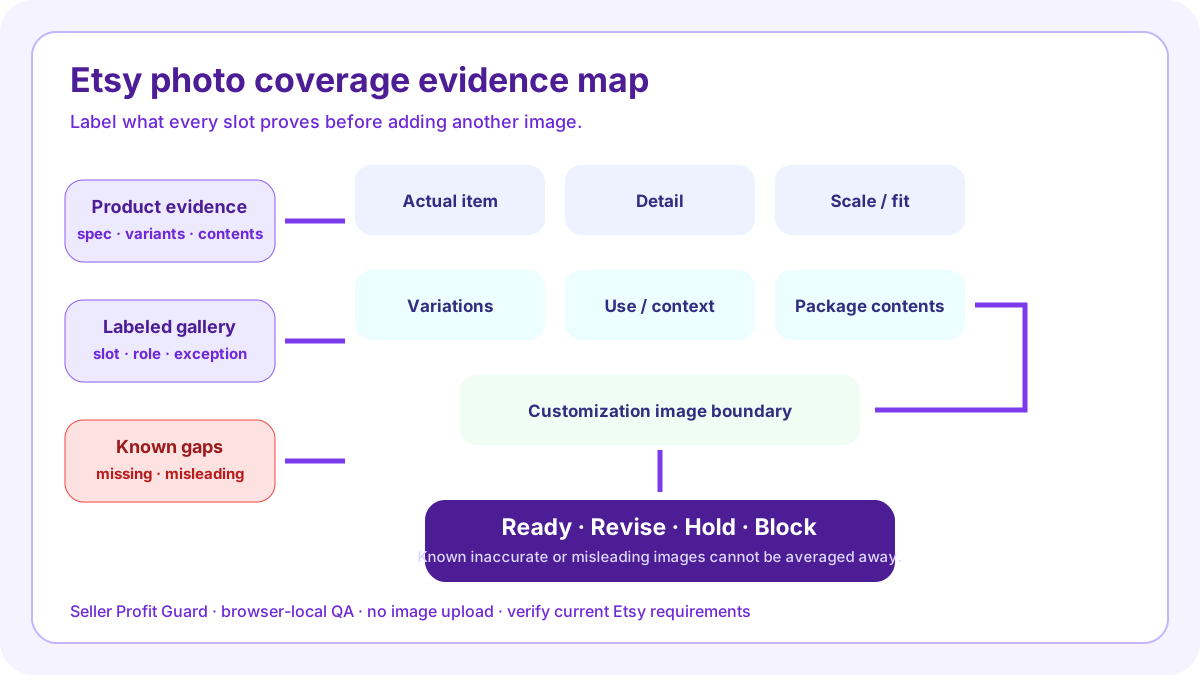
What the Etsy photo coverage checklist reviews
This checklist treats a listing gallery as a buyer-evidence system rather than a count of attractive pictures. It compares a labeled photo inventory with seven requirements: the actual finished item, material or construction detail, scale or fit, meaningful variations, real use or context, included package contents, and the correct image boundary for personalized or production-partner items.
The separate known-gaps field has precedence over the score. If a seller knows the main image is an unlabeled mockup, a variation is not shown, a prop looks included, or a scale image is misleading, the result is Block until the issue is removed or corrected. Complete decorative coverage cannot compensate for inaccurate representation.
- Name what every photo slot proves.
- Separate actual-product evidence from mockups.
- Show scale, fit, and relevant variations.
- Clarify use, contents, and excluded props.
- Record known gaps before release.
Build a photo inventory before judging coverage
Write one numbered label for every buyer-facing slot: main actual item, reverse angle, clasp detail, measurement view, model scale, silver option, gold option, package contents, customization example, or other specific role. Each number must be unique. Repeated crops should remain repeated crops; do not reuse a slot number or rename the same asset as different evidence merely to improve the result.
The inventory is intentionally text-only and browser-local. It does not upload images or inspect pixels. The seller must compare the labels with the live gallery and relevant source records. This keeps private customer, order, address, credential, and raw CSV data outside the checklist while preserving a reviewable decision.
Show the actual finished item accurately
Etsy's current Listing Image Requirements generally require original photos of the actual finished product, with limited exceptions for personalized items and products made with production partners. For a personalized item, the first image must show a finished customized example rather than a blank product or placeholder text. Additional computer-generated examples may be allowed within the stated boundary.
The checklist therefore asks what actual-item evidence is required and whether the labeled inventory contains it. It cannot decide whether a file is original, whether the seller owns image rights, or whether an exception applies. Verify the current policy and actual buyer view before release.
Use detail photos to prove materials and condition
Detail coverage should answer product-specific questions that a wide front view cannot: clasp construction, seam finish, surface texture, engraving edge, vintage wear, print quality, hardware, attachment points, file previews, or other material facts. A close crop earns a slot when it reduces a real uncertainty, not simply because it looks different.
Name the exact feature in the requirement and the exact slot in the inventory. If the listing claims sterling silver but no photo can verify composition, the photograph is only supporting context; the material record remains the authority. Do not use an image score as a substitute for documentation.
Make scale and fit visible without distortion
Etsy's product-photography guidance identifies scale shots as a way to communicate how large or small an item is. A useful scale view can show jewelry on a wearer, art in a measured room context, a bag on a model, furniture beside familiar objects, or a product beside an accurate ruler. The written dimensions and image should tell the same story.
Wide-angle distortion, an unlabeled reference object, a cropped ruler, or a model whose fit is presented as universal can mislead. Record the scale question first, then choose a view and caption that answer it. The checklist detects text coverage only; the seller must inspect visual truth and accessibility.
Map every material variation to visible evidence
Variation-heavy listings need a coverage denominator. List every color, finish, pattern, size presentation, configuration, or other option whose appearance materially changes the buyer's decision. Then map each requirement to a labeled photo or a truthful group comparison. Do not count one generic swatch as proof of every finished option unless the relationship is accurate and explained.
Etsy allows sellers to link listing photos to variations. Current capabilities and image limits can change, so verify the live editor instead of hard-coding capacity into this tool. The output is a missing-photo plan, not a platform upload schedule or a promise that every variation needs a separate slot.
Explain use, package contents, and excluded props
A lifestyle or use photo should clarify how the product functions, fits, hangs, opens, stores, installs, or appears in context. It should not make an accessory, room feature, model clothing, stand, frame, plant, or other prop look included when it is not. Package images should show the exact quantity, components, care card, hardware, gift box, or digital files the buyer receives.
Record exclusions in the photo plan and align them with the description. If the gallery shows three bracelets but the order contains one, or a print appears framed but the frame is excluded, a caption or additional contents view may be necessary. The checklist cannot read captions automatically; it requires the seller to label that evidence.
Variation-heavy necklace worked example
The complete fixture uses a personalized necklace with silver and gold finishes plus three chain lengths. Its gallery shows the finished engraved item, front and back, clasp and chain detail, pendant beside a metric ruler, the necklace at collarbone scale, both finishes, a chain-length comparison, the gift box with care card, and a clearly labeled customization example.
All seven requirements are covered and no known gap is declared, so the output is Ready when the evidence note is current. That result does not prove the metal, guarantee fit, authorize a mockup exception, or predict ranking or sales. It permits the next bounded public review.
Use ready, revise, hold, and block correctly
Ready means all seven entered requirements are represented in uniquely numbered inventory slots, no known gap or explicit contrary evidence is present, and the evidence note contains a YYYY-MM-DD review date. Revise means one or more buyer questions lack adequate coverage or slot labels are incomplete or duplicated. Hold means coverage appears complete but the evidence note is missing or undated. Block means a seller-declared gap or a matching negative inventory statement identifies a missing, inaccurate, stock, mockup, or unlabeled image problem.
Fix the failed layer rather than adding arbitrary images. A missing scale question needs a reliable scale view; a variation gap needs option evidence; a misleading main mockup needs correction under the current policy. Rerun the same fixture after the change so the decision remains comparable.
Release boundary, limitations, and next action
Save the prior gallery order, variation links, captions, description references, and evidence version. Confirm the correct account and listing, apply one approved image set, and inspect search thumbnail, listing page, mobile crop, desktop gallery, variation selection, package expectation, and image-description consistency. Safe-stop on login or CAPTCHA ambiguity, a platform warning, wrong profile, or missing target context.
This browser-local checklist does not upload or analyse image files, retrieve Etsy data, identify intellectual-property ownership, detect every stock image, validate color accuracy, certify accessibility or policy compliance, or predict impressions, ranking, clicks, conversion, sales, returns, or AdSense approval. Seller Profit Guard is unaffiliated with Etsy and provides operational listing QA, not legal, marketplace, photography, accessibility, or professional advice.
- Freeze the current gallery and variation links.
- Label every buyer-facing slot by evidence role.
- Run a complete and deliberately incomplete fixture.
- Resolve known inaccurate or misleading images first.
- Apply one approved gallery change set.
- Verify the public buyer view or restore the backup.
Sources and further reading
- Etsy Listing Image Requirements: Official original-photo, actual-finished-product, personalized-item, and production-partner image requirements.
- Etsy Seller Policy effective July 9, 2026: Official requirement to represent items accurately and use compliant listing photos.
- Etsy Seller Handbook: 7 Essential Types of Product Photos: Official studio, lifestyle, scale, detail, group, process, and packaging photo guidance.
- Etsy Seller Handbook: Product Photography Checklist: Official planning, shot, lighting, editing, crop, ratio, and upload checklist.
- Etsy Help: Image requirements and best practices: Current official file, size, orientation, thumbnail-crop, color-profile, and upload guidance.
- Etsy Help: How to create a listing: Current official listing form guidance, including up to 20 photos, up to two short videos, and buyer-facing photo editing controls.
- Etsy Help: How to edit listing photos: Current official photo order, crop, thumbnail, image-quality, and search-visibility workflow.
- Etsy Help: Add text alternatives to listing images: Current official manual alt-text workflow and concise description guidance for product detail, texture, and scale.
- Etsy Help: Add variations to listings: Current official variation-to-photo linking workflow; verify live editor capacity where Help surfaces expose different photo limits.
- Etsy Seller Handbook: Anatomy of a Well-Crafted Listing: Current official listing-image guidance on multiple views, details, lifestyle, lighting, and resolution.
- Seller Profit Guard methodology: Evidence hierarchy, privacy boundary, uncertainty labels, verification, correction, and rollback controls.
Related Seller Profit Guard tools
- Etsy CSV profit calculator: Run a local order profit check with editable fee and SKU cost assumptions.
- Payment reconciliation tool: Compare order rows with statement activity and flag unmatched rows.
- SKU cost library: Save or import material, labor, packaging, shipping, and target margin assumptions.
- Variant risk checker: Find missing SKUs and variation cost risks before a listing scales.
- Etsy title checker: Review listing-title clarity, repetition, keyword chains, and mobile scanning.
- Etsy tag checker: Review all 13 tag slots for duplicates, repeated meaning, and truthful coverage.
- Free shipping threshold calculator: Estimate when a shipping subsidy can still meet a target margin.
- Return window loss estimator: Model expected reverse shipping, restock work, recovery, and replacement loss.
- Etsy Ads break-even calculator: Estimate target-safe Etsy Ads spend, ACOS, and ROAS after fees, fulfillment, and expected return loss.
- CSV data privacy: Understand what the local-first workflow needs and what it does not need.
- Etsy Photo Coverage Formula: 10 Inputs: Define the gallery inventory, seven buyer-evidence checks, known-gap gate, provenance note, and deterministic decision logic.
- Etsy Photo Checklist: Variation-Heavy Example: Follow a personalized necklace with finish and chain options from product evidence through gallery mapping, checks, release, and recovery.
- Etsy Photo Checklist for Size-Sensitive Art: Build a materially different size-sensitive wall-art gallery with room scale, exact dimensions, crop boundaries, packaging, and frame exclusions.
- 12 Etsy Photo Coverage Mistakes to Fix: Diagnose denominator, evidence, mockup, variation, scale, package, crop, and release errors that distort an Etsy gallery plan.
- Evidence Sources for Etsy Listing Photos: Map every photo requirement to product, measurement, variation, packaging, permission, policy, and public-gallery evidence without private data.
- Etsy Photo Coverage: Ready, Revise, Hold, Block: Set non-compensating release thresholds for complete coverage, missing buyer evidence, stale authority, and known inaccurate images.
- Variation Photos vs Size-Sensitive Photos: Compare a variation-heavy necklace and size-sensitive art print at the same buyer-question grain while preserving different evidence needs.
- Weekly Etsy Photo Evidence Routine: Operate a risk-based gallery review using changed-listing sampling, source refresh, fixtures, bounded releases, buyer-view checks, and rollback.
- How to Read Etsy Photo Checklist Results: Interpret seven coverage checks, the known-gap gate, evidence status, sensitivity, limitations, and the correct next seller action.
- Etsy Photo Audit Checklist and Change Log: Use a standalone before-state, evidence, fixture, approval, public-verification, measurement, and rollback template for gallery changes.
Use the interactive tool
Enable JavaScript to open the calculator and process browser-local inputs. The explanatory content and source links remain available without JavaScript.
Related guide: Build the photo evidence denominator before changing the gallery.
This tool provides operating estimates, not tax, accounting, legal, financial, or marketplace-policy advice. Verify current official sources and your own records before changing prices or operations.