Etsy Payment Account reconciliation guide for small sellers
Last updated: 2026-07-16
Written and reviewed by Seller Profit Guard Editorial Team.
Reconcile Etsy by matching order exports to Payment Account or monthly-statement rows, then separate fees, refunds, taxes, labels, ads, reserves, adjustments, and deposits. A deposit transfers available cash; it is not order revenue or profit. Profit also needs your private product, labor, packaging, fulfillment, and loss costs.

Why do Etsy sales and bank deposits not match?
An Etsy deposit is the result of a cash-availability process, not a one-order payout. Sales enter the Payment Account, while refunds, marketplace fees, payment-processing fees, shipping labels, advertising, taxes, credits, reserves, and other activity can change the balance. Eligible funds are then sent on the deposit schedule and may take time to reach the bank. Orders and deposits therefore use different dates and scopes.
Use four records instead of forcing one number to explain everything. The order item export explains which products and SKUs sold. The Payment Account and monthly statement explain account activity. The bank statement confirms cash received. A private cost library explains material, labor, packaging, fulfillment, and expected loss. Reconciliation connects the first three; contribution review adds the fourth.
Etsy distinguishes current balance from Available for deposit after refunds, fees, taxes, and reserves. That is why a correct statement can still produce a bank deposit below gross sales.
| Record | Question it answers | Do not use it as |
|---|---|---|
| Order item or orders CSV | What sold, quantity, price, order and SKU context | A complete fee ledger or bank-receipt record |
| Payment Account / monthly statement | Sales, credits, fees, taxes, labels, ads, refunds, reserves and deposits | SKU product cost or full accounting profit |
| Bank statement | Which Etsy deposits arrived and when | A line-by-line explanation of Etsy activity |
| Private cost library | Material, labor, packaging, fulfillment and target contribution | Official platform balance or deposit status |
Which Etsy CSV files should you download?
Etsy's Download Data page currently offers order items, orders, Etsy Payments sales, and Etsy Payments deposits CSV types. The order item file is usually the best product-level starting point because it can include item title, item price, payment method, and SKU when the seller assigned one. The orders file is useful when the matching unit is the whole order rather than each line item.
For account movement, generate the monthly statement CSV from Finances and Monthly statements. Etsy's current help says Recent activities shows only the 30 most recent activities, while monthly statements provide the fuller period view. Use the same shop currency and a deliberate date range, but expect timing rows near month boundaries to require a bridge rather than a forced match.
Export names and columns can vary. Inspect headers before mapping, and keep a missing value unknown rather than replacing it with zero.
| Field | Use in reconciliation | Check before matching |
|---|---|---|
| Date | Places an order or activity in a period | Local time, availability date and bank date may differ |
| Order or transaction reference | Strong direct link when present | One order can contain several item rows |
| Type and description | Classifies Sale, Fee, Marketing, Shipping, Refund or Deposit | Labels can change; retain an unmapped category |
| Amount, Fees & Taxes, Net | Builds the money-movement bridge | Do not subtract a fee twice if Net includes it |
| Balance / current balance | Checks the running Payment Account result | It can differ from Available for deposit |
| Status / availability date | Explains reserved or unavailable funds | Use the shop's displayed record, not a generic assumption |
How do you build a Payment Account balance bridge?
Start from the opening Payment Account balance, not from gross order revenue. Add sales and credits. Subtract fees, taxes, shipping-label charges, Etsy Ads or other seller services, refunds, and other charges. Add or subtract documented adjustments and reserve releases. Subtract deposits sent. The result should explain the closing Payment Account balance, subject to the exact signs and fields in the export.
This bridge is an operating check, not an official universal Etsy formula. The monthly statement may already express a row as Net after its Fees & Taxes value, so read the headers and sample rows before deciding which columns to sum. The safest test is to reproduce the statement's running balance without double-counting a component.
Once the account bridge works, match sale rows to orders. A sale with no order match, an order with no sale match, a fee-only row with no understood category, or a bank deposit that never arrives belongs in an exception queue. Do not erase an exception simply to make totals agree.
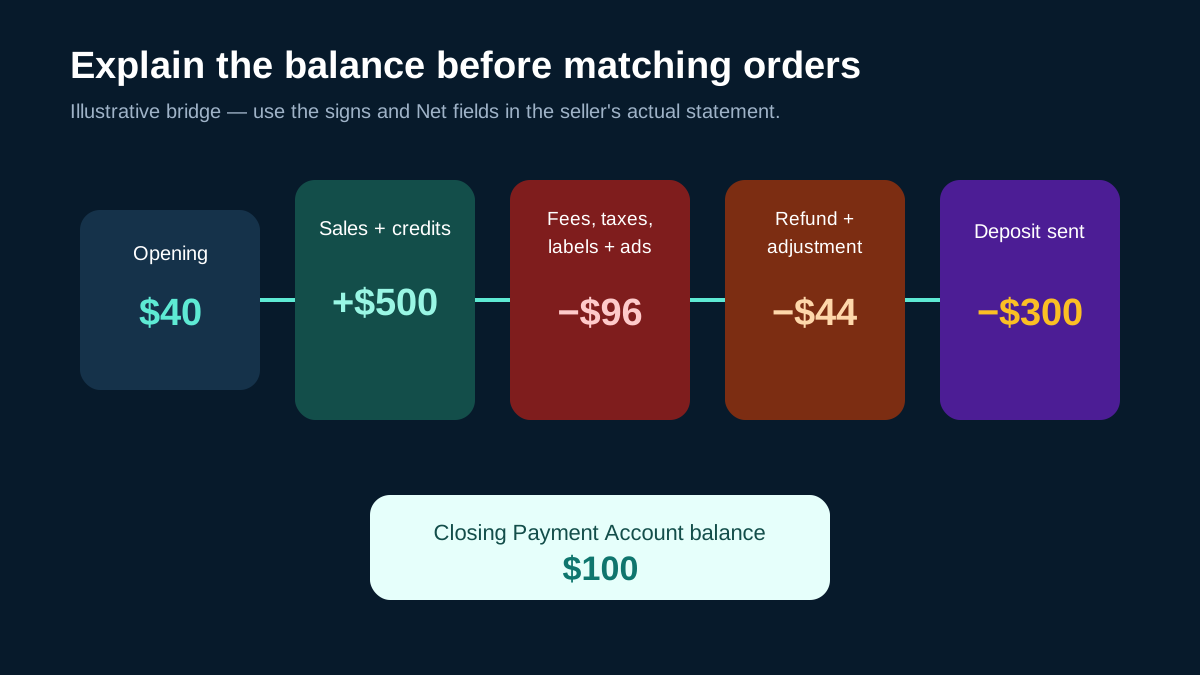
| Worked bridge | Amount | Running result |
|---|---|---|
| Opening Payment Account balance | $40.00 | $40.00 |
| Sales and credits | +$500.00 | $540.00 |
| Fees, taxes, labels and ads | −$96.00 | $444.00 |
| Refund and documented adjustment | −$44.00 | $400.00 |
| Deposit sent to bank | −$300.00 | $100.00 closing balance |
How should you classify sales, fees, refunds and deposits?
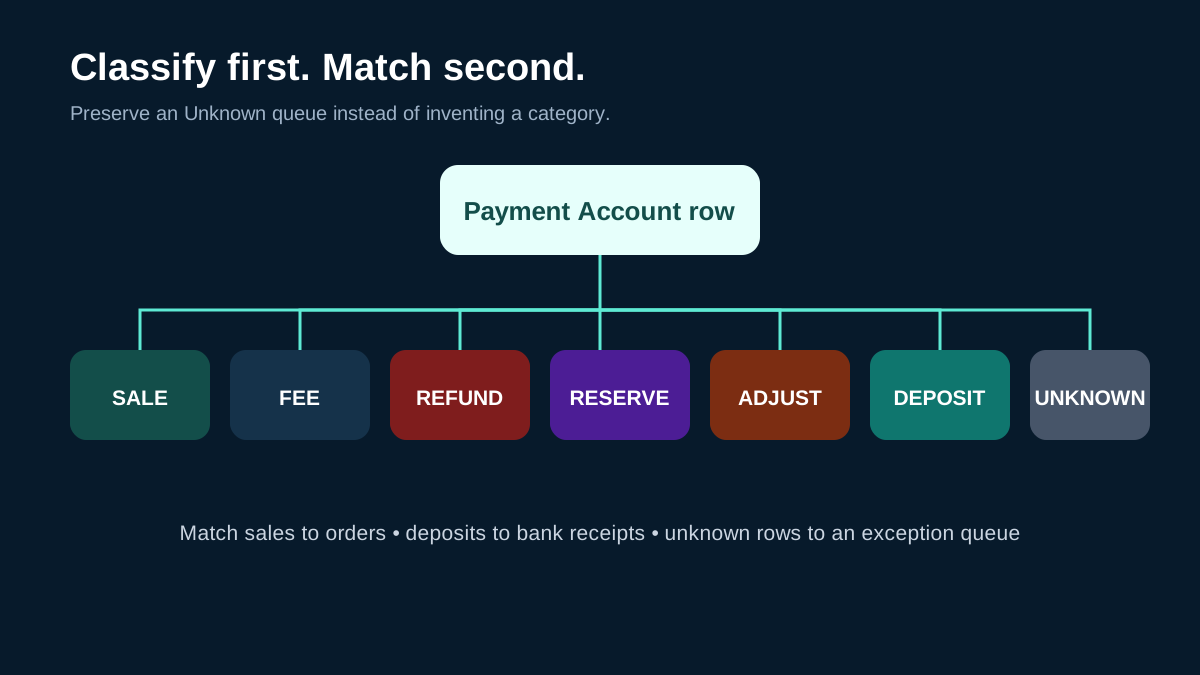
Classify first and match second. A Sale should normally connect to an order or order item. A Fee, Marketing, or Shipping row explains a platform or seller-service charge and should not be merged with the private material cost of the product. A Refund reverses customer-facing money movement, but the business loss may also include outbound shipping, replacement cost, handling, support time, or damaged inventory.
Treat a Deposit as a transfer from the Payment Account to the bank. It reduces the platform balance but does not create new revenue and should not be assigned to one order merely because the amounts are similar. Reserve activity and adjustments need their own categories so timing effects do not look like missing sales or unexplained profit.
Keep an Unknown category with the original row and reason it could not be mapped. A guessed category can clean the total while corrupting the explanation.
| Row type | Reconciliation treatment | Margin follow-up |
|---|---|---|
| Sale | Match to order/order-item reference and date | Add SKU cost, packaging, labor and fulfillment separately |
| Fee / Marketing / Shipping | Keep the statement category and sign | Confirm whether the cost is allocated elsewhere |
| Refund | Match to the original order and preserve timing | Review unrecovered shipping, product and support cost |
| Reserve / adjustment | Track status, availability date and release | Do not call delayed cash a product loss |
| Deposit | Match to the bank receipt as a transfer | Never count the transfer as revenue or profit |
| Unknown | Retain unchanged in an exception queue | Escalate instead of guessing |
How do reserves, holds and deposit schedules affect timing?
A correct sale can remain unavailable for deposit. Etsy's current help says availability depends on shop standing and can be affected by a bank-detail security hold, a Payment Account reserve, an amount due, a negative balance, deposit minimums, or the selected schedule. After Etsy sends a standard deposit, the bank can still take time to post it. Record each stage instead of treating the order date as the cash date.
For a shop with a Payment Account reserve, Etsy displays reserve details in the Payment Account. Its reserve help also describes Status and Availability Date fields in the monthly statement CSV. Use those shop-specific fields to explain held and released funds. Do not apply a generic reserve percentage or release date to a seller who has different displayed terms—or no reserve at all.
At month-end, keep opening and closing balance bridges so unavailable funds and later deposits remain visible instead of being forced into the order month.
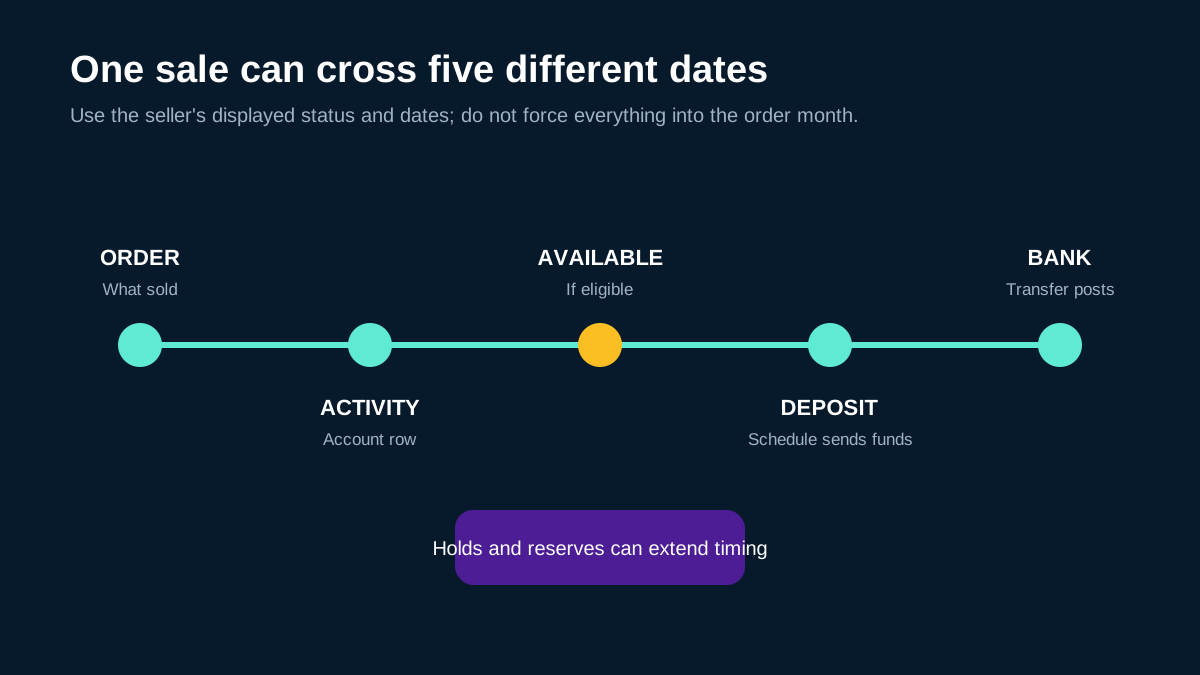
- Order date: when the sale occurred.
- Activity date: when the Payment Account row was recorded.
- Availability date: when held or reserved funds may become available, if shown.
- Deposit date: when Etsy sends eligible funds under the schedule.
- Bank-posted date: when the bank records the transfer.
What changes with taxes, labels, ads and currency conversion?
Etsy's Payment Account activity can include sales tax or VAT handling, listing and transaction fees, payment-processing fees, seller services such as Etsy Ads, shipping labels, carrier adjustments, and credits. Preserve the platform row type and its Fees & Taxes or Net values. Do not collapse every deduction into one marketplace-fee percentage, because that removes the evidence needed to explain the balance.
Currency adds another boundary. Etsy's current currency-conversion help says a conversion fee applies when the listing currency differs from the Payment Account currency, and Etsy Payments sales are converted into the Payment Account currency. Match and total in a defined currency; do not add source-currency order amounts directly to converted statement amounts.
Etsy's Activity summary currently uses Net profit for a platform view. Seller Profit Guard does not treat it as complete accounting net profit because private product, labor, packaging, inventory, financing, and overhead costs can remain outside it.
What weekly Etsy reconciliation workflow catches errors early?
Run a small weekly review and a full month-end bridge. Export the order and statement records for a period with a small overlap around the boundary. Preserve the original files read-only and work from a local copy or browser session. Normalize dates, currency, signs, and row types without deleting the raw value. Build the balance bridge first, then match sales to orders and deposits to bank receipts.
Review unmatched sales and orders, duplicates, orphan refunds, unknown fees, reserve differences, missing bank deposits, and balance-formula differences. Note the evidence for every resolution.
Finish by moving only relevant SKUs into a contribution review. Reconciliation answers whether records connect and where money moved. The profit tool answers whether product revenue covers marketplace charges plus private costs and the target contribution. Keeping those jobs separate makes both reports easier to audit.
- Download order items or orders plus the monthly statement for an overlapping period.
- Confirm shop currency, local time zone, headers, signs and the meaning of Net.
- Build the opening-to-closing Payment Account bridge before matching individual rows.
- Match sales to orders and deposits to bank receipts; never match a deposit directly to one order by amount alone.
- Classify and annotate exceptions without deleting or inventing rows.
- Send low-margin, refund-heavy or cost-missing SKUs to a separate contribution review.
What private data is not needed for reconciliation?
Most matching work needs transaction references, dates, row types, amounts, currency, fee fields, status, and redacted SKU or order identifiers. It does not need a buyer's name, delivery address, private message, payment credential, marketplace password, or a public copy of the seller's raw order history.
Seller Profit Guard is designed to parse supported files locally in the browser. For a mapping problem, share only column names and a made-up example row. Remove buyer and order details from screenshots, community posts, support email, and AI prompts. If the issue depends on an account-specific reserve, suspension, deposit, or tax record, use Etsy's authenticated support path rather than publishing the private record.
Keep the untouched export in controlled storage. Every normalized row should remain traceable to its original local record.
Related resources
- Review CSV data privacy: See which fields are useful and which buyer data should stay out of support.
- Read the calculation methodology: Separate platform reconciliation from contribution and accounting scope.
Etsy Payment Account reconciliation FAQ
Is an Etsy deposit the same as profit? No. A deposit is a cash transfer of eligible funds from the Payment Account. Product cost, labor, packaging, fulfillment, return loss, overhead, and timing can sit outside that transfer.
Why is Available for deposit lower than the current balance? Etsy says current balance and Available for deposit can differ because some sales may not yet be available and because refunds, fees, taxes, reserves, an amount due, or a negative balance can affect eligibility.
Can one bank deposit match several Etsy orders? Yes. A scheduled deposit can combine eligible funds from multiple orders and account activities. Match the deposit to the platform deposit record, then reconcile the underlying sales separately.
Should I sum Amount and Net together? Not without checking the export. Etsy describes Net as gross amount minus fees and taxes for a recent-activity row. Inspect the actual headers and reproduce the running balance so a fee is not counted twice.
What if a statement sale has no matching order? Keep it in an exception queue. Check date boundaries, order-level versus item-level granularity, refunds, duplicate imports, currency, and reference formatting before contacting Etsy Support with redacted evidence.
Does reconciliation replace bookkeeping or tax advice? No. It is an operating control that explains record connections and cash movement. Use official Etsy records and a qualified local professional for accounting and tax treatment.
How do you use the local reconciliation tool?
Open Payment Reconciliation and load the supported order file plus Payment Account or monthly-statement-style activity. Review the detected headers before accepting a mapping. Then inspect matched sales, unmatched rows, refund and fee categories, deposits, and balance-formula warnings. The tool flags records for review; it does not change Etsy data or decide accounting treatment.
After account activity is explained, open the Etsy CSV profit calculator for SKUs that need a margin decision. Add product, labor, packaging, shipping, advertising, refund, and target-contribution assumptions there. Reconciliation explains where money moved; the profit calculator estimates whether product economics support the current price and promotion.
Related resources
- Open Payment Reconciliation: Compare order rows with statement activity locally.
- Check SKU-level contribution: Add private cost assumptions after account activity is explained.
- Review refund loss: Separate the platform refund from unrecovered operating cost.
Sources and further reading
- Etsy Help: How to Manage Your Payment Account: Official balance, available funds, recent activity, monthly statement, fee and deposit reference.
- Etsy Help: Download Sold Transaction Spreadsheets: Official order items, orders, Etsy Payments sales and deposit CSV workflow.
- Etsy Help: Receive an Etsy Payments Deposit: Official availability, deposit schedule, minimum, hold and bank-arrival context.
- Etsy Help: Payment Account Reserves: Official reserve status, release and monthly-statement field reference.
- Etsy Help: Fees and Taxes for Selling: Official fee-category and Payment Account deduction context.
- Etsy Help: Currency Conversion Fees: Official listing-currency and Payment Account currency conversion reference.
Related Seller Profit Guard tools
- Payment reconciliation tool: Compare supported order and statement activity locally.
- Etsy CSV profit calculator: Add SKU and fulfillment costs after reconciliation.
- SKU cost library: Maintain private material, labor, packaging and shipping assumptions.
- Refund and fee impact guide: Model the operating loss beyond the statement refund.
- CSV data privacy: Keep buyer data out of support and public examples.
- Calculation methodology: Review the contribution boundary and source policy.
- Etsy Payment Reconciliation: Inputs and Match Rules: Map Etsy order exports, Payment Account activity, fees, refunds, deposits, dates, signs, and references into a traceable reconciliation.
- Etsy Deposit Reconciliation: A Weekly Worked Example: Trace one illustrative Etsy payout week across orders, Payment Account sales, fees, a refund, a shipping label, and a bank deposit.
- Etsy Month-End Reconciliation: Close Without Guessing: Build an Etsy month-end close with opening and closing balances, sales, fees, refunds, reserves, deposits, and dated exceptions.
- Etsy Transaction vs Processing Fee Formula: Separate Etsy transaction and payment-processing fees with their correct revenue, tax, country, percentage, fixed-fee, currency, and evidence inputs.
- Etsy Transaction vs Processing Fee Example: Reproduce a US Etsy order with a $45 transaction base, 6.5% transaction fee, 3% plus $0.25 processing fee, and separate statement rows.
- UK Etsy Transaction vs Processing Fees: Model a £45 UK Etsy Payments order with the current 6.5% transaction fee and 4% plus £0.20 processing schedule without mixing currencies.
- Etsy Listing Renewal Cost Formula: Allocate Etsy listing and renewal fees with event counts, actual sold units, expected sales, Payment account evidence, currency, period, and target.
- Slow-Moving Etsy Listing Renewal Example: Trace a slow Etsy listing through one initial fee, one expired renewal, one sale, a USD 0.40 subtotal, and a USD 0.40 cost per sold unit.
- Multi-Quantity Etsy Listing Fee Example: Allocate one listing fee plus nine reconciled multi-quantity events across ten units without adding unsupported auto-renew or expiry events.
- Etsy Multi-Quantity Fee Formula: Calculate Etsy extra-quantity and auto-renew-sold fee rows from one order pattern, current fee, actual statement evidence, currency, and target.
- Two-Unit Etsy Multi-Quantity Fee Example: Trace a two-unit Etsy order that sells out active quantity, creates one extra-quantity fee, and allocates USD 0.20 across two units.
- Etsy Quantity-Ten Fee Worked Example: Reproduce Etsy's current quantity-ten example with nine extra-quantity events, USD 1.80 incremental fees, and USD 0.18 per sold unit.
- Etsy Currency Conversion Fee Formula: Calculate Etsy's seller conversion fee, converted gross, retained amount, rate differences, and evidence decision when shop and account currencies differ.
- Etsy Currency Conversion Fee Example: Trace EUR 100 through a 1.10 USD-per-EUR applied rate, Etsy's editable 2.5% seller conversion fee, and a USD 107.25 retained result.
- Etsy Adverse Exchange-Rate Scenario: Stress-test EUR 100 at 0.95 USD per EUR, a USD 2.375 conversion fee, USD 92.625 retained, and a seller-owned USD 100 review threshold.
- Etsy Regulatory Operating Fee Formula: Calculate Etsy Regulatory Operating fees from seller region, item, shipping, gift-wrap and personalization charges, fee tax, and actual rows.
- Canada Etsy Regulatory Fee Example: Trace a CAD 50 Canada Etsy order through the current 0.50% Regulatory Operating fee, 13% fee-tax assumption, and Payment account reconciliation.
- UK Etsy Regulatory Fee Example: Calculate a UK Etsy order with item, shipping and personalization charges, the current 0.48% operating fee, and a separate VAT assumption.
- Etsy VAT on Seller Fees Formula and Inputs: Calculate Etsy seller-fee VAT from eligible fee lines, invoice treatment, tax rate, credit note, actual invoice rows, and reconciliation tolerance.
- Etsy Seller-Fee VAT Worked Example: Trace one synthetic Etsy fee packet through a EUR 5.57 eligible subtotal, 20% VAT, exact invoice reconciliation, and release decision.
- Monthly Etsy Seller-Fee VAT and Credit Note Example: Calculate a monthly GBP seller-fee VAT invoice with seven fee categories, a GBP 1.20 credit note, and separate subtotal and net-tax checks.
- Etsy Deposit Fee Formula and Inputs: Classify an Etsy Payments deposit from Available Funds, country minimum, fee threshold, fixed fee, tax, schedule, actual rows, and evidence.
- Malaysia Etsy Deposit Fee Worked Example: Trace a synthetic Malaysia weekly deposit through the current MYR 9 minimum, MYR 400 threshold, MYR 8 fee, and monthly exposure.
- Monthly Etsy Deposit Fee Scenario: Compare the same synthetic monthly Available Funds under one monthly deposit and show when aggregation moves above the fee threshold.
Next step: Open the reconciliation tool.
This is operational planning help, not tax, accounting, legal, financial, or platform-policy advice. Review the Terms and disclaimer, and verify current platform rules and fee assumptions before changing prices.