Seller Profit Guard · How it works · CSV privacy
Etsy seasonal listing readiness checker for dated capacity and cutoff QA
Use this browser-local Etsy seasonal listing readiness checker to connect one seller-defined demand window to allocable inventory, sustainable production capacity, the active processing profile, a conservative latest-order-date calculation, title and tag alignment, variation and photo evidence, promotion stop rules, known conflicts, and a dated approval before a seasonal listing is promoted.
Maintained by Seller Profit Guard Editorial Team. Last reviewed: 2026-07-30.
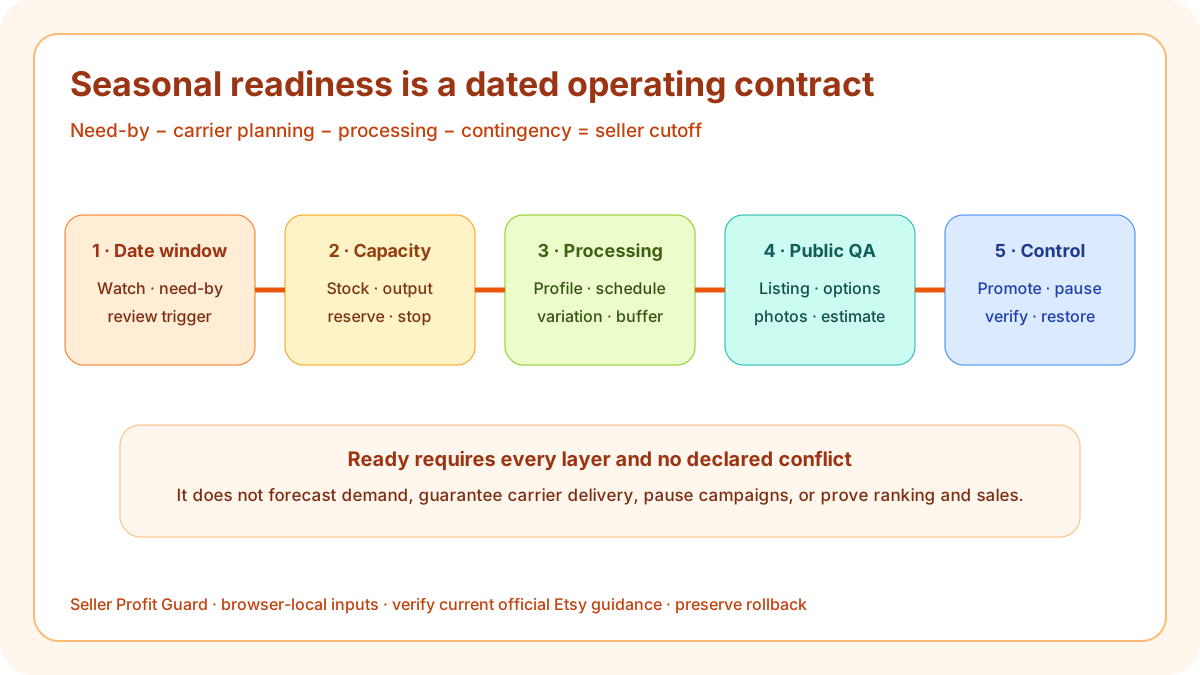
What the Etsy seasonal listing readiness checker reviews
The checker turns nine seller-entered evidence blocks into eight visible decisions. It freezes one listing and season, records a dated demand and buyer need-by window, audits inventory and production capacity, checks the current processing profile and operating schedule, requires an explicit seller cutoff calculation, reconciles public listing surfaces, and binds promoted variations to photos, stock, processing, and a pause rule.
This is not another Etsy title or tag grader. Title and tags are only one layer. A listing can use accurate seasonal language while remaining unsafe to promote because the seller has no production reserve, a variation uses a slower profile, the public estimated-delivery range has changed, or a coupon campaign continues beyond the documented capacity stop.
Define one listing, occasion, market, and review date
Start with a single candidate: listing alias, draft or version, physical or digital format, season or occasion, buyer market, review purpose, and exact date. Avoid a shop-wide statement such as “holiday listings are ready.” A personalized ornament sold to United States buyers and a wedding-favor batch for an event in another market use different date, capacity, proof, and destination assumptions.
The boundary makes correction and rollback possible. Preserve the current title, tags, attributes, description, personalization, variations, quantities, prices, images, processing and shipping settings, public delivery observation, campaign scope, and approval. Later measurements should reference the same candidate instead of a silent mixture of versions.
Record dated demand and buyer need-by boundaries
Enter at least three exact dates: demand-watch start, planned selling or promotion end, and primary buyer need-by target. Add the trigger for rechecking them. The checker does not forecast demand or retrieve trend data. The dates are planning controls supplied by the seller and should be revisited when inventory, staffing, carrier information, processing, product mix, or public delivery estimates change.
A holiday gift may use one dominant December need-by window. Wedding favors need event dates by buyer and quantity tier. A seasonal term in a tag does not create an operating window. The date packet must explain what the shop will do after the seller cutoff: pause the option, change the occasion message, offer later delivery without a promise, or move the product to a non-seasonal state.
Separate allocable inventory from sustainable production capacity
Record ready units, raw inputs, work in progress, open commitments, expected failed units, and safety reserve by promoted option. Then record completed orders per processing day and the sustainable weekly ceiling. Material on hand is not finished-order capacity. Personalization, proofing, assembly, quality checks, packing, and dispatch all consume time and can create a lower bottleneck.
The default ornament fixture has 84 ready blanks, 18 committed units, and a 12-unit reserve, so the checker displays 54 usable units. Sustainable output is 12 completed orders per Monday–Friday processing day, capped at 60 per week. The promotion pause is 80 percent of that weekly ceiling, or 48 open orders. These values are illustrative, not benchmarks; replace every value with current seller evidence.
Use the active processing profile and real operating schedule
Etsy defines processing time as the time required to prepare an order before handing it to a carrier. Current processing profiles can distinguish made-to-order and ready-to-ship items, and variation-level profiles can reflect different production needs. The order-processing schedule can include or exclude weekends and supported holidays, affecting ship-by behavior.
Record the minimum and maximum processing time, the exact processing weekdays, dated excluded processing days or an explicit none-in-window declaration, proof or approval wait where relevant, packing time, and variation exceptions. The checker uses that declared calendar in its planning arithmetic rather than silently assuming Monday through Friday. Inspect the buyer-facing delivery range for the candidate. Do not shorten a configured profile to make the seasonal plan pass; repair capacity, scope, or public expectations instead.
Calculate a seller-owned latest order date
Use a transparent planning equation: buyer need-by date minus seller carrier-planning buffer minus maximum active processing time minus contingency equals the seller-owned latest order date. Label calendar days and seller processing days explicitly. In the default 2026 fixture, December 24 minus seven calendar days reaches December 17; subtracting five declared Monday–Friday processing days reaches December 10; subtracting two more declared processing days reaches December 8. The checker skips any dated exclusion entered in the processing packet and flags an entered cutoff that differs.
That result is not an Etsy cutoff or a carrier delivery guarantee. Etsy explains that estimated delivery combines processing with carrier information and may use historical signals. Public ranges can change. Verify the current destination-facing estimate before release and again after editing processing, shipping, quantity, variation, or other relevant fields.
Align title, tags, attributes, description, and deadlines
The public listing should identify the item and objective traits clearly, use an occasion only when it is essential to what the item is, and avoid repeating aspirational gifting language. Etsy currently allows up to thirteen tags and recommends accurate relevant phrases. Attributes, description, personalization, shipping context, and image captions should agree with the same product and seasonal boundary.
State the active processing expectation, personalization deadline where applicable, seller cutoff as a planning or ordering boundary, and what happens afterward without promising carrier arrival. Do not use a sale badge, countdown, “arrives by” claim, or styled holiday photo to communicate a stronger deadline than the current processing and buyer-visible estimate support.
Audit every promoted variation and photo at the same grain
For each promoted finish, size, quantity, or personalization path, record available stock or reserved capacity, current price, SKU, processing profile, actual-item photo, package contents, and fulfillment owner. A ready color cannot compensate for an oversold color. A small batch cannot establish that a 150-unit wedding tier shares the same processing time.
Seasonal styling should add context without replacing evidence. Keep actual product, detail, scale, variation, personalization, and package images accurate. Label props and examples. If a material substitution or slower option changes the public promise, update or pause that option before promotion rather than relying on a distant disclaimer.
Bind promotion to numerical capacity stop rules
A calendar end date alone cannot control an unexpected order surge. Record exactly which listings and options are included in Etsy Ads, a sale, coupon messaging, or owned distribution. Set a start condition, open-order threshold, inventory floor, percentage-of-capacity threshold, owner, and action. The fixture begins promotion below 65 percent of sustainable weekly capacity and pauses at 48 open orders, exactly 80 percent of its 60-order weekly ceiling, or earlier at the inventory stop.
These percentages are seller assumptions, not Etsy policy or universal benchmarks. Stress-test lower output, longer processing, a failed batch, late proof approval, and a longer carrier buffer. Promotion should pause before the plan becomes misleading, not after late orders confirm that capacity was exceeded.
Use Ready, Revise, Hold, and Block without compensation
Ready requires all eight checks, exactly three valid planning dates in the order demand-watch start, selling-window end, and need-by date; inventory and capacity reserve; active processing evidence; matching cutoff arithmetic; aligned public surfaces; enforceable option and promotion controls; an exact dated human approval with a rollback reference; and no declared conflict. Ready permits backup and public QA. It does not predict demand, guarantee delivery, certify compliance, or prove ranking, conversion, or revenue.
Revise identifies a controllable incomplete layer. Hold preserves an unavailable authority or public observation. Block applies whenever the seller declares a stale cutoff, over-capacity plan, misleading delivery statement, unavailable promoted option, conflicting processing profile, or campaign beyond the stop rule. One Block issue overrides a high aggregate score.
Release one bounded seasonal packet and verify publicly
Before production work, create narrow local and remote backups and retain a rollback identifier. Confirm the correct account and listing. Safe-stop on login or CAPTCHA ambiguity, a platform warning, wrong profile, missing target context, or an unexpected editor state. Change only the approved listing, option, processing, media, and promotion fields.
On desktop and mobile, inspect title, tags, attributes, opening description, personalization, variations, quantities, prices, photos, processing, delivery range, cutoff language, and campaign scope. Rerun the supported and deliberately broken fixtures. Restore the previous packet when any critical public surface does not match the approved readiness record.
- Freeze one dated listing and season.
- Reconcile inventory, commitments, capacity, and reserve.
- Verify processing profiles and operating calendar.
- Calculate and stress-test the seller cutoff.
- Align public listing, options, photos, and promotion stops.
- Back up, release once, verify publicly, or restore.
Evidence, privacy, and responsible-use limits
Use product aliases, aggregate unit counts, capacity summaries, seller-entered dates, public listing text, and non-sensitive source references. Do not enter buyer names, email addresses, addresses, messages, order IDs, shipping labels, payment records, supplier credentials, private designs, tokens, OAuth material, or raw CSV rows into the tool, public content, analytics, or reports.
Seller Profit Guard is independent and unaffiliated with Etsy or carriers. The checker provides operational QA, not marketplace, advertising, carrier, legal, tax, accounting, or business advice. Platform interfaces, policy, carrier services, and public estimates can change. Review current official sources and obtain qualified advice when the consequence is material.
Sources and further reading
- Etsy Processing Profiles and Ship-by Dates: Current processing, schedule, holiday, variation-profile, and ship-by definitions.
- Etsy Estimated Delivery Dates: Current processing, carrier, history, origin, shipping-profile, and public estimated-delivery inputs.
- Etsy Create a Listing: Current title, description, quantity, variations, personalization, attributes, tags, media, shipping, and processing controls.
- Etsy Tag Guidance: Current tag limit, accuracy, phrase, and relevance guidance.
- Etsy Listing Title Guidance: Current buyer-friendly title guidance, including limited use of occasion terms.
- Etsy Service Level Standards: Current processing, manageable-volume, description, image, communication, and buyer-experience expectations.
- Etsy Advertising and Marketing Policy: Current Etsy Ads, Offsite Ads, sale, coupon, seller-set terms, and responsibility boundaries.
- Seller Profit Guard methodology: Evidence hierarchy, privacy-safe fixtures, deterministic decisions, uncertainty, verification, correction, and rollback.
Related Seller Profit Guard tools
- Etsy CSV profit calculator: Run a local order profit check with editable fee and SKU cost assumptions.
- Payment reconciliation tool: Compare order rows with statement activity and flag unmatched rows.
- SKU cost library: Save or import material, labor, packaging, shipping, and target margin assumptions.
- Variant risk checker: Find missing SKUs and variation cost risks before a listing scales.
- Etsy title checker: Review listing-title clarity, repetition, keyword chains, and mobile scanning.
- Etsy tag checker: Review all 13 tag slots for duplicates, repeated meaning, and truthful coverage.
- Free shipping threshold calculator: Estimate when a shipping subsidy can still meet a target margin.
- Return window loss estimator: Model expected reverse shipping, restock work, recovery, and replacement loss.
- Etsy Ads break-even calculator: Estimate target-safe Etsy Ads spend, ACOS, and ROAS after fees, fulfillment, and expected return loss.
- CSV data privacy: Understand what the local-first workflow needs and what it does not need.
- Etsy Seasonal Readiness: 9 Inputs and Formula: Define the dated window, capacity, processing, seller cutoff, listing alignment, variation, photo, promotion, and approval inputs.
- Etsy Holiday Listing Cutoff: Worked Example: Calculate and audit a personalized ornament listing from inventory and production capacity through a dated seller cutoff and public verification.
- Etsy Wedding-Season Listing Readiness: Plan a wedding-favor listing around event lead time, proof approval, batch production, color variants, and a staged order window.
- 12 Etsy Seasonal Listing Mistakes to Block: Diagnose stale cutoffs, mixed calendars, capacity errors, oversold variants, misleading images, and promotions detached from fulfillment controls.
- Reliable Data for Etsy Seasonal Readiness: Map every seasonal input to Etsy help, public listing observations, inventory and production records, seller assumptions, and dated approvals.
- Etsy Seasonal Readiness Thresholds: Apply Ready, Revise, Hold, and Block thresholds to dated windows, capacity, processing, cutoffs, listing evidence, and promotion stops.
- Holiday Gift vs Wedding-Season Etsy Plan: Compare a fixed holiday need-by window with event-specific wedding orders at the same evidence grain and decision columns.
- Weekly Etsy Seasonal Readiness Routine: Run a trigger-based weekly loop for dates, inventory, capacity, profiles, public estimates, listing evidence, promotion stops, and rollback.
- How to Read an Etsy Seasonal Readiness Result: Interpret eight checks, dates, issue precedence, decision, uncertainty, and next actions without treating readiness as a delivery or demand guarantee.
- Etsy Seasonal Listing Audit Template: Record dates, capacity, processing, cutoff math, listing surfaces, options, media, promotion, approval, release, public verification, and rollback.
Use the interactive tool
Enable JavaScript to open the calculator and process browser-local inputs. The explanatory content and source links remain available without JavaScript.
Related guide: Build the dated seasonal packet before changing public listings or promotion.
This tool provides operating estimates, not tax, accounting, legal, financial, or marketplace-policy advice. Verify current official sources and your own records before changing prices or operations.