Seller Profit Guard · How it works · CSV privacy
Coupon stack risk checker for ecommerce order margin
Apply the item discount first, apply the order coupon to the revised merchandise subtotal, then subtract seller-funded shipping, percentage fees, affiliate commission, product, packaging, fulfillment, advertising, and expected return loss. The checker compares a single-coupon order with the complete entered stack, its target-margin cushion, and the maximum coupon rate that preserves that target under the declared assumptions.
Maintained by Seller Profit Guard Editorial Team. Last reviewed: 2026-07-25.
What does the Coupon Stack Margin Checker calculate?
A seller may approve an item discount, order coupon, free shipping, affiliate commission, and paid acquisition as separate decisions. The buyer experiences one checkout and the seller contribution absorbs every seller-funded layer together. Reviewing each program in isolation hides the combined floor.
This browser-local calculator creates two matched cases. The control applies only the entered order coupon. The full-stack case keeps gross revenue, product, packaging, fulfillment, advertising, expected return loss, fee rate, and target fixed, then adds the item discount, seller-funded shipping, and affiliate commission. The difference isolates the modeled cost of those extra layers; it does not estimate incremental demand.
The primary result is contribution after the entered variable costs, not accounting profit, cash flow, tax liability, customer lifetime value, or a guaranteed platform settlement. Contribution margin is shown against gross merchandise revenue so the denominator remains stable across the two cases.
- Product or collection discount.
- Order-level coupon and seller-funded credit.
- Free-shipping or partial-shipping subsidy.
- Marketplace and payment fee assumptions.
- Affiliate commission, paid acquisition, and expected return loss.
How are item discounts, order coupons, and shipping sequenced?
The estimator starts with gross merchandise revenue, subtracts the item-discount percentage from that amount, and then applies the order-coupon percentage to the revised merchandise subtotal. Seller-funded shipping is a separate fixed deduction after revenue; it is not combined with the merchandise discount rate.
Shopify currently documents product discounts first, order discounts on the revised subtotal, and shipping discounts last for eligible combinations. That official sequence supports the calculator fixture, but it is not a universal marketplace rule. Multiple order discounts, fixed discounts, Buy X Get Y offers, app discounts, plan eligibility, external checkouts, and region-specific programs can behave differently.
Verify the intended product, market, channel, promotion classes, eligibility, combination controls, and buyer-facing checkout before using the result. If a platform chooses the best offer instead of stacking every offer, model the applied checkout path rather than the advertised headline.
Which fee and affiliate bases does the estimator use?
The tool applies the entered platform-plus-payment fee percentage and affiliate commission percentage to post-discount merchandise revenue. This explicit planning convention keeps the arithmetic reproducible: post-item-discount subtotal multiplied by one minus the order-coupon rate becomes the shared percentage-cost basis.
A live statement may use gross merchandise value, buyer-paid shipping, tax, a pre-discount amount, a post-refund amount, a fixed fee, tiered fees, or another definition. The percentage input can approximate a blended rate, but it cannot reproduce a different fixed or tiered contract. Reconcile the calculator basis with current account documentation and a mature settlement sample.
Do not treat a platform-funded buyer incentive as a seller-funded deduction without payout evidence. Etsy distinguishes Etsy-funded coupons from shop-funded offers, while TikTok Shop distinguishes seller coupons and platform subsidies. Funding ownership and shopper-visible savings are separate facts.
Worked $60 coupon-stack example
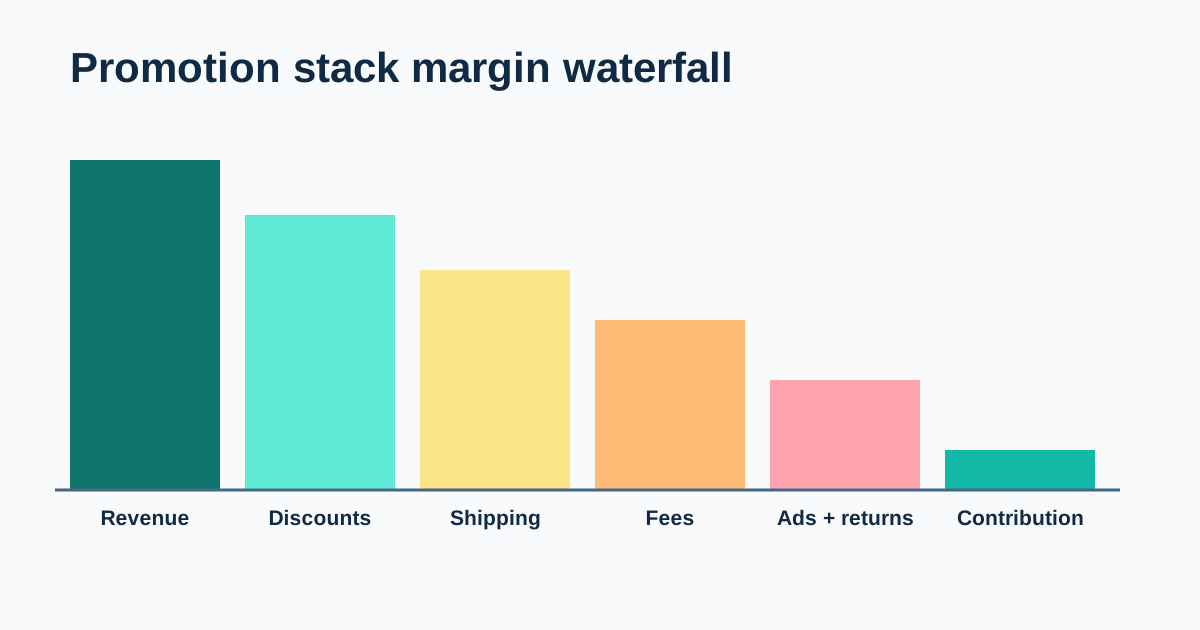
The default fixture starts with $60 gross merchandise revenue. A 5% item discount removes $3 and leaves $57. A 10% order coupon then removes $5.70, leaving $51.30. The model subtracts $4.10 of percentage fees, $2.57 of affiliate commission, $3 seller-funded shipping, $15 product cost, $1.50 packaging, $5 fulfillment, $3 advertising, and $1.50 expected return loss.
The resulting full-stack contribution is $15.63, or 26.1% of gross merchandise revenue. The matched single-coupon case contributes $23.68 because it excludes the item discount, seller-funded shipping, and affiliate commission. The entered extra stack therefore consumes $8.05 of contribution.
A 15% target margin requires $9 contribution, so the default full-stack case has a $6.63 modeled cushion. This is a deterministic fixture, not a recommendation: replace every default and verify whether the exact sequence, funding, fee basis, and commission basis describe the intended live checkout.
| Layer | Amount | Running merchandise or contribution |
|---|---|---|
| Gross merchandise revenue | $60.00 | $60.00 |
| 5% item discount | −$3.00 | $57.00 |
| 10% order coupon on $57 | −$5.70 | $51.30 |
| 8% fee and 5% affiliate commission | −$6.67 | $44.63 |
| Product, packaging, fulfillment, shipping, ads, returns | −$29.00 | $15.63 contribution |
How is the maximum order coupon at target solved?
The target contribution equals gross merchandise revenue multiplied by the entered target margin. The maximum-coupon solver holds the item discount, direct costs, seller-funded shipping, fee rate, affiliate rate, and target constant, then finds the coupon percentage that uses the remaining contribution-bearing revenue. The displayed rate is bounded from 0% to 100%.
A zero result can mean no coupon headroom remains; it does not mean a zero-value coupon is operationally valid. “No safe rate” appears when gross revenue or the post-item-discount subtotal is nonpositive, or when fee and commission rates leave no contribution-bearing revenue.
Treat the result as sensitivity under the estimator convention, not platform permission. Fixed fees, tax, buyer-paid shipping, minimum-spend conditions, product eligibility, funding reimbursements, tiered commissions, and redemption mix can move the actual boundary.
Use a target margin and an ordinary downside case
Break-even only means the modeled order is not negative. It does not cover unentered overhead, owner time, taxes, currency movement, policy changes, support load, or future product work. Use a declared target that reflects the operating buffer required for this decision.
Then rerun an ordinary downside case using supportable values: a higher carrier quote, less favorable product mix, greater ad spend per retained promoted order, a mature return-loss estimate, or the highest contractually plausible affiliate rate. Change one variable first, then combine the few movements that can realistically occur together.
Do not invent dozens of arbitrary scenarios. The useful question is which cost layer consumes the target cushion and where a stop rule belongs. Save the base, downside, source dates, and exact assumptions before launch.
Where should each input come from?
Use the current promotion manager and checkout simulator for eligibility, sequence, and the buyer-facing result. Use settlement or payment statements for seller-funded discounts and fees, affiliate reports for commission, carrier and fulfillment records for shipping, product records for unit costs, advertising reports for allocated spend, and mature refund cohorts for expected return loss.
Keep market, currency, time zone, product scope, promotion class, funding owner, calculation base, order-state filters, source access date, and formula version beside the aggregate inputs. A promotion screen proves configuration, not settlement; a receipt proves the buyer price, not every funding transfer; an ad report proves spend, not profit.
This public tool needs no buyer identity, address, message, payment detail, raw order export, private CSV, affiliate contact, credential, or token. Keep those records in the approved private environment and enter only aggregate values.
How should single-coupon and full-stack results be compared?
Hold the order grain and shared inputs constant. The single-coupon row uses the same gross merchandise revenue, coupon, product, packaging, fulfillment, advertising, return loss, fee rate, and target as the full-stack row. The second row adds the item discount, seller-funded shipping, and affiliate commission.
The contribution difference answers a cost question: how much do those entered layers reduce contribution if the same order occurs? It does not answer whether the promotion caused more orders, improved customer quality, changed repeat purchase, or generated incremental profit.
Measure volume and unit contribution separately after a mature window. Use observed-after language unless a credible experiment supports a causal statement.
What must be verified before release?
Record the correct account, market, product and variation, channel, promotion classes, dates, eligibility, combination settings, funding owners, fee and commission bases, budget or order cap, target, review date, stop trigger, and restoration steps. Confirm the intended buyer-facing checkout with a platform simulator or controlled test appropriate to the channel.
Safe-stop on a login or CAPTCHA ambiguity, platform warning, wrong profile, missing target context, unexpected promotion priority, unknown funding, or unreconciled basis. A saved configuration does not prove the intended offer is active.
Release only when the base and plausible downside cases meet the declared rule and rollback is executable. After launch, reconcile mature aggregate orders and pause or restore the prior configuration when contribution, funding, shipping, commission, returns, or account context violates the approved boundary.
What does this checker not prove?
The calculator does not certify whether offers can combine, which offer a platform will prioritize, which party funds a discount, or how a marketplace will calculate every fee, commission, refund, tax, or payout. It does not retrieve account data or reproduce checkout and settlement engines.
It also does not predict redemption, conversion, incremental demand, customer lifetime value, returns, ranking, AdSense approval, or revenue. A positive modeled contribution is necessary for some decisions but never sufficient evidence of campaign success.
Use it as an educational operating estimate. Verify current official guidance, account behavior, and first-party statements, and seek qualified tax, legal, or accounting advice when the decision requires it.
Coupon stack margin questions sellers commonly ask
Should seller-funded shipping reduce revenue or count as a cost? Keep it as a separate seller cost in this estimator. That preserves the merchandise-discount sequence and lets the operator change carrier or buyer-charge assumptions without rewriting the coupon. If a settlement report nets shipping differently, record the reconciliation instead of changing the economic fact.
Should a platform-funded coupon be entered? Enter only the amount the seller actually funds or fails to retain. A buyer may see a discount while the platform reimburses some or all of it. Use the order detail and payout statement to identify funding; do not infer the seller deduction from the banner.
Why does the order coupon cost less after an item discount? The default contract is sequential: the item discount changes the eligible merchandise subtotal, then the coupon percentage applies to that revised subtotal. That matches Shopify's documented product-then-order sequence for eligible combinations, but the current checkout remains the authority for another platform or offer class.
Why are percentage fees and affiliate commission calculated on the same amount? A single explicit post-discount basis makes the planning fixture deterministic. Real contracts can use different bases, fixed charges, thresholds, shipping, tax, or refund adjustments. When bases differ materially, calculate those charges separately and enter an effective rate only if it faithfully represents the selected order cohort.
Can a positive contribution justify launching the stack? No. The result must also clear the seller's target and plausible downside case, rely on verified eligibility and funding, fit inventory and service capacity, and have a bounded test and rollback. The calculator measures entered unit economics, not demand lift or policy compliance.
What should the seller do next?
Enter one representative order without private data, save the single-coupon and full-stack outputs, and replace every default with a current aggregate value. Label any unresolved funding, fee, commission, shipping, advertising, or return field as an assumption.
Run a checkout simulation, reconcile one mature payout sample, and test one ordinary downside case. If the stack clears the target and evidence gate, use a bounded launch with a stop trigger. If it fails, change one controllable lever—price, item discount, coupon, shipping, commission, ads, or direct cost—and rerun the matched cases.
Use the ten linked support pages for the formula, worked example, data map, error diagnosis, threshold design, comparison, operating routine, interpretation, and audit record.
Sources and further reading
- Shopify Help: Combining discounts: Official product, order, and shipping discount classes, eligibility, application order, combination settings, limits, best-offer behavior, and channel boundaries.
- Etsy Help: Redeem coupons and offers: Official distinction between shop and Etsy-funded coupons, combination behavior, and best-offer handling.
- Etsy Help: Etsy-funded coupons for sellers: Official seller-facing explanation of Etsy-funded coupon reimbursement and order-detail evidence.
- TikTok Shop Academy: Promotion stacking rules: Official promotion priority, stackability, platform-funded promotion, and Promotion Simulator guidance.
- TikTok Shop Academy: Seller coupons: Official seller-coupon funding, eligibility, application, and current combination guidance.
- Seller Profit Guard calculation methodology: Definitions for revenue, cost layers, expected loss, contribution, and editable assumptions.
- Seller Profit Guard terms and disclaimer: Operating-estimate boundaries and changing marketplace rule warning.
Related Seller Profit Guard tools
- Etsy CSV profit calculator: Run a local order profit check with editable fee and SKU cost assumptions.
- Payment reconciliation tool: Compare order rows with statement activity and flag unmatched rows.
- SKU cost library: Save or import material, labor, packaging, shipping, and target margin assumptions.
- Variant risk checker: Find missing SKUs and variation cost risks before a listing scales.
- Etsy title checker: Review listing-title clarity, repetition, keyword chains, and mobile scanning.
- Etsy tag checker: Review all 13 tag slots for duplicates, repeated meaning, and truthful coverage.
- Free shipping threshold calculator: Estimate when a shipping subsidy can still meet a target margin.
- Return window loss estimator: Model expected reverse shipping, restock work, recovery, and replacement loss.
- Etsy Ads break-even calculator: Estimate target-safe Etsy Ads spend, ACOS, and ROAS after fees, fulfillment, and expected return loss.
- CSV data privacy: Understand what the local-first workflow needs and what it does not need.
- Coupon Stack Formula: 12 Inputs That Matter: Build a coupon-stack contribution formula from 12 explicit seller inputs while separating platform rules, funding, bases, and assumptions.
- Coupon Stack Example: From $60 to Contribution: Follow a complete $60 coupon-stack example through sequential discounts, fees, shipping, affiliate commission, costs, and target comparison.
- Coupon Plus Free Shipping and Affiliate Fees: Model a coupon with free shipping and affiliate commission without hiding application order, funding, fee bases, or acquisition cost.
- 10 Coupon Stack Mistakes That Hide Losses: Diagnose ten coupon-stack errors involving sequence, bases, funding, shipping, fees, commission, ads, returns, scope, and interpretation.
- Coupon Stack Data Sources: Field by Field: Map every coupon-stack input to first-party checkout, promotion, settlement, cost, advertising, shipping, and return evidence.
- Set a Safe Coupon Stack Margin Threshold: Separate break-even, target, stress, and evidence thresholds before approving a coupon, shipping, affiliate, and advertising promotion stack.
- Single Coupon vs Full Promotion Stack: Compare one order coupon with item discount, free shipping, affiliate commission, fees, ads, and returns at the same order grain.
- Weekly Coupon Stack Review Routine: Run a repeatable weekly promotion review covering configuration, checkout, funding, orders, fees, shipping, ads, returns, action, and rollback.
- Read Coupon Stack Results Without False Precision: Interpret coupon-stack contribution as a bounded estimate rather than checkout proof, accounting profit, demand lift, or guaranteed margin.
- Coupon Stack Audit Checklist and Change Log: Audit promotion scope, rules, funding, formula, sources, fixtures, privacy, approval, release, feedback, exceptions, and rollback.
Use the interactive tool
Enable JavaScript to open the calculator and process browser-local inputs. The explanatory content and source links remain available without JavaScript.
Related guide: Turn remaining contribution into a break-even ROAS and CPA limit.
This tool provides operating estimates, not tax, accounting, legal, financial, or marketplace-policy advice. Verify current official sources and your own records before changing prices or operations.