Seller Profit Guard · How it works · CSV privacy
Handmade Labor Cost Calculator
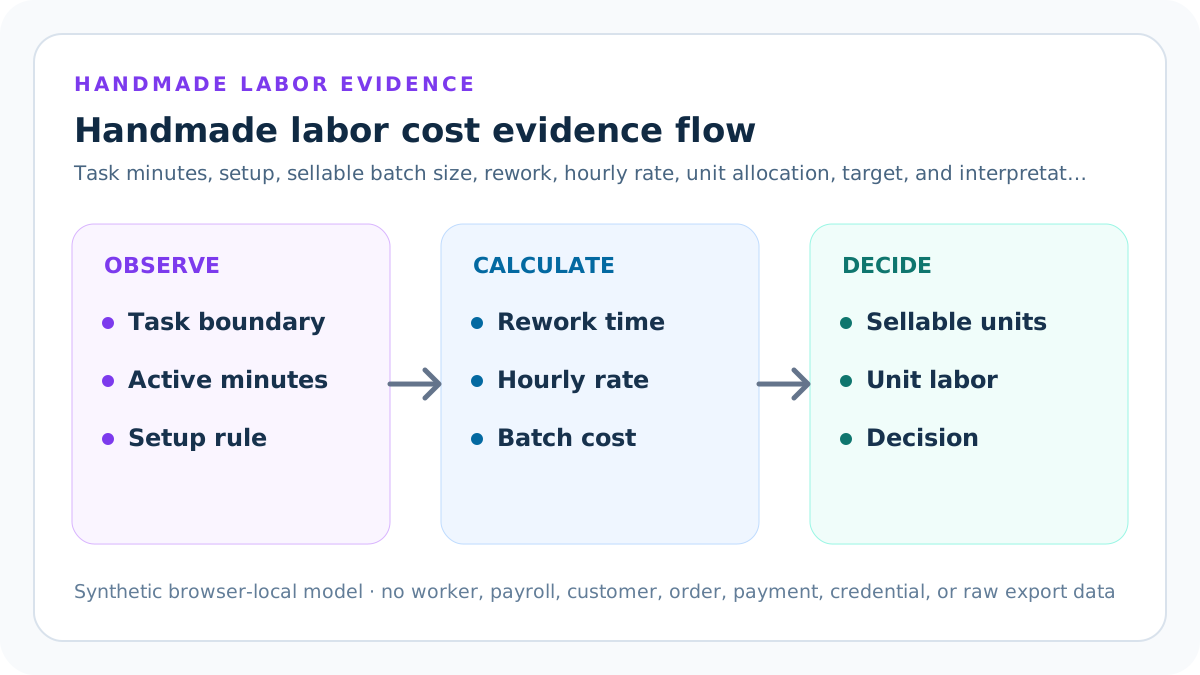
A handmade labor cost calculator adds setup time, active minutes across attempted units, and expected rework, converts total minutes with an hourly labor rate, then divides by expected sellable units. It shows production yield, unit labor cost, setup allocation, effective output per labor hour, and the gap to a seller-owned target.
Maintained by Seller Profit Guard Editorial Team. Last reviewed: 2026-07-31.
Define one handmade production task
Start with a production boundary that another reviewer can recognize: product version, material, dimensions, finish, tools, quality standard, packaging cutoff, operator skill class, and the exact start and stop event. A labor-cost result is meaningful only when every observation uses that same task definition.
Do not combine a prototype, a repeat unit, a personalized variation, and a repair in one average. Preserve each materially different workflow as a named scenario. The calculator models one privacy-safe task packet and does not require customer, order, employee, or payroll data.
Separate active labor from elapsed time
Active labor is the time during which a person performs or directly monitors the defined work under the chosen time-study rule. Elapsed curing, drying, cooling, machine-cycle, queue, carrier, or customer-response time may matter operationally, but it is not automatically active labor in this cost model.
Write the rule before timing. For example, include hands-on sanding and inspection, exclude unattended curing, and record separately any monitored machine cycle. This arithmetic rule is not a legal conclusion about compensable hours; employment and wage questions require jurisdiction-specific review.
Measure task minutes per attempted unit
Observe the repeated unit task from its declared start to stop event. Record several ordinary repetitions, unusual interruptions, quality failures, tool changes, and excluded outliers. Use a median or another documented statistic instead of selecting the fastest run as the permanent standard.
The default one-off fixture uses 45 active minutes. The twelve-unit fixture uses 18 minutes per attempted unit because the workflow is different and repeat handling reduces unit time. Multiply this figure by attempted units, not sellable units, so failed output does not erase labor already performed.
Measure setup and cleanup once per batch
Setup and cleanup includes tool preparation, fixture positioning, material staging, color or machine changeover, calibration, template loading, workspace reset, and required end-of-run cleanup that occurs once for the modeled batch. Enter the total minutes rather than hiding them inside every unit.
The calculator allocates setup across expected sellable units. A 20-minute setup allocated to one unit remains 20 minutes; a 30-minute setup allocated to twelve units becomes 2.5 minutes per unit. Larger batches can lower allocation, but only when the full batch is actually produced to the same specification.
Separate attempted and sellable units
Attempted units count every unit that receives the modeled repeated task. Sellable units count only output expected to satisfy the declared quality standard. Both must be positive whole numbers, and sellable units cannot exceed attempted units.
Multiply active task minutes by attempted units, then divide total batch labor cost by sellable units. This preserves labor spent on failed output instead of deleting it from the numerator or inflating the denominator.
Add an expected rework allowance
Multiply planned repeated-task minutes by the seller-entered rework allowance. Rework covers expected extra active time required to bring otherwise recoverable units to the declared quality standard: touch-up, correction, resealing, reinspection, relabeling, or another defined repair.
The allowance must come from comparable defect and recovery observations. It does not cover known scope conflict, a redesigned product, customer-requested changes, scrapped output, or seller-caused production failure without documentation. A high allowance should trigger process review rather than becoming invisible routine cost.
Convert minutes into labor cost
Total batch labor minutes equals setup and cleanup plus repeated unit task minutes plus expected rework minutes. Divide by 60 and multiply by the seller-entered hourly labor rate. Keep the full-precision time and cost values through the calculation, then round only the displayed outputs.
For the one-off fixture, 20 setup minutes plus 45 task minutes plus 4.5 expected rework minutes equals 69.5 minutes. At USD 24 per hour, batch labor cost is USD 27.80. That is also the unit labor cost because the sellable denominator is one.
Allocate batch labor to each sellable unit
Divide total batch labor cost by expected sellable units. The twelve-unit fixture combines 30 setup minutes, 216 repeated-task minutes, and 17.28 rework minutes. At USD 24 per hour, the batch costs USD 105.312 and the unrounded unit labor cost is USD 8.776.
The tool also shows setup cost per unit so the allocation remains visible. A one-dollar setup allocation in the twelve-unit fixture is not a universal batch benefit. It changes when batch size, changeover, product mix, quality checks, cleaning, or actual completion changes.
Read effective sellable units per labor hour
Divide expected sellable units by total batch labor hours. This output combines setup, repeated task, and expected rework into one observed production-rate indicator. The one-off fixture produces about 0.86 sellable units per labor hour; the batch fixture produces about 2.73.
Do not treat this rate as a quota, wage standard, worker comparison, or promise of future capacity. Use it to identify which process boundary changed, then inspect quality, fatigue, safety, material behavior, maintenance, learning, and product-mix evidence separately.
Compare the result with a seller-owned target
The target is a seller-entered operating threshold for labor cost per sellable unit. Target headroom equals the threshold minus calculated unit labor cost. Positive headroom means the modeled task clears that one boundary; negative headroom identifies the amount that requires review.
The default one-off has USD 2.20 headroom against a USD 30 target. The twelve-unit batch has USD 1.22 headroom against a USD 10 target, but USD -0.78 against an USD 8 target. The target does not prove price, affordability, fairness, profitability, or customer demand.
Complete the dated labor evidence contract
Record one real source-review date, a seller-entered maximum rework allowance, and a seller-entered maximum setup-to-task percentage. Confirm task identity, active-time rule, setup allocation, sellable-output denominator, rework basis, rate purpose, quality boundary, one-task grain, and accounting boundary.
These confirmations make missing evidence visible; they do not certify legal hours, wages, payroll, tax treatment, worker performance, safety, or accounting classification. Preserve protected source pointers and aggregate observations rather than names, schedules, payroll rows, customer records, or proprietary files.
Apply Block, Review, and Ready precedence
Block blank, nonfinite, negative, or structurally invalid time, batch, rate, rework, target, threshold, date, confirmation, currency, period, scope, or conflict evidence. Good-looking cost cannot compensate for a broken packet.
After structure passes, Review labor above target, rework above the seller-entered maximum, or setup share above the seller-entered maximum. Ready means only that the entered packet is structurally valid and clears its unit labor-cost target without those warnings.
Keep one-off and batch scenarios separate
A one-off unit often carries the full setup, template, staging, inspection, and cleanup burden. A repeated batch can spread those steps but may introduce fatigue, material drift, queueing, in-process inventory, quality sampling, changeover, and larger rework exposure.
Compare scenarios at the same product and quality grain. Change one variable at a time when diagnosing the difference. Do not claim an economy of scale when a new machine, lower finish standard, different worker, simplified design, or omitted inspection caused the apparent improvement.
Avoid stopwatch-only decisions
A stopwatch reading without task taxonomy, start-stop rules, sample size, operator context, quality outcome, interruptions, and outlier treatment cannot support a stable labor standard. Preserve the observation sheet and the reason for every exclusion or adjustment.
Use synthetic or aggregated observations in public documentation. Keep worker names, employee numbers, schedules, medical information, payroll, performance notes, customer identities, order IDs, private product files, and credentials out of public pages and screenshots.
Connect labor cost to pricing without confusing the terms
Labor cost per sellable unit is one component of a product cost packet. Pricing can also depend on materials, packaging, marketplace and payment fees, shipping, expected returns, acquisition, fixed business costs, taxes, target contribution, positioning, and commercial strategy.
Send the labor output to the product price floor or contribution margin workflow only after matching product, currency, period, and unit definition. Do not label labor cost as profit, owner pay, market price, or customer value.
Review the hourly labor-rate assumption
The tool multiplies active time by a seller-entered rate. Document what the rate is intended to represent, who owns it, when it was reviewed, and which costs are included or excluded. Keep wage, payroll burden, owner draw, contractor price, opportunity cost, and billing rate as separate concepts.
A calculator cannot determine minimum wage, overtime, employee status, payroll tax, benefits, or lawful compensation. Verify those matters with current official guidance and qualified local advice. The output is an internal product-cost assumption, not an employment record.
Build a reusable time-study packet
Record packet ID, task version, product and quality boundary, tool and material version, operator class, start-stop rule, active task observations, setup and cleanup, attempted and sellable counts, rework minutes, excluded events, statistic used, rate, currency, period, owner, and review trigger.
Store protected source pointers rather than private raw data in the public system. Another reviewer should be able to reproduce the aggregate calculation without seeing identity, customer, order, payment, personnel, or confidential production information.
Test the deterministic fixtures
Reproduce the one-off Ready fixture, the twelve-unit Ready fixture, the twelve-unit below-target Review, and each Block condition. Test finite numbers, one-cent or one-minute boundaries, whole-number batch validation, rework and setup thresholds, real source dates, confirmations, currency, period, scope, and declared conflicts.
A code change is not ready because the interface renders. Verify formulas, labels, mobile width, keyboard access, result wording, reset behavior, canonical, static HTML, schema, images, internal links, noindex or index state, and rollback path.
Use review triggers instead of arbitrary refreshes
Recalculate when task design, material, tooling, fixture, batch size, quality standard, worker skill class, rework rate, setup process, hourly rate, currency, or evidence period changes materially. Preserve the prior packet rather than overwriting it.
A dated change log lets the seller explain why unit labor cost moved. Content-production frequency is not evidence that a time standard changed. Do not revise the public formula merely to create freshness.
Interpret the result without false precision
USD 8.78 is a rounded display of the current assumptions, not a guarantee that every future unit consumes exactly that labor. Show the sample, variation, rework rule, setup allocation, and quality boundary beside the result.
When uncertainty is wide, keep low, expected, and high scenarios rather than hiding the range in a single rate. A Ready output does not prove safe capacity, worker performance, selling price, accounting profit, demand, revenue, or income.
Preserve rollback and correction
Before changing a public tool, price model, production standard, or related guide, save the prior inputs, formulas, outputs, screenshots, route state, sitemap membership, analytics state, and restoration command. Assign an owner and a concrete rollback trigger.
If formula, rounding, label, accessibility, content, source, route, analytics, or production behavior regresses, restore the prior verified version and document the correction. A reversible evidence trail is part of the operating result.
Choose the next action from the decision
If Block, repair the named structural or evidence field. If Review, isolate whether task time, setup allocation, batch size, rework, rate, or target creates the gap. If Ready, use the result as one versioned input in a broader cost and pricing decision.
Recheck the finished product and actual labor after the production run. Replace assumptions with comparable observations, preserve exceptions, and keep any public report aggregate and non-identifying.
Sources and further reading
- Seller Profit Guard methodology: Evidence precedence, comparable-grain calculations, deterministic fixtures, correction, release, and rollback.
- Seller Profit Guard data privacy: Local-first boundaries for seller, worker, customer, order, payment, contact, credential, and raw export data.
- U.S. Department of Labor: Hours Worked: Primary U.S. context for compensable-time questions; this calculator does not determine legal hours, employment status, or wages.
- IRS Publication 334 (2025): Primary U.S. context distinguishing manufacturing labor allocable to finished saleable product from other labor; this tool does not make a tax or accounting determination.
- IRS Schedule C instructions (2025): Primary U.S. record and cost-of-goods context, including the instruction not to deduct the value of an owner's own labor; this tool does not make a tax or accounting determination.
- U.S. Bureau of Labor Statistics: May 2025 Occupational Employment and Wages: Current primary U.S. occupational wage-estimate context; a May 2025 OEWS estimate is not a seller-specific all-in cost rate, payroll calculation, or lawful wage determination.
Related Seller Profit Guard tools
- Etsy CSV profit calculator: Run a local order profit check with editable fee and SKU cost assumptions.
- Payment reconciliation tool: Compare order rows with statement activity and flag unmatched rows.
- SKU cost library: Save or import material, labor, packaging, shipping, and target margin assumptions.
- Variant risk checker: Find missing SKUs and variation cost risks before a listing scales.
- Etsy title checker: Review listing-title clarity, repetition, keyword chains, and mobile scanning.
- Etsy tag checker: Review all 13 tag slots for duplicates, repeated meaning, and truthful coverage.
- Free shipping threshold calculator: Estimate when a shipping subsidy can still meet a target margin.
- Return window loss estimator: Model expected reverse shipping, restock work, recovery, and replacement loss.
- Etsy Ads break-even calculator: Estimate target-safe Etsy Ads spend, ACOS, and ROAS after fees, fulfillment, and expected return loss.
- CSV data privacy: Understand what the local-first workflow needs and what it does not need.
- Handmade Labor Cost Formula and Inputs: Define active minutes, setup, attempted and sellable counts, rework, hourly rate, unit labor cost, throughput, target, and evidence boundaries.
- One-Off Handmade Labor Cost Example: Calculate a one-off hand-finished unit from 45 active minutes, 20 setup minutes, 10% rework, USD 24 per hour, one sellable unit, and an USD 30 target.
- Batch Handmade Labor Cost Scenario: Allocate setup and rework across twelve sellable units using 18 active minutes per unit, 30 setup minutes, 8% rework, USD 24 per hour, and an USD 10 target.
- Handmade Labor Cost Calculation Mistakes: Correct active-time, elapsed-time, setup, batch, sellable denominator, rework, rate, rounding, scope, privacy, target, and interpretation defects.
- Reliable Handmade Labor Cost Data: Map task minutes, setup, attempted and sellable counts, rework, rate, target, period, quality, and scope to traceable sources.
- Safe Handmade Labor Cost Thresholds: Apply task, time, setup, batch, rework, rate, target, context, quality, evidence, interpretation, and reversibility gates.
- One-Off vs Batch Handmade Labor Cost: Compare a one-off and twelve-unit batch at the same product and quality grain without hiding setup, active time, rework, rate, output, or target changes.
- Weekly Handmade Labor Cost Routine: Run a repeatable task-version, time-study, setup, quality, rework, rate, fixture, exception, decision, correction, and rollback cycle.
- How to Interpret Handmade Labor Cost: Read setup, repeated task, rework, batch minutes, batch cost, unit allocation, effective output, target headroom, and decision without false precision.
- Handmade Labor Cost Audit Template: Use a dated checklist and change log for task identity, time, setup, sellable units, rework, rate, target, privacy, release, monitoring, and rollback.
Use the interactive tool
Enable JavaScript to open the calculator and process browser-local inputs. The explanatory content and source links remain available without JavaScript.
Related guide: Define active time, setup, sellable batch size, rework, rate, allocation, and decision boundaries.
This tool provides operating estimates, not tax, accounting, legal, financial, or marketplace-policy advice. Verify current official sources and your own records before changing prices or operations.