Seller Profit Guard · How it works · CSV privacy
Etsy VAT on seller fees calculator
Use this browser-local worksheet to estimate VAT, GST, or similar tax on Etsy seller fees for one monthly invoice. Confirm dated official guidance, the invoice and credit-note evidence, seller location, invoice treatment, VAT-ID context, eligible fee lines, buyer-tax exclusions, and comparable actual rows. It calculates gross and net VAT, reconciles subtotal and tax independently, and never decides tax status.
Maintained by Seller Profit Guard Editorial Team. Last reviewed: 2026-07-30.
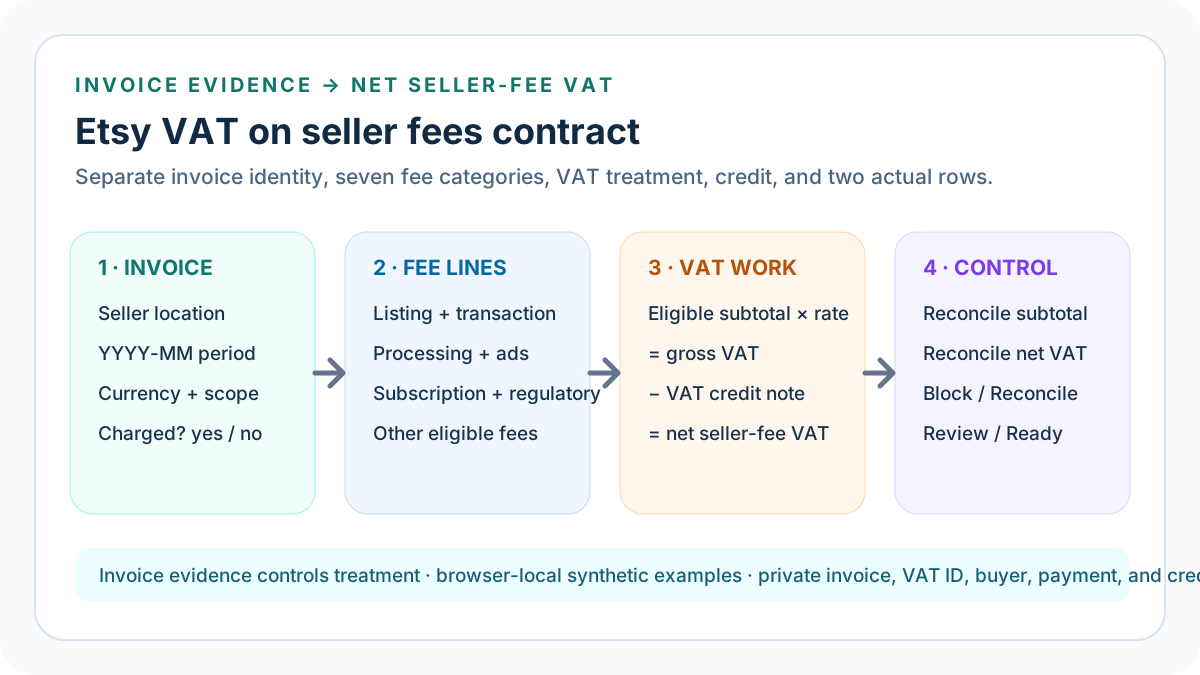
What this seller-fee VAT calculator solves
Etsy states that VAT or similar tax on seller fees depends on business status and location. The marketplace can summarize VAT-eligible fees on a monthly invoice, and Etsy Payments processing fees may also be subject to VAT where required. This calculator turns that invoice evidence into a transparent fee-subtotal, gross-tax, credit-note, and net-tax worksheet.
The model deliberately does not decide whether a seller should be charged VAT. Its charged or not-charged switch must come from the reviewed Etsy invoice and account context. That boundary prevents a public country rule, generic tax rate, or search result from replacing the seller's actual period evidence.
Complete the dated evidence confirmations first
Record real YYYY-MM-DD review dates for current Etsy seller-fee VAT guidance and for the invoice and related credit-note packet. Then confirm seller location, charged or not-charged invoice treatment, VAT-ID and business-status context, every included eligible fee line, buyer-tax exclusions, credit-note amount and period, and the two actual rows. A typed amount without these confirmations is not a complete evidence packet.
The exact calculator scope is one Etsy monthly VAT invoice. A Payment account balance, tax return, annual total, buyer invoice, customs document, or combined multi-month workbook must stay separate. Etsy says supported monthly VAT invoices appear on the first of the following month for the preceding statement and may be accompanied by a later-period credit note, so preserve both document periods instead of silently merging them.
Start with the invoice, not a headline tax rate
Record the seller location, invoice period in YYYY-MM form, three-letter currency, and evidence scope before entering tax amounts. Then use the current invoice to state whether Etsy charged VAT on the reviewed fee packet. If that treatment is unknown, the correct result is Block rather than an assumed tax amount.
A seller's VAT-ID treatment, business status, and marketplace rules can affect invoice handling. Preserve those facts in approved private evidence; do not publish tax identifiers or ask this browser-local calculator to infer a legal status from a country name.
Classify seven eligible seller-fee categories
The worksheet keeps listing, transaction, Etsy Payments processing, advertising, subscription, Regulatory Operating, and other eligible fees in separate fields. Enter only amounts that the current invoice treats as part of its VAT-eligible fee subtotal. Explicit zeroes are useful because they distinguish a reviewed empty category from an overlooked one.
Separate categories make changes explainable. If a later invoice begins or stops including one fee type, a reviewer can identify the affected line instead of reverse-engineering one opaque subtotal. Do not enter revenue, payout, product price, buyer shipping, marketplace-collected buyer tax, customs, or physical-goods import VAT.
Calculate the eligible fee subtotal
Add the seven nonnegative eligible fee categories at full precision. The default synthetic packet uses EUR 0.20 listing, EUR 3.25 transaction, EUR 1.55 processing, and EUR 0.57 Regulatory Operating fees. Advertising, subscription, and other eligible lines are zero, creating a EUR 5.57 subtotal.
Compare that model subtotal with the actual VAT-eligible fee subtotal on the invoice. This is the first independent reconciliation row. A matching tax value alone is insufficient because a wrong subtotal and compensating rate or credit can produce a plausible net amount.
Apply charged or not-charged invoice treatment
When the reviewed invoice charges VAT, multiply the eligible subtotal by the entered invoice tax rate. When the invoice does not charge VAT, the model returns zero gross and net VAT. That no-charge result describes only the entered invoice evidence and must not be presented as an exemption, legal conclusion, or future guarantee.
The control accepts only clear yes or no treatment. Unknown, ambiguous, or contradictory evidence remains Block. This is intentional: a sophisticated formula cannot repair a missing invoice, stale account context, unresolved VAT-ID treatment, or mixed evidence period.
Calculate gross VAT at full precision
For the default charged fixture, EUR 5.57 multiplied by 20% equals EUR 1.114 gross VAT. Keep the internal value at full precision even if the interface or invoice presents EUR 1.11. Early rounding can create repeated period differences and can obscure whether a credit note reconciles.
The rate is an editable invoice input, not a universal constant embedded in the tool. Recheck the actual invoice whenever location, business status, VAT-ID handling, Etsy policy, fee classification, period, or currency changes.
Handle VAT credit notes separately
A VAT credit note is subtracted after gross VAT to calculate net VAT. Do not subtract it from one fee category or silently reduce the eligible subtotal. Preserving original fee base, gross VAT, credit, and net VAT creates an accountable trail that can be corrected or restored.
The calculator blocks a negative credit and a credit larger than modeled gross VAT within the selected tolerance. If a credit document belongs to a different invoice period, preserve both periods and obtain qualified accounting or tax guidance before allocating it.
Reconcile actual net VAT
Compare modeled net VAT with the actual net-VAT row after the documented credit note. This is the second independent reconciliation. The eligible-subtotal and net-VAT differences are displayed separately so one favorable row cannot compensate for another unsupported row.
Choose a tolerance that reflects accountable currency presentation or statement precision. Do not increase tolerance to hide a missing fee category, mixed currency, wrong month, unsupported rate, unrecorded credit, or declaration conflict.
Read Block, Reconcile, Review, and Ready
Block covers invalid fee values, unknown treatment, an invalid charged rate, excessive credit, missing location, period, currency, or scope, and seller-declared evidence conflicts. Reconcile means one or both actual rows differ beyond tolerance. Review means the rows reconcile but net VAT exceeds the seller-owned ceiling.
Ready means only that the entered invoice treatment, eligible lines, calculation, credit, actual rows, and threshold pass. It does not authenticate an invoice, decide registration or liability, prepare a tax return, validate a payout, or prove product profitability.
Trace the default EUR fixture
The default synthetic packet totals EUR 5.57. Charged treatment at 20% produces EUR 1.114 gross VAT. With no credit note, net VAT remains EUR 1.114. Actual subtotal EUR 5.57 and actual net VAT EUR 1.114 produce zero differences within a EUR 0.01 tolerance.
The EUR 1.20 review ceiling passes, so the result is Ready. The fixture is a regression test and learning example, not a representation of a real seller, buyer, order, invoice, VAT ID, or Payment account.
Trace a monthly GBP credit-note fixture
A second synthetic fixture uses GBP 4 listing, GBP 65 transaction, GBP 30 processing, GBP 15 advertising, GBP 10 subscription, GBP 4.80 regulatory, and GBP 2 other eligible fees. The subtotal is GBP 130.80 and gross VAT at 20% is GBP 26.16.
A documented GBP 1.20 VAT credit reduces net VAT to GBP 24.96. Matching actual rows and a GBP 30 ceiling produce Ready. This example shows why a monthly invoice can include categories absent from one order and why the credit remains a separate evidence row.
Keep buyer VAT and customs outside this model
Seller-fee VAT is tax applied to fees Etsy charges the seller. It is not VAT collected from a buyer on a product, tax Etsy collects and remits in a marketplace transaction, customs duty, import VAT, or a carrier charge. Those flows have different bases, evidence, timing, and legal treatment.
Combining buyer and seller tax inflates cost or revenue and makes reconciliation impossible. Keep each flow in its appropriate source ledger, then carry only reconciled seller-fee VAT into the complete Etsy fee stack.
Use monthly invoices and Payment account evidence
Etsy's Help describes monthly VAT invoices for supported account contexts, while Payment account and statement tools expose fee categories, dates, credits, and balances. Use official policy to understand expected behavior and seller-owned evidence to establish what applied to the reviewed period.
When current public guidance and a historical invoice differ, preserve both rather than rewriting history. Record source access dates, invoice month, currency, and privacy-safe pointers, then classify the conflict for qualified review when it affects a material decision.
Move net VAT into the complete fee stack
After both actual rows reconcile, carry net seller-fee VAT into the Etsy Fee Stack Calculator. Retain the underlying listing, transaction, processing, advertising, subscription, regulatory, and other fee categories so VAT is not counted twice.
Then combine the reconciled fee stack with product cost, labor, packaging, shipping, returns, and a target contribution in Seller Profit Guard. Net seller-fee VAT is an expense layer, not revenue, payout, taxable income, contribution, accounting profit, or cash available to spend.
Test charged, credit, no-charge, and broken packets
Keep deterministic tests for the EUR 5.57 charged fixture, the GBP 130.80 monthly credit fixture, a documented no-charge invoice, and an unknown-treatment packet with two declared conflicts. Tests must preserve exact arithmetic, currency formatting, two-row reconciliation, threshold classification, and Block precedence.
A regression that accepts negative fees, infers treatment, applies a credit before gross VAT, hides a subtotal difference, mixes periods, or weakens declared-conflict handling must fail before release. All public examples remain synthetic and privacy-safe.
Release and recover the complete content cluster
Before release, retain narrow local and remote backups plus a rollback identifier. Run syntax and SVG validation, typecheck, unit and integration tests, production build, SEO/AEO, content and similarity audits, browser interaction, canonical and schema checks, image loading, and 390-pixel mobile QA.
Publish the parent tool and all ten support guides as one ordered cluster. Add self-canonicals, indexability, sitemap entries, guide-hub and tool backlinks together, purge only changed URLs and assets, verify public HTTP and calculation behavior, and restore the prior package after a critical live failure.
Privacy, independence, and professional limits
Seller Profit Guard is independent and unaffiliated with Etsy. This browser-local worksheet does not retrieve account data, authenticate invoices or VAT IDs, decide tax registration or liability, prepare returns, reproduce every jurisdiction, change marketplace state, or provide legal, tax, accounting, pricing, investment, or income advice.
Keep buyer names, emails, addresses, messages, order and listing IDs, invoice files, payment rows, tax identifiers, bank records, contacts, tokens, OAuth material, credentials, and raw exports outside public pages and reports. Use approved private-system pointers and qualified professional advice when material.
Sources and further reading
- Etsy VAT on Seller Fees Help: Business-status and location context, VAT-ID treatment groups, processing-fee VAT, monthly invoices, and credit notes.
- Etsy Fees and Payments Policy: Seller-fee policy, VAT-exclusive fee presentation, and the business-status and location boundary for VAT on monthly fees.
- Etsy Payment Account Help: Monthly statement, VAT statement, credit-note, fee, date, and balance evidence.
- Etsy Payment Processing Fee Help: Etsy Payments processing-fee scope and VAT applicability where required.
- Etsy VAT ID Help: VAT-ID account context and the boundary between Etsy records and legal tax obligations.
- Seller Profit Guard methodology: Evidence hierarchy, privacy-safe fixtures, deterministic decisions, bounded release, correction, and rollback.
Related Seller Profit Guard tools
- Etsy CSV profit calculator: Run a local order profit check with editable fee and SKU cost assumptions.
- Payment reconciliation tool: Compare order rows with statement activity and flag unmatched rows.
- SKU cost library: Save or import material, labor, packaging, shipping, and target margin assumptions.
- Variant risk checker: Find missing SKUs and variation cost risks before a listing scales.
- Etsy title checker: Review listing-title clarity, repetition, keyword chains, and mobile scanning.
- Etsy tag checker: Review all 13 tag slots for duplicates, repeated meaning, and truthful coverage.
- Free shipping threshold calculator: Estimate when a shipping subsidy can still meet a target margin.
- Return window loss estimator: Model expected reverse shipping, restock work, recovery, and replacement loss.
- Etsy Ads break-even calculator: Estimate target-safe Etsy Ads spend, ACOS, and ROAS after fees, fulfillment, and expected return loss.
- CSV data privacy: Understand what the local-first workflow needs and what it does not need.
- Etsy VAT on Seller Fees Formula and Inputs: Calculate Etsy seller-fee VAT from eligible fee lines, invoice treatment, tax rate, credit note, actual invoice rows, and reconciliation tolerance.
- Etsy Seller-Fee VAT Worked Example: Trace one synthetic Etsy fee packet through a EUR 5.57 eligible subtotal, 20% VAT, exact invoice reconciliation, and release decision.
- Monthly Etsy Seller-Fee VAT and Credit Note Example: Calculate a monthly GBP seller-fee VAT invoice with seven fee categories, a GBP 1.20 credit note, and separate subtotal and net-tax checks.
- 12 Etsy Seller-Fee VAT Mistakes: Correct seller-fee VAT errors involving tax status assumptions, eligible fee lines, buyer tax, processing fees, credits, periods, currencies, and rounding.
- Etsy Seller-Fee VAT Data Sources: Map each seller-fee VAT input to current Etsy policy, VAT invoice, Payment account, VAT-ID treatment, credit note, and privacy-safe evidence.
- Safe Etsy Seller-Fee VAT Decision Thresholds: Set non-compensating Block, Reconcile, Review, and Ready gates for fee eligibility, invoice treatment, VAT credits, actual rows, and net-tax exposure.
- Compare Etsy Seller-Fee VAT Scenarios: Compare charged, no-charge, credit-note, and changed-fee-mix Etsy invoice scenarios without turning them into universal tax advice.
- Monthly Etsy Seller-Fee VAT Reconciliation Routine: Run a repeatable monthly routine from invoice collection and fee-line classification through VAT credits, reconciliation, approval, and rollback.
- How to Read Etsy Seller-Fee VAT Results: Interpret the calculator decision, invoice treatment, fee-line tax, eligible subtotal, gross VAT, credit, net VAT, differences, threshold, and limits.
- Etsy Seller-Fee VAT Audit Template: Audit seller location, invoice treatment, eligible fee lines, VAT rate, credit note, actual rows, tolerance, decision, correction, approval, and rollback.
Use the interactive tool
Enable JavaScript to open the calculator and process browser-local inputs. The explanatory content and source links remain available without JavaScript.
Related guide: Build the invoice-level VAT worksheet before changing a fee stack or accounting treatment.
This tool provides operating estimates, not tax, accounting, legal, financial, or marketplace-policy advice. Verify current official sources and your own records before changing prices or operations.