Seller Profit Guard · How it works · CSV privacy
Etsy personalization instruction checker for focused custom fields
Enter the exact customization scope, one structured definition per field, current buyer instructions, format limits, synthetic valid and invalid examples, proof rules, missing-input handling, processing boundaries, known issues, and a dated evidence note. The checker returns eight deterministic checks plus Ready, Revise, Hold, or Block without opening buyer submissions.
Maintained by Seller Profit Guard Editorial Team. Last reviewed: 2026-07-25.
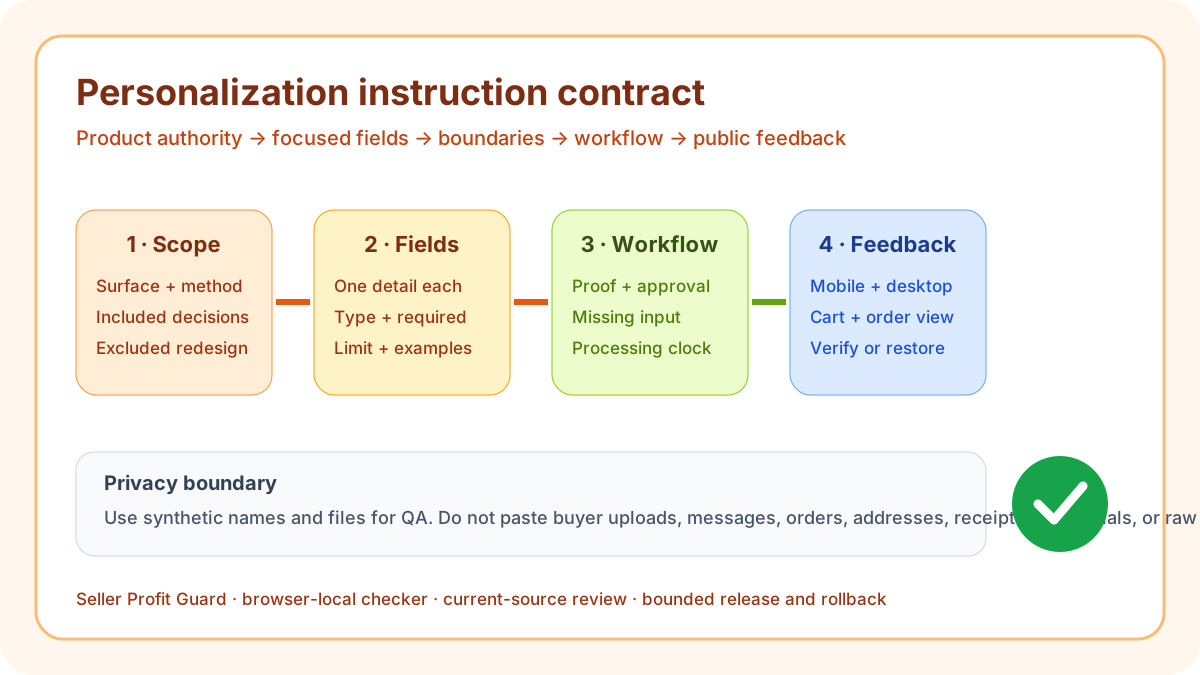
What the Etsy personalization instruction checker reviews
This tool reviews the seller-written contract behind a personalized Etsy item. It asks whether the exact customizable output is defined, whether each custom field collects one distinct detail through an appropriate type, whether the instructions explain the required action and format, and whether limits, paired examples, proofing, missing-input handling, processing, and evidence form a coherent path.
The output is deliberately narrower than a description rewrite or custom-order manager. It does not retrieve Etsy, inspect a buyer submission, open a file, verify a photograph, determine consent or intellectual-property rights, or approve a one-of-a-kind request. It surfaces structural instruction gaps before a seller applies a bounded field and copy change.
- Name the exact product surface and customization method.
- Give every buyer decision one focused field.
- State format, character, option, or file boundaries.
- Show synthetic valid and invalid examples.
- Define proof, exception, and processing behavior.
- Block every known vague, unsafe, conflicting, or stale record.
Start with the approved customization scope
Define what the seller can reliably produce before asking the buyer for data. “Engrave one buyer-supplied name on the front of the pendant in the selected font” is a scope. “Personalize this item” is not. Record the base product, customizable surface, production method, placement, included decisions, and excluded redesign, material, rush, or open creative work.
Use the product specification and production template as authority rather than inferring capability from an existing text box. A public field can be stale, optional when production requires it, or broad enough to accept an impossible request. Preserve current fields and dependent copy before repair, and keep a dated reviewer and rollback identifier.
Use one field for one buyer decision
Etsy's current personalization guidance recommends focused fields and offers text boxes, option lists, and file uploads. Exact engraving text belongs in a text box; a finite font set belongs in an option list; a reference image belongs in a file field when that workflow is supported. Name, date, font, orientation, gift note, needed-by request, and redesign brief should not be hidden in one overloaded Details prompt.
The checker expects each field-definition line to include a unique label, supported type, required or optional state, and concrete limit or option set. It enforces Etsy's current boundaries: up to five Custom options fields, a 1–1,024 character Text box limit, 2–30 unique List of options values, and at most one File upload field with up to 10 files, 100 MB each, in .jpg, .png, .svg, .heic, or .pdf. Verify the current editor before publication because interface and account behavior can change.
Write instructions that specify an action and format
Tell the buyer what to enter, select, or upload and which details materially affect the output. Engraving instructions can name exact spelling, capitalization, punctuation, character count, line breaks, and font. Portrait instructions can name subject count, orientation, crop margin, format, resolution, background, and composition boundaries.
Avoid vague verbs such as describe or send without defining completeness. A field should let a buyer and production operator reach the same interpretation. The checker looks for action and format language, but a passing phrase does not prove the rule is true; reconcile it with the product, production template, sample, and current public field.
Set concrete limits without collecting unsafe data
A limit turns open text into an operational input. State maximum characters, allowed symbols, option set, subject count, accepted file type, useful resolution, orientation, dimensions, or other constraint that controls production. Do not set an arbitrary marketing number: the boundary should come from the engraving area, embroidery frame, print crop, file workflow, material, or fulfillment method.
Do not ask for phone numbers, email addresses, postal addresses, payment information, passwords, identity numbers, or unrelated personal history through personalization. Collect only the minimum information needed to produce the purchased customization, keep private submissions out of public content and analytics, and use synthetic fixtures in this checker.
Use paired examples as executable tests
Provide at least one synthetic valid and one invalid example. For a 20-character engraving field, Amelia, M. Chen, or Anne-Marie may demonstrate permitted capitalization and punctuation, while an over-limit sentence, emoji, or unsupported redesign request demonstrates the correction path. Examples should match current fields and production templates rather than serving as decorative copy.
A custom portrait can use artificial test images and filenames to demonstrate accepted format, resolution, subject count, visibility, crop, and orientation. Never copy a real buyer portrait, name, message, order, address, receipt, or private file into a tool, guide, report, screenshot, analytics event, feedback form, or community draft.
Define proof, approval, and revision rules
Say whether the standard item receives a proof. If no proof is sent for text-only engraving, state that production follows the submitted text. When proofing exists, define eligibility, what the proof shows, how approval is given, the response window, revision count, which change becomes new scope, and when production begins.
Proof included is not an operational contract. It can create an impossible promise when the processing profile, workload, or communication workflow cannot support it. The checker requires proof and timing language, but public verification and production evidence must confirm that the workflow actually behaves as approved.
Handle missing or ambiguous input without guessing
Define what happens when a required field is blank, over limit, contradictory, unsafe, unsupported, or paired with an unusable file. A safe default is to pause production, send one focused Etsy Message, identify the failed requirement, and request correction. Do not infer spelling, capitalization, date, font, crop, identity, or consent from a profile or prior order.
Also define no-response behavior, escalation owner, cancellation boundary, and whether the processing clock pauses. An exception procedure protects both buyer expectations and the seller's production record. It should not force off-platform communication or collect additional private data simply to meet a date.
Keep processing, proof waiting, and transit separate
Etsy defines processing time as the time needed to get an order ready to ship, and custom work should be reflected in that operating estimate. Reconcile custom-field copy, description, proof procedure, capacity record, processing profile, and public ship-by expectation. A personalized order should not inherit a ready-to-ship promise that excludes fabrication.
Proof waiting, production, dispatch preparation, and carrier transit are different clocks. State the event that starts production and how buyer response affects the workflow without inventing platform behavior. Needed-by requests remain requests unless the approved product, capacity, service, and public promise support them.
Separate personalization from variations and custom listings
Use a variation when the buyer selects from a finite set that can affect inventory, total price, SKU, photo, quantity, or processing. Use personalization for focused buyer information such as exact text, a date, or a permitted file. Use a custom-order workflow for a one-off request whose design, materials, composition, scope, price, or timing must be negotiated for one buyer.
A font option may fit a list; the exact name fits text; a portrait reference fits a file; an entirely new sculpture or unlisted product architecture may require a custom listing. Do not label an option Custom and imply that unlimited work is included at the default price and processing time.
Treat add-on pricing as a separate optional text-field rule
Etsy currently supports add-on pricing only for optional Text box Custom options. The documented amount must be numeric and between $0.20 and $500 USD equivalent in the listing currency. A required text field, List of options, or File upload field does not satisfy that add-on contract, and a variation price remains the total price for that product version rather than an add-on.
The checker does not calculate or certify a live Etsy total. Record any approved add-on separately, then verify the optional state, amount, shop currency, updated item total, receipt, order detail, and rollback value in the correct account. Do not use a hidden description promise or an off-platform payment request to compensate for a field that cannot carry the price.
Interpret Ready, Revise, Hold, and Block literally
Ready means all eight deterministic checks pass, no known instruction issue is declared, and the evidence note is current. Revise means scope, fields, instructions, limits, examples, proof, exceptions, or processing is incomplete. Hold means structural checks pass but evidence is incomplete. Block means the seller has declared an unresolved vague, conflicting, unsafe, or stale instruction record.
A Ready result is not proof of product eligibility, buyer file quality, consent, rights, public field behavior, total price, inventory, fulfillment, delivery, conversion, fewer questions, refunds, revenue, or search visibility. It means only that the entered instruction contract is internally coherent enough for bounded backup, release, and public QA.
Release safely and verify both buyer and seller paths
Save current field labels, types, order, required state, limits, options, upload controls, pricing behavior, dependent copy, examples, images, processing profile, and a rollback identifier. Apply one approved set to the correct listing and account. Safe-stop on login or CAPTCHA ambiguity, a platform warning, wrong profile, missing target context, or unexpected editor behavior.
After publication, inspect mobile and desktop labels, controls, required indicators, options, upload behavior, examples, total price, processing estimate, cart summary, and seller order representation with synthetic inputs. Restore the prior configuration when a critical path differs. Search and conversion signals are later observations, not same-day release proof.
- Freeze product and production authority.
- Define focused fields and input boundaries.
- Run complete and deliberately broken fixtures.
- Back up fields, copy, assets, and profile links.
- Release one approved personalization set.
- Verify public and seller paths or restore the backup.
Limitations, privacy, and responsible use
The checker runs locally on seller-entered text and synthetic examples. It does not need buyer names, portraits, emails, addresses, messages, order IDs, receipts, payment data, raw CSV rows, passwords, tokens, OAuth records, or private files. Keep real submissions in the approved private system with suitable access and retention controls.
Seller Profit Guard is independent and unaffiliated with Etsy. The checker does not retrieve or alter Etsy data, open uploads, inspect likeness or intellectual-property rights, verify product truth, reproduce every marketplace or account feature, certify legal or policy compliance, or predict ranking, clicks, conversion, sales, refunds, delivery, AdSense approval, or income. It provides operational QA, not legal, tax, accounting, privacy, accessibility, fulfillment, search, or marketplace-policy advice.
Sources and further reading
- Etsy Help: How to offer personalized listings: Current official five-field limit, Text box, List of options and File upload contracts, file limits, personalization-versus-variation boundary, and optional text-box add-on pricing.
- Etsy Help: How to create a listing: Current official personalization instructions, character boundary, required state, item options, and physical or digital listing context.
- Etsy Help: How buyers request personalized or custom items: Current buyer-facing personalization, file instruction, message, custom request, price, timing, and transaction path.
- Etsy Help: Processing profiles and ship-by dates: Current official made-to-order preparation, processing-profile, and ship-by expectation context.
- Etsy Seller Policy: Current official accuracy, representation, privacy, communication, service, and seller-responsibility boundaries.
- Seller Profit Guard methodology: Evidence hierarchy, privacy boundary, deterministic fixtures, uncertainty, verification, correction, and rollback controls.
Related Seller Profit Guard tools
- Etsy CSV profit calculator: Run a local order profit check with editable fee and SKU cost assumptions.
- Payment reconciliation tool: Compare order rows with statement activity and flag unmatched rows.
- SKU cost library: Save or import material, labor, packaging, shipping, and target margin assumptions.
- Variant risk checker: Find missing SKUs and variation cost risks before a listing scales.
- Etsy title checker: Review listing-title clarity, repetition, keyword chains, and mobile scanning.
- Etsy tag checker: Review all 13 tag slots for duplicates, repeated meaning, and truthful coverage.
- Free shipping threshold calculator: Estimate when a shipping subsidy can still meet a target margin.
- Return window loss estimator: Model expected reverse shipping, restock work, recovery, and replacement loss.
- Etsy Ads break-even calculator: Estimate target-safe Etsy Ads spend, ACOS, and ROAS after fees, fulfillment, and expected return loss.
- CSV data privacy: Understand what the local-first workflow needs and what it does not need.
- Etsy Personalization Instructions: Inputs and Checks: Define customization scope, focused fields, buyer instructions, format limits, examples, proofing, exceptions, processing, issues, and evidence.
- Etsy Engraving Instructions Worked Example: Build a two-field engraved-name workflow with exact text, font options, limits, examples, no-proof handling, processing, release, and recovery.
- Etsy Custom Portrait Input Instructions: Translate a custom portrait workflow into subject, composition, file, approval, revision, missing-input, processing, and privacy-safe controls.
- 12 Etsy Personalization Instruction Mistakes: Diagnose overloaded prompts, missing format limits, unsafe data requests, contradictory examples, proof ambiguity, timing drift, and untested public fields.
- Evidence Sources for Etsy Personalization Instructions: Map product scope, field definitions, examples, production templates, proof rules, processing, platform behavior, and public feedback to accountable sources.
- Etsy Personalization Instructions: Ready to Block: Apply non-compensating Ready, Revise, Hold, and Block gates to field scope, limits, examples, proofing, exceptions, processing, and evidence.
- Etsy Engraving vs Custom Portrait Instructions: Compare a two-field text-and-font engraving workflow with a multi-stage file, composition, proof, and revision portrait workflow.
- Weekly Etsy Personalization Instruction Routine: Turn product, field, example, pricing, proof, exception, processing, and public-state changes into a bounded weekly evidence loop.
- How to Read an Etsy Personalization Instruction Report: Interpret eight checks, field count, Ready, Revise, Hold, Block, limitations, evidence gaps, and the next repair without false precision.
- Etsy Personalization Instruction Audit Template: Record scope, fields, limits, examples, proofing, exceptions, processing, fixtures, release, public observations, rollback, and privacy controls.
Use the interactive tool
Enable JavaScript to open the calculator and process browser-local inputs. The explanatory content and source links remain available without JavaScript.
Related guide: Build the personalization input contract before editing.
This tool provides operating estimates, not tax, accounting, legal, financial, or marketplace-policy advice. Verify current official sources and your own records before changing prices or operations.