Seller Profit Guard · How it works · CSV privacy
Etsy multi-quantity fee calculator
Use this browser-local calculator to model two separate Etsy.com Payment account rows for one dated and confirmed order pattern. It subtracts the already-listed first item, counts additional quantities, adds one auto-renew-sold event when quantity remains, applies each fee family's evidence-period effective posting-time conversion, and reconciles both rows before reporting per-order and per-unit cost.
Maintained by Seller Profit Guard Editorial Team. Last reviewed: 2026-07-30.
What this multi-quantity fee calculator solves
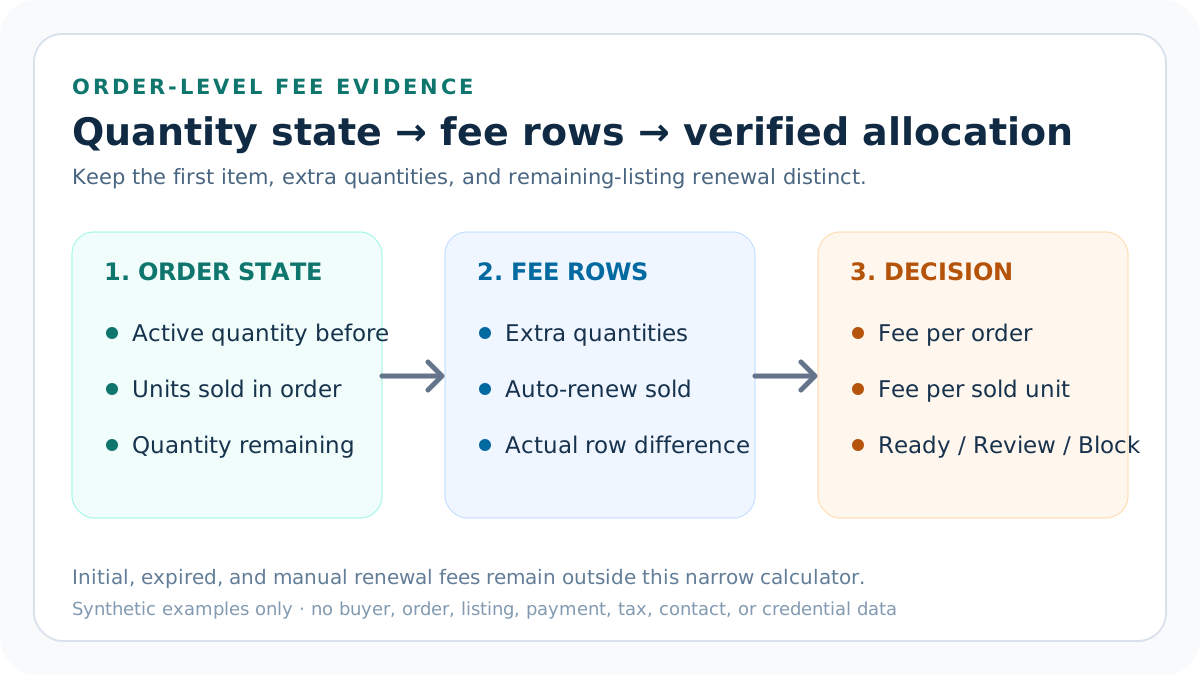
An Etsy order can create sale-triggered listing fees in more than one way. Additional units in the same transaction can create multi-quantity fees, while a sale that leaves quantity active can create an auto-renew-sold fee. The amount may match while the trigger, statement label, and operating interpretation differ.
This calculator answers one narrow question: what incremental multi-quantity and auto-renew-sold fee rows should one documented order pattern create? It excludes the initial listing fee, expired or manual renewals, every percentage fee, operating cost, payout, tax result, inventory forecast, and profit conclusion.
Start after the initial listing fee
Etsy's current multiple-quantity guidance says the first sold item is already covered by the listing. The calculator therefore starts with extra quantities in the reviewed transaction rather than charging the first unit again. The initial publication fee belongs in the broader listing-renewal-cost record.
Keeping that boundary prevents double counting when this result later enters the complete fee stack. If the initial listing, expired renewal, or manual renewal occurred in the same period, record it in the Listing Renewal Cost Calculator, not in this order-level incremental subtotal.
Verify the quantity equation before calculating fees
Enter the active listing quantity immediately before the reviewed order, units sold in that order, and quantity remaining immediately afterward. The calculator requires active quantity minus units sold to equal remaining quantity. Every field must be a supported whole-number observation.
A broken quantity equation returns Block before economics are considered. Confirm the dated order pattern explicitly. Today's inventory cannot replace the state around an older order, and the quantity originally offered cannot replace units actually sold. Preserve an approved evidence pointer without copying private identifiers into public files.
Count extra-quantity fee events
For each reviewed order, subtract one from units sold and never go below zero. A two-unit order has one extra quantity; a ten-unit order has nine. Multiply that count by the number of orders only when every repeated order truly shares the same quantity-before, sold, and remaining pattern.
The formula models expected multi-quantity rows under Etsy's current published explanation. It does not authenticate what posted to one seller's Payment account. Reconcile the modeled subtotal with the actual multi-quantity row and return Reconcile when the difference exceeds the entered tolerance.
Count auto-renew-sold events separately
When an order leaves quantity active, Etsy explains that the listing can automatically renew and remain for sale. The calculator models one auto-renew-sold event for each repeated order pattern with quantity remaining above zero. A sellout pattern models zero such events.
Do not merge this event with the extra-quantity row simply because the current fee amount is the same. Multi-quantity describes additional units in one transaction; auto-renew sold describes remaining listing availability. The two actual Payment account rows provide separate feedback sensors.
Use the current USD rule and per-family conversion evidence
Etsy currently publishes $0.20 USD to create or renew an Etsy.com listing and uses that amount in its multiple-quantity examples. The calculator validates this current source value and requires confirmation that the rule applies to the dated order evidence.
For a non-USD Payment account, Etsy says each listing fee can be converted at the market rate when reflected. Enter the same-evidence-period effective model-currency-per-USD rate separately for the multi-quantity and auto-renew-sold families, then confirm the posting-time conversion evidence. Repeated orders may use a documented effective family rate derived from their matching rows; the tool never relabels USD as another currency.
Reproduce the two-unit sellout fixture
The default uses active quantity two, two units sold, zero remaining, and one reviewed Etsy.com order. Two sold units minus the first item produces one multi-quantity event. Zero remaining quantity produces no auto-renew-sold event.
At USD 0.20, the modeled and actual multi-quantity row is USD 0.20 and the actual sold-renewal row is USD 0.00. The calculator reports USD 0.20 incremental fees, USD 0.20 per order, USD 0.10 per sold unit, and Ready under the default USD 0.50 target.
Reproduce Etsy's quantity-ten fixture
Set active quantity ten, units sold ten, remaining quantity zero, one order, USD 1.80 actual multi-quantity fees, and a USD 2.00 per-order target. Ten sold units minus the first item creates nine expected extra-quantity events.
Nine multiplied by USD 0.20 equals USD 1.80. With zero remaining quantity, the modeled auto-renew-sold row stays zero. The result is USD 1.80 per order and USD 0.18 per sold unit, matching the incremental portion of Etsy's current quantity-ten example.
Reproduce the one-of-three partial-sale fixture
Set active quantity three, one unit sold, two remaining, one order, zero actual multi-quantity fees, and USD 0.20 actual auto-renew-sold fees. One sold unit creates no additional quantity, while the two remaining units support one expected sold-renewal event.
The calculator returns USD 0.20 incremental fees and USD 0.20 per sold unit when the actual rows reconcile. This fixture is not interchangeable with a two-unit order or a sellout because the transaction grain and remaining listing state differ.
Treat repeated order patterns cautiously
The order-count field is a compact reconciliation helper, not permission to combine different transactions. When order count exceeds one, the calculator requires explicit confirmation that units sold, active quantity before, remaining quantity after, channel, fee, currency, and actual row grouping are identical.
If the listing quantity changes between orders, model each pattern separately or use a privacy-safe aggregate that preserves the event sequence. Do not multiply one convenient fixture across a month when replenishment, variations, channel changes, refunds, credits, or listing state changed.
Reconcile the two Payment account rows
Compare modeled multi-quantity fees with the confirmed multi-quantity Payment account row and modeled auto-renew-sold fees with the confirmed sold-renewal row. Use full precision and one nonnegative tolerance for presentation or supported conversion effects; do not net unrelated taxes or credits into a favorable combined total.
A difference above tolerance returns Reconcile. Investigate missing or grouped event labels, order timing, quantity evidence, converted currency, VAT or similar seller-fee tax, credits, refunds, private-listing scope, Pattern, Square, and statement dates before changing the expected formula.
Use Block, Reconcile, Review, and Ready correctly
Block means a required field is invalid or unresolved: a rule other than the current $0.20 USD, nonpositive or unconfirmed per-family conversion, USD rate other than 1:1, source review before the order evidence, fractional or negative quantity, impossible active-minus-sold relationship, invalid dates, wrong Etsy.com scope, unconfirmed pattern, rule, rows, repeated grain or exclusions, negative actual row, or declared conflict.
Reconcile means the order context is valid but one expected fee row differs from the actual row. Review means both rows reconcile but incremental fees per order exceed the seller-owned target. Ready means the quantity pattern is valid, both rows reconcile, and the order-level target passes.
Read per-order and per-unit outputs together
Incremental fee per order describes the sale-triggered listing-fee exposure for the reviewed transaction pattern. Incremental fee per sold unit allocates the same subtotal across documented units. Each denominator answers a different operating question and should remain visible.
A bulk order can have a larger per-order subtotal while retaining a smaller per-unit allocation. That does not prove the bulk order is more profitable. Product, labor, packaging, shipping, transaction, processing, ads, tax, discounts, refunds, and returns still determine contribution.
Keep Etsy.com, Pattern, Square, and private scope explicit
The default channel is Etsy.com because Etsy's multiple-quantity examples and listing fee policy support that scope. Pattern-only listings, Etsy.com plus Pattern, Square-synced or non-synced sales, and private listings can produce different fee timing or labels.
This contract requires the exact Etsy.com label and explicit confirmation that private listing, Pattern, and Square exceptions were reviewed. A supported quantity cannot compensate for wrong scope, and current public guidance cannot silently rewrite a historical statement without rule-applicability evidence.
Move reconciled rows into the full cost system
After both sale-triggered listing-fee rows reconcile, move them into the Etsy Listing Renewal Cost Calculator with initial, expired, and manual events from the complete evidence period. That produces a period-level listing-cost numerator without double counting.
Then move the complete listing-cost row into the Etsy Fee Stack Calculator and Seller Profit Guard. Add transaction, bank-country processing, Offsite Ads, conversion, regulatory, seller-fee tax, product, labor, packaging, shipping, discounts, returns, and contribution targets.
Test the supported and broken fixtures
Keep deterministic tests for the two-unit USD sellout, quantity-ten example, one-of-three partial sale, distinct per-family conversion, source-after-order date coverage, repeated-pattern refusal, and invalid source, date, scope, confirmation, negative-value, and conflict packets. Preserve event counts, row differences, target, and decision precedence.
A regression that changes first-item subtraction, remaining-quantity logic, order multiplier, per-family conversion, USD parity, raw negative handling, date coverage, evidence confirmation, or Block precedence must fail before release. The tests use synthetic data and require no private orders, listings, buyers, or statements.
Release and recover the complete cluster
Before release, retain narrow local and remote backups and a rollback identifier. Run syntax, SVG validation, typecheck, unit and integration tests, build, SEO/AEO, content and similarity audits, browser interaction, canonical and schema checks, image loading, and 390-pixel mobile QA.
Publish the parent tool and all ten support pages only as one ordered cluster. Add their self-canonicals, indexability, sitemap entries, guide-hub and tool backlinks together, purge only changed URLs and assets, verify public HTTP and behavior, and restore automatically after any critical live failure.
Privacy, independence, and professional limits
Seller Profit Guard is independent and unaffiliated with Etsy. Listing fees, multiple-quantity presentation, renewal behavior, channel treatment, taxes, credits, conversion, and Payment account labels can change. Verify current official Etsy sources and the seller's actual account before a material decision.
Keep buyer names, emails, addresses, messages, order IDs, listing IDs, payment rows, bank details, tax identifiers, tokens, OAuth material, credentials, and raw CSV outside public pages and reports. This browser-local estimate is operating guidance, not legal, tax, accounting, inventory, payout, demand, or income advice.
Sources and further reading
- Etsy Multiple Quantity Listing Fees: Current first-item, extra-quantity, remaining-quantity, quantity-ten, fee-label, and currency-conversion examples.
- Etsy Fees and Taxes Overview: Current listing, multi-quantity, auto-renew-sold, private-listing, expiry, and surrounding fee boundaries.
- Etsy Fees and Payments Policy: Controlling fee, renewal, multiple-quantity, Pattern, Square, currency, and seller-responsibility terms.
- Etsy Payment Account Help: Actual fee, tax, credit, conversion, statement, balance, and date-row reconciliation context.
- Etsy Pattern Listing Help: Pattern-only and Etsy.com sale-trigger listing-fee scope.
- Seller Profit Guard methodology: Evidence hierarchy, privacy-safe fixtures, deterministic decisions, bounded release, correction, and rollback.
Related Seller Profit Guard tools
- Etsy CSV profit calculator: Run a local order profit check with editable fee and SKU cost assumptions.
- Payment reconciliation tool: Compare order rows with statement activity and flag unmatched rows.
- SKU cost library: Save or import material, labor, packaging, shipping, and target margin assumptions.
- Variant risk checker: Find missing SKUs and variation cost risks before a listing scales.
- Etsy title checker: Review listing-title clarity, repetition, keyword chains, and mobile scanning.
- Etsy tag checker: Review all 13 tag slots for duplicates, repeated meaning, and truthful coverage.
- Free shipping threshold calculator: Estimate when a shipping subsidy can still meet a target margin.
- Return window loss estimator: Model expected reverse shipping, restock work, recovery, and replacement loss.
- Etsy Ads break-even calculator: Estimate target-safe Etsy Ads spend, ACOS, and ROAS after fees, fulfillment, and expected return loss.
- CSV data privacy: Understand what the local-first workflow needs and what it does not need.
- Etsy Multi-Quantity Fee Formula: Calculate Etsy extra-quantity and auto-renew-sold fee rows from one order pattern, current fee, actual statement evidence, currency, and target.
- Two-Unit Etsy Multi-Quantity Fee Example: Trace a two-unit Etsy order that sells out active quantity, creates one extra-quantity fee, and allocates USD 0.20 across two units.
- Etsy Quantity-Ten Fee Worked Example: Reproduce Etsy's current quantity-ten example with nine extra-quantity events, USD 1.80 incremental fees, and USD 0.18 per sold unit.
- 12 Etsy Multi-Quantity Fee Mistakes: Correct extra-quantity fee errors involving the first item, order grouping, remaining quantity, event labels, channel, currency, credits, and scope.
- Etsy Multi-Quantity Fee Data Sources: Map units sold, active and remaining quantity, event labels, channel, currency, actual fees, credits, tolerance, and targets to reliable evidence.
- Safe Etsy Multi-Quantity Fee Thresholds: Set quantity, channel, row-reconciliation, per-order target, currency, and evidence gates for Etsy multi-quantity fee decisions.
- Etsy Multi-Quantity vs Auto-Renew-Sold Fees: Compare an order that sells out a listing with one that leaves quantity active, using identical fee, currency, evidence, and statement columns.
- Weekly Etsy Multi-Quantity Fee Routine: Run a privacy-safe routine for quantity patterns, multi-quantity and auto-renew rows, channel, currency, decisions, correction, and rollback.
- How to Read Etsy Multi-Quantity Fees: Interpret quantity equations, expected events, actual differences, per-order and per-unit allocations, target, channel, and evidence state.
- Etsy Multi-Quantity Fee Audit Checklist: Audit order quantity, active and remaining listing state, expected and actual fee rows, differences, correction, approval, and rollback evidence.
Use the interactive tool
Enable JavaScript to open the calculator and process browser-local inputs. The explanatory content and source links remain available without JavaScript.
Related guide: Build the order-quantity worksheet before changing listing quantity or price.
This tool provides operating estimates, not tax, accounting, legal, financial, or marketplace-policy advice. Verify current official sources and your own records before changing prices or operations.