Privacy Policy
Last updated: 2026-07-12
Maintained under the Seller Profit Guard editorial policy.
Seller Profit Guard is designed so the core CSV profit workflow can run locally in the browser. Raw order files, buyer names, addresses, and private order details are not required for the free CSV analysis workflow.
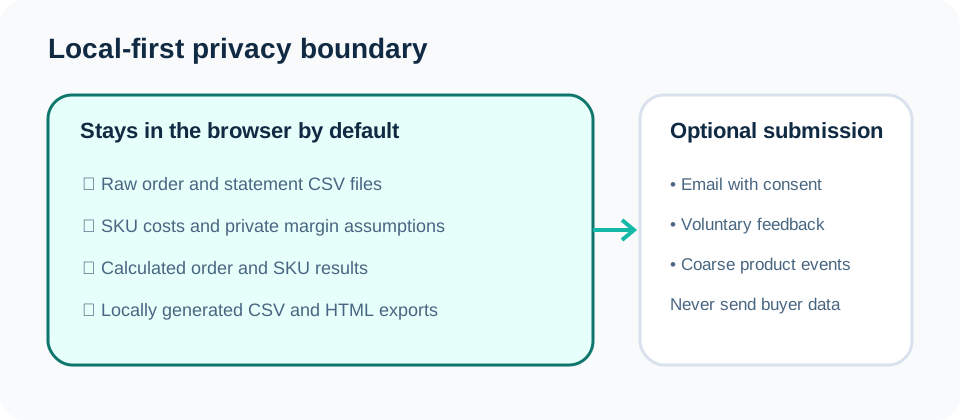
Information processed in the browser
When you use the CSV profit tool, your browser reads the file so the app can detect columns, calculate fee assumptions, match SKU cost records, flag low-margin rows, and prepare exports. The raw CSV does not need to be uploaded to Seller Profit Guard for the free workflow.
Browser-saved cost libraries stay on your device unless you intentionally export them. If you use an exported cost library later, treat it as commercially sensitive because it may contain material costs, labor assumptions, shipping estimates, and target margins.
The app is designed to work with operational fields such as item total, shipping charged, quantity, SKU, transaction grouping, marketplace fee fields, and seller-entered cost assumptions. Buyer identity, delivery address, private notes, gift messages, and payment credentials are not required for profit checks.
- Do not upload or send raw buyer data for support.
- Use public dummy CSV examples when testing features.
- Redact order IDs, names, addresses, private messages, and payment references before sharing screenshots.
- Keep exported reports private if they contain your costs, prices, or SKU strategy.
Information sent through forms
Waitlist, feedback, and intent forms may send the email address and coarse information you type into the form, such as the marketplace you sell on, the workflow you want, and the type of tool you are requesting. Do not paste raw order rows into those forms.
Analytics events are intended to be coarse product events such as page views, tool clicks, CSV upload count, report generation, and export clicks. They should not include raw CSV content, buyer data, order IDs, SKU names, costs, revenue, fees, or profit values.
If a future paid plan stores account-level settings, saved cost records, or weekly report history, that storage should be disclosed separately before collection. The current public pricing page describes the planned Plus direction and notes that payment is not currently collected on the site.
Contact and deletion
If you want a submitted email or feedback record removed, contact [email protected] with the email address used in the submission.
Do not email raw private order files for deletion requests. Describe the submission or use the same email address so it can be located.
Support responses are limited to product use, workflow clarification, and bug investigation. They are not tax, accounting, legal, financial, or platform-policy advice.
Sources and further reading
- CSV data privacy page: Plain-language explanation of the local-first CSV boundary.
- Pricing: Current Free availability and planned Plus direction.
Related Seller Profit Guard tools
- Etsy CSV profit calculator: Run a local order profit check with editable fee and SKU cost assumptions.
- Payment reconciliation tool: Compare order rows with statement activity and flag unmatched rows.
- SKU cost library: Save or import material, labor, packaging, shipping, and target margin assumptions.
- Variant risk checker: Find missing SKUs and variation cost risks before a listing scales.
- Etsy title checker: Review listing-title clarity, repetition, keyword chains, and mobile scanning.
- Etsy tag checker: Review all 13 tag slots for duplicates, repeated meaning, and truthful coverage.
- Free shipping threshold calculator: Estimate when a shipping subsidy can still meet a target margin.
- Return window loss estimator: Model expected reverse shipping, restock work, recovery, and replacement loss.
- Etsy Ads break-even calculator: Estimate target-safe Etsy Ads spend, ACOS, and ROAS after fees, fulfillment, and expected return loss.
- CSV data privacy: Understand what the local-first workflow needs and what it does not need.
Next step: Contact Seller Profit Guard.
This is operational planning help, not tax, accounting, legal, financial, or platform-policy advice. Review the Terms and disclaimer, and verify current platform rules and fee assumptions before changing prices.