Seller Profit Guard · How it works · CSV privacy
Variation SKU generator
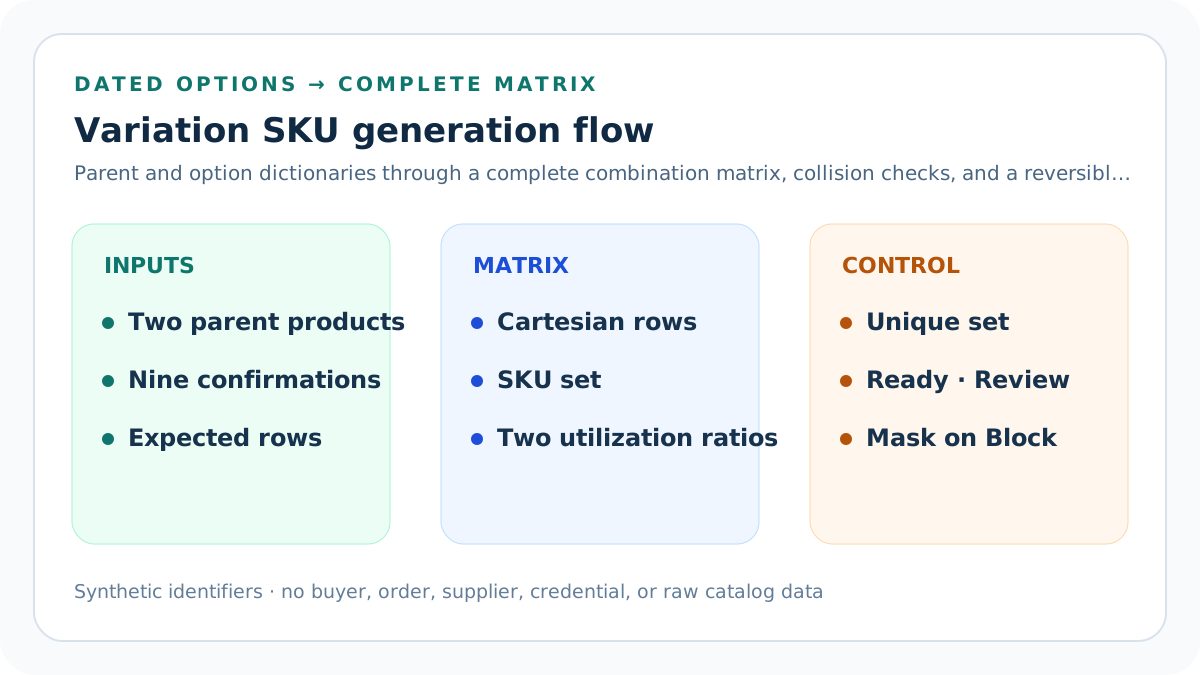
Expand two dated option dictionaries into complete SKU matrices, then reconcile every generated row with the approved sellable count. The browser-local tool checks two distinct synthetic parents, nine evidence confirmations, exact and case-insensitive uniqueness, reserved identifiers, dates, separate length and matrix-capacity thresholds, ambiguous characters, privacy and rollback; hard failures mask the generated sets.
Maintained by Seller Profit Guard Editorial Team. Last reviewed: 2026-07-31.
Start from an actual parent product
A variation matrix belongs to one confirmed parent product whose fixed option combinations represent sellable variants. Do not create rows for arbitrary personalization, buyer instructions, temporary modifiers, or attributes that do not define inventory.
The tool accepts a short parent code only after the parent-product grain is documented.
Name two independent options
Scenario A uses Size and Color; Scenario B uses Material and Finish. Each option name should describe one dimension whose values can combine independently for the reviewed product.
Two labels that mean the same thing produce an invalid matrix.
Map every option value
Enter one LABEL=CODE row for each supported option value. The label preserves human meaning while the short alphanumeric code forms the SKU segment.
Two labels cannot share one code because their generated combinations would collide.
Calculate the Cartesian product
For option set A with three sizes and option set B with two colors, generate three multiplied by two, or six, combinations. Square documents this same option-set pattern when reusable sizes and colors create every pair.
The multiplication proves possible pairs, not whether every pair is actually sellable.
Generate one SKU per combination
Join parent code, first-option code, and second-option code with the declared separator. The synthetic size-color matrix produces values such as TEE-S-BK and TEE-L-NT.
Each row retains both option labels beside its code for review.
Generate the material-finish matrix
The synthetic second scenario combines two materials with two finishes to create four rows: PEN-WAL-MAT, PEN-WAL-GLS, PEN-MAP-MAT, and PEN-MAP-GLS.
A second scenario must use its own confirmed parent and option meanings.
Validate the parent code
Require a nonempty uppercase alphanumeric parent segment. A missing or punctuated value creates malformed identifiers before any combination logic is considered.
The generator does not confirm that the parent exists in a live catalog.
Validate option rows
Reject blank labels, blank codes, punctuation in codes, duplicate labels, and duplicate codes inside either option set. A row that cannot be decoded cannot support a reversible combination.
Corrections belong in the option dictionary before generation.
Detect generated duplicates
Compare the entire generated set after normalization. Collisions can occur inside one matrix when option codes repeat or across two scenarios when parent and option codes resolve to the same string.
Every duplicate is a blocking identity defect.
Check the reserved registry
Compare generated values case-insensitively with entered active, archived, pending, and reserved SKUs. Include retired codes because historical orders, returns, reports, and integrations can still reference them.
The browser can compare only the list supplied by the operator.
Enforce a length budget
Measure every generated row against the declared maximum, not merely the shortest preview. Shopify recommends concise codes and notes that special characters and spaces can cause search problems.
The strictest tested endpoint may require a different local limit.
Limit matrix expansion
Set a per-scenario row ceiling before multiplying option values. A ten-by-ten matrix already produces one hundred combinations and deserves a deliberate catalog review rather than an accidental bulk import.
The tool caps entered limits to keep browser review bounded.
Separate possible from sellable
A Cartesian product creates all possible pairs. Before import, verify that each pair is manufactured, stocked, priced, photographed when needed, fulfillable, and supported by the platform configuration.
Remove impossible pairs from the source matrix rather than hiding them after import.
Separate variants from modifiers
Square distinguishes fixed variations chosen before purchase from modifiers used to customize an item during a sale. Shopify and Etsy also treat product options as variant-defining structures.
Do not issue inventory SKUs for every free-text or post-purchase request.
Keep price and quantity attached
Etsy lets sellers vary price, quantity, processing profile, or SKU by variation. The generated identifier is useful only when it maps to the intended operational records for that exact option pair.
The generator does not copy or validate those values.
Keep images and visible options aligned
Etsy can link photos to visible variations, and Shopify can store variant images. Review each generated color, material, or finish row against the correct visual evidence.
A correct SKU cannot fix a misleading image or option label.
Avoid O and I ambiguity
Shopify and Etsy warn that O and I can be mistaken for digits. The tool sends an otherwise valid matrix containing those characters to Review so the operator can test labels, fonts, scanners, and lookup screens.
Readability review is not a universal ban.
Use safe delimiters
This conservative model accepts only hyphen or underscore separators because official guidance and examples support them more broadly than spaces, commas, slashes, or decorative symbols.
Every connected system still requires a direct import test.
Read the simple matrix result
The default size-color packet creates six unique SKUs, fits the sixteen-character limit, avoids the entered reserved TEE-XS-BK value, and contains no ambiguous codes.
Ready describes the entered structural evidence only.
Read the second matrix result
The material-finish packet creates four additional unique identifiers. The combined result therefore contains ten rows, and the longest generated string remains below the local limit.
Cross-scenario uniqueness is checked after both sets are expanded.
Read Block, Review, and Ready
Block covers malformed rows, duplicate labels or codes, duplicate generated values, reserved collisions, excessive length, excessive matrix size, missing evidence, or open conflicts. Review covers readability ambiguity. Ready clears the entered checks.
No state creates or imports a platform variant.
Reconcile expected sellable rows
Enter the approved sellable-row count for each synthetic parent and require it to equal the complete Cartesian matrix. Scenario A reconciles six rows and scenario B reconciles four; a mismatch blocks because this generator does not silently omit unsupported pairs.
Model intentional exclusions in a separate approved catalog workflow with their own evidence.
Date and confirm the evidence packet
Record a real platform-source review date, an option-dictionary effective date no later than that review, a YYYY-MM period, and a scope naming two comparable parent matrices. Confirm parent truth, sellable pairs, registry coverage, uniqueness, endpoint limits, relationship mappings, privacy, rollback, and current platform rules.
All nine confirmations must be yes; the browser cannot infer private operating evidence.
Review length and matrix capacity
Divide the longest generated SKU by the declared length limit and the largest scenario matrix by the declared per-scenario row ceiling. A valid packet at or above either seller-set 50% to 100% threshold moves to Review for headroom and downstream compatibility analysis.
These ratios are local control signals, not universal platform limits.
Mask hard-failure outputs
When any hard gate fails, withhold scenario counts, SKU sets, total rows, longest length, and utilization values. This prevents an incomplete or conflicting matrix from being copied into a catalog because partial arithmetic was still possible.
Correct the entire evidence packet before rerunning the generator.
Preserve combination labels
Keep the human option labels beside every generated code in the private crosswalk. This lets staff reverse TEE-M-NT to Size: Medium and Color: Natural without relying on memory.
A string-only export is not a complete migration map.
Reconcile platform option order
Some systems display or export option dimensions in a defined order. Record whether Size-Color and Material-Finish ordering is stable before generating codes, and never silently swap segments later.
A segment-order change renames every affected variant.
Check historical identifiers
Before replacing existing variation SKUs, preserve the old-to-new mapping, active and archived states, historical order references, return lookups, fulfillment mappings, and rollback values.
Bulk cleanup without historical reconciliation can misidentify old sales.
Test a small import cohort
Choose a few representative combinations, import them through the documented target workflow, verify counts and relationships, then restore or expand based on observable evidence.
A static build and browser test do not prove external import behavior.
Protect private catalog data
Use synthetic option labels and aggregate counts in public content. Do not publish buyer, order, supplier, contract, cost, credential, private location, or raw catalog records.
Keep the full identifier registry in its access-controlled source.
Audit every catalog change
After adding, removing, or renaming an option value, rerun combination count, duplicate, reserved, length, alias, inventory, image, and fulfillment checks. Preserve the previous matrix for comparison.
One new code can affect many combinations.
Plan for option growth
Reserve enough code space for expected sizes, colors, materials, finishes, and parent products without claiming demand. Expansion capacity prevents emergency abbreviations that collide or break decoding.
Growth planning is architecture, not a sales forecast.
Interpret the output narrowly
The tool proves only that entered option mappings can expand into a collision-checked set under the entered constraints. It cannot prove product truth, sellability, inventory, platform acceptance, barcode validity, fulfillment readiness, or migration safety.
External evidence remains required.
Release and monitor safely
Run content, source, answer-first, originality, similarity, schema, static SEO, images, links, mobile, strict-404, backup, deployment, purge, and live verification gates before indexing the complete cluster.
Measure delayed discovery and usage without manufacturing traffic or ad clicks.
Sources and further reading
- Seller Profit Guard methodology: Evidence versions, formulas, privacy, correction, release, and rollback.
- Seller Profit Guard data privacy: Local-first boundaries for catalog, buyer, order, supplier, credential, and raw-record data.
- Shopify Help: Variants: Official definition of product variants as combinations of option values, with variant-level inventory context.
- Shopify Help: Adding variants: Reviewed July 31, 2026: up to three options and 2,048 variants per product, with compatibility caveats above 100 variants.
- Shopify Help: Using SKUs to manage your inventory: Official uniqueness, character, length, consistency, growth, variant, fulfillment, and barcode boundaries.
- Etsy Help: How to Add Variations for Your Listings: Reviewed July 31, 2026: up to two variation attributes, with price, quantity, processing profile, photo, and SKU controls.
- Etsy Help: How to Use SKU for Your Inventory: Official SKU purpose, shop search, multi-channel, short-code, ambiguous-character, and symbol guidance.
- Square Support: Create and edit item options and variations: Reviewed July 31, 2026: reusable option sets can generate all combinations and each variation can carry cost, price, and SKU.
- Square Support: Bulk import items: Official guidance that each variation should have a unique SKU and that a pre-import export supports restoration.
Related Seller Profit Guard tools
- Etsy CSV profit calculator: Run a local order profit check with editable fee and SKU cost assumptions.
- Payment reconciliation tool: Compare order rows with statement activity and flag unmatched rows.
- SKU cost library: Save or import material, labor, packaging, shipping, and target margin assumptions.
- Variant risk checker: Find missing SKUs and variation cost risks before a listing scales.
- Etsy title checker: Review listing-title clarity, repetition, keyword chains, and mobile scanning.
- Etsy tag checker: Review all 13 tag slots for duplicates, repeated meaning, and truthful coverage.
- Free shipping threshold calculator: Estimate when a shipping subsidy can still meet a target margin.
- Return window loss estimator: Model expected reverse shipping, restock work, recovery, and replacement loss.
- Etsy Ads break-even calculator: Estimate target-safe Etsy Ads spend, ACOS, and ROAS after fees, fulfillment, and expected return loss.
- CSV data privacy: Understand what the local-first workflow needs and what it does not need.
- Variation SKU Formula and Input Rules: Expand parent and option codes into unique variation SKUs with explicit row limits, length rules, reserved values, evidence, and rollback.
- Variation SKU Worked Example: Size and Color: Expand three sizes and two colors into six traceable T-shirt SKUs, then verify counts, decoding, length, uniqueness, and reserved values.
- Variation SKU Sets for Material and Finish: Generate and review four pen variants from walnut or maple materials crossed with matte or gloss finishes and one parent code.
- Variation SKU Collision Mistakes and Fixes: Correct duplicate option codes, incomplete matrices, impossible pairs, overlong rows, retired collisions, segment drift, and unsafe imports.
- Variation SKU Evidence and Data Sources: Source parent products, options, value dictionaries, existing identifiers, platform constraints, operational mappings, and migration evidence.
- Variation SKU Acceptance and Import Gates: Separate option completeness, row-count, uniqueness, reserved, length, readability, sellability, integration, and rollback thresholds.
- Variation SKU Matrices: Options Compared: Compare a six-row size-color matrix with a four-row material-finish matrix at the same parent, mapping, length, and evidence grain.
- Weekly Variation SKU Control Routine: Operate a repeatable review for parent changes, option dictionaries, matrix counts, collisions, mappings, imports, exceptions, and restoration.
- How to Interpret Variation SKU Sets: Read combination counts, generated identifiers, collisions, length, reserved checks, and status without claiming catalog or import proof.
- Variation SKU Audit and Change Log Template: Audit parents, option dictionaries, combination counts, generated rows, collisions, mappings, operational tests, migration, and restoration.
Use the interactive tool
Enable JavaScript to open the calculator and process browser-local inputs. The explanatory content and source links remain available without JavaScript.
Related guide: Define parent grain, option dictionaries, Cartesian expansion, uniqueness, reserved values, length limits, evidence, and rollback.
This tool provides operating estimates, not tax, accounting, legal, financial, or marketplace-policy advice. Verify current official sources and your own records before changing prices or operations.