Seller Profit Guard · How it works · CSV privacy
Shipping Zone Margin Calculator
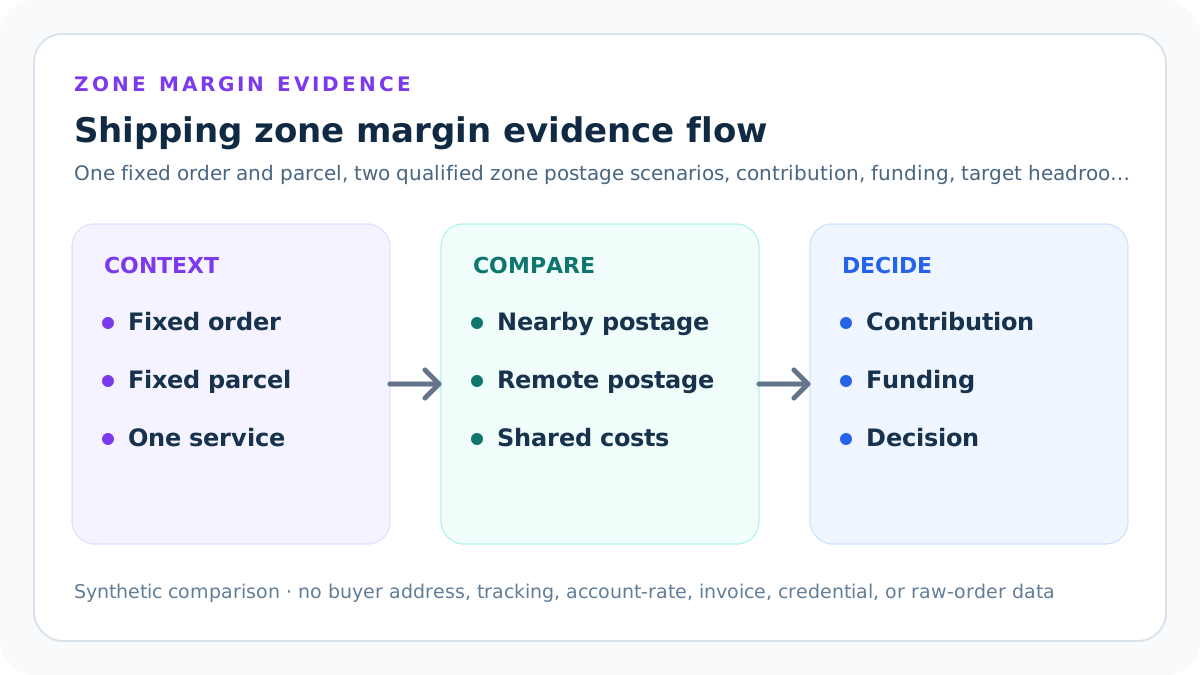
A shipping zone margin calculator holds one order, package, fee convention, and buyer shipping charge constant, then subtracts qualified nearby- and remote-zone postage separately. It reports contribution, margin, shipping-side funding, target headroom, postage increase, and contribution drop.
Maintained by Seller Profit Guard Editorial Team. Last reviewed: 2026-07-31.
Define one unchanged comparison order
Start with one item quantity, selling price, direct product cost, buyer-paid shipping amount, packaging allocation, handling allocation, fee convention, currency, and evidence month. Those fields remain identical in both zone scenarios.
If merchandise, quantity, discount, package, service, or fee base changes between rows, the contribution difference no longer isolates destination-zone postage. Build a separate packet instead of hiding several drivers inside one zone label.
Freeze the finished parcel
Use one packed parcel with a verified scale weight and the same packaging configuration in both scenarios. Record package alias, measurement time, scale state, unit, and any dimensional-weight work in a protected evidence register.
The calculator accepts a package weight but does not determine billable weight, package acceptance, dimensional divisor, surcharge, or service eligibility. Use the dedicated dimensional-weight model when the package profile itself needs comparison.
Name the nearby zone scenario
Enter a zone label supported by the selected carrier, service, origin postal code, destination evidence, rate type, and effective period. Enter a qualified postage amount for the unchanged parcel.
Nearby is a comparison role, not a universal numerical zone. Carrier zone systems differ, origin ZIP codes matter, and zone alignments can change. Preserve the exact source rather than assuming another seller's label applies.
Name the remote zone scenario
Use a distinct label and a qualified postage amount under the same carrier, service, account or published rate type, origin, package, currency, and evidence state. Only the destination-zone assignment should change.
The tool blocks remote postage below nearby postage because that named bridge needs evidence correction before interpretation. A valid real-world discount or exception can be modeled by renaming the scenarios and documenting the actual relationship in a separate packet.
Keep zones separate from postage rates
USPS explains that its National Zone Charts Matrix contains zone information rather than postage rates. A zone label therefore does not by itself produce the amount entered in this calculator.
Join the zone assignment to the current eligible rate evidence for the exact package and service. Preserve whether the amount is a public table, account quote, purchased label, adjustment, disputed invoice, refund, or final invoice.
Extend merchandise revenue
Merchandise revenue equals item quantity multiplied by selling price per item. Buyer-paid shipping is shown separately and then added to form the gross buyer amount used by the seller-entered fee scenario.
Do not substitute payout, tax-inclusive total, customs value, refund amount, or list price. Discounts and multi-item orders require the actual comparable order grain.
Extend direct product cost
Direct product cost equals quantity multiplied by the seller-entered unit cost. Use one approved cost version with an effective date and a declared boundary such as material, acquisition, or production cost.
Do not mix standard, historical, replacement, and fully allocated accounting cost. If inbound freight or packaging already sits inside unit cost, document the boundary so it is not counted again.
Hold buyer-paid shipping constant
The same literal shipping charge appears in both scenarios so the tool can show whether one checkout amount funds nearby and remote delivery differently. Zero is valid when shipping is included in merchandise price.
This input is not a recommended shipping price, free-shipping threshold, or conversion forecast. A separate shipping-subsidy decision should consider customer presentation, market, policy, and target margin.
Assign packaging cost once
Enter the mailer, box, label, tape, fill, insert, protection, and waste allocation attached to the finished parcel. Use the same amount in both zones when the package configuration is unchanged.
Packaging is not postage. If a remote destination requires a different box or protection standard, that is a package scenario and should not be attributed only to the zone-rate bridge.
Assign handling cost once
Enter the approved order-level handling allocation for packing, documentation, label preparation, or related seller work. Keep the convention and evidence period identical across both rows.
Handling is not automatically a customer-facing fee, tax deduction, or owner wage. Do not duplicate labor already included in product cost or another overhead allocation.
Define the fee scenario
The calculator applies one seller-entered percentage to merchandise revenue plus buyer-paid shipping and then adds one fixed fee. Both zone scenarios use that same fee amount.
This is not a current Etsy, Shopify, TikTok Shop, payment processor, advertising, tax, or currency-conversion schedule. Preserve platform, market, percentage, fixed amount, fee base, source date, and exclusions.
Calculate shared non-postage cost
Shared non-postage cost equals direct product cost plus packaging, handling, and modeled fees. This amount is intentionally identical in the nearby and remote calculations.
If the two rows show different shared cost, stop the comparison. The result would otherwise make a mixed order, package, or platform change look like a pure zone effect.
Calculate nearby contribution
Nearby contribution equals gross buyer amount minus shared non-postage cost and nearby postage. Nearby contribution margin divides that amount by gross buyer amount.
Contribution is a bounded management remainder, not net profit. It excludes overhead not entered, advertising, financing, owner compensation outside handling, tax treatment, cash timing, refunds, returns, and demand.
Calculate remote contribution
Remote contribution applies the same formula with remote postage. The calculation changes no other order, package, fee, currency, or service field.
A lower result does not prove the destination is unprofitable or that the seller should restrict sales. It identifies the postage-sensitive remainder under the declared evidence and exclusions.
Bridge the postage increase
Postage increase equals remote postage minus nearby postage. Contribution drop equals nearby contribution minus remote contribution. With every other field frozen, those two values should reconcile.
A mismatch means another input changed, a formula version drifted, or the rows do not share one comparable grain. Block publication or decision use until the bridge reproduces.
Calculate shipping-side funding
Shipping-side funding equals buyer-paid shipping minus postage, packaging, and handling. The tool reports the measure separately for each zone.
Negative funding does not mean the whole order loses money; merchandise contribution may fund shipping. It does mean the literal shipping charge does not cover the modeled shipping-side lines and triggers Review.
Set one minimum contribution target
The seller-entered target applies to both zones. Target headroom equals zone contribution minus that minimum. Store owner, business purpose, population, approval, effective date, and expiry.
The target is not a carrier threshold, public pricing rule, marketplace requirement, tax conclusion, or guarantee. It is an internal reversible planning boundary.
Set a postage-increase review threshold
Remote postage increase rate equals remote postage minus nearby postage, divided by nearby postage. Enter the largest percentage increase the seller is prepared to treat as Ready for this one comparison.
The default synthetic packet rises from USD 6 to USD 12, a 100% increase, below its 125% review threshold. The threshold is a seller control, not a carrier promise or market-wide rule.
Set a contribution-drop review threshold
Contribution drop rate equals nearby contribution minus remote contribution, divided by positive nearby contribution. It measures how much of the nearby remainder disappears when only qualified postage changes.
The default contribution falls from USD 28.20 to USD 22.20, a 21.28% drop, below its 30% limit. If nearby contribution is not positive, repair or separately interpret the packet rather than relying on the percentage.
Date the evidence packet
Enter one real YYYY-MM-DD source review date covering the order, finished parcel, zone assignments, eligible postage evidence, buyer shipping, fee convention, shared costs, and target.
A month alone cannot show which carrier guide, alignment, quote, label, or invoice state a reviewer used. Preserve retrieval and effective dates in protected lineage even when the public calculator stores one review date.
Confirm nine evidence families
Ready and Review require explicit yes confirmations for order economics, finished package, nearby postage, remote postage, buyer shipping, fee convention, shared-cost allocation, carrier-zone context, and planning boundaries.
A missing confirmation is Block rather than zero. The tool cannot independently prove a private order, negotiated rate, parcel measurement, destination, or carrier account state.
Use a complete comparison scope
The scope must identify one order, package or parcel, carrier service, origin, nearby and remote destination-zone roles, and currency. This makes the calculator reject a polished but under-specified narrative.
Keep protected ZIP codes, addresses, tracking, and account-rate evidence outside the public field. A safe scope describes applicability without disclosing a buyer or private contract.
Read the default synthetic comparison
One item sells for USD 40 with USD 15 buyer shipping. Direct product cost is USD 12, packaging USD 1, handling USD 2, and modeled fees are USD 5.80.
Zone 3 postage of USD 6 produces USD 28.20 contribution. Zone 8 postage of USD 12 produces USD 22.20 contribution. The USD 6 postage increase exactly matches the USD 6 contribution drop.
Read the remote-target scenario
Keeping every other input unchanged and raising remote postage to USD 20 lowers remote contribution to USD 14.20. Against a USD 20 minimum, remote target headroom becomes USD minus 5.80.
The packet remains structurally calculable but requires Review. The result names the exact zone scenario and target gap rather than applying a vague low-margin label to every destination.
Read the shipping-underfunding scenario
With buyer shipping reduced to USD 8 and the contribution target lowered to USD 10, both zone contributions remain above target. Nearby shipping-side funding is USD minus 1 and remote funding is USD minus 7.
Review remains required because target clearance and shipping-charge coverage answer different questions. A favorable total cannot hide a separately declared shipping-funding policy boundary.
Apply Block before Review
Block nonpositive quantity, price, package weight, or postage; negative cost lines; invalid fee, labels, zone ordering, currency, unit, carrier context, period, scope, or declared conflicts.
Only structurally valid packets reach target and shipping-funding Review. Ready means both zones clear the declared gates, not that the carrier, destination, price, or policy is universally suitable.
Protect carrier and buyer records
Public examples are synthetic. Keep buyer names, delivery addresses, destination ZIP codes tied to people, tracking, account numbers, negotiated rates, invoices, claims, credentials, messages, and raw orders outside public content and analytics.
Use parcel aliases, rounded public examples, aggregates, redacted pointers, and access controls. An authorized reviewer should reproduce the comparison without exposing a customer's location or a private carrier agreement.
Version zones and rates
Store exact zone source, origin, destination class, carrier, service, rate type, package profile, effective date, retrieval time, quote or invoice state, and reviewer. Open a new version when any applicability field changes.
Do not overwrite historical evidence after a carrier realignment or annual rate change. Preserve the prior decision and compare the changed zone assignment and changed postage as separate drivers.
Compare quote, label, adjustment, and invoice states
A checkout quote, purchased label, carrier adjustment, dispute, refund, and final invoice are different evidence states. Recompute the same packet as evidence matures.
Variance should feed the next target, package, or rate review. A later credit does not erase the original operational defect, and an initial quote does not become final merely because it was used in a listing.
Test boundaries and counterexamples
Test zero and positive quantity, package weight and postage, fee limits, duplicate labels, reversed postage, currency, unit, month, scope, target, and declared conflicts. Reproduce Ready, both Review families, and Block.
Also test a discounted remote service, a changed package, split fulfillment, Alaska or Hawaii context, surcharge, return, refund, and carrier adjustment as separate packets rather than forcing them into the default bridge.
Release and observe the zone asset
Before release, create narrow backups and run typecheck, unit, integration, build, content, duplicate, SEO, schema, image, link, keyboard, mobile, privacy, static-route, and rollback checks.
After release, verify calculations, canonical, indexability, guide discovery, sitemap policy, strict 404, events, and Day 0/7/14/28 evidence. Restore the prior version on formula, privacy, source, routing, accessibility, or health regression.
Use the result for one reversible next action
If remote headroom is weak, verify rate evidence, package billable weight, service choice, shipping charge, product economics, and destination policy separately. If shipping funding is negative, decide whether merchandise contribution intentionally subsidizes it.
Do not jump from one synthetic comparison to a destination ban or price increase. Reproduce the affected order population, quantify exposure, name decision authority, test alternatives, and preserve rollback criteria.
Sources and further reading
- Seller Profit Guard methodology: Comparable-grain evidence, deterministic scenarios, validation, correction, release, and rollback.
- Seller Profit Guard data privacy: Local-first boundaries for buyer, address, tracking, invoice, account-rate, credential, and raw order data.
- USPS PostalPro: Zone Charts: Official USPS zone-chart resources explaining that origin and destination ZIP pairing and mailpiece weight determine the applicable zone context.
- USPS: Domestic Zone Chart: Official dated USPS origin-and-destination ZIP zone lookup; the current page states an effective date of July 1, 2026.
- UPS: Daily Rates and Zone Charts: Official UPS access to origin-postal-code zone charts and 2026 daily-rate guides; account daily rates remain distinct from retail rates and an individual package estimate.
- FedEx 2026 Service Guide: Official FedEx context that applicable zones depend on origin and destination ZIP codes and that zone alignments may change.
Related Seller Profit Guard tools
- Etsy CSV profit calculator: Run a local order profit check with editable fee and SKU cost assumptions.
- Payment reconciliation tool: Compare order rows with statement activity and flag unmatched rows.
- SKU cost library: Save or import material, labor, packaging, shipping, and target margin assumptions.
- Variant risk checker: Find missing SKUs and variation cost risks before a listing scales.
- Etsy title checker: Review listing-title clarity, repetition, keyword chains, and mobile scanning.
- Etsy tag checker: Review all 13 tag slots for duplicates, repeated meaning, and truthful coverage.
- Free shipping threshold calculator: Estimate when a shipping subsidy can still meet a target margin.
- Return window loss estimator: Model expected reverse shipping, restock work, recovery, and replacement loss.
- Etsy Ads break-even calculator: Estimate target-safe Etsy Ads spend, ACOS, and ROAS after fees, fulfillment, and expected return loss.
- CSV data privacy: Understand what the local-first workflow needs and what it does not need.
- Shipping Zone Margin Formula and Inputs: Define frozen order fields, zone evidence, postage, fees, contribution, shipping funding, targets, and Block or Review rules.
- Shipping Zone Margin Worked Example: Reconstruct a nearby-zone order from synthetic inputs through fees, shared cost, postage, contribution, funding, and target headroom.
- Shipping Zone Margin for a Remote Zone: Model a remote destination by changing qualified postage only, then explain target failure, funding pressure, and evidence limits.
- Shipping Zone Margin Calculator Mistakes: Diagnose mixed parcels, wrong zones, stale rates, hidden surcharges, fee errors, privacy leaks, false precision, and decision overreach.
- Shipping Zone Margin Data Sources: Build protected lineage for orders, parcels, zones, rates, labels, invoices, fees, targets, conflicts, and corrections safely.
- Shipping Zone Margin Decision Thresholds: Separate structural Block, contribution targets, shipping-funding Review, source freshness, exposure, confidence, and rollback thresholds.
- Shipping Zone Margin: Nearby vs Remote: Bridge an unchanged nearby and remote parcel scenario, reconcile postage to contribution, and attribute every difference.
- Shipping Zone Margin Operating Routine: Run a repeatable zone review across source intake, parcel sampling, exceptions, invoice variance, approvals, close, and reopening.
- How to Interpret Shipping Zone Margin: Write bounded result statements, separate contribution from profit, explain uncertainty, and route each driver to a reversible action.
- Shipping Zone Margin Audit Template: Audit fixed order and parcel identity, zones, rates, formulas, decisions, privacy, accessibility, static SEO, release, correction, and rollback.
Use the interactive tool
Enable JavaScript to open the calculator and process browser-local inputs. The explanatory content and source links remain available without JavaScript.
Related guide: Define the two-zone formula, frozen fields, source evidence, and decision gates.
This tool provides operating estimates, not tax, accounting, legal, financial, or marketplace-policy advice. Verify current official sources and your own records before changing prices or operations.