Seller Profit Guard · How it works · CSV privacy
Seasonal promotion margin calculator
Compare a dated promotion plan with a controlled stress scenario. Model retained economics, capacity, target headroom, the target-safe discount, and plan-to-stress contribution decline. Require real campaign dates, current source review, and explicit evidence confirmations without uploading orders, changing live offers, or treating modeled results as demand forecasts.
Maintained by Seller Profit Guard Editorial Team. Last reviewed: 2026-07-31.
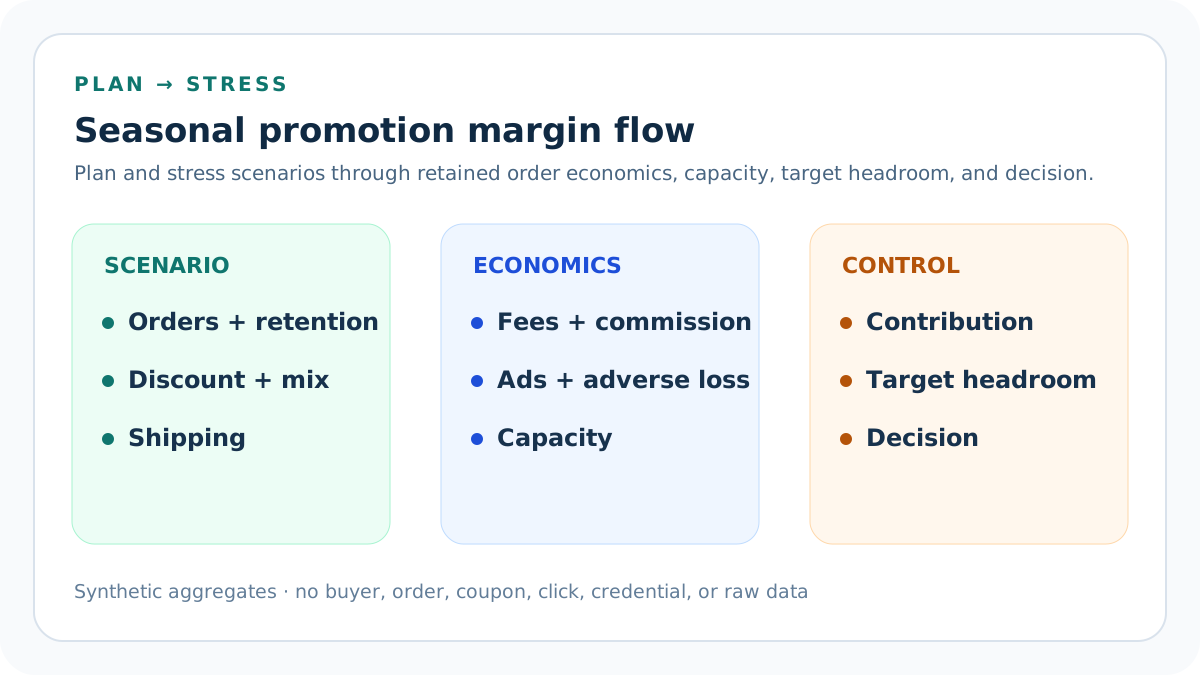
Freeze one dated promotion packet
Record the promotion start and end date, platform, market, currency, eligible products, offer mechanics, application order, shipping treatment, commission rule, ad-budget convention, and capacity window.
A seasonal label is not a calculation scope.
Use aggregate assumptions only
Prepare synthetic or aggregate plan inputs outside the public calculator.
Do not paste buyer names, emails, addresses, order IDs, coupon codes tied to customers, click IDs, timestamps, payment records, credentials, or raw exports.
Separate plan and stress scenarios
Use one planned case and one deliberately adverse but plausible stress case.
A stress case is not a prediction; it is a controlled sensitivity test.
Count placed orders
Enter total submitted orders expected inside each scenario's exact campaign window.
Do not substitute units, sessions, clicks, customers, or retained orders.
Estimate retained-order rate
Use a mature comparable cohort or a documented planning assumption after cancellation, refund, and return outcomes.
Recent promotional orders can overstate retained economics.
Set regular merchandise revenue
Use weighted average pre-promotion merchandise revenue per placed order for the declared product mix.
List price, cart subtotal, GMV, and retained merchandise revenue are different values.
Model the literal discount
Enter the effective merchandise discount after documented eligibility, stacking, and application order.
Do not add percentages blindly when platform mechanics compound or select a best offer.
Model product-mix erosion
Stress the weighted regular merchandise revenue when lower-priced products may dominate the campaign.
A volume increase can coexist with weaker revenue per order.
Keep buyer shipping separate
Enter buyer-paid shipping retained in the scenario separately from merchandise revenue.
Free-shipping discounts and seller postage affect different lines.
Record direct product cost
Use current weighted cost for the products expected in each retained order.
Do not use retail value or an unrelated historical average.
Record packaging and fulfillment
Include direct packaging materials, pick-pack labor, and per-order fulfillment charges.
Keep monthly overhead outside this variable-cost line.
Record seller shipping cost
Use verified or supported postage for the campaign mix and destination scope.
Stress carrier, zone, parcel, or free-shipping changes explicitly.
Model percentage fees
Apply the seller-entered platform and payment percentage convention to collected revenue.
Verify the actual fee base and credit behavior for the platform and market.
Model fixed fees
Apply the seller-entered fixed fee convention to placed orders.
Do not assume every fixed charge reverses after cancellation or refund.
Model creator commission
Apply the declared percentage to discounted retained merchandise revenue when that matches the agreement.
Change the base when the actual program uses a different contractual definition.
Use total campaign ad spend
Enter one date-bounded total for each scenario.
Do not multiply an average daily budget without documenting days, pacing, and billing behavior.
Estimate adverse-outcome loss
Use expected non-recovered loss per placed order for refunds, returns, replacements, disputes, or damaged inventory not already captured.
Do not double-count product, shipping, or fee loss.
Include fixed promotion cost
Add creative, setup, temporary merchandising, landing-page, or campaign administration cost that belongs to the promotion.
Separate reusable long-term assets when appropriate.
Set a fulfillment capacity
Enter the documented maximum placed orders the operation can accept for the same period and service promise.
Capacity should come from labor, inventory, carrier, and handling evidence.
Price capacity overage
Add temporary labor, expedited supply, outsourced fulfillment, or other incremental cost for orders above the declared capacity.
A cost estimate does not prove the operation can actually fulfill the excess.
Calculate retained orders
Multiply placed orders by the retained-order rate for each scenario.
Preserve fractional expected values in planning math; do not imply a forecasted individual order.
Calculate collected revenue
Multiply retained orders by discounted merchandise plus buyer-paid shipping.
Taxes and pass-through amounts stay outside unless the seller explicitly models them.
Calculate contribution
Subtract retained variable costs, fees, commission, ad spend, adverse loss, fixed promotion cost, and capacity overage from collected revenue.
This is campaign contribution under entered assumptions, not accounting net income.
Reconcile planned and realized campaign windows
After a campaign closes and outcomes mature, compare the approved dates, eligible products, placed and retained orders, effective discount, buyer shipping, ad spend, fulfillment capacity, and direct costs with the realized aggregate packet. Keep planned, stress, and actual evidence as separate versioned scenarios.
Do not extend the measurement window, omit late refunds, or redefine eligible orders merely to rescue a weak result. A realized variance should update the next planning baseline only after its denominator, timing, and cost treatment match the declared campaign boundary.
Calculate target headroom
Subtract the seller-owned contribution reserve from scenario contribution.
Positive contribution can still miss the operating target.
Calculate stress contribution decline
When planned contribution is positive, divide the nonnegative plan-to-stress contribution loss by planned contribution.
A stress improvement reports zero decline; the ratio is a seller planning control, not a platform benchmark.
Set a maximum stress-decline threshold
Compare the calculated decline with a dated seller-owned maximum supported by reserve needs and counterexamples.
The synthetic 55% default is editable and is not a universal safe seasonal-promotion limit.
Solve the stress discount boundary
Hold stress volume, retained rate, mix, shipping, fees, commission, ad spend, adverse loss, fixed cost, capacity, and target constant; solve the largest merchandise discount that preserves target.
The boundary becomes invalid when any held input changes.
Date the campaign and evidence
Record real promotion start, promotion end, and source-review dates, then preserve the exact period with the input packet.
A seasonal label or month name cannot replace ordered calendar dates.
Confirm the evidence chain
Confirm offer rules, costs, fees and commission, outcome maturity, date-bounded ad budget, capacity, thresholds, aggregate privacy, and the planning boundary.
A typed yes is a reviewable seller attestation, not independent verification.
Use Block, Review, and Ready
Block nonfinite values, invalid dates, incomplete confirmations, incompatible scope, or declared conflicts. Review a valid scenario below target, above capacity, or above the stress-decline threshold.
Ready means both entered scenarios preserve every declared control; it does not authorize the promotion.
Respect platform-specific mechanics
Shopify, Etsy, TikTok Shop, marketplaces, and direct stores can apply discounts, shipping, commissions, and budgets differently.
Use current official documentation and exact account settings.
Preserve an evidence ledger
Store each input, unit, source, date, maturity state, owner, reviewer, formula version, and declared assumption.
Never overwrite a failed stress case.
Define stop and rollback criteria
Name the margin, capacity, cancellation, return, shipping, ad-spend, and fulfillment signals that pause or restore a campaign configuration.
A public calculator cannot monitor or change a live promotion.
Release and restore safely
Run calculation, content, similarity, SEO, image, link, browser, mobile, privacy, canonical, schema, strict-404, sitemap, and rollback gates.
Measure Day 0/7/14/28 without calling temporal movement causal proof.
Sources and further reading
- Seller Profit Guard methodology: Evidence versions, formulas, privacy, correction, release, and rollback.
- Seller Profit Guard data privacy: Local-first boundaries for order, buyer, promotion, advertising, and payment data.
- Shopify Help: Combining discounts: Official discount classes, eligibility, combination settings, application order, and best-combination behavior. Reviewed July 31, 2026.
- Etsy Help: Set up sales and discounts: Official sales, promo-code, bundle, targeted-offer, limit, and non-stacking context. Reviewed July 31, 2026.
- Google Ads Help: Campaign total budgets: Official campaign-total budget, start/end-date, pacing, availability, and average-daily-budget distinctions. Reviewed July 31, 2026.
Related Seller Profit Guard tools
- Etsy CSV profit calculator: Run a local order profit check with editable fee and SKU cost assumptions.
- Payment reconciliation tool: Compare order rows with statement activity and flag unmatched rows.
- SKU cost library: Save or import material, labor, packaging, shipping, and target margin assumptions.
- Variant risk checker: Find missing SKUs and variation cost risks before a listing scales.
- Etsy title checker: Review listing-title clarity, repetition, keyword chains, and mobile scanning.
- Etsy tag checker: Review all 13 tag slots for duplicates, repeated meaning, and truthful coverage.
- Free shipping threshold calculator: Estimate when a shipping subsidy can still meet a target margin.
- Return window loss estimator: Model expected reverse shipping, restock work, recovery, and replacement loss.
- Etsy Ads break-even calculator: Estimate target-safe Etsy Ads spend, ACOS, and ROAS after fees, fulfillment, and expected return loss.
- CSV data privacy: Understand what the local-first workflow needs and what it does not need.
- Seasonal Promotion Margin Formula and Inputs: Build plan and stress contribution formulas from retained orders, discount, mix, shipping, ads, returns, commission, and capacity.
- Holiday Weekend Promotion Margin Example: Follow a 200-order synthetic holiday weekend through retained revenue, campaign costs, capacity, contribution, and target headroom.
- Month-Long Seasonal Promotion Stress Test: Stress a month-long campaign with more orders, weaker retention and mix, deeper discount, shipping pressure, and higher ad spend.
- Seasonal Promotion Margin Mistakes: Correct order-grain, stacking, mix, budget, fee, commission, return, capacity, timing, and false-precision errors before launch.
- Seasonal Promotion Margin Data Sources: Map promotion mechanics, order outcomes, revenue mix, shipping, ads, commissions, returns, costs, and capacity to dated evidence.
- Safe Seasonal Promotion Margin Thresholds: Set break-even, target-margin, stress-decline, capacity, evidence, stop, correction, release, and restoration thresholds for promotions.
- Holiday Weekend vs Month-Long Promotion: Compare a holiday weekend and month-long promotion at the same economic grain to isolate volume, retention, mix, shipping, and ads.
- Weekly Seasonal Promotion Margin Routine: Run a repeatable cycle from campaign packet and source refresh through stress testing, approval, monitoring, correction, and rollback.
- Interpret Seasonal Promotion Margin Results: Read plan and stress contribution, target headroom, capacity, discount boundary, sensitivity, and uncertainty without false precision.
- Seasonal Promotion Margin Audit Template: Use a standalone checklist and dated change log for campaign scope, formulas, sources, scenarios, thresholds, release, and rollback.
Use the interactive tool
Enable JavaScript to open the calculator and process browser-local inputs. The explanatory content and source links remain available without JavaScript.
Related guide: Define plan and stress formulas, promotion mechanics, capacity, evidence, and interpretation boundaries.
This tool provides operating estimates, not tax, accounting, legal, financial, or marketplace-policy advice. Verify current official sources and your own records before changing prices or operations.