Seller Profit Guard · How it works · CSV privacy
Purchase order quantity calculator
Plan two distinct replenishment periods by netting approved demand and safety stock against Available inventory and unique eligible inbound, then rounding positive need through MOQ and case-pack rules. Ready requires dated evidence, seller-owned order, overage, and evidence controls, plus nine confirmations. Block masks every derived result; no output creates or approves a purchase order.
Maintained by Seller Profit Guard Editorial Team. Last reviewed: 2026-07-31.
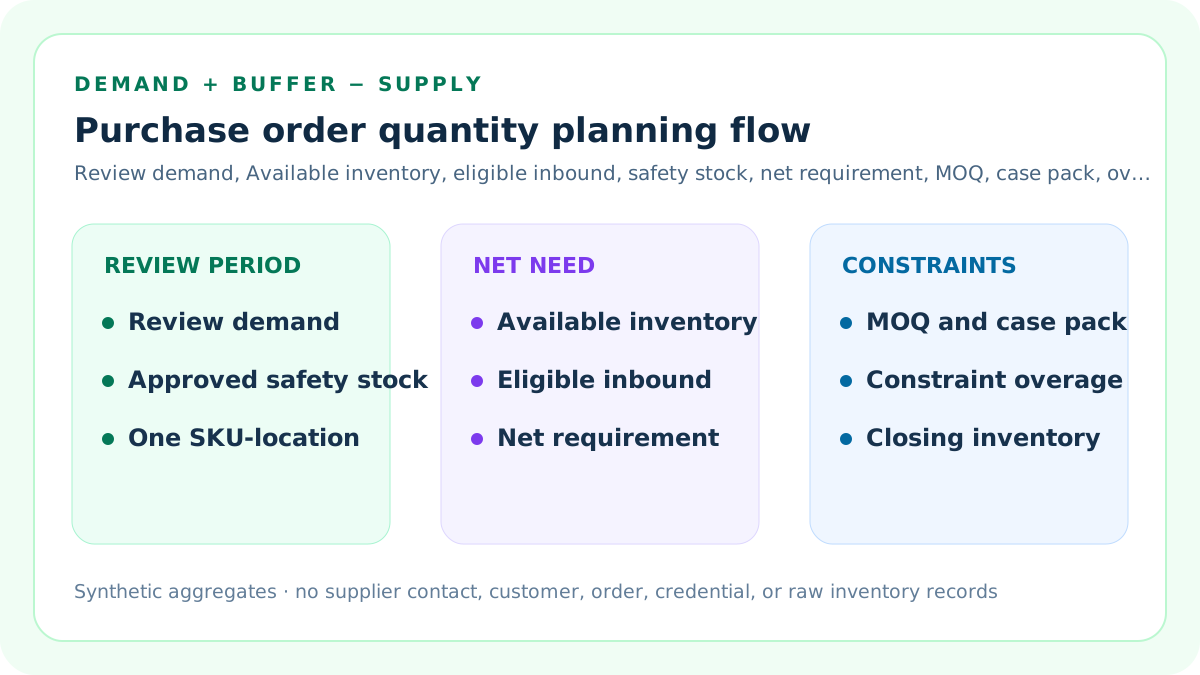
Define one replenishment review period
State the exact SKU, location, unit, start date, end date, and planning reason. Monthly, seasonal, launch, and clearance periods are not interchangeable.
A vague horizon makes every downstream number ambiguous.
Enter review-period demand
Use a separately prepared seller forecast or approved planning estimate for the declared period. Preserve method, version, owner, exclusions, and uncertainty.
The calculator does not generate a forecast.
Use existing Available inventory
Use the quantity currently available to sell at the same SKU-location grain. Do not substitute On hand without reconciling committed and unavailable units.
Timestamp the inventory snapshot.
Use only eligible inbound supply
Include open supply only when it is unique, confirmed, not cancelled, not already received, assigned to the same SKU-location, and expected inside the review period.
Incoming is not currently Available.
Use separately approved safety stock
Add a safety-stock quantity only when it was set through a separate service and uncertainty policy. Do not invent a buffer merely to enlarge the order.
This tool does not optimize safety stock.
Calculate unconstrained requirement
Unconstrained requirement equals review-period demand plus approved safety stock minus existing Available inventory minus eligible inbound supply, floored at zero.
Negative need becomes zero, not a return order.
Apply supplier MOQ
When the unconstrained requirement is positive, compare it with the supplier's current minimum order quantity and use the larger value as the constraint floor.
MOQ is a floor, not an optimum.
Apply case-pack or order multiple
Round the constraint floor upward to the next complete case pack or order multiple. Preserve the extra units created by rounding as constraint overage.
Never round down below demand or MOQ.
Read Scenario A
The monthly fixture has 180 units of demand, 70 Available, 30 eligible inbound, and 40 safety stock. Net need is 120 units; a 100-unit MOQ and 24-unit case pack preserve a 120-unit order.
Projected closing inventory equals 40 units.
Read Scenario B
The seasonal fixture has 600 units of demand, 120 Available, 60 eligible inbound, and 80 safety stock. Net need is 500 units; a 300-unit MOQ and 72-unit case pack round the recommendation to 504.
Constraint overage equals four units.
Compare monthly and seasonal reviews
Scenario A lands exactly on a case-pack boundary. Scenario B crosses the 500-unit seller review threshold only because the required 500 units must round to a 72-unit multiple.
The threshold prompts review, not automatic rejection.
Keep forecast evidence separate
Record whether demand came from comparable history, booked demand, a launch plan, promotion plan, seasonal curve, or another approved method.
Do not present a planning input as observed truth.
Keep review periods non-overlapping
Do not count the same demand in both a monthly order and a seasonal buy unless the scopes explicitly reconcile. Record which plan supersedes or supplements the other.
Double coverage creates excess stock.
Reconcile open orders
Match supplier, SKU, location, ordered quantity, received quantity, remaining quantity, expected date, cancellation status, and plan allocation.
A duplicated open PO understates new need.
Exclude late inbound
Supply arriving after the review period cannot cover demand inside that period. Route timing risk to the reorder-point and supplier-lead-time reviews.
Quantity and timing are separate controls.
Use one inventory-state vocabulary
Shopify distinguishes Available from Incoming, Committed, Unavailable, and On hand. Preserve the exact source field and transformation.
State mixing can overstate usable stock.
Use a seller-owned order threshold
The maximum order quantity is an escalation limit based on cash, storage, shelf life, concentration, approval authority, and operating capacity.
Clearing it does not authorize a PO.
Require dated evidence and nine confirmations
Use a real source-review date no earlier than the seller policy date, then confirm period scope, demand version, Available inventory, unique eligible inbound, safety-stock authority, supplier constraints, threshold ownership, aggregate privacy, and the purchasing-authority boundary.
Any missing confirmation blocks derived outputs.
Classify Block, Review, and Ready
Block covers invalid quantities, evidence, scope, thresholds, or open conflicts. Review covers short demand evidence or recommendations above the seller threshold.
Ready clears only the entered worksheet.
Read constraint overage
Constraint overage is recommended order quantity minus unconstrained requirement. It exposes units added only by MOQ or case-pack rules.
It is not surplus until demand and receipts occur.
Read projected closing inventory
Projected closing inventory equals Available plus eligible inbound plus planned order minus review-period demand. It should reconcile with the safety-stock target plus rounding effects.
It is a scenario endpoint, not guaranteed availability.
Run one-input sensitivity
Change demand, Available units, eligible inbound, safety stock, MOQ, case pack, evidence days, and order threshold one at a time.
Record which input changes the order.
Separate order quantity from reorder point
A reorder point evaluates when inventory position triggers review. This tool sizes supply for a review period that has already been selected.
It does not calculate an order date.
Separate order quantity from EOQ
EOQ balances modeled ordering and holding costs. This calculator nets a declared review-period requirement and applies operational constraints.
It does not optimize economic lot size.
Separate order quantity from supplier MOQ analysis
The MOQ calculator compares supplier-offer cash and coverage exposure. This tool treats the approved MOQ as one constraint after demand and inventory netting.
Supplier selection remains outside scope.
Separate order quantity from purchase authorization
A numeric recommendation is not a requisition, purchase request, purchase order, supplier confirmation, payment approval, or receiving instruction.
Named owners retain authority.
Separate order quantity from cash planning
Units do not show deposits, payment terms, freight, duties, cash timing, credit limits, or working-capital consequences.
Run a separate cash and landed-cost review.
Protect planning records
Use synthetic or aggregate values publicly. Keep supplier names, contacts, bank details, contracts, customer rows, order rows, credentials, and raw exports in authorized systems.
The browser does not upload source records.
Preserve an evidence ledger
Record forecast version, period, inventory timestamp, inbound references, safety-stock approval, MOQ, case pack, formula, owner, reviewer, exception, and prior accepted plan.
A recommendation without lineage is not auditable.
Monitor receipts and demand
Compare forecast, actual demand, cancellations, partial receipts, damage, delays, inventory adjustments, and closing stock with the accepted plan.
Correct future assumptions without rewriting history.
Set stop and restoration rules
Stop when forecast scope changes, inventory is unreconciled, inbound is duplicated or late, constraints change, supplier evidence expires, or approval is missing.
Restore the prior accepted plan until evidence is repaired.
Use ten independent support artifacts
Formula, monthly example, seasonal case, mistakes, sources, thresholds, comparison, routine, interpretation, and audit pages answer separate planning questions.
They are not keyword substitutions.
Release only after quality gates
Validate arithmetic, examples, direct answers, sources, metadata, schema, images, links, similarity, privacy, mobile behavior, backups, build, deployment, and live behavior.
Search signals are measured later, not used as a release gate.
Sources and further reading
- Microsoft Learn: Handling reordering policies: Official lot-for-lot, time-bucket, safety-stock, minimum-order, maximum-order, and order-multiple planning context.
- Shopify Help: Purchase orders: Official purchase-order fields for products, quantities, costs, terms, suppliers, incoming transfers, receipts, and adjustments.
- Shopify Help: Inventory states: Official definitions of Available, Committed, Unavailable, Incoming, and On hand inventory.
- Oracle NetSuite: Purchasing: Official guidance to consider what is already on order, how much, and when it will be received.
- Oracle NetSuite: Ordering items: Official suggested-order and open-supply review context.
- Oracle NetSuite: Demand planning: Official distinction between demand plans, supply plans, purchase orders, and monitoring.
- Seller Profit Guard methodology: Evidence, formula, privacy, correction, release, monitoring, and rollback controls.
- Seller Profit Guard data privacy: Local-first boundaries for inventory, supplier, purchase, customer, order, and raw export records.
Related Seller Profit Guard tools
- Etsy CSV profit calculator: Run a local order profit check with editable fee and SKU cost assumptions.
- Payment reconciliation tool: Compare order rows with statement activity and flag unmatched rows.
- SKU cost library: Save or import material, labor, packaging, shipping, and target margin assumptions.
- Variant risk checker: Find missing SKUs and variation cost risks before a listing scales.
- Etsy title checker: Review listing-title clarity, repetition, keyword chains, and mobile scanning.
- Etsy tag checker: Review all 13 tag slots for duplicates, repeated meaning, and truthful coverage.
- Free shipping threshold calculator: Estimate when a shipping subsidy can still meet a target margin.
- Return window loss estimator: Model expected reverse shipping, restock work, recovery, and replacement loss.
- Etsy Ads break-even calculator: Estimate target-safe Etsy Ads spend, ACOS, and ROAS after fees, fulfillment, and expected return loss.
- CSV data privacy: Understand what the local-first workflow needs and what it does not need.
- Purchase Quantity Formula and Inputs: Define one review period, demand plan, Available inventory, eligible inbound, safety stock, MOQ, case pack, evidence, and controls.
- Monthly Purchase Quantity Example: Reperform a monthly review from demand and inventory netting through MOQ, case-pack rounding, closing stock, and decision status.
- Seasonal Purchase Quantity Scenario: Reperform a seasonal buy with a larger demand plan, eligible inbound, safety stock, MOQ, case pack, overage, and review threshold.
- Purchase Quantity Planning Mistakes: Find horizon, forecast, inventory-state, inbound, safety-stock, MOQ, case-pack, rounding, threshold, authority, and privacy errors.
- Purchase Quantity Data and Evidence: Map period, forecast, inventory state, inbound supply, safety stock, MOQ, case pack, threshold, ownership, and privacy to controlled evidence.
- Purchase Quantity Review Thresholds: Set maximum-order, evidence, concentration, storage, cash, approval, monitoring, stop, and restoration controls without inventing universal limits.
- Monthly vs Seasonal Purchase Quantity: Compare monthly and seasonal periods at one SKU-location grain and isolate the effects of demand, inbound, safety stock, MOQ, case pack, and threshold.
- Weekly Purchase Quantity Review Routine: Run a weekly forecast, inventory, inbound, safety-stock, constraint, review, approval, exception, monitoring, and restoration cycle.
- Interpret Purchase Quantity Results: Interpret net need, constrained recommendation, overage, closing stock, threshold status, sensitivity, evidence quality, and remaining authority.
- Purchase Quantity Audit Checklist: Audit period, forecast, inventory, inbound, safety stock, MOQ, case pack, formula, threshold, approval, privacy, monitoring, and rollback.
Use the interactive tool
Enable JavaScript to open the calculator and process browser-local inputs. The explanatory content and source links remain available without JavaScript.
Related guide: Define review-period demand, Available inventory, eligible inbound, safety stock, MOQ, case pack, thresholds, and evidence controls.
This tool provides operating estimates, not tax, accounting, legal, financial, or marketplace-policy advice. Verify current official sources and your own records before changing prices or operations.