Seller Profit Guard · How it works · CSV privacy
Etsy transaction vs processing fee calculator
Use this browser-local calculator to separate Etsy's transaction fee from Etsy Payments processing. Confirm the payment path, bank-country schedule, paid-personalization treatment, fixed-fee currency, tax treatment, evidence date, and original-charge status. Build each fee base independently, then reconcile the two full-precision results against separate Payment account rows.
Maintained by Seller Profit Guard Editorial Team. Last reviewed: 2026-07-30.
What this Etsy fee comparison solves
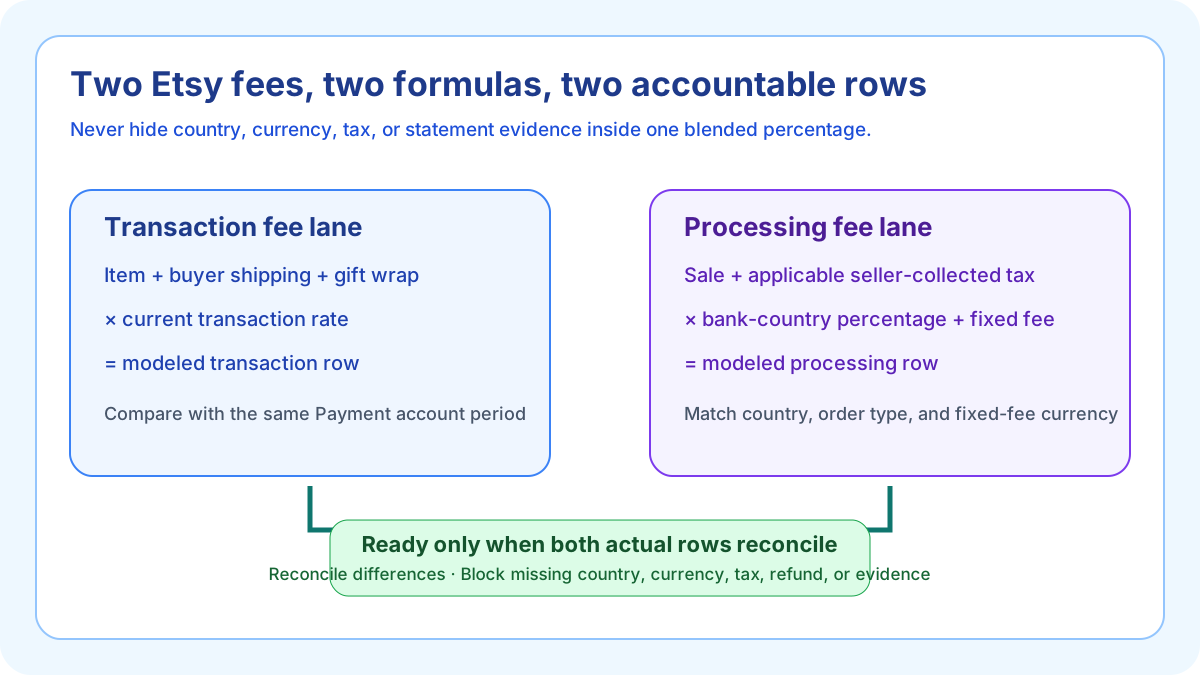
Etsy's transaction fee and Etsy Payments processing fee are separate charges with different formulas. Sellers often blend them into one marketplace percentage, then copy that shortcut across order values or countries. The fixed processing component and country-specific schedule make that shortcut unstable.
This focused calculator answers a narrower question than the complete fee stack: what should each of these two rows be for one documented order, and do the modeled rows agree with the actual Payment account within an owned tolerance? It does not calculate every Etsy charge, payout, contribution, tax liability, or accounting profit.
Build the transaction-fee base
Enter item revenue, paid personalization included in the displayed item price, buyer-paid shipping, and gift-wrap revenue separately. Etsy's current policy describes the transaction fee as 6.5 percent of the displayed listing price plus shipping and gift wrap charged to the buyer, and says an optional paid-personalization charge is added to that displayed listing price. Keep the entered rate editable and source-dated.
Do not subtract the shipping label, product cost, listing fee, or another seller expense before calculating this base. Do not apply one tax convention globally: Etsy says US transaction fees do not apply to sales tax, while outside the US a displayed listing price should include tax the seller is responsible for. Enter only the tax amount current evidence says belongs in this fee base.
Build the payment-processing base separately
Etsy Payments processing uses a percentage plus a fixed fee for each qualifying transaction. Etsy's current Help guidance says the base includes the item's total sale price, shipping fees, and applicable sales tax. Enter the processing-base tax separately from the transaction-base tax so neither row silently inherits the other's rule.
Tax collected and remitted by Etsy, seller-collected tax, tax embedded in a displayed price, VAT on seller services, import tax, and tax visible to a buyer can have different meanings. The tool therefore requires an explicit tax-base confirmation; a zero must mean documented non-applicability rather than an omitted review.
Select the bank-country percentage and fixed fee
The Etsy Payments schedule is organized by the location of the seller's Payment bank account. Current entries vary widely and some locations distinguish domestic from international orders. The United States fixture uses 3 percent plus USD 0.25; the United Kingdom fixture uses 4 percent plus GBP 0.20.
Store the Etsy Payments path, bank country, order-type context, rate, fixed amount, published fixed-fee currency, source URL, evidence date, and reviewer as one packet, then mark the schedule confirmed. Shop language, buyer country, buyer display currency, or a preferred reporting currency alone does not establish the correct schedule.
Keep the fixed fee in the correct currency
A percentage is dimensionless, but the processing fixed amount is not. USD 0.25 cannot be relabeled as GBP 0.25. Enter both the model currency and the published fixed-fee currency; the calculator blocks unless both are valid three-letter codes and match the actual rows being reconciled.
If listing currency and Payment account currency differ, currency conversion can create another Etsy fee and statement effect. That belongs in the complete fee stack and reconciliation workflow. This tool only states the model currency and refuses a missing or malformed three-letter code.
Reproduce the United States default fixture
The default confirms Etsy Payments, the United States bank-country schedule, separate tax treatment, a 2026-07-30 evidence review, original charge with no refund or credit, USD 40 item revenue, zero paid personalization, USD 5 shipping, zero gift wrap, zero tax in both fee bases, a 6.5 percent transaction rate, and 3 percent plus USD 0.25 processing. Both bases equal USD 45.
The transaction fee is USD 45 multiplied by 0.065, or USD 2.925, displayed as USD 2.93. Processing is USD 45 multiplied by 0.03 plus USD 0.25, or USD 1.60. The combined full-precision pair is USD 4.525, displayed as USD 4.53. Full precision remains available for row reconciliation.
Model tax in each fee base instead of assuming one universal rule
For the paid-personalization fixture, add USD 5 that is already part of the displayed item price. Both fee bases rise from USD 45 to USD 50; transaction becomes USD 3.25 and processing becomes USD 1.75. For the separate US tax boundary, enter zero tax in the transaction base and USD 3 of applicable tax in the processing base. The transaction base remains USD 45 while the processing base becomes USD 48.
A non-US order may represent seller-responsible tax inside the displayed listing price rather than as an extra field. The two explicit tax-base inputs prevent a US exclusion from being copied worldwide. The seller must verify current Etsy guidance, jurisdiction, order evidence, and actual statement presentation.
Compare a current United Kingdom scenario
For a GBP 45 order under the current UK Etsy Payments table entry, the 6.5 percent transaction fee is GBP 2.925. Processing at 4 percent plus GBP 0.20 is GBP 2.00, producing a combined pair of GBP 4.925. The interface displays GBP 2.93, GBP 2.00, and GBP 4.93.
The US and UK examples share a numerical order value only to explain formula structure. USD 45 and GBP 45 are not economically equivalent, and the 0.40 processing difference is not a currency-converted savings claim. VAT on seller fees, regulatory charges, conversion, and other country-specific rows remain outside this comparison.
Reconcile expected and actual fees independently
Enter the actual transaction-fee row and actual payment-processing row from the same privacy-safe order sample and statement period. The calculator reports a difference for each fee. It does not accept a zero combined difference when one fee is overstated and the other is understated by the same amount.
Tolerance should cover documented precision or statement presentation only. It must not excuse the wrong country, order type, tax base, fixed-fee currency, refund state, or reporting period. A row above tolerance returns Reconcile. A declared context conflict returns Block regardless of the numerical score.
Handle refunds, credits, and timing explicitly
Etsy's current payment-processing guidance describes proportional credits when a sale made through Etsy Payments is refunded. Transaction-fee credits, cancellations, partial refunds, taxes, and posting timing should be traced to their own Payment account rows. Do not compare an expected original-sale fee with a net later-period credit without classification.
This focused calculator accepts only the exact status `original charge; no refund or credit`. A changed order belongs in the dedicated refund-reconciliation workflow. List unsettled refunds, credits, country changes, fixed-fee currency conflicts, or missing rows in the evidence field; arithmetic remains visible but the decision returns Block.
Use Ready, Reconcile, and Block correctly
Ready means Etsy Payments is confirmed, the current bank-country schedule and separate tax bases are confirmed, the evidence date is valid, the transaction rate is the current 6.5 percent, the model and fixed-fee currency match, the order is an original charge without refund or credit, no negative or declared conflict remains, and both rows reconcile. Reconcile means safe context exists but an actual row differs.
Block means the comparison lacks a safe contract or evidence state. Negative values, another payment path, a stale or impossible rate, invalid date, unconfirmed schedule or tax treatment, currency mismatch, or changed refund state cannot be compensated by matching totals. The labels authorize only the next verification step.
Move the reconciled pair into broader profit analysis
After both fee rows reconcile, move them into the Etsy Fee Stack Calculator alongside listing or renewal, Offsite Ads, conversion, regulatory, seller-fee tax, refund, and other valid marketplace rows. Then move the verified fee stack into Seller Profit Guard with product, labor, packaging, carrier label, returns, discounts, overhead boundary, and contribution target.
Never call the two-fee subtotal total Etsy cost. It excludes numerous marketplace and operating layers. The transaction share of the pair is descriptive for the current order and changes with order value because the processing fixed amount does not scale proportionally.
Test, release, and recover a bounded cluster
Keep five deterministic fixtures: the US default, the USD 3 processing-tax boundary, the current UK schedule, offsetting actual-row mismatches that still Reconcile, and a broken packet with the wrong payment path, unconfirmed schedule and tax bases, invalid date, wrong transaction rate, negative inputs, fixed-currency mismatch, and refund conflict. Tests must preserve full precision and Block precedence.
Before release, retain narrow local and remote backups and a rollback identifier. Run typecheck, unit and integration tests, build, SEO/AEO, content and similarity audits, browser and 390-pixel mobile QA, then release the complete cluster in order. Verify HTTP, canonical, indexability, images, links, sitemap, tool behavior, and strict 404; roll back a critical failure.
Privacy, independence, and professional limits
Seller Profit Guard is independent and unaffiliated with Etsy. Fees, bases, country schedules, order classifications, fixed amounts, currencies, taxes, VAT, refunds, credits, deposits, Payoneer requirements, and Payment account interfaces can change. Verify current official Etsy sources and the seller's actual account before a material decision.
Keep buyer names, emails, addresses, messages, order IDs, payment rows, bank details, tax identifiers, labels, tokens, OAuth material, credentials, and raw CSV outside public pages, analytics, reports, and feedback. This browser-local calculator is operating guidance, not legal, tax, accounting, payout, or income advice.
Sources and further reading
- Etsy Fees and Taxes Overview: Current transaction-fee base and rate plus the distinct payment-processing layer.
- Etsy Payment Processing Fees: Current country table, percentage and fixed fees, tax-inclusive processing base, refund credit, and VAT context.
- Etsy Fee Basics: Current plain-language explanation of the two fee identities and bases.
- Etsy Fees and Payments Policy: Controlling fees, currencies, taxes, deductions, refunds, and seller responsibilities.
- Etsy Payment Account Help: Actual fee, refund, credit, tax, balance, statement, and payout-period reconciliation context.
- Seller Profit Guard methodology: Evidence hierarchy, privacy-safe fixtures, deterministic decisions, bounded release, correction, and rollback.
Related Seller Profit Guard tools
- Etsy CSV profit calculator: Run a local order profit check with editable fee and SKU cost assumptions.
- Payment reconciliation tool: Compare order rows with statement activity and flag unmatched rows.
- SKU cost library: Save or import material, labor, packaging, shipping, and target margin assumptions.
- Variant risk checker: Find missing SKUs and variation cost risks before a listing scales.
- Etsy title checker: Review listing-title clarity, repetition, keyword chains, and mobile scanning.
- Etsy tag checker: Review all 13 tag slots for duplicates, repeated meaning, and truthful coverage.
- Free shipping threshold calculator: Estimate when a shipping subsidy can still meet a target margin.
- Return window loss estimator: Model expected reverse shipping, restock work, recovery, and replacement loss.
- Etsy Ads break-even calculator: Estimate target-safe Etsy Ads spend, ACOS, and ROAS after fees, fulfillment, and expected return loss.
- CSV data privacy: Understand what the local-first workflow needs and what it does not need.
- Etsy Transaction vs Processing Fee Formula: Separate Etsy transaction and payment-processing fees with their correct revenue, tax, country, percentage, fixed-fee, currency, and evidence inputs.
- Etsy Transaction vs Processing Fee Example: Reproduce a US Etsy order with a $45 transaction base, 6.5% transaction fee, 3% plus $0.25 processing fee, and separate statement rows.
- UK Etsy Transaction vs Processing Fees: Model a £45 UK Etsy Payments order with the current 6.5% transaction fee and 4% plus £0.20 processing schedule without mixing currencies.
- 11 Etsy Transaction and Processing Fee Mistakes: Fix the eleven most damaging Etsy transaction-versus-processing errors involving bases, tax, country, order type, fixed fees, currency, and refunds.
- Etsy Transaction and Processing Fee Sources: Map every Etsy transaction and payment-processing input to current policy, country-rate tables, Payment account rows, tax treatment, and private evidence.
- Safe Etsy Fee Reconciliation Thresholds: Set arithmetic, currency, evidence, and reconciliation thresholds for Etsy transaction and processing fees without hiding meaningful differences.
- US vs UK Etsy Transaction and Processing Fees: Compare US and UK Etsy fee pairs at the same 45-unit order value to isolate processing percentage, fixed-fee currency, and country-schedule effects.
- Weekly Etsy Fee Reconciliation Routine: Run a privacy-safe weekly routine for Etsy transaction and processing rates, country schedules, tax bases, actual rows, differences, correction, and rollback.
- How to Read Etsy Transaction and Processing Fees: Interpret two Etsy fee bases, modeled fees, combined estimate, fee share, actual-row differences, Ready, Reconcile, and Block without false precision.
- Etsy Transaction and Processing Fee Audit: Audit transaction and processing bases, country rates, fixed-fee currency, tax, expected and actual rows, correction, approval, and rollback.
Use the interactive tool
Enable JavaScript to open the calculator and process browser-local inputs. The explanatory content and source links remain available without JavaScript.
Related guide: Build the two-fee worksheet before changing price or fee assumptions.
This tool provides operating estimates, not tax, accounting, legal, financial, or marketplace-policy advice. Verify current official sources and your own records before changing prices or operations.