Seller Profit Guard · How it works · CSV privacy
Etsy Regulatory Operating Fee calculator
Use this browser-local calculator for one dated Etsy.com transaction from a seller in Etsy's current Regulatory Operating Fee table. Confirm a country-table review on or after the transaction date, seller location, exact current country rate, complete fee base, buyer-tax exclusion, supported seller-fee tax, and same-grain actual rows. It returns non-compensating differences and a Block, Reconcile, Review, or Ready decision.
Maintained by Seller Profit Guard Editorial Team. Last reviewed: 2026-07-30.
What this Regulatory Operating Fee calculator solves
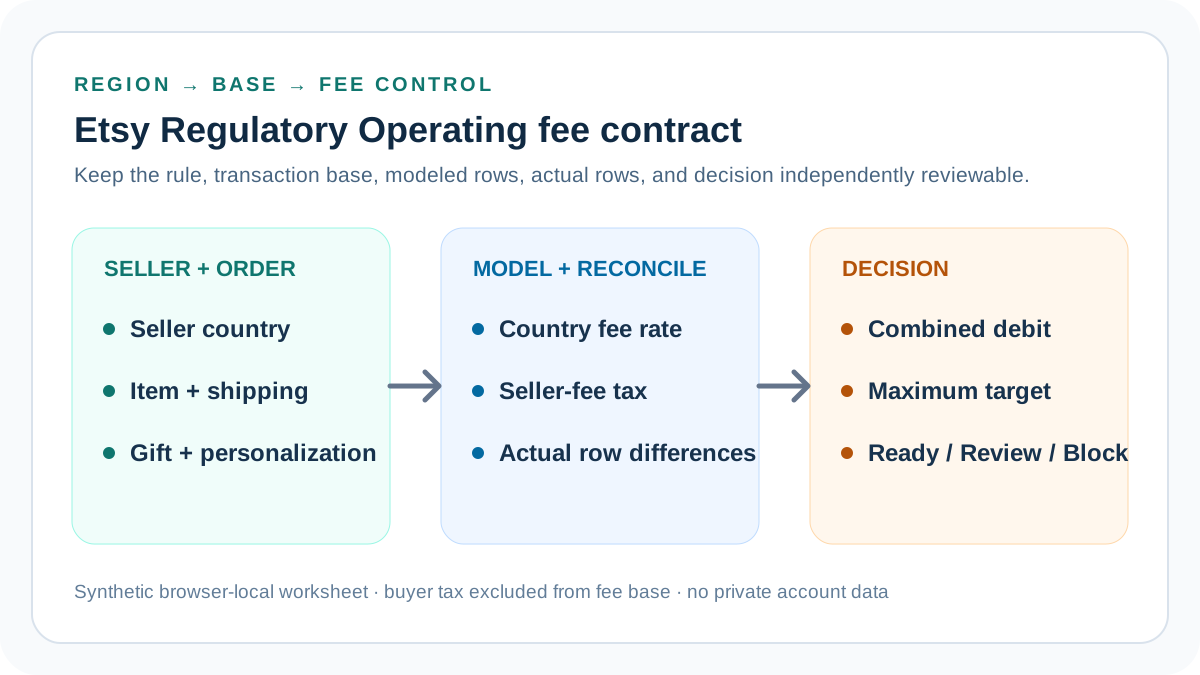
Etsy currently charges a Regulatory Operating fee to sellers located in certain countries. The percentage varies by seller country and applies to the displayed item price plus shipping, gift wrap, and personalization when those components apply. This calculator models that narrow seller-fee layer and its possible seller-fee tax; it does not pretend to calculate the entire Etsy fee stack.
The worksheet answers four bounded questions: which current public rate matches the seller region, what eligible base follows the entered order components, what fee and seller-fee tax follow from that base, and whether modeled rows agree with accountable Payment account observations. Search visibility or a favorable total cannot substitute for those controls.
Start with seller location, not buyer location
The current Etsy rule is tied to the seller's location. Select the seller country accountable to the reviewed account and period. Do not use the buyer's delivery country, browsing currency, tax location, or a marketplace URL as a substitute for seller-location evidence.
A cross-border order does not automatically change the percentage in this worksheet. If the seller location changed, the account was migrated, or the reviewed statement spans a change, split the periods and preserve the effective location evidence rather than averaging rates.
Use the current country-rate reference
The calculator includes a source-dated reference for Canada 0.50%, France 1.14%, Hungary 1.97%, Italy 0.80%, India 0.05%, Spain 0.88%, Türkiye 1.67%, the United Kingdom 0.48%, and Vietnam 1.24%. The current-rule contract requires the entered rate to match the selected listed country exactly.
A mismatched rate or any unlisted country blocks, including an unlisted country entered at 0%. Historical fee reconstruction needs a separately versioned historical workflow; it cannot silently pass through this current-rule calculator. Verify Etsy's current help and policy pages before a material decision.
Build the eligible order base
Eligible base equals displayed item price plus shipping charged, gift wrap charged, and personalization charged. For an item price of 40, shipping of 8, gift wrap of 2, and no separate personalization charge, the base is 50 in the modeled currency.
Keep every component at the same transaction grain and currency. Do not substitute payout, deposit, gross merchandise value, bank receipt, or net order profit. A missing shipping or personalization row understates the base even when the resulting percentage calculation appears internally consistent.
Exclude buyer tax from this fee base
Etsy's seller-fee overview explains that the Regulatory Operating fee is applied to the order total excluding tax collected by Etsy. Therefore this calculator has no buyer-tax input in the eligible base. Sales tax, marketplace VAT collected from a buyer, and similar buyer remittances must remain separate.
Seller-fee tax is different. VAT, GST, HST, QST, or another tax may apply to fees Etsy charges the seller, depending on business status and location. The calculator models that second layer only through the seller-fee tax percentage field.
Calculate the operating fee
Modeled Regulatory Operating fee equals eligible base multiplied by the entered country percentage. A base of CAD 50 at Canada's current 0.50% reference produces CAD 0.25 before any seller-fee tax.
Preserve full precision internally and round only for display or the accountable statement rule. Do not round every order component before addition, apply the percentage twice, or convert a 0.50% rate into 0.50 as a decimal multiplier.
Calculate tax on the seller fee separately
Modeled seller-fee tax equals the Regulatory Operating fee multiplied by the entered fee-tax percentage. With a CAD 0.25 fee and a 13% illustrative seller-fee tax input, the modeled tax is CAD 0.0325 and the displayed combined debit is CAD 0.28.
The 13% example is a fixture, not a determination that a particular seller owes that rate. Tax registration, invoices, exemptions, reverse-charge treatment, credits, and regional rules require actual account evidence and, when material, qualified tax or accounting advice.
Reproduce the Canada fixture
Use seller region Canada, currency CAD, item 40, shipping 8, gift wrap 2, personalization 0, fee rate 0.50%, fee-tax rate 13%, actual fee 0.25, actual fee tax 0.0325, tolerance 0.01, and maximum combined debit 0.30.
The calculator returns a CAD 50 eligible base, CAD 0.25 operating fee, CAD 0.03 displayed seller-fee tax, CAD 0.28 displayed total, zero full-precision differences, and Ready. This verifies only the supplied worksheet and target.
Reproduce the United Kingdom fixture
Use seller region United Kingdom, currency GBP, the same GBP 50 base, the current 0.48% reference, an illustrative 20% seller-fee tax input, actual fee 0.24, actual fee tax 0.048, tolerance 0.01, and maximum debit 0.30.
The result is GBP 0.24 operating fee and GBP 0.29 displayed total. The packet is Ready when both actual rows reconcile and no evidence conflict is declared. The fixture does not determine the seller's VAT status.
Use Hungary as a threshold stress test
Use seller region Hungary, currency EUR, base EUR 50, current rate 1.97%, illustrative fee-tax rate 27%, actual fee 0.985, actual fee tax 0.26595, and a maximum combined debit of EUR 1.00.
The displayed fee is EUR 0.99 and combined debit is EUR 1.25. Both actual rows can reconcile while the decision remains Review because the seller-owned debit threshold is exceeded. That separates arithmetic confidence from an operating choice.
Reconcile the fee and fee-tax rows independently
Compare modeled operating fee with the actual operating-fee row and modeled seller-fee tax with the actual fee-tax row. The calculator exposes both differences and uses the entered tolerance at full precision.
A matching combined total cannot cure offsetting component errors. Fee drift may indicate the wrong region, rate, base, refund, credit, currency, or period. Tax drift may indicate the wrong tax rate, invoice, credit, registration status, or row classification.
Use Block, Reconcile, Review, and Ready correctly
Block has first precedence for invalid dates or amounts, a rate mismatch, any unlisted country, malformed currency, a scope other than one Etsy.com transaction, missing seller-location, rule, fee-base, buyer-tax, seller-fee-tax, or same-grain-row confirmation, and declared refund, credit, currency, or statement conflicts.
Reconcile means the packet is structurally valid but at least one actual row differs beyond tolerance. Review means the rows reconcile but combined debit exceeds the seller-owned maximum. Ready means the narrow packet validates, reconciles, and passes the threshold.
Handle refunds and credits without silent netting
Refunds, cancellations, fee reversals, and tax credits can change actual statement rows. Preserve original charge and later credit as separate dated observations when available. Do not subtract a credit from the eligible order base merely to force a net match.
If a source shows only a net amount, classify that limitation and stop at Reconcile until the responsible fee and credit identities are understood. A future credit is not evidence that the original rate or base was wrong.
Move the result into the complete fee stack
After the two rows reconcile, carry the modeled operating fee and its seller-fee tax into the Etsy Fee Stack Calculator. Add listing, transaction, payment processing, Offsite Ads, currency conversion, refunds, and operating costs without counting this fee twice.
Then carry the reconciled stack into Seller Profit Guard with product, labor, packaging, shipping, expected return loss, and target contribution. Regulatory fee plus seller-fee tax is a debit layer, not revenue, payout, contribution, accounting profit, or taxable income.
Test current, adverse, and broken packets
Keep deterministic tests for Canada at 0.50%, the United Kingdom at 0.48%, Hungary at 1.97%, an unlisted 0% country, two offsetting actual-row differences, and invalid dated evidence. Tests preserve full-precision multiplication, currency formatting, separate differences, threshold classification, and Block precedence.
A regression that changes eligible-base composition, admits buyer tax, accepts an unlisted country, masks a current-reference mismatch, nets two actual rows, loses the evidence dates or confirmations, or weakens raw negative-value validation must fail before release. Use synthetic values only.
Release and recover the complete cluster
Before release, retain narrow local and remote backups and a rollback identifier. Run syntax and SVG validation, typecheck, unit and integration tests, production build, SEO/AEO, content and similarity audits, browser interaction, canonical and schema checks, image loading, and 390-pixel mobile QA.
Publish the parent tool and all ten support guides as one ordered cluster. Add self-canonicals, indexability, sitemap entries, guide-hub and tool backlinks together, purge only changed URLs and assets, verify public HTTP and behavior, and restore automatically after a critical live failure.
Privacy, independence, and professional limits
Seller Profit Guard is independent and unaffiliated with Etsy. This browser-local estimate does not retrieve account data, authenticate location, determine seller-fee tax, reproduce every refund or credit, or provide legal, tax, accounting, pricing, investment, or income advice.
Keep buyer names, emails, addresses, messages, order IDs, payment rows, tax identifiers, bank records, tokens, OAuth material, credentials, and raw CSV outside public pages and reports. Use approved private-system pointers for accountable evidence.
Sources and further reading
- Etsy Regulatory Operating Fee Help: Current seller-location trigger, country percentages, eligible item, postage, gift-wrap, and personalization base, Payment account presentation, and VAT boundary.
- Etsy Fees and Payments Policy: Controlling Regulatory Operating fee percentage and displayed item-price plus shipping base.
- Etsy Fees and Taxes Overview: Order-total base, tax collected by Etsy exclusion, and surrounding seller-fee context.
- Etsy Payment Account Help: Actual fee, tax, credit, statement, balance, and date-row reconciliation context.
- Etsy VAT on Seller Fees Help: Seller-fee VAT or similar tax, business and location context, invoices, and credits.
- Seller Profit Guard methodology: Evidence hierarchy, privacy-safe fixtures, deterministic decisions, bounded release, correction, and rollback.
Related Seller Profit Guard tools
- Etsy CSV profit calculator: Run a local order profit check with editable fee and SKU cost assumptions.
- Payment reconciliation tool: Compare order rows with statement activity and flag unmatched rows.
- SKU cost library: Save or import material, labor, packaging, shipping, and target margin assumptions.
- Variant risk checker: Find missing SKUs and variation cost risks before a listing scales.
- Etsy title checker: Review listing-title clarity, repetition, keyword chains, and mobile scanning.
- Etsy tag checker: Review all 13 tag slots for duplicates, repeated meaning, and truthful coverage.
- Free shipping threshold calculator: Estimate when a shipping subsidy can still meet a target margin.
- Return window loss estimator: Model expected reverse shipping, restock work, recovery, and replacement loss.
- Etsy Ads break-even calculator: Estimate target-safe Etsy Ads spend, ACOS, and ROAS after fees, fulfillment, and expected return loss.
- CSV data privacy: Understand what the local-first workflow needs and what it does not need.
- Etsy Regulatory Operating Fee Formula: Calculate Etsy Regulatory Operating fees from seller region, item, shipping, gift-wrap and personalization charges, fee tax, and actual rows.
- Canada Etsy Regulatory Fee Example: Trace a CAD 50 Canada Etsy order through the current 0.50% Regulatory Operating fee, 13% fee-tax assumption, and Payment account reconciliation.
- UK Etsy Regulatory Fee Example: Calculate a UK Etsy order with item, shipping and personalization charges, the current 0.48% operating fee, and a separate VAT assumption.
- 12 Etsy Regulatory Fee Mistakes: Correct Etsy Regulatory Operating fee errors involving seller location, rate, order base, buyer tax, VAT, currency, refunds, credits, and scope.
- Etsy Regulatory Fee Data Sources: Map seller region, current percentage, item, shipping, gift wrap, personalization, buyer-tax exclusion, fee tax, and actual rows to evidence.
- Safe Etsy Regulatory Fee Thresholds: Set seller-region, fee-base, rate, VAT, reconciliation, total-debit, conflict, and recovery gates for Etsy Regulatory Operating fees.
- Etsy Regulatory Fee Country Comparison: Compare current Canada, UK, Hungary and other Etsy Regulatory Operating fee percentages on one aligned eligible order base.
- Weekly Etsy Regulatory Fee Routine: Run a privacy-safe weekly routine for current Etsy country rates, eligible bases, seller-fee tax, Payment account rows, corrections, and rollback.
- How to Read Etsy Regulatory Fee Results: Interpret seller region, reference rate, eligible base, modeled and actual fee, seller-fee tax, differences, threshold, scope, and uncertainty.
- Etsy Regulatory Fee Audit Template: Audit seller region, current percentage, base components, buyer-tax exclusion, fee tax, actual rows, differences, correction, approval, and rollback.
Use the interactive tool
Enable JavaScript to open the calculator and process browser-local inputs. The explanatory content and source links remain available without JavaScript.
Related guide: Build the regional fee worksheet before changing price or accounting treatment.
This tool provides operating estimates, not tax, accounting, legal, financial, or marketplace-policy advice. Verify current official sources and your own records before changing prices or operations.