Seller Profit Guard · How it works · CSV privacy
Dimensional Weight Calculator
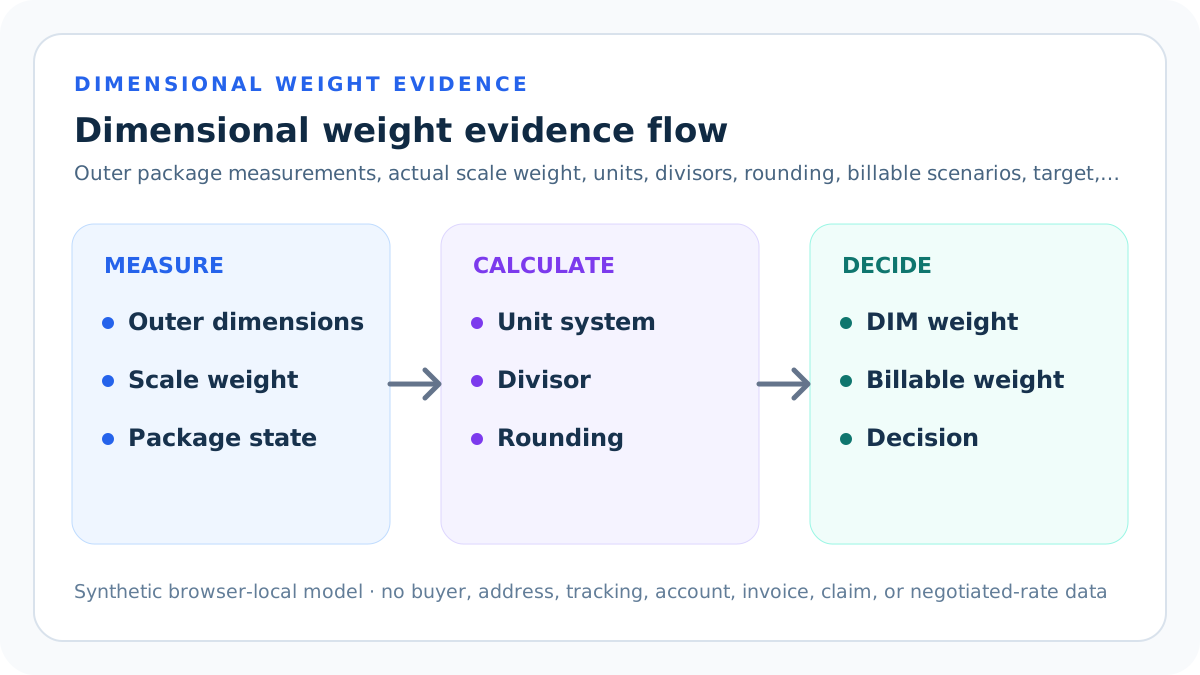
A dimensional weight calculator rounds package dimensions under a declared rule, multiplies length × width × height, divides volume by a seller-verified divisor, and compares dimensional with actual scale weight. The greater value becomes the pre-round billable-weight scenario.
Maintained by Seller Profit Guard Editorial Team. Last reviewed: 2026-07-31.
Define one carrier-rule scenario
Choose one carrier, service, rate type, origin market, destination class, effective rule date, measurement system, package type, dimension rounding rule, and billable-weight rounding rule. Those fields form one scenario.
Do not label an unspecified divisor as a universal carrier rule. Contract rates, retail rates, daily rates, product classes, origin countries, package types, and effective dates may differ.
Measure the finished outer package
Measure length at the longest outer point, then width and height at their extreme outer dimensions after the product, protection, closures, and exterior packaging are complete. Preserve the measurement tool, operator, date, and repeat result.
An internal box dimension, supplier catalog dimension, product dimension, folded soft-pack estimate, or pre-packed shell can understate carrier volume. Irregular or compressible packages require the exact applicable carrier rule.
Weigh the same finished parcel
Use a calibrated scale to record actual finished-package weight at the same shipment grain. Preserve unit, scale identifier, calibration status, operator, date, and whether the result is before or after any carrier adjustment.
Product weight, net contents, batch average, catalog weight, estimated weight, and label entry are not interchangeable. A package can be dimensionally light but physically heavy, or physically light but volumetrically large.
Choose imperial or metric consistently
Imperial mode treats dimensions as inches, weight as pounds, and the divisor as cubic inches per pound. Metric mode treats dimensions as centimeters, weight as kilograms, and the divisor as cubic centimeters per kilogram.
Never combine centimeters with an imperial divisor or pounds with a metric result. Converting a rule requires documented unit conversion and confirmation that the carrier publishes or accepts the converted convention.
Enter a seller-verified primary divisor
The primary divisor must come from the current rule applicable to the seller's carrier, service, rate type, origin, package, and effective date. Save its official source URL, retrieval date, and scope.
The calculator defaults to a synthetic divisor for testing, not a promise of live applicability. UPS, FedEx, USPS, other carriers, resellers, and negotiated agreements can use different conditions.
Enter a comparison divisor deliberately
A comparison divisor creates a second scenario using the same rounded dimensions and actual weight. It can represent another rate type, contract, service, carrier, effective rule, or sensitivity check.
Do not interpret the comparison as an available price or service unless the seller qualifies for that rule. Give it a separate source label and preserve every difference beyond the divisor.
Apply dimension rounding before volume
The selected dimension rule rounds each outer dimension by nearest whole unit, ceiling, or not at all. The calculator displays raw dimensions, rule-rounded dimensions, raw volume, rule volume, and the percentage change.
Carrier rules can specify how to round or treat fractional measurements. Apply the exact current rule before multiplying; rounding the final cubic volume instead can produce a different result.
Calculate dimensional volume
Rule volume equals rule-rounded length multiplied by rule-rounded width multiplied by rule-rounded height. Units remain cubic inches in imperial mode or cubic centimeters in metric mode.
Volume describes occupied space under the selected measurement convention. It is not package capacity, product volume, density classification, oversize eligibility, girth, surcharge, or acceptance proof.
Calculate dimensional weight
Primary dimensional weight equals rule volume divided by the primary divisor. Comparison dimensional weight uses the comparison divisor. Retain full precision before any billable-weight rounding.
A smaller divisor produces a larger dimensional weight for the same package. That arithmetic fact does not mean the smaller divisor is the correct or available rule.
Compare dimensional with actual weight
For each scenario, compare full-precision dimensional weight with actual scale weight and select the greater value before the declared billable-weight rounding rule. This models the common maximum-weight structure.
Some carrier products can have additional thresholds, minimums, exclusions, oversize rules, package types, or negotiated provisions. The tool cannot replace the complete current service guide.
Apply billable-weight rounding
Ceiling mode raises any fractional controlling weight to the next whole pound or kilogram. None mode preserves the controlling value. The chosen option must match the verified carrier scenario.
Do not round actual and dimensional inputs opportunistically to obtain a lower result. Preserve intermediate values so an invoice reviewer can reproduce the exact billable-weight scenario.
Read a compact dense parcel
The default synthetic package is 10 × 8 × 4 inches, or 320 cubic inches, with 5 pounds actual weight. Dividing by 139 or 166 produces dimensional weights below actual, so both ceiling-rounded billable scenarios remain 5 pounds.
This Ready result shows only that actual weight controls the two entered scenarios and clears a 10-pound planning maximum. It does not quote either scenario.
Read a large light parcel
A synthetic 20 × 16 × 12-inch package has 3,840 cubic inches. Dividing by 139 gives about 27.63 pounds and by 166 gives about 23.13; ceiling produces 28 and 24 pounds while actual remains 5.
This Review result exposes a dimensional premium and a six-pound scenario difference. It does not prove the seller can obtain either rule or that reducing dimensions preserves protection.
Compare the seller-owned maximum
Target headroom equals maximum seller-planned billable weight minus primary billable weight. Negative headroom quantifies the full-precision gap and triggers Review.
The target is an internal planning boundary, not a carrier limit, published service maximum, shipping price, margin threshold, or acceptance criterion. Record owner, purpose, approval, effective date, and expiry.
Read dimensional premium
Primary dimensional premium equals primary billable weight minus actual scale weight. A positive value shows how much the modeled billable result exceeds the parcel's actual weight after the selected rules.
Premium is not a surcharge amount or cost. Shipping price depends on carrier, account, service, zone, accessorials, package rules, currency, and current rate evidence.
Review measurement-rounding sensitivity
The calculator compares rule volume with raw measured volume. A change above the seller-entered maximum triggers Review because the selected measurement and rounding combination materially changes the space model.
The threshold is a seller-owned sensitivity control, not a carrier allowance. Store its owner, purpose, effective date, and expiry; repeat outermost measurements and verify the applicable carrier rule whenever the result crosses it.
Apply Block, Review, and Ready precedence
Block blank, non-finite, nonpositive, or structurally invalid numeric evidence; invalid unit or rounding values; an impossible review date; incomplete yes/no evidence confirmations; vague carrier rule, period, or package scope; or declared conflicts. Invalid structure cannot be rescued by favorable billable weight.
After structure passes, Review dimensional weight above actual, primary billable weight above target, or volume-rounding change above the seller-entered maximum. Ready clears only those bounded gates.
Build a privacy-safe dimension packet
Store seller alias, package alias, aggregate measurements, scale and measurement evidence pointers, carrier-rule URL, retrieval date, divisor, rounding, service, rate type, origin, period, reviewer, both seller thresholds, nine evidence confirmations, and unresolved issues.
Keep buyer names, addresses, tracking numbers, labels, carrier account identifiers, negotiated-rate files, invoices, credentials, claims, and raw exports outside public pages and screenshots.
Test the calculation contract
Reproduce compact-dense Ready, large-light Review, above-target Review, configurable sensitivity Review and Ready, invalid-number Block, impossible-date Block, incomplete-confirmation Block, and declared-conflict Block fixtures. Test unit systems, fractional dimensions, dimension rounding, weight rounding, divisor boundaries, target boundaries, threshold boundaries, and output masking.
Then run typecheck, unit, integration, build, SEO, duplicate, schema, image, link, mobile, keyboard, static-route, live, and rollback checks with synthetic evidence.
Observe and correct rule drift
After release, verify canonical, indexability, schema, sitemap membership, guide discovery, tool interactions, mobile layout, events, and strict 404 behavior. Record current official-rule retrieval dates and Day 0/7/14/28 evidence.
A changed carrier page, divisor, threshold, rate type, measurement rule, or product scope opens a new version. Do not rewrite historical packets or claim same-day ranking, conversion, cost, or revenue effects.
Choose the next action from the driver
If Block, repair measurement, weight, divisor, unit, rounding, carrier context, period, scope, or conflict. If Review, isolate package volume, actual weight, target, or rule difference. If Ready, use billable weight as one shipping-planning input.
Validate price and package acceptance with the current carrier or authorized rate source. Preserve the prior package and rule packet so every material change remains attributable.
Sources and further reading
- Seller Profit Guard methodology: Comparable-grain evidence, deterministic calculations, validation, correction, release, and rollback.
- Seller Profit Guard data privacy: Local-first boundaries for buyer, address, tracking, carrier-account, invoice, credential, claim, and raw export data.
- UPS: Shipping Dimensions and Weight: Official U.S. UPS explanation reviewed 2026-07-31 for outer measurements, dimensional formula, divisor differences by rate type, and billable-weight rounding.
- FedEx: What Is Dimensional Weight?: Official U.S. FedEx explanation reviewed 2026-07-31 for dimensional weight, measurement rounding, divisor context, and comparison with actual weight.
- USPS Postal Explorer: Ground Advantage Retail: Official USPS rule context reviewed 2026-07-31 for extreme dimensions, cubic-volume threshold, divisor, and whole-pound rounding for the named product scope.
Related Seller Profit Guard tools
- Etsy CSV profit calculator: Run a local order profit check with editable fee and SKU cost assumptions.
- Payment reconciliation tool: Compare order rows with statement activity and flag unmatched rows.
- SKU cost library: Save or import material, labor, packaging, shipping, and target margin assumptions.
- Variant risk checker: Find missing SKUs and variation cost risks before a listing scales.
- Etsy title checker: Review listing-title clarity, repetition, keyword chains, and mobile scanning.
- Etsy tag checker: Review all 13 tag slots for duplicates, repeated meaning, and truthful coverage.
- Free shipping threshold calculator: Estimate when a shipping subsidy can still meet a target margin.
- Return window loss estimator: Model expected reverse shipping, restock work, recovery, and replacement loss.
- Etsy Ads break-even calculator: Estimate target-safe Etsy Ads spend, ACOS, and ROAS after fees, fulfillment, and expected return loss.
- CSV data privacy: Understand what the local-first workflow needs and what it does not need.
- Dimensional Weight Formula and Inputs: Define outer dimensions, actual weight, unit system, divisors, dimension rounding, billable rounding, carrier rule, target, and scope.
- Dimensional Weight Worked Example: Reproduce a compact dense 10 × 8 × 4 inch, 5 pound parcel under seller-entered 139 and 166 divisor scenarios with explicit rounding.
- Large Light Parcel Dimensional Weight: Model a 20 × 16 × 12 inch, 5 pound parcel whose dimensional weights and rounded billable scenarios exceed actual scale weight.
- Dimensional Weight Calculator Mistakes: Find outer-measurement, scale, unit, divisor, rounding-order, service, rate-type, threshold, privacy, and interpretation defects.
- Dimensional Weight Evidence Sources: Build protected source lineage for dimensions, scale weight, divisors, unit conventions, rounding rules, services, rate types, targets, and corrections.
- Dimensional Weight Decision Thresholds: Apply Block, Review, and Ready gates to dimensions, actual weight, divisors, units, rounding, carrier context, target, sensitivity, and release.
- Actual vs Dimensional Weight Comparison: Compare compact dense and large light parcels plus divisor, package, rounding, and actual-weight scenarios without hiding rule differences.
- Dimensional Weight Operating Routine: Run recurring package measurement, scale, carrier-rule, divisor, rounding, exception, approval, release, adjustment, and correction controls.
- How to Interpret Dimensional Weight: Read raw and rounded dimensions, volume, actual weight, two dimensional and billable scenarios, premium, target headroom, decision, and uncertainty.
- Dimensional Weight Audit Template: Audit physical evidence, unit and formula identity, carrier-rule applicability, rounding, scenarios, privacy, accessibility, release, correction, and rollback.
Use the interactive tool
Enable JavaScript to open the calculator and process browser-local inputs. The explanatory content and source links remain available without JavaScript.
Related guide: Define measurements, units, divisors, rounding, carrier scope, and billable-weight boundaries.
This tool provides operating estimates, not tax, accounting, legal, financial, or marketplace-policy advice. Verify current official sources and your own records before changing prices or operations.