Seller Profit Guard · How it works · CSV privacy
TikTok Shop creator commission calculator for seller margin
Enter product revenue, creator commission, platform and payment fees, coupon cost, samples, fulfillment, returns, ads, and product cost to estimate contribution per attributed order. Compare standard and Shop Ads commission scenarios before increasing creator spend.
Maintained by Seller Profit Guard Editorial Team. Last reviewed: 2026-07-25.
Why creator commission needs a full-margin model
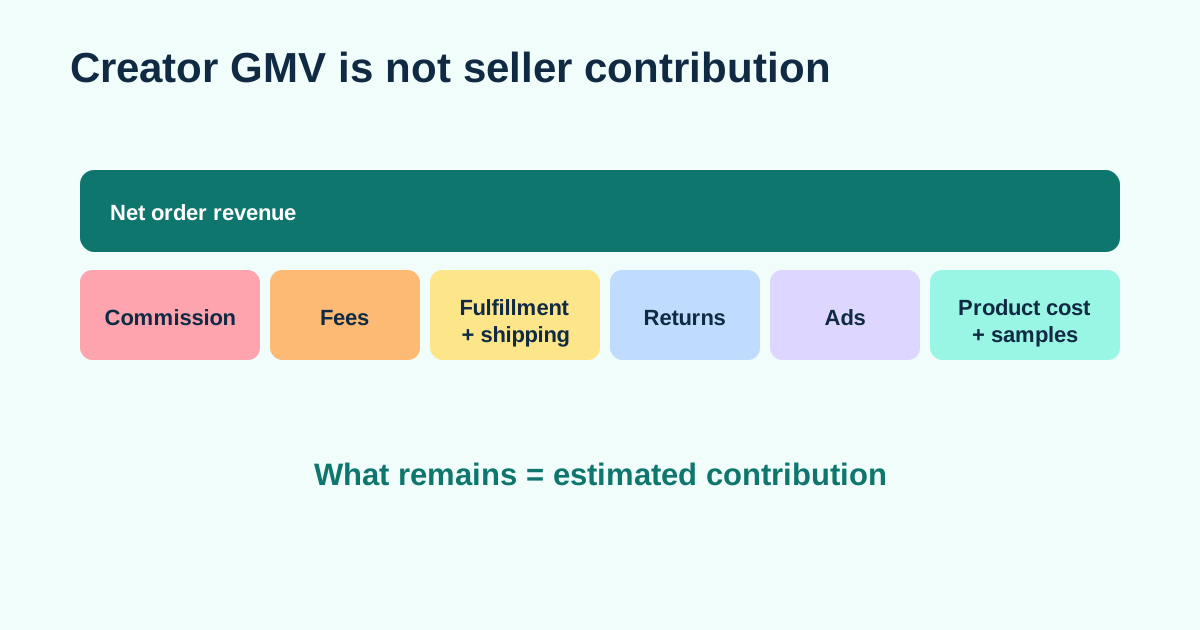
Creator commission is only one cost layer. A promoted order can also include seller-funded discounts, marketplace or payment fees, shipping subsidy, fulfillment, product and packaging cost, ad spend, samples, and expected return loss. Looking at GMV minus commission can make an unprofitable order appear healthy.
The calculator keeps each assumption editable because rates and program rules vary by market, category, collaboration, account, and date. Copy current values from Seller Center and Ads Manager rather than relying on a universal default.
- Standard affiliate commission as a percentage of eligible GMV.
- Separate Shop Ads commission scenario where the feature applies.
- Sample cost allocated across expected attributed orders.
- Coupon, platform fee, fulfillment, advertising, and return assumptions.
- Contribution per order and target-margin gap.
The per-order commission formula
A basic commission estimate is eligible commission base multiplied by the applicable commission rate. The seller contribution estimate then subtracts all other variable costs from net order revenue. Keep the commission base separate from revenue when Seller Center defines it differently for the account or market.
A practical planning formula is: contribution = net order revenue − product cost − packaging − fulfillment − platform and payment fees − creator commission − allocated sample cost − ad spend − expected return loss. This is an operating estimate, not a payout or accounting statement.
Worked example with standard and Shop Ads rates
The calculator's default fixture uses $50 net order revenue and a separate $50 eligible commission base. Product cost is $14, packaging is $1, fulfillment is $6, the entered platform and payment fee is 8% of revenue or $4, the seller-funded coupon is $2, expected return loss is $2, and ad spend is $5 per attributed order. A $30 landed sample allocated across 20 retained attributed orders adds $1.50.
Those common costs total $35.50 before creator commission. At a 10% Standard rate, commission is $5 and retained contribution is $9.50, or 19% of revenue. At an entered 5% Shop Ads rate, commission is $2.50 and retained contribution is $12, or 24%. The $2.50 difference is exactly the commission difference; ad spend remains in both paths.
| Input | Standard scenario | Shop Ads scenario |
|---|---|---|
| Net order revenue | $50.00 | $50.00 |
| Creator commission | $5.00 at 10% | $2.50 at 5% |
| Common modeled costs | $35.50 | $35.50 |
| Estimated contribution | $9.50 | $12.00 |
| Contribution margin | 19.0% | 24.0% |
| Cushion above 15% target | $2.00 | $4.50 |
Allocate samples instead of hiding them
A free sample is a campaign acquisition cost. Allocate landed sample cost, outbound shipping, packaging, and handling across the retained attributed orders expected from that creator or campaign. If a $35 sample produces five retained orders, the sample allocation is $7 per order; if it produces twenty, the allocation is $1.75.
Use a conservative order count until the creator has evidence. Do not divide sample cost by views or clicks when the business decision depends on retained profitable orders. Keep organic, affiliate, and paid attribution windows separate in the source data.
Account for returns and attribution differences
An attributed order can later be refunded, returned, replaced, or partially recovered. Expected return loss should include the probability of return multiplied by reverse shipping, lost outbound shipping, handling, restock work, unsellable inventory, replacement cost, and any recovered resale value.
TikTok's official help distinguishes Seller Center reporting from Ads Manager attribution windows. Reconcile reports before claiming that a creator or ad caused every order shown in one dashboard. Use retained contribution, not only attributed GMV, to compare creators.
Decision rules for a creator offer
Set a target contribution or margin before negotiating the rate. Stress-test at the proposed commission, a higher rate, a lower conversion volume for sample payback, and a higher return rate. If the product fails under ordinary variation, change price, costs, shipping, coupon, sample terms, or the offer before scaling.
The calculator does not judge creator fit or content quality. Review audience relevance, product-category experience, content rights, inventory, claims, and operational capacity separately. A mathematically affordable commission is not a guarantee of sales or compliant creative.
What every input means
Net order revenue is the retained seller revenue grain used for the contribution denominator; it is not automatically the same as list price, GMV, customer payment, gross revenue in Ads Manager, or final payout. The eligible commission base is entered separately because commission rules and refund treatment may not match the revenue field. A deliberate zero base remains zero instead of silently becoming revenue.
Product cost, packaging, fulfillment, seller-funded coupon, ad spend, and expected return loss are per retained order. Platform and payment fee is modeled as a percentage of entered net revenue, so a seller whose statement uses a different base must first convert the actual fee to an equivalent per-order percentage or treat this output as a planning approximation. The sample field is a total landed sample cost divided by expected retained attributed orders.
Standard and Shop Ads rates are two mutually compared paths, not two commissions added to one order. Target contribution margin is a seller policy applied to net order revenue. The calculator exposes both dollar contribution and margin, the difference between paths, and each path's cushion above or below the target.
| Input group | Declared grain | Evidence or assumption |
|---|---|---|
| Revenue and commission base | One retained attributed order | Seller Center and settlement mapping |
| Product, packaging, fulfillment | Per retained order | Current SKU and operations records |
| Platform/payment fee | Percent of entered revenue | Reconciled fee assumption |
| Sample | Campaign total | Landed sample and shipping record |
| Expected orders | Retained attributed orders | Bounded test forecast or mature cohort |
| Ads and return loss | Per retained order | Ads report and matured return model |
| Target margin | Percent of entered revenue | Seller decision policy |
Current TikTok commission boundaries
TikTok's March 2026 Business Help guidance says invited sellers can configure a separate Shop Ads commission rate for products in Open or Target Collaboration. The documented configurable range is 1%–80%. When the separate Shop Ads rate is turned off, affiliate posts used in ads can continue to earn the Standard rate. Availability and the applicable path must be verified in the seller's current account.
For Open Collaboration, TikTok currently documents a minimum Shop Ads rate equal to 30% of the Standard rate in most regions, with Mexico and Brazil named as exceptions. The checker warns when a positive Shop Ads rate falls below that relationship. It does not know the seller's market or collaboration type, so the warning is a verification stop rather than an instruction to change a live rate.
Target Collaboration can supersede Open Collaboration for the same creator and product. Protected-rate timing, refund state, creator eligibility, affiliate-post authorization, and the final Affiliate Center amount can also affect what becomes payable. Never turn a public example into an account-specific rate.
How the calculator score works
The convenience score is not a profit probability. It starts from 55, adds 160 times the lower of the two contribution-margin results, subtracts seven points for each surfaced issue, and clamps the result from zero to 100. The lower-margin path is used so one attractive scenario cannot hide an under-target comparison path.
Issues cover percentage boundaries, negative amounts, nonpositive revenue, an invalid retained-order denominator, commission base above net revenue, the documented Open Collaboration rate relationship, break-even failure, and target-margin failure. Arithmetic remains visible even when inputs are invalid so the seller can diagnose which field caused the result; a warning result is not release approval.
A 100 score can occur when both entered paths have large cushions and no mechanical issue. It still cannot establish demand, creator quality, content rights, inventory capacity, attribution accuracy, settlement, incrementality, compliance, or future performance.
- Score = clamp(55 + 160 × lower path margin − 7 × issue count).
- Standard commission = eligible base × Standard rate.
- Shop Ads commission = eligible base × Shop Ads rate.
- Contribution = revenue − common costs − path commission.
- Margin = path contribution ÷ net order revenue.
- Cushion = path contribution − target contribution.
Reproduce the default, clean, and adverse fixtures
The default fixture returns $9.50 Standard contribution and $12 Shop Ads contribution. It shows $5 and $2.50 commissions, $35.50 common cost, $1.50 sample allocation, 19% and 24% margins, and $2 and $4.50 target cushions. These exact values are covered by unit and browser tests.
A clean high-cushion fixture can use $100 revenue and commission base, $20 product cost, $2 packaging, $8 fulfillment, 5% platform fee, 8% Standard commission, 4% Shop Ads commission, no coupon, a $20 sample across 20 retained orders, $5 ads, $2 return loss, and a 15% target. Both paths remain positive and the input contract clears.
An adverse fixture should include a commission base above revenue, a percentage above its allowed boundary, a positive Shop Ads rate below the documented Open Collaboration relationship, a zero retained-order denominator, and a cost stack below break-even. The interface must report the issues, retain deterministic outputs, and restore defaults on reset.
Separate attribution, commission, and incrementality
TikTok currently describes Shop Ads attribution at the Shop ID level rather than the product ID level. Its Help Center also distinguishes Seller Center sales timing from Ads Manager's attribution window. An order can therefore appear in an ad report without proving that the promoted product or creator caused an incremental purchase at the same product grain.
The Ads x Affiliate report can help compare organic and ad-supported affiliate activity, while Ads Manager's estimated affiliate commission may differ from the final Affiliate Center payout. Reconcile the named report, attribution window, order state, refunds, payable rate, and final commission before replacing a planning estimate with realized economics.
Use the calculator to ask whether an entered path can afford its costs. Use a separate experiment or causal analysis to ask whether creator activity generated incremental retained orders. Do not label attributed revenue, creator content views, or gross orders as incremental profit.
Privacy, rights, and operational controls
This browser-local calculator needs aggregate numbers only. Do not paste creator names, handles, contracts, messages, buyer details, order IDs, addresses, payment references, raw exports, tokens, or account credentials. Keep source files in protected seller systems and enter only the minimum non-identifying amounts needed for the scenario.
Before changing a live collaboration, preserve the current product, creator scope, Standard and Shop Ads rates, protected-rate context, sample terms, creative authorization, campaign state, date, owner, and rollback path. Safe-stop on login or CAPTCHA ambiguity, platform warnings, the wrong shop profile, missing target context, or a rule that conflicts with the approved plan.
Seller Profit Guard is independent and is not affiliated with TikTok. The output is a planning estimate, not a payout statement, accounting result, tax or legal advice, creator recommendation, rights clearance, ad authorization, or performance guarantee.
When to hold or roll back a creator test
Hold before launch when the commission base cannot be reconciled, the collaboration path is unclear, the account is not eligible for the entered Shop Ads feature, rates violate the current account rule, the sample denominator is speculative without a cap, or either ordinary stress case falls below the seller's target. Mathematical affordability cannot override unsupported claims, missing content rights, insufficient inventory, or unsafe account state.
After launch, reconcile retained orders, matured refunds, commission payout, actual ad spend, sample allocation, product mix, fulfillment cost, and return loss on equivalent windows. Roll back or pause when the payable rate differs from the approved packet, attribution cannot be reconciled, contribution falls below the stop threshold, inventory or support capacity breaks, or the creator authorization changes.
Record the decision as keep, revise, pause, or restore with the evidence date and owner. A successful platform save proves configuration only; it does not prove profitability or causality.
Sources and further reading
- TikTok Business Help: Different affiliate commission rates: Official distinction between standard and Shop Ads commission rates, with a worked rate example.
- TikTok Business Help: Open collaborations: Official description of product-level open collaboration and editable affiliate commission.
- TikTok Business Help: Shop Ads attribution: Official attribution-window and Seller Center versus Ads Manager reporting boundaries.
- TikTok Business Help: Turn on Shop Ads commission rates: Official invited-seller availability, collaboration prerequisite, 1%–80% range, and fallback to Standard commission when the separate rate is off.
- TikTok Business Help: View Shop Ads metrics: Official definitions for Shop Ads cost, purchases, gross revenue, ROAS, and estimated affiliate commission, including the final-payout limitation.
Related Seller Profit Guard tools
- Etsy CSV profit calculator: Run a local order profit check with editable fee and SKU cost assumptions.
- Payment reconciliation tool: Compare order rows with statement activity and flag unmatched rows.
- SKU cost library: Save or import material, labor, packaging, shipping, and target margin assumptions.
- Variant risk checker: Find missing SKUs and variation cost risks before a listing scales.
- Etsy title checker: Review listing-title clarity, repetition, keyword chains, and mobile scanning.
- Etsy tag checker: Review all 13 tag slots for duplicates, repeated meaning, and truthful coverage.
- Free shipping threshold calculator: Estimate when a shipping subsidy can still meet a target margin.
- Return window loss estimator: Model expected reverse shipping, restock work, recovery, and replacement loss.
- Etsy Ads break-even calculator: Estimate target-safe Etsy Ads spend, ACOS, and ROAS after fees, fulfillment, and expected return loss.
- CSV data privacy: Understand what the local-first workflow needs and what it does not need.
- Creator Commission Formula: 14 Inputs: Build a TikTok Shop creator commission estimate from 14 labeled inputs, two commission paths, retained orders, and a target contribution threshold.
- Creator Commission Example: Standard Rate: Follow a complete TikTok Shop Standard commission example from eligible base and sample allocation to retained contribution and target-margin decision.
- Shop Ads Commission: Margin Scenario: Model TikTok Shop Ads commission separately from Standard commission, ad spend, authorization, attribution, and regional account rules.
- 9 Creator Commission Calculator Errors: Correct nine creator commission errors involving bases, rates, samples, attribution, returns, discounts, advertising, timing, and interpretation.
- Creator Commission Data: Source Map: Map every creator commission calculator input to TikTok first-party reports, seller cost records, retained-order evidence, and explicit assumptions.
- Safe Creator Commission Margin Thresholds: Set break-even, target, stress, and evidence thresholds for a TikTok Shop creator commission offer without false precision.
- Standard vs Shop Ads Commission Math: Compare Standard and Shop Ads commission at one order grain while preserving advertising, attribution, authorization, and rate-priority differences.
- Weekly Creator Commission Review Routine: Run a weekly creator commission evidence loop covering rates, retained orders, samples, advertising, returns, contribution, exceptions, and rollback.
- Read Creator Contribution Without Hype: Interpret creator commission outputs as bounded operating estimates, not payout statements, incremental lift, accounting profit, or guaranteed margin.
- Creator Commission Audit and Change Log: Audit creator commission formulas, source versions, fixtures, privacy, approval, publication, feedback, exceptions, and rollback.
- TikTok Shop Fee Calculator Formula and Inputs: Define the referral base, category rate, invoice lines, affiliate commission, costs, reserve, threshold, and evidence required for a review.
- TikTok Shop Fee Calculator: Organic Order Example: Reperform an invented organic self-selling order from customer payment and platform discount through fees, costs, reserve, and contribution.
Use the interactive tool
Enable JavaScript to open the calculator and process browser-local inputs. The explanatory content and source links remain available without JavaScript.
Related guide: Read the complete TikTok Shop margin calculator guide.
This tool provides operating estimates, not tax, accounting, legal, financial, or marketplace-policy advice. Verify current official sources and your own records before changing prices or operations.