Seller Profit Guard · How it works · CSV privacy
Ecommerce Contribution Margin Calculator
An ecommerce contribution margin calculator subtracts every order-variable cost from net order revenue, then divides the remaining contribution by net revenue. Use one comparable order grain, reconcile the modeled cost total to booked evidence, and keep fixed overhead, income tax, financing, and accounting profit outside the result.
Maintained by Seller Profit Guard Editorial Team. Last reviewed: 2026-07-30.
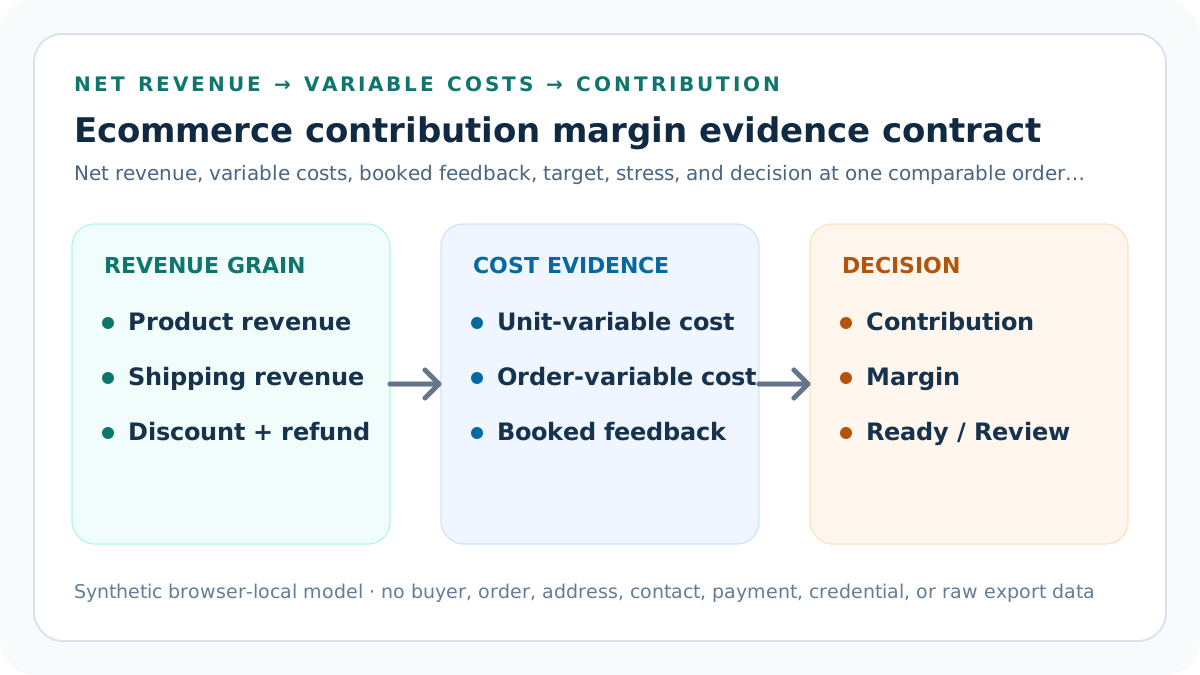
What does contribution margin measure?
Contribution margin measures what one comparable order leaves after costs that vary with that order. The calculator reports both a currency amount and a percentage of net revenue. The amount shows dollars available for fixed overhead and other purposes; the percentage makes differently sized orders easier to compare.
The result is not net profit. Rent, software subscriptions that do not vary per order, owner compensation, financing, depreciation, income tax, and other period costs remain outside this worksheet. A positive contribution can still coexist with an unprofitable business when fixed costs exceed the total contribution generated.
Start with one comparable order grain
Choose one shipped order or one clearly defined synthetic order before entering revenue or costs. Product revenue, buyer-paid shipping, discounts, refunds, units, fees, fulfillment, advertising, return-loss assumptions, currency, and period must describe that same grain. Mixing monthly advertising with one order is not a valid contribution calculation.
The evidence-scope field makes that contract visible. Use a privacy-safe alias in private records, not buyer names, email addresses, street addresses, order identifiers, payment rows, or raw exports in public content. If two rows cannot be aligned to one order and period, declare the conflict and stop.
Confirm the evidence contract before calculating
Seven explicit confirmations now guard the result: net revenue must come from one comparable order record; discount, refund, and expected-loss rows must not overlap; the percentage fee must use the entered net-revenue base; all material order-variable costs must be included exactly once; mixed costs must be split into fixed and variable parts; fixed overhead and tax-profit rows must remain outside the worksheet; and the independently booked cost total must match the order, currency, and period. Any missing confirmation returns Block.
These confirmations are evidence gates, not decorative checkboxes. The SBA contribution-margin guidance specifically warns that mixed costs should be separated into fixed and variable parts. Preserve the source date, allocation method, and reviewer for each gate so a later cost-version change can be traced and reversed.
Calculate net order revenue before costs
Gross order revenue equals product revenue plus buyer-paid shipping. Net order revenue subtracts the discount and refund allocated to that order. Marketplace-collected tax that never belongs to the seller is not automatically revenue; follow the seller's current accounting policy and comparable statement evidence rather than adding it for a larger denominator.
Reductions cannot exceed gross order revenue in this bounded model. A zero or negative net-revenue packet blocks percentage interpretation because the denominator is unusable. Refund timing, chargebacks, credits, gift cards, currency conversion, and platform-funded promotions require separate evidence when they do not map cleanly to the reviewed order.
Extend unit-variable costs by quantity
Add product cost, packaging cost, and truly variable labor cost for one unit, then multiply that subtotal by units in the order. The calculator requires a positive whole-number quantity so a three-unit order cannot silently use one unit of material, packaging, or labor while reporting a three-unit margin.
Use current cost versions and explicit units. Convert a bulk material purchase into cost per usable unit, record waste policy, and value variable labor with a documented rate and time basis. Do not treat missing cost as zero; preserve an estimate label and review trigger until observed evidence replaces it.
Add order-variable costs once
Outbound shipping and fulfillment, percentage fees, a fixed variable fee, attributed advertising or affiliate cost, expected return or warranty loss, and other order-variable costs are added after extended unit costs. Each row should have one owner, unit, source, applicable period, and documented allocation rule.
Avoid duplicate subtraction. A shipping label already included in fulfillment must not be entered again. An affiliate charge included in the combined percentage rate must not also appear as an amount. A return loss embedded in product cost must not be repeated in the expected-loss row.
Use the fee percentage on net revenue
The neutral calculator applies the entered percentage variable-fee rate to net revenue and adds the entered fixed variable fee separately. This is an explicit planning model, not a statement reconstruction. Platform-specific fee bases can include different revenue, tax, refund, attribution, or currency components.
When exact platform treatment matters, use the dedicated Etsy Fee Stack, transaction-versus-processing, Offsite Ads, currency-conversion, regulatory-fee, VAT, or refund-reconciliation tools first. Carry only the reconciled variable-cost amount into this worksheet rather than inventing a blended rate from unrelated rows.
Reconcile modeled costs to booked feedback
The actual booked variable-cost total is an independent feedback row. The calculator subtracts the modeled total from that observation and compares the difference with the seller-entered tolerance. A difference above tolerance returns Reconcile even when the modeled contribution appears attractive.
Do not widen tolerance merely to produce Ready. Identify the first differing row, preserve the before-state, correct one accountable input, rerun the deterministic fixtures, and retain a restore point. Minor rounding can be tolerated; another currency, period, order, cost version, or fee category cannot.
Read contribution amount and percentage together
Contribution amount equals net revenue minus modeled variable costs. Contribution margin divides that amount by net revenue. The percentage supports comparison, but the currency amount shows how much the order actually contributes toward fixed overhead, owner goals, reinvestment, and other period obligations.
Small orders can show a respectable percentage while contributing too few dollars to cover operational capacity. Large orders can contribute more dollars with a lower percentage. Review both measures with fulfillment time, inventory exposure, cash timing, return risk, and capacity instead of promoting whichever number looks better.
Set a seller-owned target
The target contribution amount equals net revenue multiplied by the entered target contribution margin. Target gap is actual modeled contribution minus that target. The calculator reviews a clean, reconciled packet when contribution is negative or its percentage is below the seller's explicit target.
A target is a planning boundary, not an industry guarantee. It should reflect the seller's fixed-cost structure, capacity, product role, cash needs, risk, and operating plan. Record who approved it, the effective date, the review trigger, and the rollback condition before using it for pricing or promotion.
Stress variable costs without claiming a forecast
The stress assumption increases the complete modeled variable-cost total by a stated percentage, then recalculates contribution and margin. It exposes sensitivity to credible cost drift without pretending to forecast supplier pricing, carrier charges, returns, advertising, exchange rates, or platform policy.
Choose a stress rate from documented ranges or a labeled seller scenario. A stress result below zero triggers Review even when the base result clears target. Keep separate scenarios for structurally different risks when one blanket percentage would hide the row that actually drives the downside.
Trace the default single-item example
The default packet begins with USD 50 product revenue, USD 5 shipping revenue, and a USD 5 discount, leaving USD 50 net revenue. One unit carries USD 18 product cost, USD 2 packaging, and USD 3 variable labor. Outbound fulfillment adds USD 6.
A 6% variable-fee rate plus USD 0.50 fixed fee contributes USD 3.50. Attributed advertising adds USD 4, expected return loss USD 1.50, and other variable cost USD 1. Total variable cost is USD 39, contribution is USD 11, and contribution margin is 22.0%.
Compare the multi-item example
The multi-item fixture uses USD 96 product revenue, a USD 8 discount, and three units, producing USD 88 net revenue. Extended product, packaging, and labor costs total USD 55.50. Shipping, fees, advertising, expected loss, and other variable cost bring the total to USD 78.28.
Contribution is USD 9.72 and margin is about 11.0%. The packet reconciles to the booked total but misses its 15% target, so it returns Review. This is materially different from scaling the single-item order because discounts, fixed fees, shipping, and advertising do not all scale per unit.
Read Block, Reconcile, Review, and Ready
Block covers negative inputs, non-whole or nonpositive quantity, reductions above gross revenue, unusable net revenue, percentages outside zero to one hundred, invalid currency or period, missing evidence scope, and declared conflicts. Reconcile covers a booked-cost difference above tolerance after structural evidence passes.
Review covers negative contribution, base margin below target, or stress contribution below zero. Ready means only that the entered order packet passes these deterministic rules. It does not approve a price, prove accounting profit, predict demand, promise cash, or override qualified accounting, tax, or legal review.
Keep fixed and variable costs separate
A cost belongs here when it changes because the reviewed order exists or when the seller has adopted a documented per-order allocation for operating comparison. A period cost belongs outside when it continues regardless of this order. Classification must be consistent across comparable scenarios.
If software, rent, salaried labor, equipment, insurance, subscriptions, or owner compensation are allocated per order for a management view, label the allocation separately rather than calling it variable. Contribution answers what remains before those costs; a later period model determines whether aggregate contribution covers them.
Test boundaries and broken packets
Keep deterministic fixtures for USD 11 single-item Ready, USD 9.72 multi-item Review, USD 1 booked-cost Reconcile, and an over-reduction plus two-conflict Block. Test exact tolerance, zero target gap, stress boundary, quantity validation, invalid percentages, missing scope, currency, and period.
A regression that mixes grains, accepts reductions above revenue, treats unknown cost as zero, loses the actual-cost feedback row, double-counts a cost, calls contribution net profit, or hides a negative stress result must fail before release. Browser tests must cover input changes, result text, reset, and mobile layout.
Release and recover the complete cluster
Before release, preserve narrow local and remote backups and a verified rollback identifier. Run queue, syntax, SVG, typecheck, focused and full unit, integration, build, SEO/AEO, content, similarity, browser, canonical, schema, internal-link, image, and 390-pixel mobile checks.
Publish the parent tool and ten dedicated support guides as one ordered cluster. Add indexability, sitemap, guide hub, tool hub, contextual backlinks, llms references, and targeted cache purge together. Verify public calculations and every URL, then automatically restore after a critical live failure.
Privacy and professional limits
The calculator runs locally in the browser and uses synthetic defaults. It does not retrieve platform, payment, advertising, bank, accounting, tax, inventory, or buyer data. It does not store or transmit entered values unless the surrounding site explicitly states and obtains permission for a separate action.
Keep buyer names, emails, addresses, messages, order IDs, payment rows, bank details, tax identifiers, contacts, credentials, tokens, OAuth material, and raw exports outside public pages. Use redacted evidence pointers, verify current records, and obtain qualified accounting, tax, legal, or financial advice when material.
Sources and further reading
- OpenStax Managerial Accounting: Contribution Margin: Contribution amount, contribution margin ratio, variable-cost, and fixed-cost definitions.
- U.S. Small Business Administration: Break-even point: Government guidance on contribution margin and separating mixed costs into fixed and variable parts.
- IRS Publication 334: Tax Guide for Small Business: Primary U.S. tax guidance supporting the boundary between this operating estimate and taxable income.
- Seller Profit Guard methodology: Contribution definitions, evidence hierarchy, privacy-safe fixtures, deterministic decisions, bounded correction, release, and rollback.
Related Seller Profit Guard tools
- Etsy CSV profit calculator: Run a local order profit check with editable fee and SKU cost assumptions.
- Payment reconciliation tool: Compare order rows with statement activity and flag unmatched rows.
- SKU cost library: Save or import material, labor, packaging, shipping, and target margin assumptions.
- Variant risk checker: Find missing SKUs and variation cost risks before a listing scales.
- Etsy title checker: Review listing-title clarity, repetition, keyword chains, and mobile scanning.
- Etsy tag checker: Review all 13 tag slots for duplicates, repeated meaning, and truthful coverage.
- Free shipping threshold calculator: Estimate when a shipping subsidy can still meet a target margin.
- Return window loss estimator: Model expected reverse shipping, restock work, recovery, and replacement loss.
- Etsy Ads break-even calculator: Estimate target-safe Etsy Ads spend, ACOS, and ROAS after fees, fulfillment, and expected return loss.
- CSV data privacy: Understand what the local-first workflow needs and what it does not need.
- Contribution Margin Formula and Inputs: Define ecommerce net revenue, every order-variable cost, contribution amount, margin percentage, target gap, and stress case without mixing fixed overhead.
- Single-Item Contribution Margin Example: Trace a complete USD 50 single-item ecommerce order from revenue and variable-cost inputs to USD 11 contribution, 22% margin, target, and stress result.
- Multi-Item Contribution Margin Example: Model a three-unit USD 88 ecommerce order with shared shipping, per-unit costs, order fees, acquisition cost, return allowance, and an 11% contribution margin.
- Contribution Margin Calculation Mistakes: Diagnose denominator, quantity, fee-base, shipping, acquisition, return-loss, overhead, reconciliation, and interpretation errors in ecommerce contribution.
- Contribution Margin Data Sources: Map every ecommerce contribution input to checkout, order, payment, shipping, advertising, product-cost, labor, return, warranty, and seller-owned evidence.
- Safe Contribution Margin Thresholds: Separate validity, booked-cost reconciliation, break-even, seller target, and variable-cost stress thresholds before acting on ecommerce contribution.
- Single vs Multi-Item Contribution Margin: Compare single-item and three-unit ecommerce orders to isolate quantity, shared shipping, packaging, fixed fees, acquisition, and return-risk drivers.
- Weekly Contribution Margin Routine: Run a weekly contribution review with evidence dates, representative orders, source checks, fixtures, exceptions, owner, feedback, and rollback criteria.
- How to Interpret Contribution Margin: Interpret contribution amount, percentage, target gap, booked-cost difference, and stress results without false precision or claims about accounting profit.
- Contribution Margin Audit Template: Use a dated checklist and change log for net revenue, every variable cost, contribution, margin, target, reconciliation, stress, approval, and rollback.
- How do you calculate product launch break-even units?: Add only documented one-time development, sample, creative, setup, initial advertising, inventory write-off, and other launch costs. Estimate contribution before return loss per placed unit, subtract mature return-rate loss, divide by retained rate, then divide launch cost by contribution per retained unit and round up. Keep forecast, evidence, thresholds, monitoring, and restoration explicit.
- What is a complete marketplace launch break-even example?: An invented marketplace launch totals USD 3,300. Contribution before return loss is USD 18 per placed unit; a 10% mature return rate and USD 8 returned-unit loss produce USD 17.20 net placed-unit contribution and USD 19.11 per retained unit. The quotient rounds up to 173 retained units; 220 forecast retained units leave about USD 904.44.
Use the interactive tool
Enable JavaScript to open the calculator and process browser-local inputs. The explanatory content and source links remain available without JavaScript.
Related guide: Define the contribution formula, cost classification, and evidence grain.
This tool provides operating estimates, not tax, accounting, legal, financial, or marketplace-policy advice. Verify current official sources and your own records before changing prices or operations.