Seller Profit Guard · How it works · CSV privacy
Ad attribution reconciliation checker
Classify aggregate platform-attributed order rows into retained click, retained view, canceled or refunded, duplicate, outside-window, source-conflict, and unmatched buckets. Test row balance, retained and excluded rates, seller thresholds, dated confirmations, seller exceptions, and evidence state without uploading order records or claiming causal lift.
Maintained by Seller Profit Guard Editorial Team. Last reviewed: 2026-07-31.
Freeze one reporting packet
Use one platform, shop, campaign family, market, currency, platform report date basis, attribution model, click window, view window, order-event convention, and mature seller-order window.
Never combine platforms or silently translate one platform's rule into another.
Use aggregate counts only
Prepare privacy-safe counts or synthetic fixtures outside the public tool.
Do not paste order IDs, timestamps, click IDs, buyer names, emails, addresses, messages, payment records, or raw exports.
Count platform attributed rows
Use the platform's reported attributed-order rows for the exact closed scope.
Orders, conversions, items, GMV, event rows, and customers are different denominators.
Make classification buckets exclusive
Assign every platform row to exactly one of retained click, retained view, canceled/refunded, duplicate, outside window, source conflict, or unmatched platform.
A row cannot be both duplicate and refund in this model.
Count retained click matches
Use seller-authorized order evidence that matches the declared platform click-attribution rule and retains value after outcome maturity.
A click match is attributed evidence, not causal proof.
Count retained view matches
Use seller-authorized evidence that matches the declared platform view rule and retains value.
Keep view-through orders separate because windows, precedence, and interpretation differ.
Count canceled and refunded rows
Place platform-attributed rows whose seller outcome no longer retains the declared value into one excluded bucket.
Do not count an order again as ambiguous unless the status itself is unresolved.
Count duplicate rows
Identify duplicated platform rows or repeated event records under a versioned rule.
Multiple legitimate orders following one interaction are not duplicates automatically.
Count outside-window rows
Classify seller-matched orders whose qualifying interaction falls outside the declared platform window.
Record timezone and timestamp basis privately.
Count source conflicts
Classify matched orders whose source, medium, campaign, shop, creative, product, or channel field conflicts with the reviewed claim.
Do not overwrite source evidence to force agreement.
Count unmatched platform rows
Record platform rows for which no seller order can be reconciled under authorized matching.
Missing access and delayed ingestion remain explicit exceptions.
Count seller-side unmatched orders
Record in-scope seller orders that appear eligible but are absent from the platform packet.
This is a separate diagnostic and does not change the platform-row classification sum.
Calculate the classification gap
Subtract the sum of all seven mutually exclusive platform buckets from reported platform rows.
Any nonzero gap blocks interpretation because rows are missing or double-classified.
Calculate reconciled retained orders
Add retained click and retained view matches.
Keep the two components visible instead of presenting one opaque total.
Reconcile count evidence before economic value
Use this checker to balance attributed rows, retained matches, exclusions, ambiguities, and seller-side exceptions before passing any count into contribution, CPA, or ROAS analysis. Preserve the exact report scope and the reconciled click and view components with that handoff.
A balanced count packet does not establish revenue value, profit, incrementality, or causal lift. Join only approved aggregate value evidence in a separate model, and never let a favorable economic result conceal an attribution gap or unresolved order classification.
Calculate excluded rows
Add canceled/refunded and duplicate rows.
Excluded does not mean fraudulent or invalid outside the declared reconciliation scope.
Calculate ambiguous rows
Add outside-window, source-conflict, and unmatched-platform rows.
Ambiguity is an evidence state requiring collection or correction.
Calculate match rate
Divide reconciled retained orders by positive platform attributed rows.
A high match rate cannot repair a nonzero classification gap.
Calculate click and view mix
Divide each retained attribution type by reconciled retained orders.
The mix describes the reconciled packet and cannot prove which interaction caused purchase.
Set ambiguity tolerance
Use a seller-owned count tolerance for a closed packet, documented with owner, reason, period, and expiry.
A tolerance is not permission to ignore systematic tracking defects.
Set a minimum retained-match rate
Divide reconciled retained click and view matches by positive platform-attributed rows, then compare the result with a seller-owned minimum.
The default 85% fixture threshold is an editable operating control, not a platform benchmark or universal safe rate.
Set a maximum excluded-row rate
Divide canceled/refunded plus duplicate rows by positive platform-attributed rows, then compare the result with a seller-owned maximum.
The default 10% fixture threshold is not evidence that exclusions below 10% are harmless.
Date and confirm the evidence
Record a real source-review date and confirm the closed report, current rules, seller evidence, exclusive duplicate logic, maturity, row balance, thresholds, aggregate privacy, and planning boundary.
A typed yes is an attestation for this local model, not independent verification by Seller Profit Guard.
Validate the default fixture
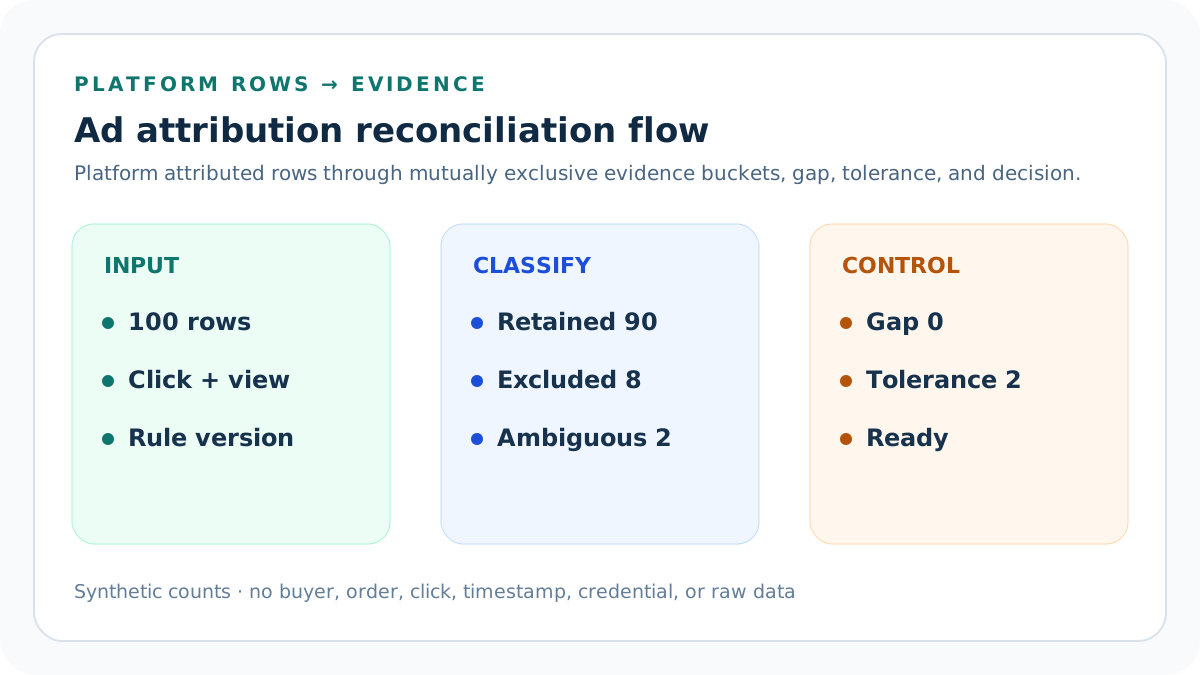
The seven buckets sum to 100 platform rows: 80 click, 10 view, 4 canceled/refunded, 4 duplicate, 1 outside-window, 1 source conflict, and 0 unmatched.
Ninety reconcile as retained, eight are excluded, two are ambiguous, and the classification gap is zero.
Read the seller controls
One seller-side unmatched order remains against a two-row tolerance; the retained rate is 90% against an 85% minimum and the excluded rate is 8% against a 10% maximum.
The default is Ready but retains every exception and threshold for follow-up rather than deleting unfavorable evidence.
Stress view attribution
Move supported rows from click to view while preserving the 100-row classification sum.
The total can stay stable while interpretation risk and platform-window dependence change.
Stress missing platform rows
Increase unmatched-platform rows or seller-side unmatched orders without changing unrelated buckets.
Review begins when either ambiguity count exceeds the declared tolerance.
Stress classification integrity
Change reported rows without changing buckets.
A nonzero gap routes to Block even if match rate appears strong.
Respect report timing
Close platform conversion delay and seller cancellation, refund, return, dispute, and ingestion delay before final reconciliation.
Platform report date and seller order date may differ by documented design.
Respect platform-specific rules
TikTok, Shopify, Etsy, and other systems can use different models, precedence, windows, products, channels, and report semantics.
Use current official documentation and exact account settings.
Use Block, Review, and Ready
Block invalid or nonfinite counts, invalid thresholds, nonzero classification gap, missing dated context, incomplete confirmations, or declared conflicts. Review valid packets above ambiguity, seller-exception, minimum retained-rate, or maximum excluded-rate controls.
Ready means the aggregate packet reconciles within all dated seller controls; it does not approve spend or prove incrementality.
Preserve correction lineage
Store source versions, formula version, prior result, correction reason, reviewer, date, and restore identifier.
Never erase unfavorable or late evidence.
Protect private records
Keep matching logic and raw evidence in authorized systems; publish only counts, redacted pointers, and synthetic examples.
Apply access controls, retention, and deletion rules.
Release and restore safely
Run calculation, content, similarity, SEO, image, link, browser, mobile, privacy, and rollback checks.
After release verify canonical, schema, indexability, calculator states, images, strict 404, sitemap policy, and Day 0/7/14/28 evidence.
Sources and further reading
- Seller Profit Guard methodology: Evidence versions, reconciliation, privacy, correction, release, and rollback.
- Seller Profit Guard data privacy: Local-first boundaries for buyer, order, advertising, payment, refund, and raw-record data.
- TikTok Business Help: TikTok Shop Ads attribution: Reviewed July 31, 2026: official Shop ID scope, 7-day click and 1-day view windows, click precedence, and report-date context.
- Shopify Help: Marketing reports: Reviewed July 31, 2026: official attribution models, channel-credit behavior, report scope, and conversion context.
- Etsy Help: How Etsy's Offsite Ads Work: Reviewed July 31, 2026: official 30-day click window and attributed-order context.
Related Seller Profit Guard tools
- Etsy CSV profit calculator: Run a local order profit check with editable fee and SKU cost assumptions.
- Payment reconciliation tool: Compare order rows with statement activity and flag unmatched rows.
- SKU cost library: Save or import material, labor, packaging, shipping, and target margin assumptions.
- Variant risk checker: Find missing SKUs and variation cost risks before a listing scales.
- Etsy title checker: Review listing-title clarity, repetition, keyword chains, and mobile scanning.
- Etsy tag checker: Review all 13 tag slots for duplicates, repeated meaning, and truthful coverage.
- Free shipping threshold calculator: Estimate when a shipping subsidy can still meet a target margin.
- Return window loss estimator: Model expected reverse shipping, restock work, recovery, and replacement loss.
- Etsy Ads break-even calculator: Estimate target-safe Etsy Ads spend, ACOS, and ROAS after fees, fulfillment, and expected return loss.
- CSV data privacy: Understand what the local-first workflow needs and what it does not need.
- Ad Attribution Reconciliation Formula and Inputs: Classify platform-attributed order rows into retained, excluded, ambiguous, and gap outcomes with aggregate seller evidence.
- Ad Attribution Click Reconciliation Example: Follow 100 synthetic platform rows through click matches, view matches, exclusions, ambiguity, tolerance, and decision state.
- Ad Attribution View Reconciliation: Reconcile view-through attributed orders with shorter windows, precedence, source conflicts, and stronger interpretation limits.
- Ad Attribution Reconciliation Mistakes: Correct denominator, overlapping-bucket, window, timezone, refund, duplicate, source, report-date, and causal-claim errors.
- Ad Attribution Reconciliation Data Sources: Map platform reports, order status, timestamps, source fields, windows, refunds, duplicates, and corrections to authorized evidence.
- Safe Ad Attribution Reconciliation Thresholds: Set classification-gap, ambiguity, retained-rate, excluded-rate, maturity, correction, stop, and restoration controls for attribution evidence.
- Click vs View Attribution Reconciliation: Compare click and view attribution at the same report grain while preserving window, precedence, maturity, and ambiguity differences.
- Weekly Ad Attribution Reconciliation Routine: Run a repeatable cycle from platform report closure through seller matching, classification, correction, release, and rollback.
- Interpret Ad Attribution Reconciliation: Read retained, excluded, ambiguous, gap, click/view mix, and seller exceptions without false precision or causal claims.
- Ad Attribution Reconciliation Audit Template: Use a standalone checklist and dated change log for report scope, rules, buckets, exceptions, correction, release, and rollback.
Use the interactive tool
Enable JavaScript to open the calculator and process browser-local inputs. The explanatory content and source links remain available without JavaScript.
Related guide: Define mutually exclusive attribution buckets, report timing, tolerance, privacy, and interpretation boundaries.
This tool provides operating estimates, not tax, accounting, legal, financial, or marketplace-policy advice. Verify current official sources and your own records before changing prices or operations.