Seller Profit Guard · How it works · CSV privacy
TikTok Shop fee reference calculator
Compare an organic and affiliate TikTok Shop order using editable referral-fee bases, verified invoice lines, creator commission, seller costs, refund reserve, contribution margin, official source context, and narrow Ready, Review, or Block decisions.
Maintained by Seller Profit Guard Editorial Team. Last reviewed: 2026-07-29.
Use this as an editable fee reference
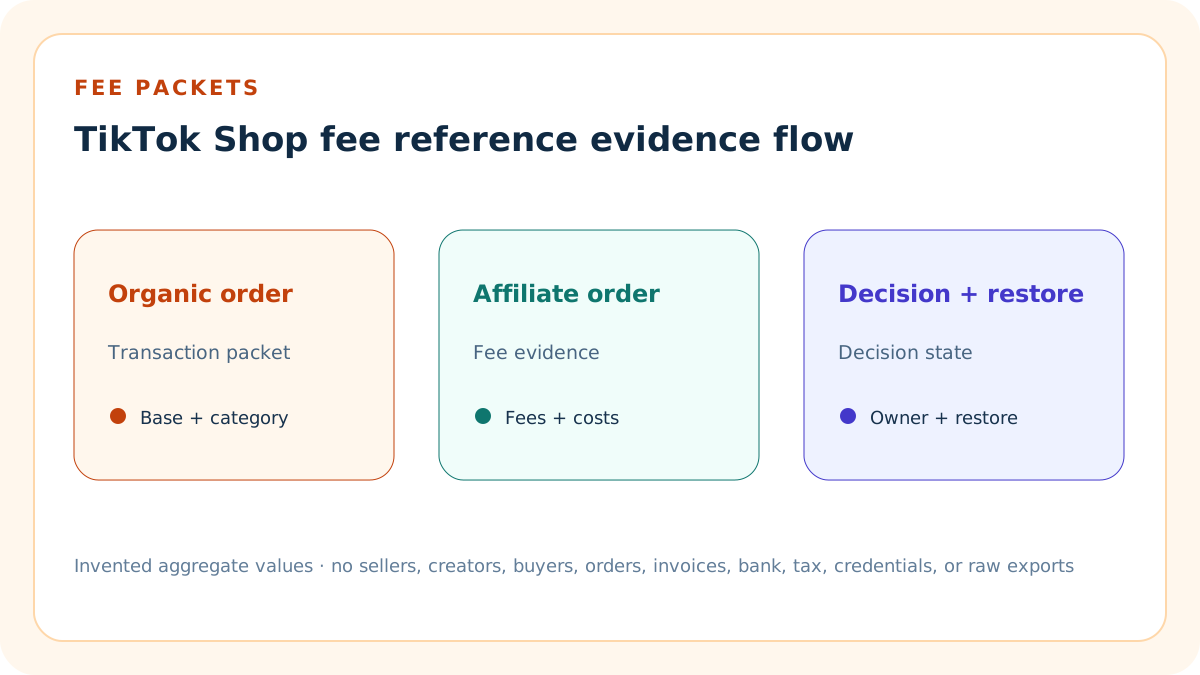
The calculator compares one organic self-selling packet with one affiliate-attributed packet at completed retained-order grain. It itemizes the referral base, referral fee, verified payment or other fee, promotion, logistics, CPS Ads, creator commission, seller costs, reserve, contribution, and margin.
It is not a universal rate table, live invoice reader, payout statement, settlement forecast, tax calculator, or substitute for the category, transaction, Invoice Center, Finance, Affiliate Center, and fulfillment evidence in the seller's protected account.
Start with the exact market and category
Record the seller market, listing category, subcategory, model currency, policy version, and date checked. Referral rates can differ by category and exceptional high-value tiers, so a generic percentage without its category source is weak evidence.
Do not choose a category for its fee rate. The listing category must remain accurate for the product, and the calculator blocks when category or rate evidence is unresolved.
Build the referral-fee base explicitly
The declared model starts with customer payment plus platform-funded discount minus excluded tax and retail-delivery fee. It then subtracts customer refund to obtain the retained base used by this planning packet.
Seller-funded discounts, platform-funded discounts, shipping, tax, refund, and platform reimbursement are not interchangeable. Preserve the exact order-breakdown labels and formula version instead of collapsing every adjustment into net sales.
Separate rate from base
Enter the verified category referral rate separately from the calculated base. The tool shows both so reviewers can see whether an unexpected fee comes from a changed rate, changed transaction components, a refund, or a different category.
A current common-category rate is only a fixture default. Always verify the actual category row and order details before repricing or treating a difference as an anomaly.
Keep other invoice fees separate
Payment or other verified order fee, promotion fee, logistics fee, and CPS Ads fee are independent editable lines. Their defaults are zero unless the invented fixture deliberately includes a documented logistics charge.
Do not invent a payment fee merely because another marketplace charges one. Use zero until the current invoice or transaction evidence shows the line and its base.
Model affiliate commission on its own base
Affiliate commission uses actual paid price minus affiliate refund, multiplied by the protected creator commission rate. An organic self-selling packet can correctly use zero affiliate paid price and zero creator commission.
Do not apply creator commission to tax, platform-funded discount, unrelated shipping, or the referral-fee base unless the current Affiliate Center evidence explicitly defines that treatment.
Respect commission protection and attribution
Record whether the order is self-selling, standard affiliate, Shop Ads affiliate, or another documented collaboration. Preserve the applicable commission rate, attribution evidence, effective date, and any protection period.
A current product-level rate does not necessarily prove the rate attached to an earlier creator relationship or order. Use the order and commission record, not a screenshot of today's setting alone.
Treat refund timing as a separate event
Record customer refund and affiliate refund at the same retained-order grain. Referral-fee credits, refund administration fees, and final creator commission can settle after the original sale and therefore need dated reconciliation.
Do not assume a full fee reversal, a zero administration fee, or immediate creator adjustment. The tool is a planning reference and does not calculate every after-sales line.
Keep campaign savings conditional
Commission savings or waivers belong in the packet only when the order, campaign, product, and eligibility evidence show that the benefit applied. Record the observed Finance result separately from an expected campaign benefit.
Never reduce the referral fee simply because a GMV Max campaign was created. Eligibility and the final transaction evidence control the realized saving.
Keep referral-fee tax outside the rate
Service-fee tax may apply to certain seller registration locations and appears as a separate charge. Record seller state, applicable date, taxable fee base, rate, invoice line, and reviewer when it applies.
Do not increase the referral percentage to approximate tax. The public fixture omits tax-on-fee unless a separate verified line is entered in the payment or other fee field.
Calculate the organic fixture
The invented organic packet uses USD 60 customer payment, USD 5 platform discount, USD 4 tax exclusion, a 6% category rate, zero affiliate commission, USD 5 logistics, USD 21 combined seller operating cost, and a 3% reserve.
Its referral base is USD 61, referral fee is USD 3.66, and contribution is USD 29.51. These values teach the formula and are not a claim about any real seller, category, transaction, or payout.
Calculate the affiliate fixture
The invented affiliate packet holds the same completed-order and seller-cost grain, then adds a USD 56 actual-paid-price commission base and a 10% creator rate. The creator commission is USD 5.60.
The resulting contribution is USD 23.91. The USD 5.60 difference from the organic packet isolates the declared affiliate commission because the other fixture inputs are held constant.
Compare like with like
Use the same market, category, currency, completion state, discount definition, tax treatment, fulfillment scope, product cost, reserve method, and date range when comparing organic and affiliate economics.
If the packets differ in price, category, fulfillment, promotion, refund status, or campaign treatment, label those differences rather than attributing the entire gap to affiliate commission.
Calculate contribution transparently
Contribution equals retained revenue minus referral fee, verified payment or other fee, promotion, logistics, CPS Ads, creator commission, product cost, packaging, other fulfillment cost, and return reserve.
The result excludes income tax, overhead not entered, financing, inventory carrying cost, chargebacks, unmodeled after-sales fees, and any fee line absent from the packet.
Set a seller-owned threshold
The default fixture uses a 30% minimum contribution margin. Ready requires both packets to meet the threshold with complete evidence; Review identifies a valid packet below the target; Block overrides arithmetic when the configuration or evidence is incomplete.
A threshold is an operating policy, not a platform rule. Record owner, reviewer, effective date, exception authority, and the business reason for changing it.
Block structural conflicts first
Block when the market, category, currency, base, refund, rate, invoice-line scope, affiliate attribution, commission rate, cost scope, tax treatment, ownership, backup, stop rule, or restoration evidence is incomplete or contradictory.
A high calculated margin cannot rescue an unverified fee rate or mismatched transaction grain. Resolve evidence before using the output for pricing, promotion, or collaboration decisions.
Use Review for economic misses
Review means both packets calculate and reconcile, but at least one contribution margin is below the seller-entered threshold. The output names the failing packet and its margin.
Review is not a recommendation to stop a product or creator relationship. It is a prompt to inspect the actual fee, price, cost, attribution, conversion, and strategic context.
Interpret Ready narrowly
Ready means the two entered packets reconcile under the declared formulas, sources, threshold, ownership, and restoration controls. It proves only the internal consistency of the current model.
It does not prove the platform invoice is correct, a creator is owed a specific amount, a campaign will convert, a payout will settle, tax treatment is complete, or a product should be repriced.
Protect seller and creator data
Use invented examples and approved aggregate order counts. The browser-local tool does not connect to TikTok Shop, upload exports, or read seller, creator, buyer, order, invoice, bank, tax, message, dispute, or enforcement records.
Public evidence must never include account identifiers, creator handles tied to private economics, buyer details, order IDs, invoice files, bank data, tax numbers, credentials, or raw exports.
Version every fee packet
Record market, category, currency, policy source, access date, order grain, transaction fields, fee lines, affiliate basis, commission rate, costs, reserve, owner, reviewer, prior result, backup, stop rule, and restoration test.
A material rate, formula, category, transaction, refund, promotion, fulfillment, collaboration, cost, or tax change opens a new packet rather than overwriting the accepted one.
Require a closed evidence duration
Record the number of closed evidence days represented by the fee packet. The public fixture uses 30 days so a single unsettled order, incomplete refund window, or not-yet-issued invoice cannot silently stand in for the operating period.
Evidence duration is a seller control rather than a TikTok rule. Block non-whole, zero, negative, or implausibly long values and retain the exact data-through date behind the duration.
Date source review separately from policy
The official-source review date records when the referral, affiliate, invoice, savings, and service-fee tax guidance was checked. The seller policy effective date records when this formula and target became authorized internally.
The policy date cannot be later than its supporting source review. A later platform change opens a new review even when the seller threshold and arithmetic remain unchanged.
Confirm the category tier instead of assuming six percent
The official United States table contains category-specific rates and special high-value tiers. The fixture's 6% Home Organizers rate is editable teaching data, not a universal default or a substitute for the exact current category row.
Record Level 1 and Level 2 category, any tier threshold, the applicable portion of sale value, source date, reviewer, and exception. Do not split a product into a favorable category or ignore a tiered portion.
Reconcile Invoice Center after issuance
Invoice Center can expose referral, promotion, logistics, and CPS Ads fees at order detail. The model keeps these lines separate because the invoice is usually issued after the transaction and may not yet exist for a recent period.
Use the public calculator to plan, then reconcile the protected monthly invoice and order-level detail when available. Never upload the invoice workbook, order IDs, buyer details, tax identifiers, or credentials to this public site.
Model commission protection at the order date
An affiliate packet needs the commission rate active for the creator and product when the order qualified. Rate decreases may remain protected for an existing relationship, while an increase can apply immediately under current official guidance.
Record collaboration type, rate history, protection start and end, actual paid price, refund, settlement state, and reviewer. Today's product setting alone cannot prove the historical order's commission.
Verify savings as an observed transaction line
Commission Savings is conditional on an eligible Product GMV Max or LIVE GMV Max order. The seller should verify a realized waiver in Finance transaction details rather than subtract an advertised or expected benefit from every order.
If eligibility, product scope, campaign generation, or Finance evidence is missing, enter no saving. Preserve expected and observed savings as different fields in the private evidence packet.
Quarantine economics on structural Block
When any required confirmation, date, duration, numeric field, source context, conflict, backup, restoration, or authority boundary fails, all 21 derived monetary and margin outputs become Unavailable.
The tool continues to show labels, formulas, confirmation count, evidence dates, threshold, and issue messages so the reviewer can repair the packet without mistaking invalid arithmetic for usable profit evidence.
Use nine independent confirmations
Ready requires privacy-safe packets, exact market and category rate, order and refund grain, Invoice Center lines, affiliate protection, commission-savings eligibility or exclusion, service-fee tax scope, independent review, and restoration authority.
A scenario-level yes cannot replace these shared confirmations. Each confirmation should point to dated protected evidence, an owner, an independent reviewer, and an explicit exception when the line does not apply.
Test adverse states
Test a target-margin miss, missing configuration confirmation, refund above the fee base, affiliate refund above paid price, commission without a base, rate outside 0–100%, missing source context, declared conflict, and reset.
The release gate also checks direct answers, official sources, originality, images, links, metadata, privacy, noindex staging, mobile layout, static hashes, unsupported schema, and sitemap exclusion.
Release the complete cluster
Index the working tool and ten dedicated support guides together only after content, official-source, originality, image, accessibility, test, backup, release-mode, deployment, targeted purge, and live-verification gates pass.
Search signals are later measurements rather than a release prerequisite. Ordered production, rollback, policy correctness, and complete-cluster integrity still control publication.
Sources and further reading
- TikTok Shop Academy: Referral Fee Updates: Official US referral-fee definition, completed-order base, refund administration fee, settlement, and calculation examples.
- TikTok Shop Academy: Referral Fees by Category: Official current category-level referral-rate table and exceptional tiers.
- TikTok Shop Academy: How Standard Affiliate Commission Works: Official actual-paid-price, refund, active-rate, settlement, and commission-protection guidance reviewed July 29, 2026.
- TikTok Shop Academy: Check Tax Invoices: Official Invoice Center and order-level referral, promotion, logistics, and CPS Ads fee evidence.
- TikTok Business Help: Commission Savings: Official eligible campaign commission-savings workflow and Finance verification boundary.
- TikTok Shop Academy: Sales Tax on Referral Fees: Official state-specific service-fee tax scope and Seller Center evidence locations.
- Seller Profit Guard methodology: Deterministic evidence, privacy, validation, correction, release, monitoring, and restoration controls.
Related Seller Profit Guard tools
- Creator Commission Calculator: Model creator, sample, advertising, and return economics in a separate campaign packet.
- TikTok Ads CPA Limit: Model paid acquisition economics after the fee packet is verified.
- TikTok Shop Listing QA Checker: Keep product-detail quality and eligibility separate from fee economics.
- Fee Anomaly Checker: Compare observed fee lines with a dated rule snapshot at aggregate grain.
- Methodology: Review evidence, privacy, validation, release, monitoring, and restoration.
- Data Privacy: Protect seller, creator, buyer, order, invoice, bank, tax, and raw export data.
- TikTok Shop Fee Calculator Formula and Inputs: Define the referral base, category rate, invoice lines, affiliate commission, costs, reserve, threshold, and evidence required for a review.
- TikTok Shop Fee Calculator: Organic Order Example: Reperform an invented organic self-selling order from customer payment and platform discount through fees, costs, reserve, and contribution.
- TikTok Shop Fee Calculator: Affiliate Order Example: Model a distinct affiliate-attributed order with protected creator rate, actual-paid-price base, refunds, invoice lines, and contribution.
- TikTok Shop Fee Calculator Mistakes: Diagnose wrong categories, mixed discount funding, tax inside the base, invented payment fees, attribution errors, refunds, and duplicated costs.
- TikTok Shop Fee Calculator Data Sources: Map each calculator field to current Academy policy, order breakdown, Invoice Center, Finance, Affiliate Center, fulfillment, cost, or assumption evidence.
- TikTok Shop Fee Calculator Decision Thresholds: Separate structural Blocks, contribution-margin Review cases, and narrow Ready evidence without treating a model as an invoice or approval.
- Organic vs Affiliate TikTok Shop Fees: Compare organic and affiliate orders at the same transaction grain and isolate which verified fee or commission line drives the contribution gap.
- Weekly TikTok Shop Fee Reconciliation Routine: Turn category, transaction, invoice, affiliate, promotion, fulfillment, refund, cost, exception, and restoration evidence into a recurring review.
- Interpret TikTok Shop Fee Results Without False Precision: Explain what referral base, fee totals, contribution, margin, and Ready, Review, or Block can establish—and what remains unverified.
- TikTok Shop Fee Audit Template: Provide a reusable control sheet and change log for market, category, transaction, invoice lines, affiliate basis, costs, decisions, and rollback.
- How do you calculate a TikTok Shop Ads CPA limit?: Calculate pre-ad contribution from retained revenue minus verified non-ad variable costs. Break-even CPA equals pre-ad contribution per attributed retained purchase. Target CPA subtracts required contribution dollars, while minimum platform gross-revenue ROAS equals attributed gross revenue divided by total allowable advertising spend.
- What is a safe TikTok Shop Ads CPA for a product-card order?: In the invented product-card packet, USD 61 retained revenue minus USD 34.66 of non-ad variable cost leaves USD 26.34 pre-ad contribution. A 20% target margin leaves USD 14.14 target CPA and requires about 4.60 gross-revenue ROAS on USD 65 attributed revenue.
Use the interactive tool
Enable JavaScript to open the calculator and process browser-local inputs. The explanatory content and source links remain available without JavaScript.
Related guide: Define TikTok Shop referral base, invoice fee, affiliate commission, contribution, evidence, threshold, and restoration controls.
This tool provides operating estimates, not tax, accounting, legal, financial, or marketplace-policy advice. Verify current official sources and your own records before changing prices or operations.