Seller Profit Guard · How it works · CSV privacy
Shopify plan fee allocator
Allocate one verified fixed Shopify plan charge across two non-overlapping channels or SKU groups by retained orders, net sales, or retained units. The browser-local worksheet normalizes the billing cycle, reconciles the full allocation, and reports cost per order and unit without reading private orders, recommending a plan, or estimating payment fees.
Maintained by Seller Profit Guard Editorial Team. Last reviewed: 2026-07-31.
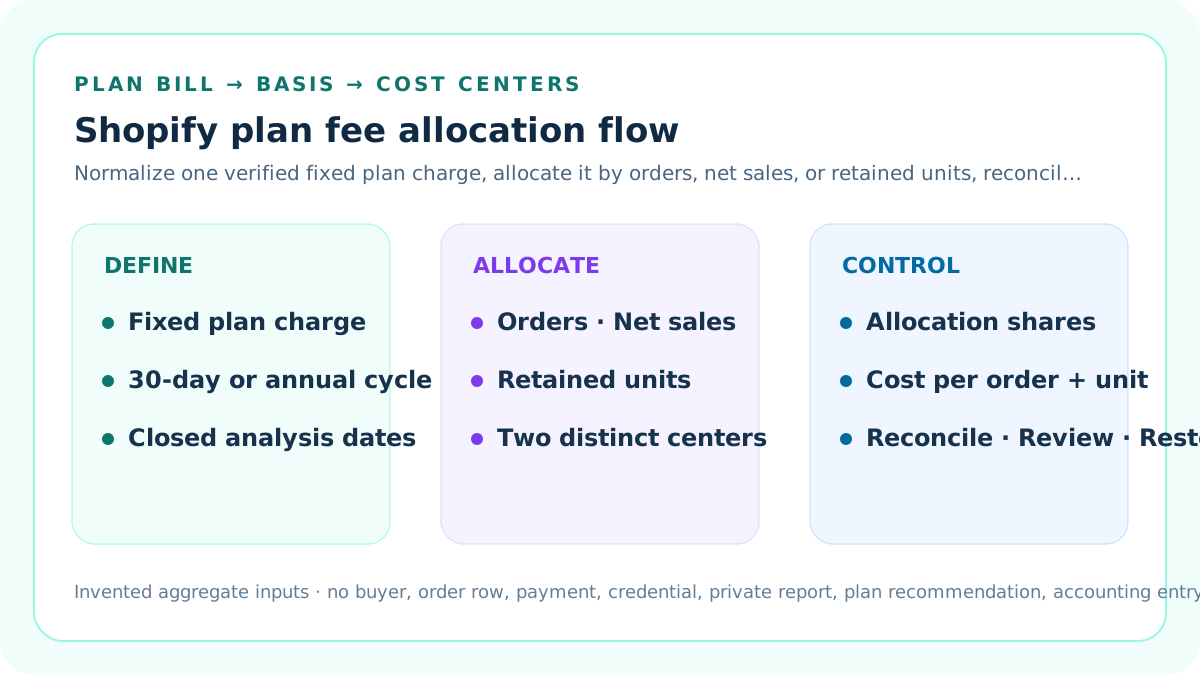
Define the allocator's narrow job
This calculator allocates one verified fixed Shopify subscription-plan charge across two non-overlapping seller cost centers. A cost center can be a sales channel, product family, or SKU group when both groups use the same closed dates, currency, and aggregate definitions.
It does not estimate payment rates, app charges, shipping labels, taxes, transaction fees, product profit, or which Shopify plan a seller should choose.
Separate it from the Shopify plan and fee reference
The existing Shopify plan and fee reference estimates an average order-level stack containing plan, app, payment, and optional third-party gateway assumptions. This allocator deliberately excludes that broader stack.
Use this page only when the fixed plan charge must be assigned between two internal destinations by orders, net sales, or retained units.
Verify the plan charge at its source
Read the applicable Shopify plan charge and billing cycle from Settings > Plan or the related bill. Record the amount, currency, bill identifier in a protected register, cycle start, cycle end, credits, change events, and reviewer.
Do not copy account email, payment method, address, tax identifier, bank reference, credential, complete invoice, or private order data into this public worksheet.
Normalize billing and analysis periods
The normalized cost is plan charge divided by billing-cycle days and multiplied by analysis-period days. This makes a declared annual charge comparable with a closed monthly operating period without pretending the annual bill was paid monthly.
The calculator accepts 30, 365, or 366 billing-cycle days and a one-to-366-day analysis period. Confirm the store's actual cycle instead of assuming a calendar month.
Do not confuse 30 days with a calendar month
Shopify states that month-to-month subscription billing uses 30-day cycles, so a seller can receive two bills in a 31-day month. The analysis dates must therefore be explicit.
A June report, a July invoice date, and a rolling 30-day dashboard are not automatically comparable periods.
Choose one cost-center grain
Name two non-overlapping destinations such as Online Store versus POS, core products versus limited editions, or one documented SKU portfolio versus another.
Do not mix a channel in one bucket and a product subset inside that channel in the other; overlapping destinations allocate the same economic activity twice.
Choose order weighting deliberately
Order weighting assigns the normalized charge in proportion to retained-order counts. It is simple and can suit operational capacity analysis when each retained order uses comparable platform infrastructure.
It can distort economics when average order values, units per order, product complexity, or channel intensity differ substantially.
Choose net-sales weighting deliberately
Net-sales weighting assigns the charge in proportion to the entered net-sales aggregates. It can align a shared platform cost with the revenue base that benefits from it.
Preserve the report definition, reversals, discounts, dates, currency, channel, and product filters. Gross sales and net sales are not interchangeable labels.
Choose retained-unit weighting deliberately
Retained-unit weighting assigns the charge in proportion to units that remain after the seller's declared reversal treatment. It can help product-family or SKU cost reviews.
A sales report can contain separate line items, so row count is not automatically order count or retained-unit count. Use an explicit metric.
Keep the three bases visible
Enter retained orders, net sales, and retained units for both cost centers even though the calculator selects only one allocation basis. The unused measures create an interpretation check.
The page also reports plan cost per order, per retained unit, and per 100 net-sales units so the allocation consequence remains visible.
Apply the allocation formula
Cost-center share equals its selected basis divided by the combined selected basis. Allocated plan cost equals normalized plan cost multiplied by that share.
The two shares must total 100%, and the two allocated amounts must reconcile to the normalized plan cost apart from display rounding.
Work the low-volume cost-center example
The default fixture uses a USD 105 plan charge over 30 days. Cost center A has 20 retained orders, USD 1,600 net sales, and 30 retained units.
Under net-sales weighting, A receives 16% or USD 16.80. Its plan cost is USD 0.84 per retained order and USD 0.56 per retained unit.
Work the high-volume cost-center example
Cost center B has 180 retained orders, USD 8,400 net sales, and 270 retained units in the same closed period.
B receives 84% or USD 88.20. Its plan cost is USD 0.49 per retained order and about USD 0.33 per retained unit.
Explain why the per-order results differ
The two cost centers have different net sales per order. A net-sales allocation therefore produces different fixed plan cost per order even though both groups share one plan.
Changing to order weighting would allocate 10% and 90%, producing the same unrounded plan cost per order for both destinations.
Set a seller-planned review threshold
Enter a maximum plan cost per retained order as a review threshold. A cost center above that value receives Review rather than an automatic recommendation.
The threshold is a seller assumption, not a Shopify limit, accounting standard, tax rule, pricing requirement, or proof that a product is unprofitable.
Use Ready narrowly
Ready means the entered plan charge, dates, currency, cost centers, allocation basis, aggregate inputs, sources, ownership, and restoration context pass the deterministic worksheet and both results stay within the entered threshold.
Ready does not approve a plan, product price, financial statement, tax treatment, budget, or production change.
Use Review for a valid but costly allocation
Review means the allocation reconciles but at least one cost center exceeds the seller's plan-cost-per-order threshold.
Investigate volume, revenue mix, product grouping, plan use, and the chosen basis. Do not change the method merely to make the warning disappear.
Use Block for broken evidence
Block covers an invalid charge, impossible billing cycle, invalid analysis period, unsupported method, missing or overlapping cost centers, invalid aggregates, weak context, currency or date errors, short scope, or declared conflict.
Repair the evidence and rerun the same fixture before using the result downstream.
Exclude app and variable charges
Shopify bills can include recurring app charges, pay-per-use charges, shipping labels, transaction-related charges, taxes, domains, themes, or other items. Those costs have different drivers.
This allocator accepts the fixed plan charge only. Allocate app subscriptions with a separate tool-cost rule and variable charges at their actual transaction or usage grain.
Exclude payment processing and transaction fees
Payment processing and third-party transaction assumptions change with order value, payment provider, plan, country, card type, and setup. They are not fixed plan cost.
Use the Shopify plan and fee reference for an editable order-level fee stack, then keep its result separate from this fixed-cost allocation.
Treat reports as defined aggregates
Shopify reports can show sales by channel, product, or time, and sales data can include line items and reversals. Record the exact report, filters, metric definitions, time zone, refresh time, and export hash.
Do not interpret a CSV row count as orders when product-level rows or order edits can create a different grain.
Use comparable closed dates
Both cost centers must cover the same closed start and end dates, the same report time zone, and the same reversal maturity convention.
An incomplete current day, a rolling window, and a closed prior month should not be combined to allocate one fixed charge.
Use one currency
The plan charge and both aggregate reports need one declared currency for the allocation and output labels. Convert elsewhere under a dated, reviewed exchange-rate rule when necessary.
This tool does not fetch rates or normalize multi-currency orders.
Record exclusions
Document test orders, deleted orders, fully reversed orders, gift-card treatment, taxes, shipping, tips, duties, B2B orders, draft orders, POS, marketplace channels, and any product exclusions relevant to the chosen report.
A clean total without an exclusion register is difficult to reproduce.
Protect private data
Only aggregate, invented fixture values belong on this public page. The formula needs no buyer name, email, address, phone, order reference, payment detail, note, customer record, staff record, or raw export.
Keep protected reports in the authorized store environment and preserve only redacted aggregate evidence pointers in the operating log.
Assign ownership
Name the plan-bill owner, analytics owner, allocation-rule owner, reviewer, stop authority, downstream cost-library owner, and restoration owner.
The calculator output cannot grant Settings > Plan permission, change a subscription, edit a report, post an accounting entry, or alter SKU costs.
Preserve a change log
For each run, record the plan charge, cycle, normalized period, method, bucket labels, aggregate inputs, result, threshold, source versions, reviewer, reason, and next review date.
If the method changes, preserve both old and new allocations rather than rewriting history.
Run a sensitivity comparison
Recalculate the same two cost centers by orders, net sales, and retained units. Compare the shares and per-order results without changing the underlying period.
A large swing is evidence that the allocation method materially affects SKU or channel conclusions and deserves explicit management review.
Avoid false precision
Display cents for reconciliation, but recognize that source definitions, timing, reversals, credits, and cost-center boundaries can be more important than the final decimal place.
A mathematically exact split of an ambiguous source is still an ambiguous allocation.
Keep allocation separate from causation
A cost center receiving 84% of plan cost does not prove that it caused 84% of Shopify infrastructure use or would save that amount if removed.
The result is a documented internal allocation under one policy, not an experimentally measured causal cost.
Stage downstream updates
Before updating a product-cost library, price model, budget, or channel report, compare the new allocation with the prior accepted version and identify every affected consumer.
Use a protected copy, preserve the old output, reconcile totals, and require reviewer approval for material changes.
Monitor change triggers
Rerun when the plan, billing cycle, currency, closed dates, channel structure, product grouping, reversal definition, report metric, allocation policy, or threshold changes.
A page refresh or a new invoice date is not enough; the underlying evidence or policy must have changed.
Require strict magnitude contracts
Parse the fixed charge, net sales, and threshold as finite decimal literals, and parse cycles, periods, orders, units, and evidence days as safe whole numbers. Reject decorated values such as USD 105 or 30 days.
Strict parsing prevents a partial numeric prefix from silently becoming an allocation input.
Expose seller-owned upper bounds
Declare maximum fixed plan charge, retained orders, net sales, and retained units per cost center. Keep these bounds separate from Shopify plan limits, accounting materiality, and platform policy.
An amount or activity value above its declared bound Blocks until the source and threshold are reviewed.
Date and confirm allocation governance
Record real plan-bill and analytics source-review and policy-effective dates, then require nine confirmations covering invented aggregates, fixed-charge scope, period and currency, cost-center coverage, basis definitions, thresholds, counterexamples, restoration, and authority.
A balanced split cannot replace missing source authority, non-overlap evidence, or a tested rollback.
Close the allocation evidence timeline
Require the closed allocation days to meet the declared minimum, require the source-review date to cover the complete evidence month, and require the allocation policy to be effective no later than the first day of that month.
A later policy cannot retroactively govern earlier aggregates, and a review completed before month end cannot prove that the closed month was fully inspected.
Quarantine blocked allocation outputs
When a structural, source, privacy, date, confirmation, or restoration gate fails, show Unavailable for normalized cost, both centers' shares and unit costs, and the reconciliation difference.
Do not reuse a plausible derived amount from a blocked allocation in a price, budget, cost library, accounting, or tax workflow.
Design restoration before release
Preserve the prior plan charge, report snapshots, inputs, rule version, outputs, affected cost records, deployment identifier, and tested restoration steps.
If reconciliation or downstream checks fail, stop, restore the prior allocation, and document the unresolved difference.
Use search signals only after quality release
Index the cluster only after the calculator, sources, content, original diagrams, metadata, links, privacy, uniqueness, mobile behavior, backup, deployment, and live checks pass.
Search impressions, clicks, AEO citation, CTR, position, traffic, and revenue are measured later; they are not the release gate.
Interpret the result as one layer
Combine the allocated plan cost with verified product cost, labor, packaging, fulfillment, platform fees, payment costs, ads, discounts, returns, and taxes only in the appropriate downstream model.
Do not call the plan allocation a full margin, profit, fee, or pricing result.
Review official evidence regularly
Shopify can change plans, features, billing presentation, report terminology, and availability. Recheck current official Help and the store's own authorized Settings and Analytics evidence.
Do not update a reviewed date merely to make an old assumption look current.
Sources and further reading
- Shopify Help: billing cycles and thresholds: Official distinction between 30-day and annual Shopify subscription billing cycles, effective monthly pricing, billing dates, and threshold bills.
- Shopify Help: Shopify charges on bills: Official location for reviewing subscription fees and paid subscriptions in Settings > Plan.
- Shopify Help: sales reports: Official definitions and report boundaries for orders, net sales, sales channels, line items, reversals, and product reporting.
- Shopify Help: order reports: Official order-volume and product-order reporting context.
- Seller Profit Guard methodology: Deterministic assumptions, evidence precedence, privacy, release, monitoring, correction, and rollback controls.
Related Seller Profit Guard tools
- Shopify Plan and Fee Reference: Estimate editable order-level plan, app, payment, and gateway assumptions separately.
- Overhead Allocation Calculator: Allocate broader shared operating overhead with a separate driver.
- Seller Tool Subscription Audit: Inventory recurring software charges before choosing a cost driver.
- Weekly Profit Checklist: Review dated inputs and exceptions before downstream profit work.
- Methodology: Review evidence, calculation, correction, release, monitoring, and rollback controls.
- Data Privacy: Keep operational reports, order rows, and buyer data outside public fixtures.
- Shopify Plan Fee Allocation Formula and Inputs: Define the fixed plan charge, billing cycle, closed period, two cost centers, allocation basis, aggregates, thresholds, and evidence before assigning cost.
- Shopify Plan Fee Allocation Example for a Low-Volume Group: Calculate a low-volume cost center's share, allocated charge, per-order amount, per-unit amount, threshold state, and reconciliation.
- Shopify Plan Fee Allocation for a High-Volume Group: Allocate the same fixed charge to a high-volume cost center and explain scale, mixed baskets, reversals, and basis sensitivity.
- Shopify Plan Fee Allocation Mistakes and Corrections: Diagnose billing-cycle, denominator, overlap, row-grain, reversal, currency, fee-stack, precision, authority, and history errors.
- Reliable Data Sources for Shopify Plan Fee Allocation: Map the plan charge, cycle, dates, orders, net sales, units, channel or product grain, currency, reversals, and ownership to primary evidence.
- Decision Thresholds for Shopify Plan Cost per Order: Separate complete reconciliation, seller-planned target, stress, review, and block conditions without inventing a Shopify threshold.
- Shopify Plan Fee Allocation: Low Volume vs High Volume: Compare both cost centers at the same grain under order, net-sales, and retained-unit methods and identify the variable that changes the result.
- A Repeatable Shopify Plan Fee Allocation Routine: Turn the allocator into a dated close process with evidence capture, exception aging, review, downstream staging, monitoring, and restoration.
- How to Interpret Shopify Plan Cost Allocation: Explain what allocation shares and cost-per-order results mean, what they cannot prove, and how sensitivity and uncertainty affect the next action.
- Shopify Plan Fee Allocation Audit Checklist and Change Log: Provide a standalone bill, period, cost-center, aggregate, formula, decision, approval, deployment, monitoring, and restoration checklist.
- Shopify App Cost per Order Formula: Define app identities, independent cycles, recurring, usage, one-time, credit, external-charge, retained-order, threshold, and evidence inputs.
- Shopify App Cost per Order Worked Example: Calculate a small app stack from recurring, usage, normalized one-time, credit, external, retained-order, and review inputs.
Use the interactive tool
Enable JavaScript to open the calculator and process browser-local inputs. The explanatory content and source links remain available without JavaScript.
Related guide: Define plan charge, periods, cost centers, allocation bases, sources, decisions, monitoring, and restoration controls.
This tool provides operating estimates, not tax, accounting, legal, financial, or marketplace-policy advice. Verify current official sources and your own records before changing prices or operations.